

- 1. Have a Remote Work Policy in Place
- 2. Send Equipment and a Virtual Welcome Package Before Day One
- 3. Be Prepared with Comprehensive Virtual Onboarding Materials
- 4. Leverage Existing Technology and Communication Tools
- 5. Let New Hires Know What to Expect
- 6. Set Up a Dedicated Onboarding Space
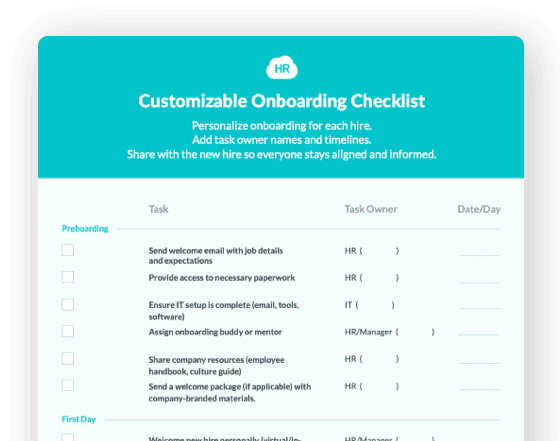
- 7. Use Self-Guided Onboarding Checklists
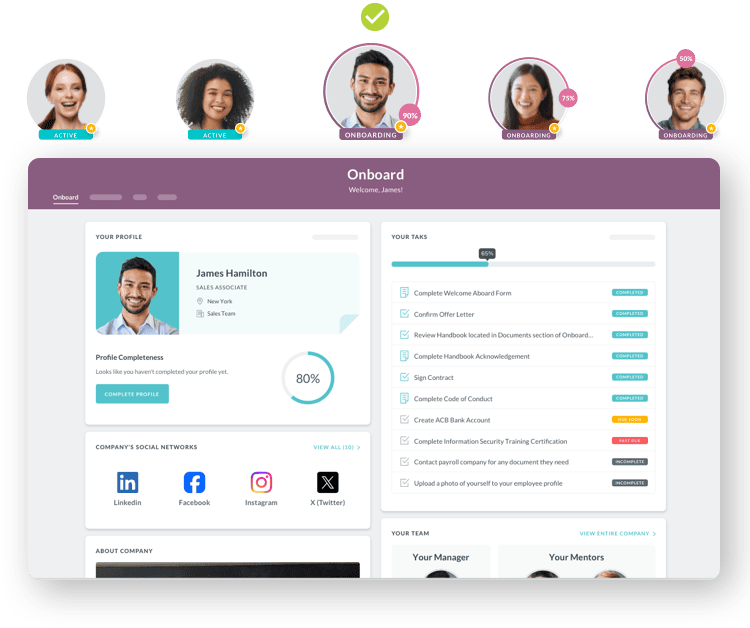
- 8. Introduce Them to Team Members Intentionally
- 9. Give Them a Virtual Tour
- 10. Assign a Mentor or Buddy
- 11. Provide Comprehensive Training and Resources
- 12. Encourage Communication and Provide Feedback
- 13. Give Them Room to Learn and Grow

Remote employee onboarding is the process of integrating new hires into your organization virtually, using digital tools, automated workflows, and structured communication to ensure they feel welcomed, prepared, and productive from day one—regardless of physical location.
With 22% of the US workforce now working remotely and 52% in hybrid arrangements, mastering the virtual onboarding process has become essential for HR teams. According to Harvard Business Review, a well-structured onboarding process can increase new hire retention by up to 50% and boost productivity by over 62%. Yet many companies still struggle to create connection, transmit culture, and ensure compliance when there's no physical office to facilitate these naturally.
The good news? With the right remote onboarding strategy and employee onboarding software, you can deliver an experience that matches—or even exceeds—traditional in-office onboarding.
Quick Answer: How to Onboard Remote Employees
Remote employee onboarding requires three critical elements: structured digital workflows, intentional relationship-building, and clear communication protocols. Success depends on sending equipment early, creating centralized onboarding hubs, assigning mentors, and maintaining regular check-ins throughout the first 90 days. Companies using automated onboarding software report 60% faster time-to-productivity and 82% better retention rates.
Key Steps: Establish remote work policies → Send equipment/welcome packages → Create digital onboarding hub → Leverage technology tools → Set clear expectations → Assign buddy/mentor → Conduct virtual introductions → Provide comprehensive training → Schedule regular check-ins → Give room for growth
Timeline: Week 1 (Logistics & Introductions) | Days 1-30 (Role Training) | Days 31-90 (Performance & Culture Integration)
What is Remote Employee Onboarding?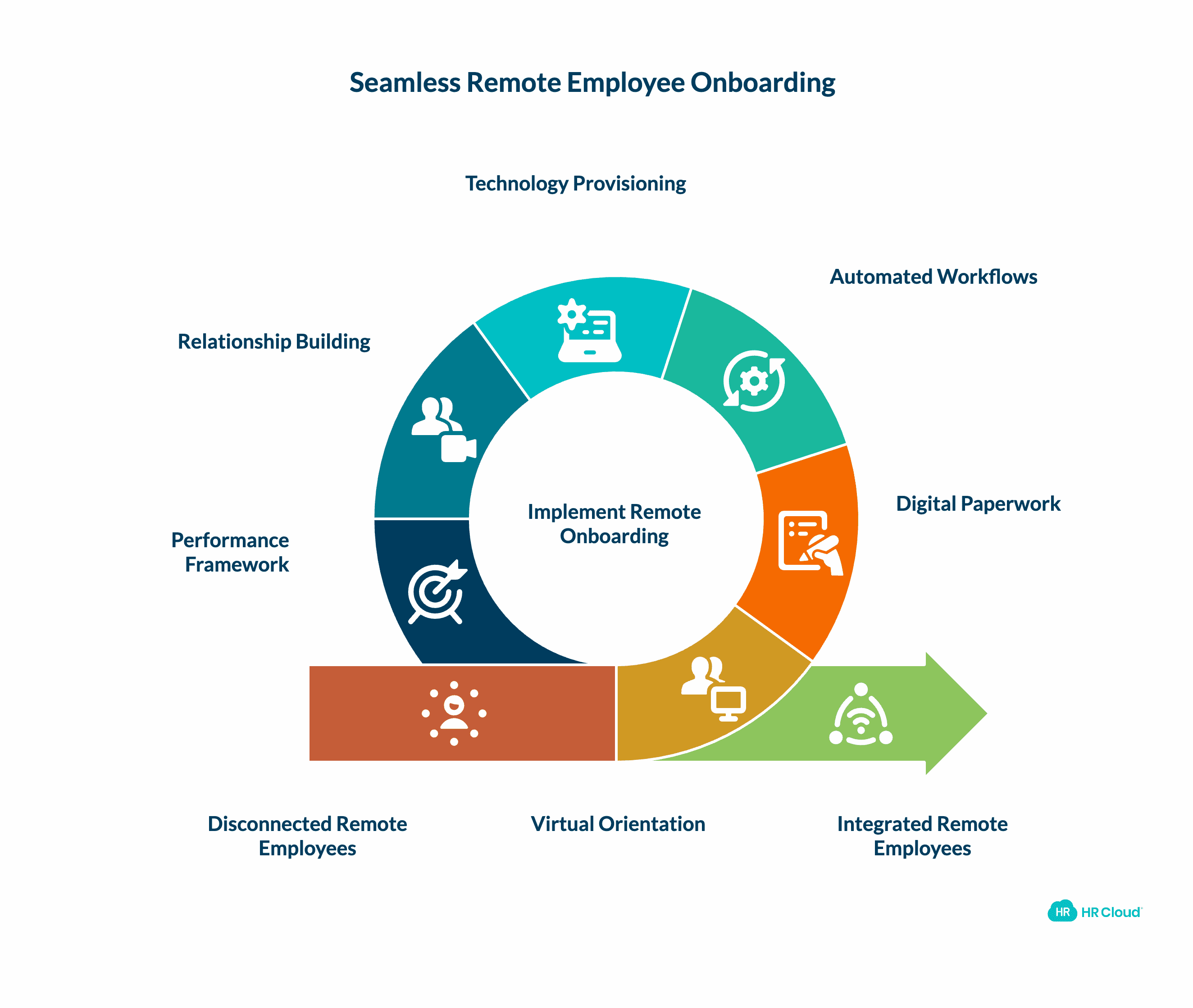
Remote employee onboarding is the structured process of integrating new hires into an organization entirely through digital channels—without physical office presence. This includes:
-
Virtual orientation covering company culture, values, and expectations
-
Digital paperwork completion via e-signature platforms
-
Automated workflow delivery of training modules and resources
-
Technology provisioning for remote work tools and systems
-
Relationship building through video introductions and mentor assignments
-
Performance framework establishment with clear goals and metrics
Unlike traditional onboarding, remote onboarding must intentionally create connections and culture transmission that would occur naturally in office environments. Research from McKinsey shows that remote-capable work has fundamentally transformed how organizations integrate new talent into their workforces.
The Power of Preboarding: Starting Before Day One
Preboarding—the period between offer acceptance and official start date—is your secret weapon for remote onboarding success. According to SHRM research, companies that engage new hires during this phase report 11% higher first-year retention and 36% faster time-to-productivity.
Preboarding checklist:
-
Send offer letter with excitement-building message within 24 hours
-
Ship welcome package and equipment 7-10 days before start
-
Provide access to onboarding portal for self-paced pre-reading
-
Schedule informal virtual coffee chat with future manager
-
Send company swag and branded materials
-
Share team introduction video and org chart
-
Invite to company social channels (optional, low-pressure)
-
Confirm tech setup appointment for day one
-
Send detailed first-week agenda to reduce first-day anxiety
HR Cloud's preboarding workflows automatically trigger these tasks when offers are accepted, ensuring nothing falls through the cracks during this critical engagement window.
Several digital onboarding tools and technologies can help make the remote work onboarding process easier for you and your new employee. Video conferencing software like Skype or Zoom enables virtual employee orientation and tours. Cloud collaboration platforms such as Google Drive facilitate document sharing and real-time collaboration across distributed teams.
This guide shares 13 proven tips to help you get started with remote onboarding best practices that drive retention, productivity, and long-term success.
1. Have a Remote Work Policy in Place-Jan-29-2026-06-18-26-0921-PM.png?width=2232&height=1878&name=Why%20is%20Effective%20Onboarding%20Critical%20for%20Business%20Success_%20-%20visual%20selection%20(1)-Jan-29-2026-06-18-26-0921-PM.png)
If you're regularly onboarding remote employees, a comprehensive remote work policy becomes your foundation for success. According to SHRM, this policy should clearly outline expectations for remote work conduct, communication protocols, collaboration standards, and performance accountability.
Your HR automation system should integrate this policy into the preboarding phase, ensuring new hires understand expectations before their first day. Clear policy communication prevents confusion and establishes behavioral norms from the start.
Start in the hiring process: In your application, ask candidates about their remote work preferences, communication style, technical proficiency, and home office setup. If a candidate expresses concerns about remote work isolation or lacks the self-direction required for distributed teams, they may not be the right fit for your virtual environment.
Key policy elements to include:
-
Core working hours and time zone expectations
-
Communication response time standards
-
Video call participation requirements
-
Security and data protection protocols
-
Equipment and technology standards
-
Performance measurement criteria
Platforms like HR Cloud's HRIS system can automatically distribute policy acknowledgments and track completion during the onboarding workflow.
2. Send Equipment and a Virtual Welcome Package Before Day One
Few things frustrate both HR teams and new employees more than spending the first work days troubleshooting technical difficulties. Equipment delivery and IT setup are crucial steps in how to onboard a new employee remotely successfully.
Order and ship all necessary hardware to their home address at least one week before their start date:
-
Laptop or desktop computer with pre-installed software
-
Monitor(s) optimized for remote productivity
-
Keyboard, mouse, and ergonomic accessories
-
Headset with noise cancellation for clear video calls
-
Webcam (if not built into laptop)
-
Printer/scanner (if role-appropriate)
-
External hard drive or secure USB drives
-
Phone or VOIP equipment for client-facing roles
-
Charging accessories and surge-protected power strips
Software considerations: Ensure all necessary applications are pre-installed with login credentials provided securely. Use custom workflows to trigger IT setup tasks automatically when a new hire is added to your system.
Create a memorable welcome experience by including a physical welcome package alongside equipment. Research from Gallup shows that employees who receive thoughtful welcome kits report 24% higher engagement during their first 90 days.
Welcome package ideas:
-
Personalized welcome letter from the CEO or team leader
-
Company-branded swag (T-shirts, notebooks, water bottles, pens)
-
Employee handbook in digital and physical formats
-
Curated snack box with treats to enjoy during work hours
-
Tech accessories like branded USB drives or laptop stands
-
Gift cards for coffee shops or online retailers
-
Virtual event passes to upcoming company gatherings
-
Small desk plant or succulent to brighten their home office
This tangible welcome ritual helps remote employees feel valued and connected to your company culture before they ever log in.
3. Be Prepared with Comprehensive Virtual Onboarding Materials-Jan-29-2026-06-18-26-1533-PM.png?width=2179&height=2046&name=Why%20is%20Effective%20Onboarding%20Critical%20for%20Business%20Success_%20-%20visual%20selection%20(2)-Jan-29-2026-06-18-26-1533-PM.png)
Gather all your onboarding materials and create digital versions accessible through a centralized onboarding portal. You may also send physical copies in their welcome package for employees who prefer printed reference materials.
Use HR Cloud's employee onboarding platform to create structured, trackable onboarding experiences with automated task assignments and progress monitoring.
Essential materials for all employees:
-
Mission, vision, values, and culture overview
-
Organizational charts with team photos and roles
-
Employee directory with contact methods
-
Communication procedures (when to use email, video calls, and chat)
-
Tutorials for commonly used tools
-
Security standards and data protection protocols
-
Templates for standard documents (presentations, email invitations, sales follow-up emails, etc.)
Department-specific materials:
For Marketing:
-
Lead qualification criteria (use lead verification tools)
-
Content style guide
-
Blog and SEO best practices
For Sales:
-
CRM contact information standards
-
How to order business cards
-
Travel and expense procedures
For Software Developers:
-
How to set up a development environment
-
Codebase
-
Development processes
-
Architecture standards
Create learning modules that employees can complete at their own pace. Video-based training with knowledge checks allows new hires to revisit complex topics as needed. HR Cloud's Onboard platform supports multimedia content delivery with completion tracking and automated reminders.
If creating these modules feels overwhelming, consider partnering with a Professional Employer Organization (PEO) to create learning modules for any job position, or leverage HR automation tools to streamline the process.
Remote Onboarding Compliance Requirements
Remote work introduces unique compliance challenges that structured onboarding must address:
I-9 Verification & E-Verify: Remote employees must complete I-9 documentation electronically with document verification conducted via video call or through authorized representatives. HR Cloud's I-9 module automates reminders, tracks expiration dates, and maintains audit-ready records.
Data Security & Privacy:
-
Provide VPN access and security training before day one
-
Require multi-factor authentication for all company systems
-
Deliver GDPR, CCPA, or other regional privacy training
-
Establish device encryption and remote wipe capabilities
-
Train on phishing, social engineering, and security best practices
Equipment & Asset Tracking: Document all shipped equipment with serial numbers, tracking confirmations, and return procedures. HR Cloud's asset management system tracks company property assigned to remote employees.
4. Leverage Existing Technology and Communication Tools
Use video conferencing and online team meetings to facilitate smooth transitions. When onboarding remote employees, the right technology stack can dramatically improve the experience.
Smart organizations leverage tools such as:
-
Zoom or Microsoft Teams for virtual meetings and screen sharing
-
Slack or Microsoft Teams for real-time communication and team channels
-
Asana, Monday.com, or Trello for project management and task visibility
-
HR Cloud for comprehensive HR software including onboarding automation
-
Microsoft Teams for collaboration and document sharing
-
Donut for automated virtual coffee chat pairings
Integration is key: HR Cloud integrates with major platforms including ADP, Workday, UKG, SAP, Slack, and Microsoft Teams, ensuring your onboarding workflows connect seamlessly with your existing tech stack.
For example, you can use Microsoft Teams to welcome your new team member, outline their role responsibilities, and offer support. Some apps, such as Donut, allow employees to chat with a company representative through the internet.
Mobile-first approach: With frontline and distributed workers, ensure your onboarding experience works flawlessly on mobile devices. HR Cloud's mobile app allows new hires to complete onboarding tasks, access company information, and connect with teammates from anywhere.
Remote Onboarding Tools Comparison
|
Tool Category |
Purpose |
Top Options |
HR Cloud Integration |
|
Onboarding Software |
Automate workflows, track completion, digital forms |
HR Cloud Onboard, BambooHR, Sapling |
Native platform |
|
Video Conferencing |
Virtual meetings, screen sharing, face-to-face |
Zoom, Microsoft Teams, Google Meet |
Calendar sync |
|
Communication |
Real-time chat, channels, file sharing |
Slack, Microsoft Teams |
Direct integration |
|
HRIS/Payroll |
Employee data, payroll processing |
ADP, Workday, UKG, SAP |
Native integration |
|
Document Management |
E-signatures, form completion |
DocuSign, Adobe Sign |
Built-in e-signature |
|
Recognition |
Peer kudos, rewards, engagement |
Workmates, Bonusly |
Native platform |
|
Project Management |
Task tracking, collaboration |
Asana, Monday, Trello |
API connections |
5. Let New Hires Know What to Expect
Working remotely can be unfamiliar territory for most. Ensure everyone understands what's expected during the remote onboarding process and beyond. According to Gartner research, clear expectations from day one can boost onboarding effectiveness by 70% and improve new hire productivity significantly.
Communicate clearly:
-
What information do they need to review before day one?
-
Who will they be meeting with, and when?
-
What tools and systems must they master?
-
What are their first-week priorities and success metrics?
-
How will their performance be measured?
This is also the optimal time to set communication expectations. Establish norms around:
-
Preferred communication channels for different scenarios
-
Response time expectations (urgent vs. routine)
-
Video-on policies for meetings
-
Async communication best practices across time zones
-
"Do Not Disturb" hours and work-life boundaries
Create an onboarding timeline: Provide a detailed schedule for their first 30, 60, and 90 days with clear milestones, deliverables, and check-in points. Using a structured onboarding plan template can further streamline this process, helping managers outline key tasks, responsibilities, and milestones in a consistent format. It ensures new hires understand expectations from day one, reduces ambiguity, and allows HR teams to track progress efficiently while maintaining alignment across teams and departments.
This structured approach helps remote employees understand their trajectory and reduces the ambiguity that often accompanies virtual work environments.
6. Set Up a Dedicated Onboarding Space-Jan-29-2026-06-18-26-1605-PM.png?width=2808&height=1854&name=Why%20is%20Effective%20Onboarding%20Critical%20for%20Business%20Success_%20-%20visual%20selection%20(3)-Jan-29-2026-06-18-26-1605-PM.png)
Create a centralized digital hub where remote employees can find everything they need in one location. This removes the frustration of hunting through emails, Slack messages, and shared drives for critical information.
Options for your onboarding hub:
-
Dedicated folder in your company's shared drive with organized subfolders
-
Intranet page with links to all relevant documents and resources
-
Employee self-service portal with role-specific content
-
Learning Management System (LMS) with structured training modules
-
Custom onboarding workspace in your project management tool
Benefits of a dedicated space:
-
New hires can reference materials independently
-
You can track progress and completion rates
-
Updates propagate instantly to all users
-
Creates consistency across all remote hires
-
Reduces repetitive questions to HR
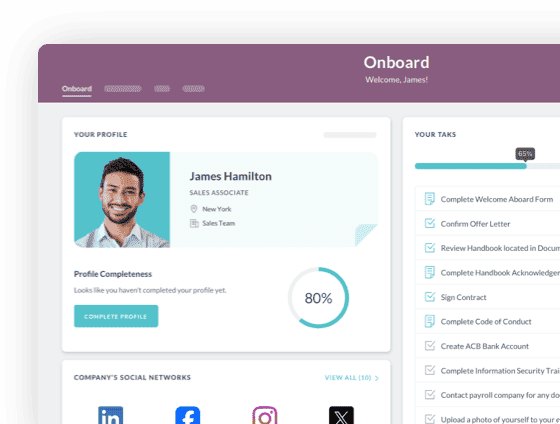
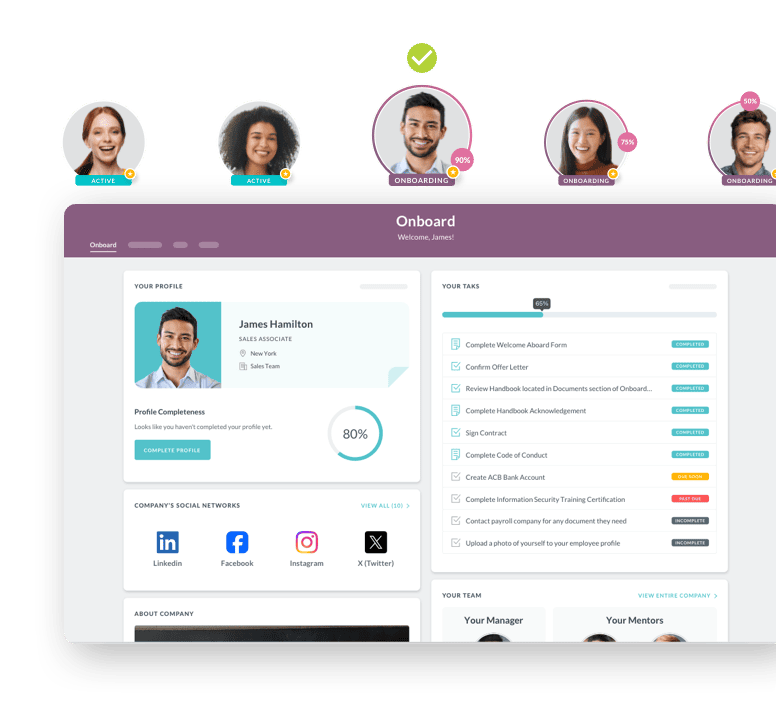
HR Cloud's Onboard platform provides a comprehensive onboarding portal with customizable checklists, document management, e-signature capabilities, and real-time progress tracking. It automatically routes tasks to appropriate stakeholders and sends reminders to keep everyone on schedule.
As your business scales, onboarding automation becomes essential. HR Cloud's platform helps automate repetitive tasks, standardize experiences across departments and locations, and free your HR team to focus on relationship-building rather than administrative follow-up.
7. Use Self-Guided Onboarding Checklists-2.png?width=2916&height=1944&name=Why%20is%20Effective%20Onboarding%20Critical%20for%20Business%20Success_%20-%20visual%20selection%20(4)-2.png)
Self-guided remote onboarding checklists are powerful tools for streamlining the onboarding process, ensuring new hires complete all necessary steps while giving them control over their pace.
Essential checklist items:
-
Company email account setup and security protocols
-
Completion of required paperwork (I-9 forms, tax documents, direct deposit)
-
Review of company policies, procedures, and employee handbook
-
Access provisioning for necessary software and tools
-
Completion of introductory training modules
-
Scheduling of first team meetings and 1:1s
-
Virtual meet-and-greets with key team members and stakeholders
-
Department-specific tool training and workflow orientation
The power of checklists: According to research from TalentLMS, structured onboarding processes with clear checklists can reduce new hire time-to-productivity by up to 60% while improving retention rates by 82%.
HR Cloud's checklist builder allows you to create role-specific, location-specific, and department-specific onboarding paths. Checklists can be automated based on hire attributes, with tasks assigned to appropriate owners (HR, IT, manager, new hire) and automatic reminders sent as deadlines approach.
Best practice: Include a mix of self-paced learning, scheduled interactions, and collaborative activities. This balanced approach prevents isolation while respecting the asynchronous nature of remote work.
8. Introduce Them to Team Members Intentionally-1.png?width=2448&height=1770&name=Why%20is%20Effective%20Onboarding%20Critical%20for%20Business%20Success_%20-%20visual%20selection%20(6)-1.png)
One of the biggest challenges of remote work is overcoming the feeling of isolation and disconnection. Proactive, structured introductions help new employees feel like valued team members from day one.
Immediate introductions: Send a welcome announcement through your internal communication platform or employee engagement software as soon as the new hire's start date is confirmed. Include:
-
Professional photo and brief bio
-
Role and responsibilities overview
-
Interesting personal facts or hobbies
-
Invitation for team members to reach out and introduce themselves
Structured meeting schedule: Coordinate one-on-one video calls with:
-
Direct manager (recurring weekly 1:1s)
-
Immediate team members (15-30 minute intro calls)
-
Cross-functional partners they'll work with regularly
-
Skip-level leadership for context on company vision
-
Assigned buddy or mentor for informal support
Use visual tools: Share your company's organization chart and directory so remote employees can understand reporting structures, team composition, and key stakeholders. Include photos, contact methods, and brief role descriptions to help new hires remember names and responsibilities.
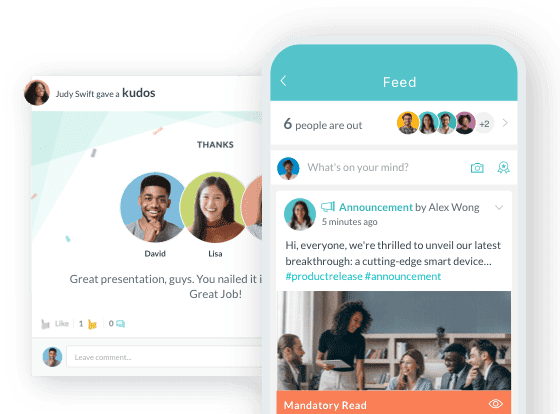
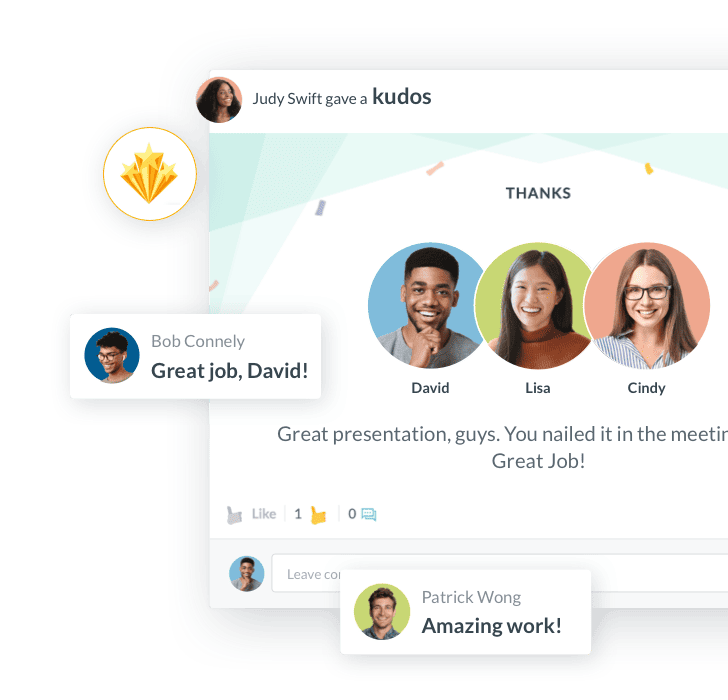
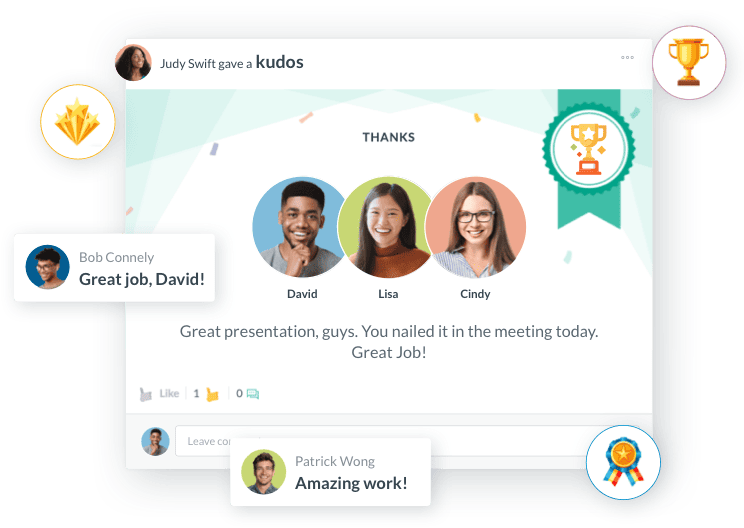
Leverage technology for informal connection: Platforms like Workmates facilitate social connections through channels, shout-outs, and recognition programs that help remote employees integrate into company culture naturally.

9. Give Them a Virtual Tour
If your company maintains a physical office, provide a virtual tour so remote employees can visualize where their colleagues work and what the space looks like. This creates psychological connection even when physical presence isn't possible.
Virtual tour components:
-
Pre-recorded video walkthrough of office spaces
-
Team member desk/workspace introductions
-
Common areas (kitchen, collaboration spaces, quiet rooms)
-
Company culture artifacts (awards, mission statement displays, employee recognition boards)
For fully distributed companies without offices, give tours of:
-
Your company website and its structure
-
Company intranet and where to find key resources
-
Social media channels and community presence
-
Customer-facing platforms and brand touchpoints
-
Content management system for company documents
Make it personal: Encourage team members to record short video introductions from their home offices. This helps normalize remote work arrangements and shows new hires they're not alone in working from home.
Always enable video: When conducting virtual tours or any orientation meetings, ensure everyone has cameras on. Face-to-face interaction, even virtually, creates warmth and helps new employees feel welcomed rather than like just another username in a chat window.
10. Assign a Mentor or Buddy-2.png?width=1633&height=1608&name=Why%20is%20Effective%20Onboarding%20Critical%20for%20Business%20Success_%20-%20visual%20selection%20(5)-2.png)
One of the most effective ways to help remote employees feel welcome and facilitate remote team integration is implementing a structured buddy system. A workplace mentor provides initial guidance and helps eliminate the anxiety many new remote employees experience.
Why buddy programs work:
-
87% of new hires with buddies feel more confident in their first 90 days
-
Buddy systems reduce time-to-productivity by an average of 35%
-
New employees with mentors report 23% higher job satisfaction
-
Mentored employees are more likely to understand company culture and unwritten rules
Select the right buddy: Choose someone who:
-
Has been with the company long enough to know the ropes (typically 1+ years)
-
Demonstrates your company values and culture
-
Has strong communication skills and patience
-
Understands the challenges of remote work
-
Isn't the new hire's direct manager (to encourage informal questions)
Structure the relationship:
-
Schedule regular check-ins (at least weekly for the first month)
-
Use video coffee chats and informal virtual interactions to break the ice
-
Provide buddies with a guide on their responsibilities and expectations
-
Recognize and reward employees who serve as exceptional mentors through your employee recognition platform
Use technology to facilitate connections: Donut and similar tools can automate buddy pairings and schedule virtual coffee chats, ensuring connections happen consistently rather than falling through the cracks.
11. Provide Comprehensive Training and Resources
As part of your onboarding program, provide new employees with all the training sessions and resources they need to excel in their roles from day one.
Effective onboarding training should include:
-
Thorough introduction to company culture, mission, and values
-
Key company policies and procedures (with emphasis on remote work policies)
-
Job-specific skills and tool proficiency training
-
Interactive elements like Q&A sessions and hands-on exercises
-
Opportunities for job shadowing with team members (via screen sharing)
-
Meetings with key department leads and stakeholders
Leverage multiple training formats:
-
Live virtual training sessions for interactive learning
-
Pre-recorded video modules for self-paced learning
-
Documentation and written guides for reference
-
Hands-on projects with guided support
-
Peer shadowing sessions via video conferencing
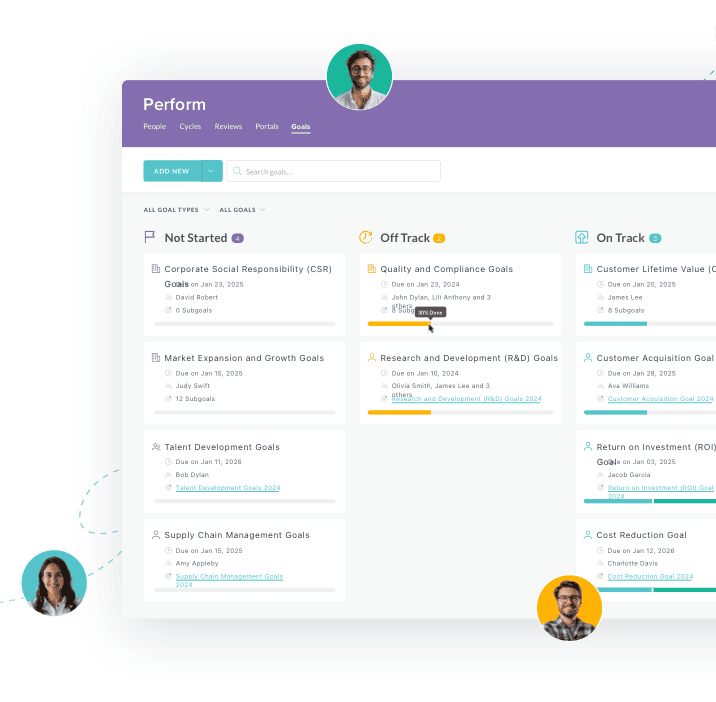
Use an LMS or learning platform: HR Cloud's performance management capabilities allow you to assign role-specific training, track completion, quiz comprehension, and ensure compliance with mandatory training requirements.
Goal: Set new employees up for success by providing everything they need to hit the ground running, ensuring alignment from day one through their first 90 days and beyond.

12. Encourage Communication and Provide Feedback
Working remotely makes it dangerously easy for employees to feel "out of sight, out of mind." Combat this with intentional, structured communication practices throughout the onboarding process and beyond.
Schedule regular check-ins:
-
Daily quick syncs during the first week (15 minutes)
-
Weekly 1:1s during the first 90 days (30-60 minutes)
-
30/60/90-day milestone reviews with formal feedback
-
Ad-hoc availability for questions and support
These meetings serve multiple purposes:
-
Gauge how the new hire is settling in
-
Answer questions and remove blockers
-
Provide constructive feedback on performance
-
Recognize early wins and progress
-
Identify training gaps or support needs
Create bidirectional feedback loops: Don't just provide feedback—actively solicit feedback from your employees. This reveals problems in your onboarding process and shows new hires their input matters.
Methods for collecting feedback:
-
Pulse surveys at key milestones (week 1, 2, 4, 8, 12)
-
Anonymous feedback channels for honest input
-
Regular 1:1 conversations with managers
-
Performance tracking software with check-in prompts
Make video standard: Ask new employees to enable video during meetings to facilitate better connection. Since teams can't meet face-to-face, online meetings and consistent communication are essential for building healthy remote team relationships and reinforcing your company culture.
Address concerns early by responding to feedback and making adjustments. This demonstrates responsiveness and helps prevent potential problems from escalating.
13. Give Them Room to Learn and Grow-1.png?width=2700&height=2238&name=Why%20is%20Effective%20Onboarding%20Critical%20for%20Business%20Success_%20-%20visual%20selection%20(7)-1.png)
Remember that your new remote employee is still learning and developing in their role. They will inevitably make mistakes, face challenges, and need support—and that's not just okay, it's expected and healthy.
Create a growth-oriented culture:
-
Encourage questions without judgment
-
Frame mistakes as learning opportunities
-
Celebrate small wins and early achievements
-
Provide constructive feedback focused on improvement
-
Set clear goals with measurable milestones
Empower experimentation and innovation:
-
Give new hires autonomy to solve problems their way
-
Encourage trying new approaches and tools
-
Create psychological safety for taking calculated risks
-
Share your own failures and lessons learned as a leader
Implement goal setting exercises to help employees visualize their growth trajectory within the company. Use performance management software to track goals, document progress, and align individual objectives with company priorities.
Long-term development:
-
Discuss career paths and growth opportunities early
-
Provide access to learning resources and professional development
-
Create stretch assignments that challenge and develop skills
-
Offer mentorship and leadership development programs
Recognition matters: Use your employee recognition and rewards platform to celebrate achievements, milestone completions, and exemplary work. Public recognition through Workmates or company-wide channels reinforces positive behaviors and helps remote employees feel valued.
This supportive approach helps new hires become confident, engaged, and successful team members who feel genuinely part of your organization despite the physical distance.
The 30/60/90-Day Remote Onboarding Framework-1.png?width=1872&height=1638&name=Why%20is%20Effective%20Onboarding%20Critical%20for%20Business%20Success_%20-%20visual%20selection%20(8)-1.png)
Successful remote onboarding extends far beyond the first week. Structure your program around clear milestones that guide new hires from orientation to independence to optimization.
Days 1-30: Foundation & Orientation
-
Week 1: Logistics, introductions, tool setup, culture immersion
-
Weeks 2-3: Role-specific training, process learning, shadowing sessions
-
Week 4: First independent projects with close supervision
-
Goal: New hire understands company, team, and basic role responsibilities
-
Success Metrics: 100% onboarding checklist completion, positive first-month feedback, comfort asking questions
Days 31-60: Skill Development & Integration
-
Weeks 5-6: Increasing project complexity and autonomy
-
Weeks 7-8: Cross-functional collaboration, relationship building
-
Goal: New hire delivers quality work with minimal supervision
-
Success Metrics: Hit first performance milestones, positive peer feedback, proactive communication
Days 61-90: Performance & Ownership
-
Weeks 9-10: Full project ownership, mentoring newer teammates
-
Weeks 11-12: Performance review, goal setting, career pathing
-
Goal: New hire operates independently and contributes strategic value
-
Success Metrics: Meet or exceed performance targets, demonstrate culture fit, positive 90-day review
Use performance management software to track milestones, document progress, and ensure alignment between manager expectations and new hire understanding.
Managing Remote Onboarding Across Time Zones-1.png?width=2802&height=1305&name=Why%20is%20Effective%20Onboarding%20Critical%20for%20Business%20Success_%20-%20visual%20selection%20(9)-1.png)
When your team spans multiple time zones, traditional synchronous onboarding breaks down. Successful distributed organizations master asynchronous onboarding strategies.
Best practices for global remote teams:
Record everything: Create video libraries of training sessions, company presentations, and tool tutorials so new hires in any time zone can access content when convenient.
Flexible meeting times: Rotate synchronous meeting times to ensure no single geography bears the burden of inconvenient hours. Use tools like World Time Buddy to find overlap windows.
Async-first communication: Default to written documentation, recorded updates, and threaded discussions rather than real-time meetings. Use platforms like Loom for async video messages.
Overlap hour meetings: Schedule critical onboarding touchpoints during the 2-3 hour windows when most team members' work hours overlap.
Follow-the-sun support: Assign onboarding support responsibilities to team members in different regions so new hires always have someone available during their working hours.
Cultural sensitivity: Provide training on cultural differences, communication styles, and holiday calendars for distributed teams. Avoid scheduling US-centric dates for global teams.
Documentation-heavy approach: Since you can't rely on "quick questions at someone's desk," create comprehensive written guides, FAQs, and troubleshooting resources.
HR Cloud's mobile app ensures new hires can complete onboarding tasks, access resources, and stay connected regardless of location or time zone.
Measuring Remote Onboarding Success: Key Metrics
What gets measured gets improved. Track these metrics to optimize your remote onboarding program:
Process Efficiency Metrics:
-
Time-to-productivity (days until new hire reaches 100% performance)
-
Onboarding checklist completion rate and timeline
-
Average time spent on administrative tasks vs. strategic work
-
Number of IT/HR support tickets per new hire
-
Equipment delivery and setup success rate
Engagement & Experience Metrics:
-
New hire satisfaction scores at 7, 30, 60, 90 days
-
Manager satisfaction with onboarding preparedness
-
Early-stage eNPS (employee Net Promoter Score)
-
Buddy/mentor relationship quality ratings
-
Participation in voluntary social events and channels
Performance & Retention Metrics:
-
90-day performance review scores
-
First-year retention rate (goal: >90%)
-
Time to first independent project delivery
-
Quality of first deliverables (peer/manager rated)
-
6-month and 12-month retention rates
Cultural Integration Metrics:
-
Understanding of company values (assessed via quiz/survey)
-
Feeling of belonging and connection to team (Likert scale)
-
Frequency of peer recognition given/received
-
Participation in company-wide initiatives
-
Employee advocacy and referral behavior
Benchmark your program: According to research from leading HR organizations, top-performing remote onboarding programs achieve:
-
90%+ first-year retention vs. 69% industry average
-
Time-to-productivity under 60 days vs. 90+ day average
-
85%+ new hire satisfaction scores
-
95%+ onboarding task completion rates
HR Cloud's analytics dashboard provides real-time visibility into onboarding metrics, allowing you to identify bottlenecks, celebrate wins, and continuously improve your program.
13 Remote Onboarding Steps: Quick Reference
1. Create remote work policy → Define expectations, communication norms, performance criteria
2. Ship equipment early → Deliver hardware + welcome package 7 days before start
3. Prepare digital materials → Centralize handbook, policies, training in onboarding portal
4. Set up technology stack → Provide access to all tools, test connectivity, enable integrations
5. Communicate clear expectations → Share 30/60/90-day goals, success metrics, meeting schedule
6. Build onboarding hub → Create single source of truth for all resources and documentation
7. Deploy self-service checklists → Guide new hires through paperwork, training, system setup
8. Orchestrate introductions → Schedule 1:1s with team, cross-functional partners, leadership
9. Conduct virtual tours → Show office spaces (if applicable) and digital platforms
10. Assign mentor/buddy → Pair with experienced employee for informal support and questions
11. Deliver comprehensive training → Combine live sessions, recorded modules, hands-on projects
12. Maintain regular communication → Daily check-ins week 1, weekly 1:1s through day 90
13. Encourage growth mindset → Celebrate wins, normalize mistakes, provide development opportunities
Transform Your Remote Onboarding Experience
Remote employee onboarding doesn't have to be complicated or impersonal. With the right strategy, technology, and commitment to employee experience, you can create onboarding journeys that drive engagement, accelerate productivity, and build lasting connections.
HR Cloud's comprehensive onboarding platform helps companies onboard remote employees 3X faster through automated workflows, digital forms, and structured portals. Our customers report up to 60% reduction in onboarding time and 24% improvement in data accuracy.
Key benefits of HR Cloud for remote onboarding:
-
Automated Workflows: Trigger tasks based on role, department, and location
-
Digital Forms & E-Signatures: Complete all paperwork remotely without printing
-
Mobile-First Design: Enable frontline workers to onboard from any device
-
Integrations: Connect seamlessly with ADP, Workday, UKG, Slack, and Teams
-
Compliance Tools: Automate I-9 verification and E-Verify processing
-
Progress Tracking: Real-time dashboards show completion status for HR and managers
-
Self-Service Portals: Give new hires control over their onboarding journey
-
Engagement Features: Built-in recognition and communication tools
Ready to elevate your remote onboarding? Schedule a demo to see how HR Cloud can transform your employee experience from day one.
 Discover how our HR solutions streamline onboarding, boost employee engagement, and simplify HR management
Frequently Asked Questions About Remote Employee Onboarding
How long should remote employee onboarding last?
Effective remote onboarding spans 90 days minimum, with structured milestones at 30, 60, and 90 days. The first week addresses logistics and introductions, the first month focuses on role training and tool proficiency, and the full 90 days ensures cultural integration and performance development. Some companies extend onboarding to 120 days for complex roles.
What equipment should you send remote employees?
Essential equipment includes: laptop/desktop with pre-installed software, monitor(s), keyboard and mouse, webcam, noise-canceling headset, phone/VOIP equipment (if needed), chargers and power strips, printer/scanner (role-dependent), and ergonomic accessories. Ship everything 5-7 days before their start date with setup instructions.
How do you build company culture remotely?
Build culture through: welcome videos from leadership, virtual team social events, buddy/mentor programs, recognition and rewards platforms, regular all-hands meetings, values-based storytelling, collaborative projects across teams, and consistent internal communication that reinforces cultural norms and expected behaviors.
What are the biggest remote onboarding challenges?
Top challenges include: technical issues and equipment problems (38%), feelings of isolation and loneliness (29%), difficulty building authentic relationships (27%), communication gaps and misunderstandings (24%), time zone coordination across distributed teams (18%), and unclear performance expectations (15%).
Can you onboard remote employees successfully without video calls?
While possible, it's not recommended. Video calls are critical for building rapport, transmitting nonverbal communication, creating personal connection, and reducing feelings of isolation. Research shows remote employees who have regular video interactions report 43% higher engagement than those limited to voice/text communication.
How much does remote onboarding cost compared to in-office?
Remote onboarding typically costs 15-30% less than in-office onboarding due to: eliminated office space costs, reduced catering/materials expenses, and lower administrative overhead. However, you'll invest more in: shipping equipment, digital tool licenses, and potentially home office stipends. The ROI comes from faster time-to-productivity and better retention.
What onboarding software is best for remote teams?
Leading remote onboarding platforms include: HR Cloud (comprehensive automation with integrations), BambooHR (user-friendly for SMBs), Sapling (acquisition-friendly), WorkBright (mobile-first for deskless workers), and ClearCompany (ATS integration). Evaluate based on: automation capabilities, integration ecosystem, mobile accessibility, compliance features, and scalability.
How do you measure remote onboarding success?
Track key metrics including: time-to-productivity, onboarding completion rates, new hire satisfaction scores at 30/60/90 days, first-year retention rates, manager satisfaction ratings, and early performance review results. Use HR Cloud's analytics to monitor these metrics in real-time and identify improvement opportunities.

Keep Reading
HR Software With Fast Implementation: Best Platforms to Launch in Under 8 Weeks (2026)
You've been living with the wrong HR system long enough. The paper-chase onboarding, the
Best 10 HR Analytics Tools in 2026
Organizations running on hard evidence see a steep drop in daily friction and employee
HR Software Evaluation Checklist for 500–5,000 Employees
Somewhere between 500 and 5,000 employees, HR software stops being a convenience and