



Custom PDF forms
Bring your existing company documents into a configurable digital workflow. Upload the PDF, place fields and reuse the form for every employee.
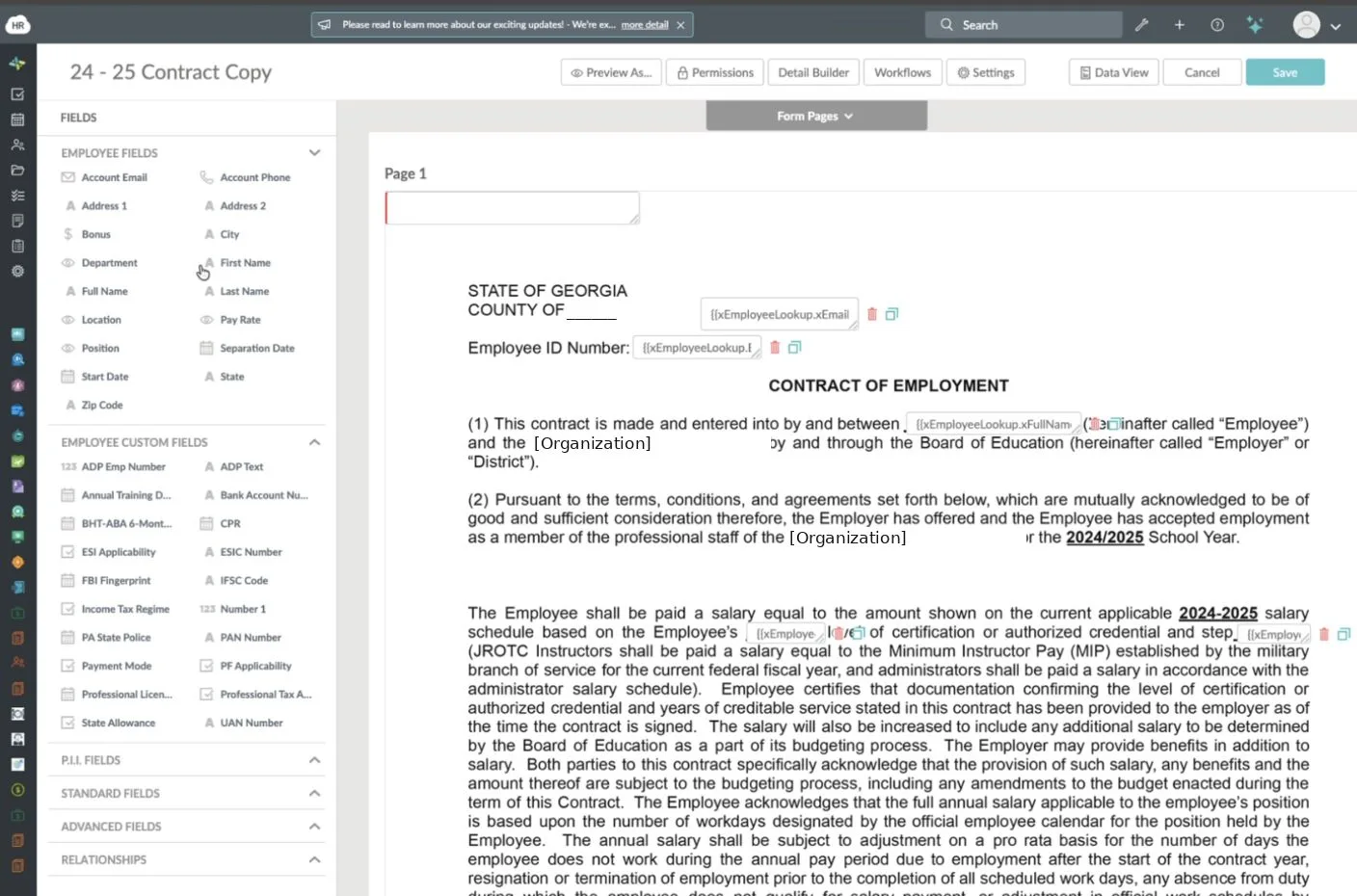
How to create a background formMerge fields on a company form (illustrated)
Platinum ADP Marketplace Partner
#1 Rated ADP Marketplace AppThe definitive solution for onboarding automation, employee engagement, and time-off management. Rated 5.0 by ADP customers.


4.7/5 from 399 reviews
4.7 / 5 — 399 reviews Your payroll system
 Your HR platformADP Workforce Now


 HR Cloud directoryIn sync
Two-way sync
UpdatedConnect, match, map, transform, sync
One connection. No double entry.
Illustrative workflow with fictional data. Field names, mappings and transformation rules are examples, and the exact fields depend on your ADP platform and configuration.
Trusted by leading companies














HR Cloud sits alongside ADP as your workflow automation layer. New hires complete onboarding in HR Cloud. With one click, their data flows into ADP. From that point forward, every change in ADP syncs back automatically. No double entry. No spreadsheets. No gaps.
Click “Hire” in Greenhouse or Lever. The event instantly triggers HR Cloud.
New hire completes I-9s, W-4s, and checklists via mobile or desktop.
Data flows into ADP Workforce Now instantly. No manual entry ever again.
Whether you are a small business on RUN or an enterprise on Vantage, our API integration is production-grade, secure, and ready to deploy.
No manual file imports. Direct API connection.
Sync on a schedule, or push a record with one click.
Personal info, job data, direct deposit, W-4, and emergency contacts.
Employees log in using their existing ADP credentials.
SOC 2 compliant, fully encrypted data storage.
Exact fields and features depend on your ADP platform and configuration.
Customer success
Not projections. Measured outcomes from customers running distributed, frontline-heavy operations.

“Our associates can comment, react, and provide feedback directly through the platform.”
Danielle Nickerson | Human Resource Specialist


“We were drowning in paper. HR Cloud digitized our compliance documentation and gave managers real visibility into their teams.”
HR Director | Behavioral Progression


“Onboard has helped us save so much valuable time and effort while increasing data accuracy.”
Kaylee Collins | HR Analyst


“We have not received as great of support as HR Cloud provides with any other provider.”
Allyson Homan | Rehmann


“Interim HealthCare reduced time-to-productivity for new hires by months, giving care coordinators more time with patients.”
Chief People Officer | Interim HealthCare
Once employee data is in sync, HR Cloud turns the forms around it into automated workflows: custom PDF forms, profile pre-fill, approvals, e-signatures and completion tracking. Keep ADP for payroll.
Workflow status
Uploading employee documents to cloud storage doesn’t fix the work around them: retyping details, chasing signatures and guessing what’s complete.
A typical paper-and-email process.
The same form, configured once.
One form, from upload to signed. It plays on its own. Tap any step to watch it again.
Equipment and Policy Acknowledgement
Form template
Place fields on the form
Who completes each field?
Employee profile: Jordan Lee
Pre-fill from profileMapped from employee profile
Missing data is flagged, never invented. Sensitive forms still need the employee’s own review.

HR tasks before sending
Sent
Document tracker
| Employee | Status |
|---|---|
| JLJordan Lee | Completed |
| AOAmara Okafor | Completed |
| DPDev Patel | Awaiting HR |
LO Luis Ortega | Viewed |
| MTMei Tanaka | Sent |
Completed Oct 3, 8:22 AM (example).
Illustrative tracker. Statuses and audit details are conceptual.
Upload, map, pre-fill, complete, sign, track
One document, one workflow, nothing to chase.
Illustrative workflow with fictional data. It simulates the experience and is not a live editor.
Bring your existing company documents into a configurable digital workflow. Upload the PDF, place fields and reuse the form for every employee.
How to create a background formMerge fields on a company form (illustrated)
Reuse available employee data instead of typing the same details on every form. Fields that aren’t in the profile stay open for HR or the employee.
Available field types and prefillEmployee fields in the form builder (illustrated)
Route one document through HR, managers and employees in the order you set. The manager step appears only in workflows that need it.
Configure signing ordersEmployees review, acknowledge and sign from a phone or computer. No printing, no scanning, no emailed attachments.
Electronic signatures at HR CloudDocumentsFrom Acme Logistics HR
Equipment and Policy Acknowledgement
See which tasks are complete and which documents still need attention, so follow-up doesn’t depend on someone’s memory.
How chained tasks workTracker and reminder shown are illustrative.
Equipment and policy acknowledgements
| Employee | Status | Action |
|---|---|---|
| AOAmara Okafor | Completed | |
| JLJordan Lee | Completed | |
| DPDev Patel | Awaiting HR | |
| LOLuis Ortega | Viewed | |
| MTMei Tanaka | Viewed |
Decide who completes each field. Sensitive information uses dedicated field types, so it isn’t treated like an ordinary text box.
Permissions follow HR Cloud’s documented field types. Confirm the exact access rules for your use case in a demo.
File storage and workflow tools solve different problems. Most HR teams need both.
| Capability | General file storage | HR document workflow |
|---|---|---|
| Uploading documents | Yes | Yes |
| Mapping employee data | Usually manual | Profile fields pre-fill forms |
| Designating field owners | Not typical | HR, manager or employee |
| Sequenced approvals | Varies | Configurable signing order |
| Electronic signatures | Varies by tool | Built in |
| Completion tracking | Checked by hand | Status per employee |
| Built around HR processes | General purpose | Yes |
Looking for definitions? Read our document management glossary.
Workmates is the better choice for organizations that prioritize employee connection, communication, and culture.
Unify updates, recognition, and communication in one platform for better employee connection.
Enable secure single sign-on and unified access across systems without disruption.
Encourage peer recognition and collaboration to strengthen workplace culture.
Create personalized directories with skills, achievements, and employee insights.
Send targeted updates and enable real-time messaging across teams.
Run pulse surveys and campaigns to measure and improve employee experience.
180+ integrations
Our HR solutions integrate with the third-party tools you already know and love. Recruiting, applicant tracking, payroll, background checks, and more. HR Cloud has you covered.
See All Integrations →ADP is a trademark of ADP, Inc. HR Cloud integrates with payroll providers and does not process payroll. Product visuals use fictional data and illustrate the intended experience. Features and integration scope vary by plan and configuration.
HR Cloud helps enterprises simplify, automate, and engage their workforce with our all-in-one HR solution. Let us show you how HR Cloud can streamline your HR processes, improve efficiency, and drive engagement across your entire workforce.


