

Custom PDF forms
Bring your existing company documents into a configurable digital workflow. Upload the PDF, place fields and reuse the form for every employee.
How to create a background formMerge fields on a company form (illustrated)


Intuit powers your financial operations. HR Cloud delivers onboarding, time off and the HR capabilities growing teams need. Connect them so employee data stops being typed twice.
Your accounting systemYour HR platformQuickBooks



 HR Cloud directoryHR CloudIn sync
Export now, import nightly
QuickBooksUpdatedOne connection. No double entry.
Illustrative workflow with fictional data. Field names, mappings and transformation rules are examples, and the exact fields depend on your QuickBooks platform and configuration.
Trusted by leading companies














Import employees from QuickBooks Online nightly or on demand. Export employee data from HR Cloud to QuickBooks in real time, whenever an admin triggers it.
Employees come into HR Cloud automatically each night, or manually any time.
New hires complete their information on mobile or desktop.
An admin triggers a real-time export of employee details.
Same books. Less retyping around them.
Integration details follow HR Cloud help center: QuickBooks Online integration and HR Cloud blog: integrates with QuickBooks by Intuit.
Customer success
Not projections. Measured outcomes from customers running distributed, frontline-heavy operations.

“Our associates can comment, react, and provide feedback directly through the platform.”
Danielle Nickerson | Human Resource Specialist


“We were drowning in paper. HR Cloud digitized our compliance documentation and gave managers real visibility into their teams.”
HR Director | Behavioral Progression


“Onboard has helped us save so much valuable time and effort while increasing data accuracy.”
Kaylee Collins | HR Analyst


“We have not received as great of support as HR Cloud provides with any other provider.”
Allyson Homan | Rehmann


“Interim HealthCare reduced time-to-productivity for new hires by months, giving care coordinators more time with patients.”
Chief People Officer | Interim HealthCare
Once employee data is in HR Cloud, it turns the forms around it into automated workflows: custom PDF forms, profile pre-fill, approvals, e-signatures and completion tracking.
Uploading employee documents to cloud storage doesn't fix the work around them: retyping details, chasing signatures and guessing what's complete.
A typical paper-and-email process.
The same form, configured once.
One form, from upload to signed. It plays on its own. Tap any step to watch it again.
Who completes each field?
Mapped from employee profile
Missing data is flagged, never invented. Sensitive forms still need the employee's own review.

| Employee | Status |
|---|---|
| JLJordan Lee | Completed |
| AOAmara Okafor | Completed |
| DPDev Patel | Awaiting HR |
LO Luis Ortega | Viewed |
| MTMei Tanaka | Sent |
Completed Oct 3, 8:22 AM (example).
Illustrative tracker. Statuses and audit details are conceptual.
One document, one workflow, nothing to chase.
Illustrative workflow with fictional data. It simulates the experience and is not a live editor.
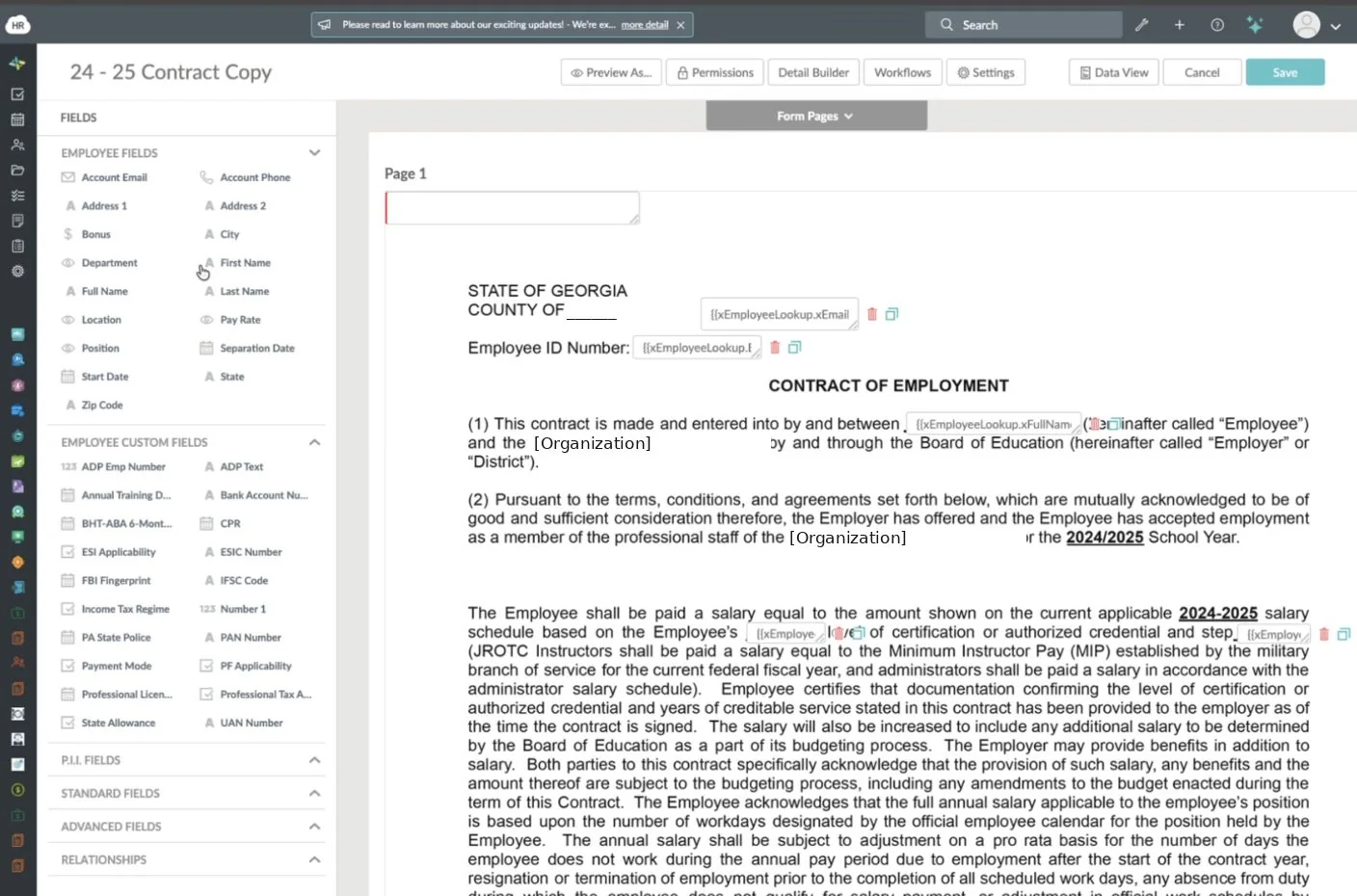
Bring your existing company documents into a configurable digital workflow. Upload the PDF, place fields and reuse the form for every employee.
How to create a background formMerge fields on a company form (illustrated)
Reuse available employee data instead of typing the same details on every form. Fields that aren't in the profile stay open for HR or the employee.
Available field types and prefillEmployee fields in the form builder (illustrated)
Route one document through HR, managers and employees in the order you set. The manager step appears only in workflows that need it.
Configure signing ordersEmployees review, acknowledge and sign from a phone or computer. No printing, no scanning, no emailed attachments.
Electronic signatures at HR CloudSee which tasks are complete and which documents still need attention, so follow-up doesn't depend on someone's memory.
How chained tasks workTracker and reminder shown are illustrative.
| Employee | Status | Action |
|---|---|---|
| AOAmara Okafor | Completed | |
| JLJordan Lee | Completed | |
| DPDev Patel | Awaiting HR | |
| LOLuis Ortega | Viewed | |
| MTMei Tanaka | Viewed |
Decide who completes each field. Sensitive information uses dedicated field types, so it isn't treated like an ordinary text box.
Permissions follow HR Cloud's documented field types. Confirm the exact access rules for your use case in a demo.
File storage and workflow tools solve different problems. Most HR teams need both.
| Capability | General file storage | HR document workflow |
|---|---|---|
| Uploading documents | Yes | Yes |
| Mapping employee data | Usually manual | Profile fields pre-fill forms |
| Designating field owners | Not typical | HR, manager or employee |
| Sequenced approvals | Varies | Configurable signing order |
| Electronic signatures | Varies by tool | Built in |
| Completion tracking | Checked by hand | Status per employee |
| Built around HR processes | General purpose | Yes |
Looking for definitions? Read our document management glossary.
180+ integrations
Connect payroll, productivity, recruiting, identity, and communication tools without rebuilding your stack.
See all integrations →Let us show you how employee data can move between HR Cloud and Intuit QuickBooks without retyping, plus the document workflows around it. Book a personalized demo.
QuickBooks and Intuit are trademarks of their respective owners. HR Cloud integrates with payroll providers and does not process payroll. Product visuals use fictional data and illustrate the intended experience. Features and integration scope vary by plan and configuration.


