ADP New Hire Paperwork Automation: What HR Teams Are Getting Wrong

I-9 paperwork violations carry fines of $288–$2,861 per instance under DHS's updated 2026 penalty schedule. That number compounds fast when your new hire paperwork process has a gap you didn't know existed.
Most HR teams using ADP Workforce Now (WFN) assume their ADP new hire paperwork automation covers the full picture. ADP handles payroll, tax form routing, and new hire data. These are real capabilities but there's a meaningful difference between data automation and paperwork automation.
That gap is precisely where compliance exposure and manual rework accumulate. And three patterns make it visible.
A Form I-9 completed with pre-populated ATS data the new hire never confirmed — now a substantive violation under ICE's 2026 reclassification.
Role-specific NDAs still sent as PDFs because custom document routing isn't configured.
HR chasing direct deposit forms two weeks post-start because no escalation logic fired.
After reading this article, you'll know what ADP's onboarding automation actually covers, where the four most common mistakes happen, and how to close each gap without replacing ADP.
What ADP Workforce Now's Paperwork Automation Actually Covers
ADP Workforce Now's native onboarding module is available as a separately licensed add-on for Payroll and Enhanced HR clients. It automates the collection and routing of standard federal and state compliance forms.
The coverage hits the federal compliance baseline solidly:
- Form I-9 for employment eligibility
- W-4 for federal tax withholding
- direct deposit authorization
- benefits enrollment
- state-required withholding documents
ADP WFN onboarding supports e-signatures, digital storage, and automatic sync to the ADP payroll record on completion. For digital new hire forms in these categories, it works.
But it's worth naming the distinction between data and paperwork automation clearly before listing what falls outside that scope.
Data automation moves information from one field to another. Think candidate record to payroll, form response to employee file.
Paperwork automation is broader: it's the collection, routing, review, and confirmation of documents across roles, locations, and document types.
ADP handles the first reliably. The second requires more configuration. Here’s what falls outside the default scope: custom company documents, role-specific or location-specific document packages, branded pre-boarding portals, and NDA or offer letter variants.
These are deliberate scope decisions on part of ADP, not design failures. ADP WFN covers the federal compliance baseline well.
You need to think if your team had built that extra layer of automation. If not, you could be making these four mistakes assuming that they are already being covered in ADP Workforce Now default automation.
4 Mistakes HR Teams Make With ADP New Hire Paperwork Automation
Let me be clear upfront.
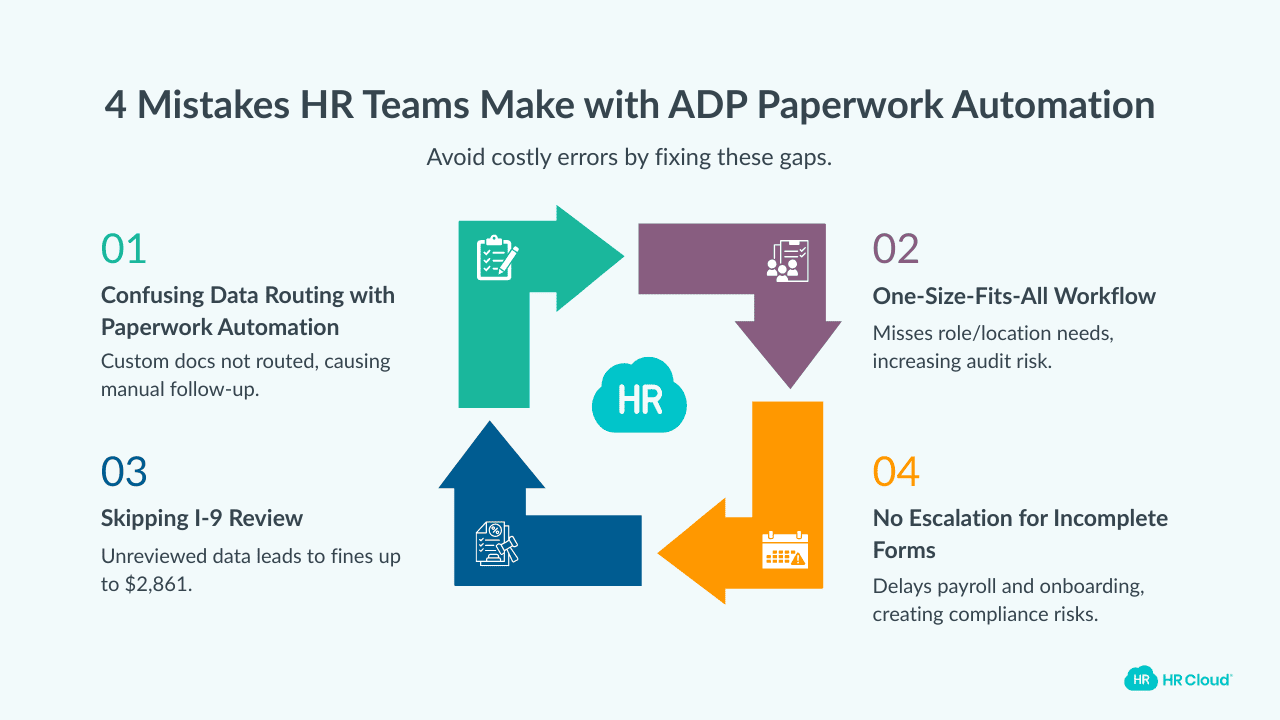
None of these mistakes are about where ADP is falling short. They're about what happens when teams try to apply the platform in ways it wasn't configured for, and discover the gap at the worst possible moment.
Here's a sneak peek of what each of these mistakes actually costs your team when it shows up in practice.
| Mistake | What It Actually Costs |
|---|---|
| Confusing data routing with paperwork automation | Manual PDF follow-up; custom documents missing at hire |
| Skipping I-9 pre-population review | Substantive violation risk; fines up to $2,861 per instance |
| One workflow for all roles and locations | State compliance exposure; audit vulnerability for multi-state orgs |
| No escalation logic for incomplete forms | Payroll delays; I-9 discovered incomplete after start date |
Let’s discuss in more detail.
Mistake 1: Confusing Data Routing With Paperwork Automation
ADP's onboarding automation is, at its core, a data routing engine. It collects standard federal form responses and syncs that data to the payroll record. That's its real value, and it's not the same thing as automating your complete paperwork collection experience.
Custom company documents — NDAs, role-specific offer letters, department policy acknowledgments, equipment sign-off forms — aren't natively routed through ADP Onboarding without separate configuration. Most teams discover this operationally, not in advance.
Existing users of ADP WFN confirm the pattern. HR managers who needed company-specific forms customized found the platform couldn't accommodate it, and some moved to supplementary tools as a result.
If you are you still emailing PDF attachments alongside your ADP task lists, that's an expensive gap. An unsigned NDA is an IP exposure. A missing safety acknowledgment is an OSHA liability. An equipment form returned without a signature leaves no audit trail if something goes wrong.
You need to building a complete new hire document workflow, and knowing where ADP coverage stops helps.
Mistake 2: Skipping I-9 Pre-Population Review
Many ADP configurations connected to an ATS pre-populate Section 1 of the I-9 with candidate data. Is it efficient? Yes. Automatically compliant? Not anymore.
ICE reclassified several previously correctable I-9 errors as substantive violations in its 2026 guidelines, removing the 10-day correction window that previously applied to technical errors — verify the full reclassified list at SHRM before publishing.
Pre-populated data the employee never personally reviewed is now a substantive violation risk; you can no more fob it off as an unforced error.
Do this today
Does your I-9 automation ADP workflow require affirmative employee review before Section 1 is accepted?
Find out exposure level before the audit notice arrives. Otherwise, you might miss the correction window.
Download your free employee onboarding checklist
Using this checklist ensures that you are not scrambling to make the new employees feel welcomed, prepared, and set up for long-term success.
Download Now
Mistake 3: Using One Workflow for Every Role and Location
ADP's native onboarding supports customization. The problem is that most teams configure one template and apply it universally — same checklist, same document set — across all roles, departments, and states.
A single new hire paperwork checklist applied universally misses:
- state-specific withholding requirements
- role-specific compliance documents
- location-specific policy variations
For multi-state organizations, that can lead to serious audit exposure.
Mistake 4: No Escalation Logic for Incomplete Forms
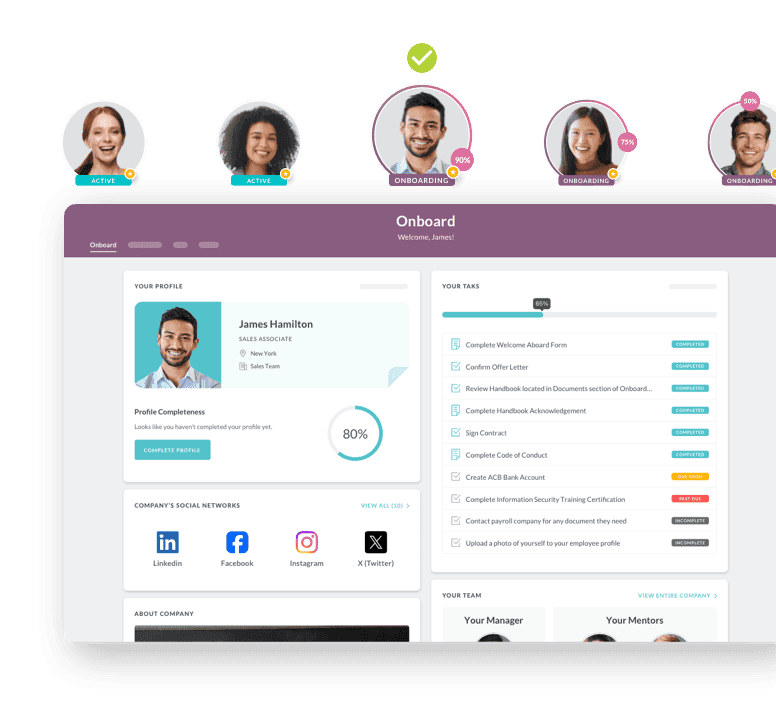
ADP Onboarding sends automated task reminders. What it doesn't do natively is escalate overdue digital new hire forms to the manager, auto-reassign incomplete tasks, or flag stalled paperwork to HR before a compliance deadline passes.
This means HR teams discover incomplete I-9s and missing W-4s days after a new hire has started and not before.
The fix is to have an escalation layer that sends automated alerts to new hire direct managers or HR when forms aren't completed within defined windows, with visibility into every outstanding item.
And remember, that escalation logic should be built-in from the pre-onboarding phase, not after a payroll issue surfaces.
Why the I-9 Compliance Risk Is Higher in 2026 Than Most Teams Realise
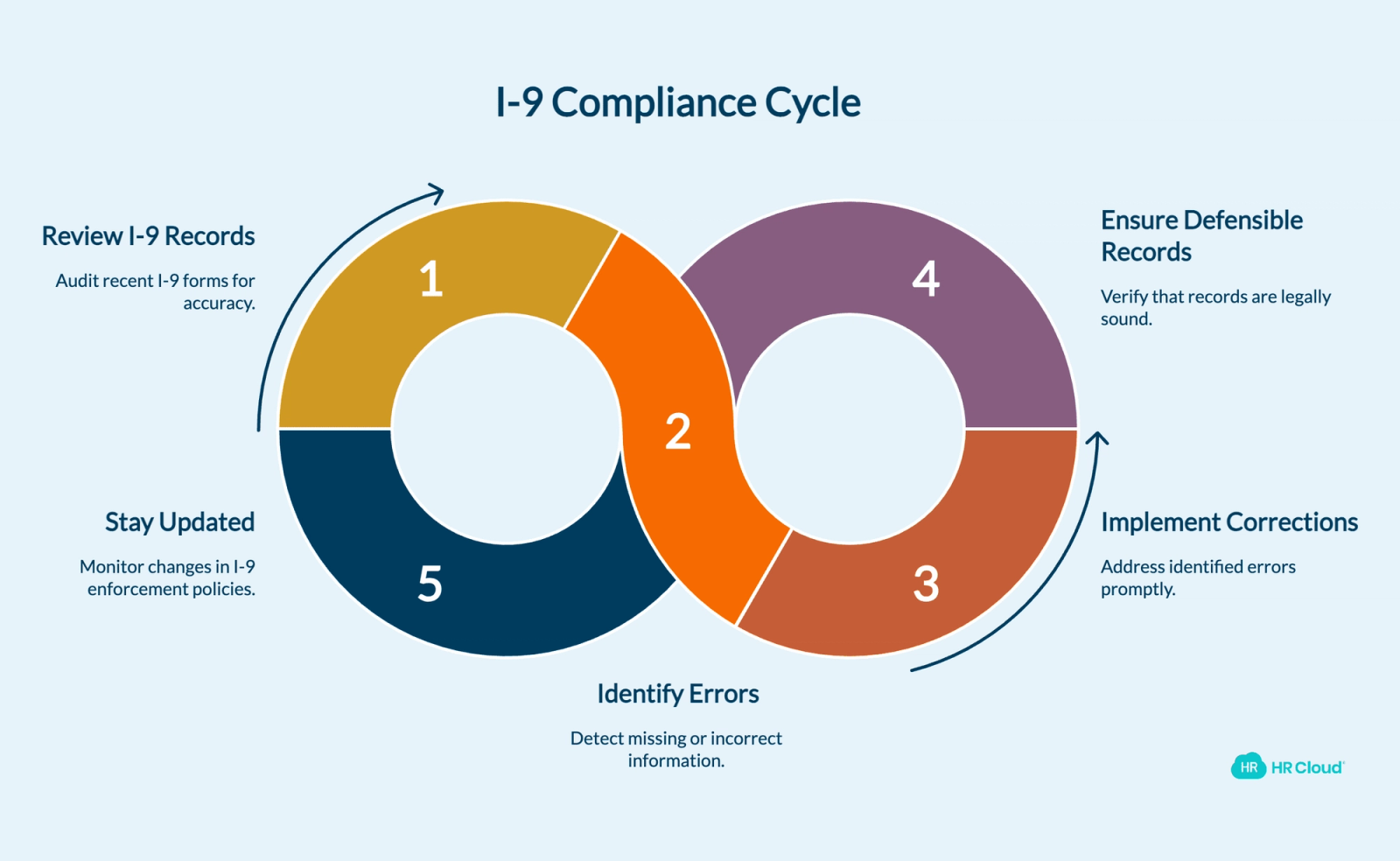
Of the four mistakes, Mistake 2 carries the sharpest compliance edge in 2026. The enforcement environment itself has changed, which needs modifications in your current I-9 workflow to remain compliant.
ICE has averaged roughly 1,990 I-9 inspections per year from 2008 through 2024, with a peak of 6,456 in 2019. You need to be proactively compliant and audit-ready in such an active enforcement environment.
In 2026 ICE reclassified three previously correctable administrative errors as substantive violations:
- missing date of birth in Section 1
- missing date of hire in Section 2
- incorrect use of the Spanish-language I-9 outside of Puerto Rico.
Errors that earlier your HR team could quietly correct during an inspection now trigger immediate monetary penalties with no correction window.
So the relevant question to ask, in 2026, isn't whether you have I-9 automation in ADP WFN. It's whether that I-9 automation produces defensible records. An automated process that allows pre-populated data without employee confirmation is now more legally exposed than a careful manual process with proper review.
Do this today
Pull one recent I-9 from your ADP records and trace whether the new hire completed Section 1 themselves or whether it arrived pre-filled on their behalf. If you can't tell, that's a problem, and that's exactly what an auditor will look for first.
HR Cloud's I-9 and E-Verify workflow requires affirmative new hire review before Section 1 is accepted, with a full audit trail. Confirm at support.hrcloud.com or with the product team before publishing.
Honest caveat: I-9 enforcement policy can change. This section reflects the compliance environment as of publication. Consult legal counsel for organization-specific guidance.
Closing the Gap Without Replacing ADP
By this point, you've either recognized one of these mistakes in your current setup or confirmed you've avoided them. Either way, you now know where your ADP paperwork automation actually ends.
And so you need to start actively working towards filling the automation gap not addressed by ADP. Preferably without doing away with ADP WFN.
With HR Cloud Onboard you can do exactly that.
| Gap | HR Cloud Capability |
|---|---|
| Custom document routing | Branded form builder + role-specific packages |
| I-9 pre-population risk | Affirmative employee review + full audit trail |
| Single-template workflow | Role, location, and position-based customization |
| Missing escalation logic | Automated overdue alerts + compliance dashboard |
HR Cloud Onboard, an ADP Marketplace Partner, connects directly to ADP WFN, RUN Powered by ADP, ADP Vantage, and ADP Lyric via two-way data sync*.* New hire data flows automatically between the two systems — no duplicate entry, no manual migration, no parallel records to reconcile.
What HR Cloud adds are these: custom forms, NDAs, role-specific offer letters, and policy acknowledgments route automatically by position so that HR isn't chasing PDFs after the hire date.
The I-9 workflow requires affirmative new hire review before Section 1 is accepted, with a full audit trail behind every submission.
Onboarding checklists are built by role, location, and position so that a nurse in California and a warehouse worker in Texas aren't moving through the same workflow.
And when a form goes overdue, an alert fires to HR automatically. On Day 3, not Day 14.
HR Cloud customers report saving seven hours per HR team member per week, with onboarding time reduced by up to 60% for clients in high-volume hiring industries. Verify these figures with the HR Cloud team before publishing.
To close these gaps quickly, treat ADP as the foundation and build everything else using HR CLoud Onboard. If you would like to dive deeper into ADP WFN and HR Cloud Onboard connection, start from here: **How to Improve ADP Workforce Now Onboarding: A Complete Guide for HR Teams.**
Or, book a demo to see it in action.

Discover how our HR solutions streamline onboarding, boost employee engagement, and simplify HR management
Book Your Free DemoFrequently Asked Questions
What paperwork does ADP Workforce Now automate for new hires?
ADP Workforce Now's onboarding module automates standard federal and state compliance forms: Form I-9 for employment eligibility, W-4 for federal tax withholding, direct deposit authorization, benefits enrollment, and state withholding forms where required. Custom company documents — NDAs, role-specific offer letters, department policies — require additional configuration or a supplementary HR onboarding platform. Verify current features at adp.com.
Does ADP handle I-9 and E-Verify automatically?
ADP Workforce Now supports electronic I-9 completion and E-Verify automation. Organizations using ATS-connected onboarding should verify that their workflow requires affirmative new hire review of Section 1 before submission. Pre-populated I-9 data not actively confirmed by the employee now carries substantive violation risk under ICE's 2026 enforcement guidelines.
What is the ADP new hire paperwork checklist?
The standard ADP new hire paperwork checklist includes: (1) Form I-9 with E-Verify, (2) W-4 federal tax withholding, (3) state tax withholding where applicable, (4) direct deposit authorization, (5) benefits enrollment, (6) ACA Notice of Coverage Options within 14 days of start date, and (7) employee handbook acknowledgment. Role-specific documents require additional configuration.
Can ADP automate W-4 and direct deposit setup?
Yes. ADP Workforce Now onboarding allows new hires to complete their W-4 and direct deposit authorization electronically before or on Day 1. The data syncs automatically to the ADP payroll record — no manual entry required. Availability depends on your ADP HR client plan tier.
What are the most common mistakes in ADP onboarding paperwork?
The four most common mistakes with ADP new hire paperwork automation are: assuming data routing equals full paperwork automation, allowing pre-populated I-9 data without affirmative employee review, applying a single workflow across all roles and locations, and relying on task reminders without escalation logic for overdue forms. Each carries a distinct compliance or operational cost.
Does ADP Workforce Now support different onboarding workflows by job role or location?
ADP Workforce Now onboarding supports workflow customization, but most teams configure a single template and apply it universally. A new hire paperwork checklist built for one role or state won't automatically cover the compliance requirements of another. Organizations operating across multiple states or roles — healthcare, manufacturing, construction — need to build and maintain separate workflows deliberately, or use a supplementary platform that handles role and location-based routing by default.
How does HR Cloud integrate with ADP for new hire paperwork?
HR Cloud Onboard integrates with ADP Workforce Now, RUN Powered by ADP, ADP Vantage, and ADP Lyric via two-way data sync. New hire data collected in HR Cloud — forms, e-signatures, I-9, direct deposit — syncs automatically to ADP, eliminating duplicate entry. HR teams gain custom form routing and escalation logic without replacing their existing ADP stack.
About the author

Keep Reading


Like What You Hear?
We’d love to chat with you more about how HR Cloud® can support your business’s HR needs.
Book Your Free Demo