How to Implement a New HRIS Without Disrupting Your HR Team: A 6-Week Playbook

Implementing a new HRIS can be overwhelming, but a structured rollout plan helps HR teams avoid disruption while maximizing adoption and efficiency. This blog presents a practical six-week implementation playbook that covers planning, data migration, system configuration, testing, training, and go-live preparation. It emphasizes the importance of stakeholder alignment, phased execution, clear communication, and employee training to minimize risks and ensure a smooth transition. By following a step-by-step implementation approach, organizations can accelerate HRIS adoption, reduce operational disruptions, and achieve faster returns on their technology investment.
You're an HR Director at a company with 800 employees spread across three locations. A third of your workforce doesn't have a company email address. Half of them don't sit at desks. Your current HR system was built for an office. Your workforce isn't one.
When you think about switching HRIS platforms, the fear isn't abstract — it's specific. What happens when a shift manager at your manufacturing plant can't figure out how to approve a time-off request at 6 a.m.? What happens when a nurse submits onboarding paperwork on her phone and the form doesn't load? What happens when IT is unavailable and you're the only one who can troubleshoot?
Most HRIS implementation guides assume your employees sit at desks, have company email, and can attend a 90-minute training session. That advice will fail you. The teams that actually struggle at go-live — and the ones HR Cloud works with every day — are managing nurses, plant workers, retail associates, school staff, and field crews. The playbook they need looks different.
That fear is grounded in real data. According to Gartner, ERP and HRIS implementations fail to meet objectives at a rate of 55–75%. Meanwhile, nearly 1 in 4 organizations report that their new HR tech implementations fail to meet adoption expectations, according to the Sapient Insights Group annual HR Systems Survey.
The failure almost never happens in the software. It happens in the rollout — specifically, when the rollout plan assumes a workforce that doesn't match the one you actually have.
This playbook is built for the workforce you actually have.
Key Takeaways
- HRIS implementation fails most often because of dirty data and weak change management — not the software. Both are preventable with the right sequence.
- The project owner must sit in HR, not IT. You know the workflows. IT supports integrations — you run the project.
- Most implementation plans assume office-based, desk-sitting employees. If your workforce includes hourly workers, shift staff, or field crews, your rollout plan needs a mobile-first track from Week 1.
- Data cleanup is the single highest-leverage week of the entire implementation. Time invested in Week 2 prevents the most expensive post-launch problems.
- A 2022 Gartner survey found only 32% of employees actively use the average HRIS. That gap is a change management problem, not a technology problem — and it's fixable.
- HR Cloud's People HRIS is designed for HR-led implementation at organizations with 500–5,000 employees, including multi-location and frontline-heavy workforces
Why HRIS Implementations Fail — And Why Frontline Teams Are Most at Risk
The standard failure patterns apply everywhere. But organizations with distributed, hourly, or mobile workforces carry extra exposure at each one.
Failure Pattern 1: Scope Creep at Launch Teams scope a reasonable implementation, then add modules, integrations, and edge-case workflows as go-live approaches. What was a 6-week project becomes a 6-month one. The fix: define what's in scope for launch in writing, get vendor sign-off, and treat everything else as Phase 2. For frontline organizations, this especially means resisting the urge to launch scheduling, time-tracking, and onboarding simultaneously. Pick one problem to solve first.
Failure Pattern 2: Dirty Data Going In Inconsistent department names, job titles that vary by person rather than role, compensation data that doesn't match payroll — none of this gets cleaner by moving to a new system. It gets more visible. For organizations with high turnover in frontline roles, the data problem is often worse than anyone realizes before migration starts. Week 2 of this playbook exists specifically to surface that before go-live.
Failure Pattern 3: IT-Run Implementations IT needs to be involved for security reviews, SSO configuration, and integration testing. But when IT runs the project, HR workflows get deprioritized, user experience decisions get made by people who aren't users, and training gets treated as optional. The project owner must be in HR. If you're navigating what to do when your CEO mandates new HR software, that post covers how to keep HR in the driver's seat from day one.
Failure Pattern 4: Big-Bang Go-Lives Switching every department on the same day gives you no room to catch problems before they affect your entire workforce. This is doubly dangerous in frontline environments where a broken time-off approval chain affects shift coverage — immediately, visibly, and loudly. A phased rollout is not weak execution. It's the only approach that gives you control.
Failure Pattern 5: Training That Assumes a Desk The classic implementation training plan — a 90-minute Zoom session with slides — reaches maybe 60% of an office workforce. It reaches almost none of a shift-based one. Nurses don't have Zoom accounts. Plant workers don't check email between shifts. Retail associates won't attend a training session on their day off. According to Gartner's 2022 research cited by SHRM, the average HRIS is used by only 32% of employees — and in frontline organizations, that number can be far lower when training is office-first by design.
Why this matters for HR Directors: The assumption embedded in most HRIS rollout plans is that your employees are easy to reach. If they're not — if they're on a floor, a job site, a patient wing, or a delivery route — your rollout plan has to account for that from Week 1, not Week 6.
Before You Start: Three Decisions to Make in Week Zero
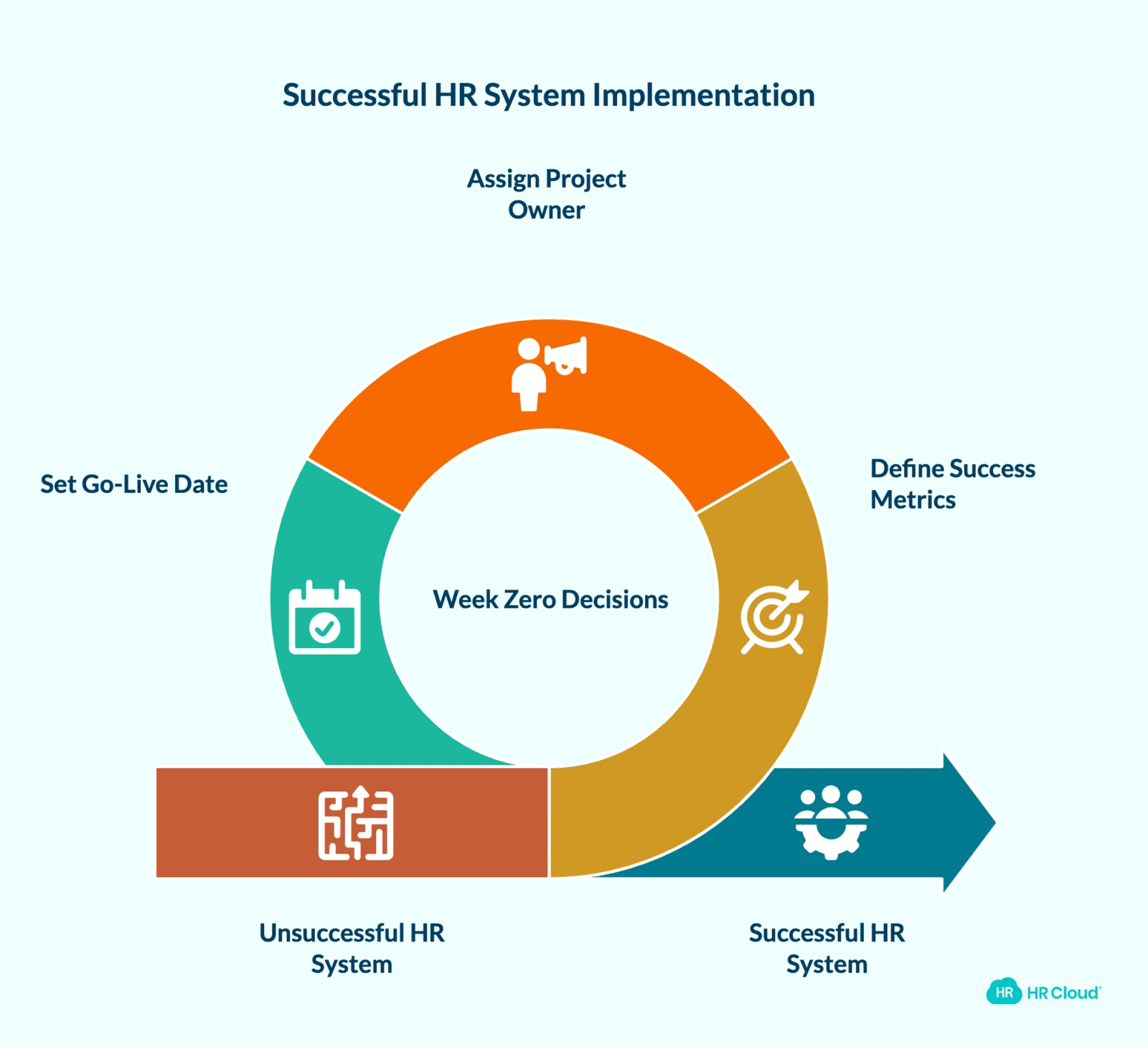
Don't touch a single piece of employee data until you've made these three decisions.
Decision 1: What does success look like in measurable terms? Not "improve HR processes." Specifics: reduce new hire paperwork completion time from 4 days to same-day. Get time-off approval under 24 hours. Eliminate the manual step in payroll reconciliation. For frontline orgs: complete I-9 verification before the first shift, not after. Specific goals produce specific configurations. Vague goals produce systems that do everything adequately and nothing well.
Decision 2: Who owns this project? One person. In HR. With authority to make configuration decisions and communicate on behalf of the project. This person attends every vendor call, signs off on the data file before import, and sends the go-live announcement. If you don't have this person identified before Week 1, you don't have an implementation — you have a committee.
Decision 3: When is go-live — and what's happening in your workforce that week? Set the date before the project starts and work backward. Avoid go-live during open enrollment, a major hiring push, a seasonal surge, or a payroll cycle change. For healthcare organizations: avoid during a Joint Commission survey window. For retail: avoid the 6-week holiday run-up. For manufacturing: avoid a planned shutdown or ramp-up week. Choose a quiet week deliberately, and confirm it's quiet across operations, not just in HR.
The 6-Week HRIS Implementation Playbook
The framework below gives every week a clear focus, a specific deliverable, and — for frontline organizations — a callout on where distributed workforces require a different approach. Share it with your vendor in your kickoff call. If they can't align to week-by-week deliverables, examine why before you sign anything.
Week 1: Scope, Stakeholders, and System Audit
This week's job is to map what you have and agree on what you're building.
Audit your current system. List every HR process your team runs today: onboarding, time tracking, performance reviews, payroll integration, compliance recordkeeping. Mark each one: manual, automated, or broken. The broken column is your implementation priority list.
Identify your stakeholders — including operations. HR leadership, payroll, finance, and 2–3 department managers are standard. For frontline-heavy organizations, also include a shift supervisor, a floor manager, or a department lead who represents the hourly workforce. These people will be your most important adoption drivers. If they're not involved in Week 1, they'll be your biggest obstacle in Week 5.
Document your actual workflows — as they happen, not as HR intended them. Before you configure anything in your new system, write down how processes actually work today. Not how they're supposed to work — how they actually happen. For frontline orgs: how does a nurse actually request time off today? Does she text her supervisor? Fill out a paper form? Log into a kiosk? That's the workflow you're replacing. If you don't map it before you configure, you'll configure for a process that doesn't exist. For a practical look at how this changes day-to-day operations, see HR Cloud's guide to digitizing employee onboarding.
Agree on launch scope in writing. What modules go live on Day 1? What integrations must work before launch? What stays manual for now? One page. Vendor sign-off. Treat it as binding.
Deliverable by end of Week 1: A scope document listing Day 1 modules, required Day 1 integrations, and processes deferred to Phase 2 — with a stakeholder map that includes at least one operational lead from your frontline.


Week 2: Data Migration and Cleanup
This is the highest-leverage week of the entire implementation. It's also where most projects slow down — and where frontline organizations consistently get surprised.
Start with employee master data. Names, job titles, departments, start dates, employment status, compensation, manager relationships. This is your foundation. Everything else — onboarding workflows, reporting, time-off approvals — is built on top of it. If this data is wrong, everything built on top will be wrong.
Frontline data has specific problems. High-turnover roles mean terminated records that were never formally closed. Job titles that exist only in one manager's head. Department names that match a pay stub but not an org chart. Hourly compensation fields that vary by shift differential and haven't been updated consistently. These aren't edge cases in healthcare, manufacturing, construction, or retail — they're the norm. Budget more time here than you think you need.
Standardize before you migrate. Fix inconsistent department names, role titles, and pay classifications before any data moves. Your new HRIS will surface every inconsistency on Day 1 — better to find it in Week 2 than in a payroll run.
Decide what to archive vs. migrate.You don't need five years of performance notes in your new system at launch. Identify what's operationally necessary. Archive the rest. Launching with clean, minimal data is vastly better than launching with everything.
Use your vendor's import templates. Use them exactly as provided. Mapping your own spreadsheet format to a new system is one of the most consistent sources of import errors — errors that don't appear until after go-live, when you're already in front of employees.
Deliverable by end of Week 2: A clean, validated employee data file ready for import, and a documented archive vs. migrate decision list.
| Data Type | Migrate at Launch | Archive | Frontline Risk |
|---|---|---|---|
| Employee master data (name, title, dept, start date) | ✓ | — | High — titles and depts often inconsistent |
| Active job postings | ✓ | — | Low |
| Current performance cycle | ✓ | — | Medium — may not exist for hourly roles |
| Historical performance notes (3+ years old) | — | ✓ | Low |
| Terminated employee records | — | ✓ | High — frontline turnover leaves many unclosed |
| Legacy compliance docs (no active obligation) | — | ✓ | Low |
| I-9 and active compliance docs | ✓ | — | High — must migrate; compliance risk if missed |
| Shift differentials and pay classifications | ✓ | — | High — frequently inconsistent; verify before import |
Week 3: Configuration and Integrations
This is where your new platform starts to look like your organization.
Configure your org structure for how work actually happens. Departments, locations, reporting lines, and approval hierarchies. For organizations with multiple locations, shift-based scheduling, or field-based roles — common in healthcare, manufacturing, construction, and retail — this step takes considerably longer than it does for single-site office organizations. The approval chains are more complex. The location structures are more varied. The role definitions don't always map cleanly to standard HRIS templates. Plan for it explicitly with your vendor.
Set up your Day 1 integrations. Modern HRIS platforms support connections to payroll providers, communication tools, and SSO systems — though the specific integrations available and how they're configured vary by platform. Prioritize the integrations your team relies on daily. Check HR Cloud's integrations directory for the full list of supported connections. Non-essential integrations move to Phase 2.
Configure workflows from your Week 1 documentation — not vendor defaults. Onboarding checklists, offboarding tasks, time-off approval chains, performance review cycles. The defaults are built for an average organization. For frontline orgs: build onboarding workflows that work without company email. Build time-off requests that work from a mobile browser, not just a desktop login. Build approval chains that account for shift supervisors, not just salaried managers.
Test every integration in a sandbox before touching production. Don't assume a connection works because it appears in a directory. Run a test with realistic data — including frontline worker profiles, not just office employees — before anyone goes near the live system.
Deliverable by end of Week 3: A configured system with Day 1 integrations tested in sandbox, and at least one mobile workflow validated end-to-end.
Pro tip: If your vendor requires significant IT resources to complete basic HRIS configuration — and your IT team is shared with operations — that dependency doesn't disappear after go-live. It becomes a recurring constraint every time you need to update a workflow or add a new location. Ask your vendor specifically who handles post-launch configuration changes before you sign.
Week 4: Testing and Training
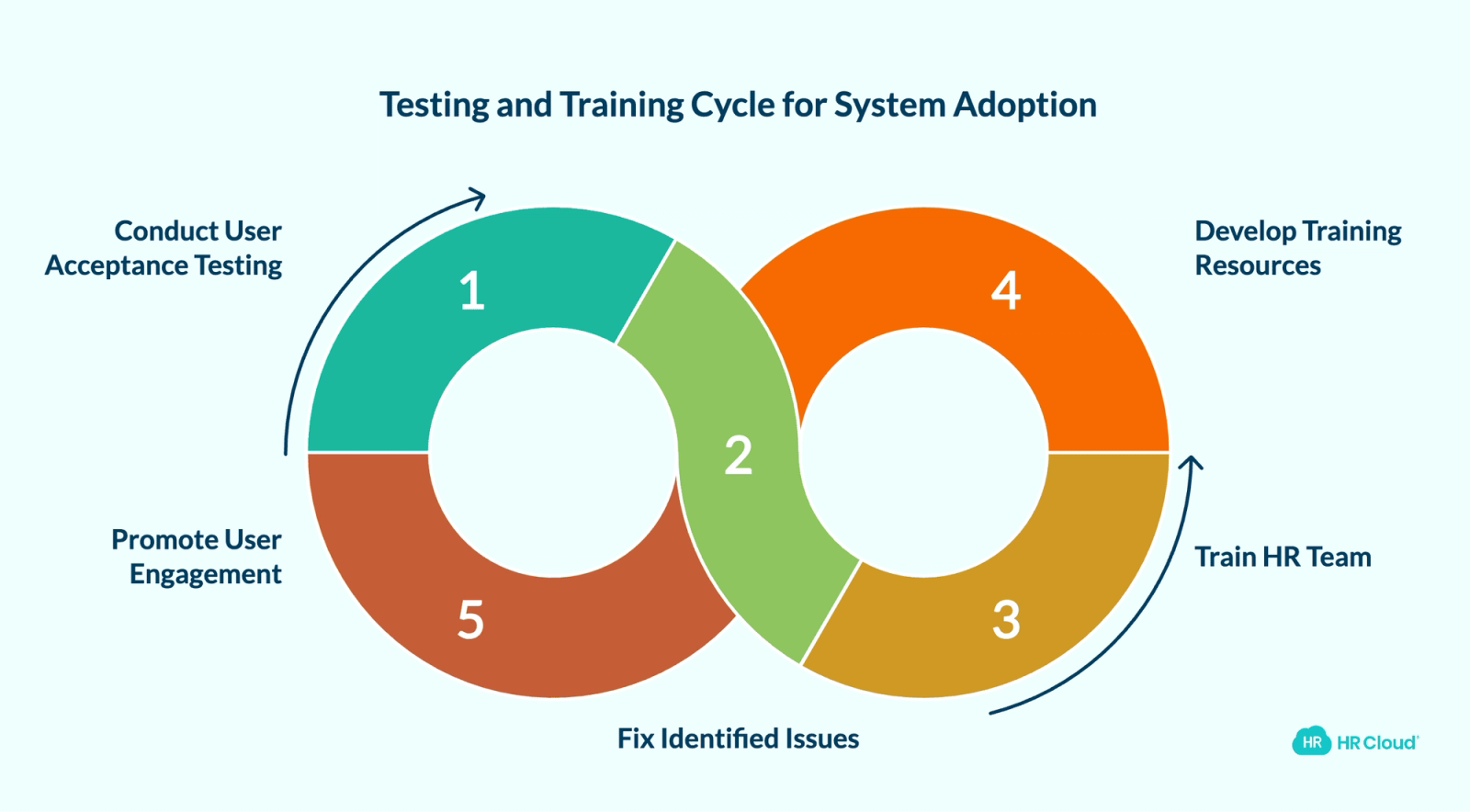
You have a working system. This week, you make sure it works for the people who will actually use it — on the devices they actually use, during the hours they actually work.
Run UAT with a cross-role, cross-device group. 5–10 people covering different roles: an HR generalist, a salaried manager, a shift supervisor or department lead, and at least one hourly or frontline employee. Ask each of them to complete real tasks — submitting a time-off request, completing an onboarding form, running a basic report. Test on both desktop and mobile. If your frontline workforce primarily uses smartphones, the mobile experience is not a secondary test — it's the primary one.
Fix what UAT surfaces. Nothing else. This is not the week to expand scope. Fix what broke. Save enhancements for the 30-day post-launch review.
Train your HR team first — with frontline scenarios. According to Deloitte's research on modernizing HR, HR staff already spend as much as 57% of their time on administrative tasks. They're stretched before the new system even launches. Training needs to focus on the tasks they'll handle most often: approving requests from employees who can't figure out the system, troubleshooting mobile access issues, updating records for high-turnover roles, and processing onboarding for people who don't have company email accounts.
Build training resources that reach employees who don't sit at desks. A 2–3 minute video built for mobile viewing — not a Zoom recording with slides. A laminated one-page quick-start guide that can go in a break room, a nurses' station, or a job trailer. A QR code that takes employees directly to the login page. For hourly workers: make the first task something they're already motivated to complete — like viewing their schedule or checking a pay stub — not something that feels like HR paperwork.
Here's what separates the implementations that stick from the ones that don't: the teams with the highest frontline adoption treat the first employee interaction with the new system like product onboarding, not HR compliance. The goal isn't to get employees into the system — it's to get them to do something useful the first time they log in, so they come back on their own.
Deliverable by end of Week 4: A tested, stable system. A trained HR team. Mobile-validated quick-start resources that work without a company email address or a desktop computer.

Struggling to Support Frontline Workers?
- Centralize onboarding, policies, and updates
- Reach deskless workers without email
- Reduce confusion from day one
Week 5: Soft Launch and Feedback Loop
Do not flip the switch for everyone at once. A soft launch is how you catch the problems that testing missed — and in frontline organizations, there are always a few.
Roll out to one location, one shift, or one department first. Choose a group with a manager who will actively support the rollout — and who has credibility with their team. In manufacturing, that's often a floor supervisor whose team trusts them. In healthcare, it's a department lead, not just an administrator. In retail, it's a store manager who runs tight operations. The right pilot manager turns early confusion into early advocacy. The wrong one turns it into resistance that spreads.
Watch for the frontline-specific failure modes. The problems that surface in desk-based UAT are not always the problems that surface in frontline soft launches. Common ones:
- Employees who share a device or kiosk and can't stay logged in
- Shift workers who get the go-live communication email three days after launch because they don't check email daily
- Supervisors who approve requests verbally and expect the system to match, not replace, that habit
- Mobile login flows that work on Wi-Fi but fail on cellular
Build these scenarios into your monitoring. If you don't look for them specifically, you won't find them until they become complaints.
Set up a monitored feedback channel. A shared inbox. A text line. A QR code in the break room that links to a short feedback form. The channel matters less than the response time: every issue reported should get an acknowledgment within 24 hours. Problems that get ignored in Week 5 become reasons employees don't trust the system in Week 10.
Monitor adoption by location, shift, and manager — not just overall. An 80% overall adoption rate can hide a single location stuck at 20%. Break the data down before the full launch. Reach out to the managers of low-adoption groups directly, not through a broadcast reminder.
Send a company-wide heads-up one week before full go-live. Tell employees what's changing, what they need to do first, and where to get help. For frontline workers: post it physically. A break room notice. A shift handoff reminder. A supervisor-delivered briefing at the start of a shift. Email alone will not reach your entire workforce.
Deliverable by end of Week 5: Soft launch complete, frontline-specific issues documented and resolved, full organization briefed and ready.
Week 6: Full Go-Live
If the first five weeks went the way they should, Week 6 should feel anticlimactic. That's the goal. Drama on go-live day means something was missed in the weeks before it.
Deactivate your old system on go-live day. Running two systems in parallel creates a decision every employee has to make: which one is real? Remove that decision. One source of truth. One place to go. The faster you shut down the old system, the faster the new one becomes normal.
Send a go-live communication that reaches every employee — not just the ones with email. For frontline workers: this means physical signage at entry points and break areas, supervisor-delivered announcements at shift starts, and a QR code that goes directly to the login screen. The announcement should answer three questions: what's different today, what do I do first, and who do I call if something doesn't work.
Staff your support channel for the first 48 hours. This is non-negotiable. The first two days generate the highest volume of questions. Have someone on your HR team monitoring and responding during all active shift hours — not just 9 to 5. If your workforce runs overnight shifts, your support coverage should too.
Review adoption by location, role, and shift — not just totals. An overall login rate looks fine until you notice that one location hasn't moved at all, or that hourly employees are logging in but not completing their profiles. Targeted follow-up in Week 6 prevents those gaps from calcifying into permanent non-adoption.
Deliverable by end of Week 6: Full organization live. Old system off. Adoption tracked by location and workforce type. 30-day post-launch plan in place.
HRIS Migration Checklist
Use this alongside the weekly playbook. The frontline risk column flags where distributed workforces need additional attention.
Pre-Launch
[ ] Success metrics defined in measurable terms
[ ] Project owner assigned — HR team member, not IT
[ ] Go-live date confirmed; checked against operational calendar (seasonal surges, audits, shutdowns)
[ ] Stakeholders identified including at least one frontline operational lead
[ ] Current workflows documented as-is, including informal/workaround processes
[ ] Launch scope signed off in writing
Data
[ ] Employee master data cleaned and standardized
[ ] Shift differentials, pay classifications verified and normalized
[ ] Archive vs. migrate decisions documented
[ ] Data imported using vendor-provided templates
[ ] Data accuracy verified post-import including hourly roles
[ ] Terminated records audited — especially for high-turnover frontline roles
Configuration
[ ] Org structure configured for actual reporting lines, including shift supervisors
[ ] Approval chains built for the managers who actually approve things, not org chart assumptions
[ ] Day 1 integrations tested in sandbox
[ ] Mobile workflows validated end-to-end on actul employee devices
Training
[ ] HR team trained including frontline troubleshooting scenarios
[ ] Manager training completed for shift supervisors and department leads, not just salaried managers
[ ] Mobile quick-start resources built (video + one-pager) — accessible without company email
[ ] Physical training materials (break room, job trailer, nurses' station) prepared
[ ] UAT completed and all critical issues resolved — tested on mobile, not just desktop
Launch
[ ] Soft launch completed with one location or shift
[ ] Frontline-specific failure modes monitored and addressed
[ ] Adoption tracked by locatishift, and manager
[ ] Go-live communication sent via all channels including physical
[ ] Old system deactivated
[ ] 30-day post-launch review scheduled
Change Management When Your Employees Don't Sit at Desks
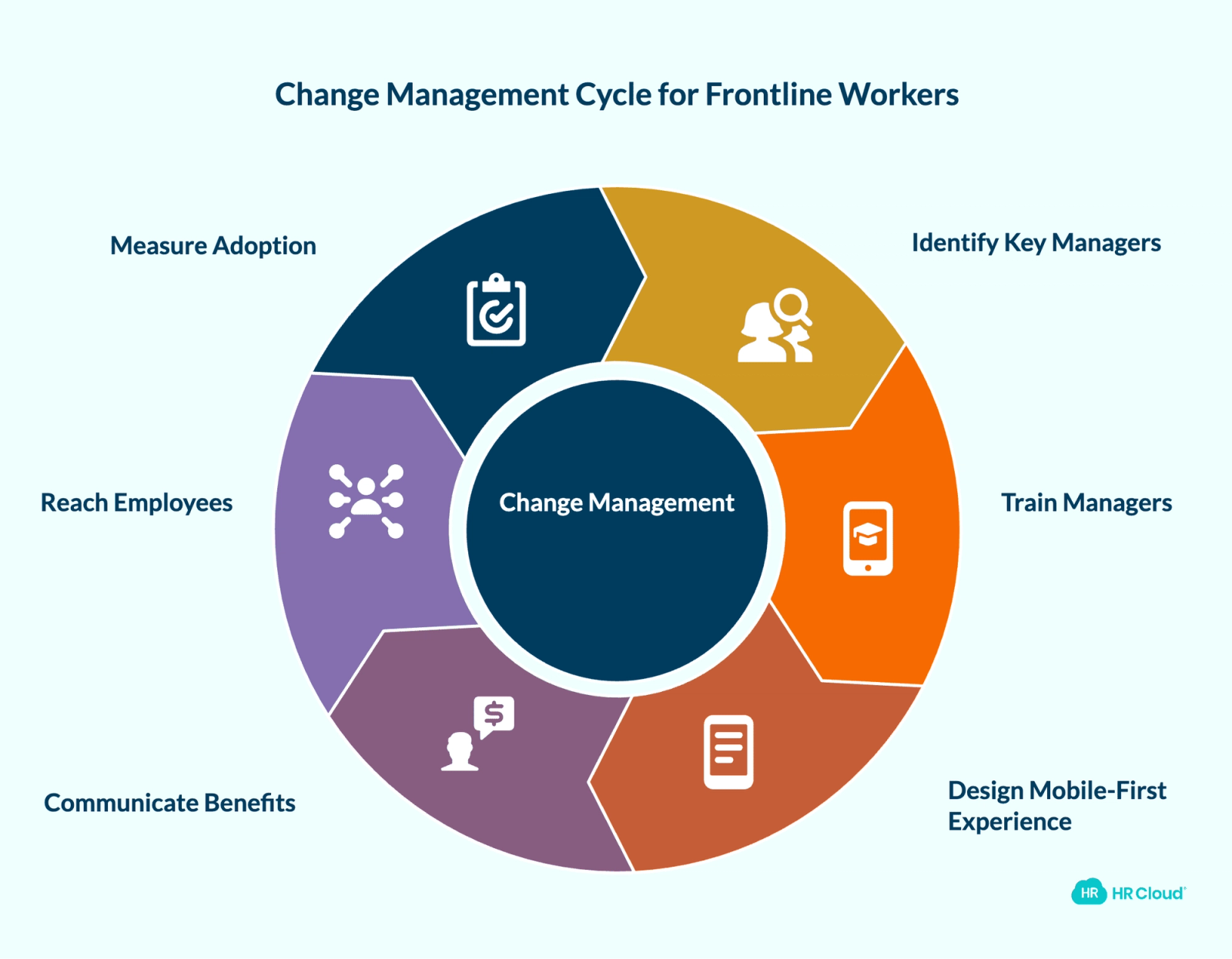
For office-based teams, change management is mostly a communication problem. For frontline organizations, it's a logistics problem — and the solution looks different.
The 2022 Gartner data is instructive: the average HRIS is used by only 32% of employees. In organizations where a significant portion of the workforce is hourly, mobile, or shift-based, that number can run lower still. The gap between 32% and full adoption is almost never the software. It's the rollout model.
Manager readiness is the most important variable — and "manager" means shift supervisors, store managers, field leads, and department heads, not just directors. When a plant floor supervisor tells their crew "this is how we're doing time-off requests now," adoption happens. When that supervisor doesn't know how to use the system, adoption stalls at the team level regardless of what HR communicates from the top. Identify the 5–10 operational managers who have the most direct contact with your frontline workforce. Train them first. Train them on a phone, not a laptop. Make sure they can answer the three questions every employee will ask: how do I log in, how do I request time off, and who do I call if it doesn't work.
Mobile-first means the phone experience is the primary experience, not a backup. If your frontline employees primarily use smartphones, design the entire rollout around that assumption. That means: testing every step on a mobile browser, not just the desktop interface; building quick-start resources that display correctly on a small screen; sending the go-live announcement via text or QR code, not just email; and configuring the first screen an employee sees to be something immediately useful — their schedule, their upcoming shifts, their pending onboarding tasks — not a settings menu.
Tell employees what's in it for them, in language that matches their day. "We're upgrading our HR platform" means nothing to a CNA at the start of a 12-hour shift. "You can now request time off from your phone in under two minutes, and your supervisor will get the notification instantly" means something. "Your new hire paperwork is done before your first day, so you spend Day 1 on the floor instead of in the HR office" means something. Connect the system to the part of work they actually care about.
Reach employees where they are, not where HR expects them to be. Physical signage at break rooms, locker areas, and time clock stations. QR codes on laminated cards that supervisors hand out at shift briefings. Text message updates for time-sensitive go-live announcements. For employees who do use email regularly, email works too — but it can't be the only channel. HR Cloud's People HRIS is built to support multi-channel communication and mobile-first access for exactly this reason — so the system can reach your workforce the way your workforce actually operates.
The real adoption metric: Don't measure whether employees logged in. Measure whether they completed a task they would have previously done through a paper form, an email, or a phone call to HR. That's when the system is actually working.
Common Mistakes That Derail Implementations
Migrating everything at launch. Pick your most critical modules for Day 1. Add the rest in Phase 2. Scope creep is the most common reason implementations run over time. For frontline organizations: resist the push to launch scheduling, time-tracking, and onboarding simultaneously. One problem, solved well, builds more trust than three problems solved partially.
Skipping data cleanup. Dirty data in a new system is still dirty data — just more visible and more disruptive. The migration is your best opportunity to fix records that have been wrong for years. In high-turnover frontline environments, this means auditing terminated records, normalizing job titles, and verifying pay classifications before a single row gets imported.
Letting IT run the project. IT is a critical partner for integrations and security. They are not the right project lead. HR owns the workflows and the pain points — HR should own the project.
Designing training for office workers when your workforce isn't. A Zoom-based training session with a slide deck is a reasonable choice for an office team. It's a poor choice for nurses, warehouse workers, or retail associates who don't sit at desks, don't have dedicated training time, and won't attend an optional session during off-hours. Design training for the employee experience, not the HR team's convenience.
Going live during a high-volume operational period. Open enrollment, peak season, a major hiring push, a regulatory audit window — any of these will compress the bandwidth your team needs to support a new system. A botched go-live during a high-volume period creates twice the damage: the system problems and the operational disruption compound each other.
Choosing a platform that requires IT to operate post-launch. For a clear breakdown of what to evaluate before you select, see HR Cloud's HRIS vs. HRMS comparison. The right platform for a lean HR team with a distributed workforce is one where HR can make configuration changes, add a new location, update an approval chain, or build a new onboarding workflow without opening an IT ticket.
Download your free employee onboarding checklist
Using this checklist ensures that you are not scrambling to make the new employees feel welcomed, prepared, and set up for long-term success.
Download Now
How to Turn This Into Action This Week
Step 1: Run a 60-minute workflow audit with your HR team — and include one operational manager. List every process you run today. Mark each one: working, inefficient, or broken. Then ask the operational manager how their team actually does those same tasks. The gap between HR's version and the frontline version is usually where implementations go wrong.
Step 2: Audit your frontline communication channels. Before you plan your go-live announcement, answer this: how do you reach an employee who doesn't check email? If you don't have a clear answer, that's your first implementation risk to address — and it's separate from any platform decision.
Step 3: Assign a project owner and set your go-live date. One person. In HR. With authority. Name them today. Then set the date, check it against your operational calendar, and share the 6-week framework with your vendor. A vendor that can align to week-by-week deliverables is a vendor that's done this before.
Ready to Run a Cleaner Implementation?
Most HRIS implementation guides were written for organizations where every employee has a desk, a company email address, and time to attend a training session. If that's not your workforce, the standard playbook will fail you at go-live.
The 6-week framework above is built for organizations with real operational complexity — multiple locations, hourly workers, shift-based schedules, lean HR teams, and managers who approve things at 5 a.m. on a phone.
HR Cloud's People HRIS is built for exactly that kind of organization — 500 to 5,000 employees, IT-light implementation, mobile-first workflows, and multi-location support from day one. Book a Free Demo

Discover how our HR solutions streamline onboarding, boost employee engagement, and simplify HR management
Book Your Free DemoFrequently Asked Questions
How long does HRIS implementation typically take?
It depends significantly on platform, organization size, and how distributed your workforce is. Platforms designed for mid-size organizations and lean HR teams are generally built for faster go-lives — measured in weeks, not quarters. Enterprise implementations can take considerably longer, especially when the organization has multiple locations, complex integrations, or a frontline workforce requiring mobile-specific configuration.
What data do I need to migrate when switching HRIS platforms?
At minimum: employee master data (names, job titles, departments, start dates, employment status, compensation). You'll also want to migrate active job postings, current performance cycles, and compliance documents with ongoing obligations — particularly I-9 records. For frontline organizations, also verify shift differentials and pay classifications before migration; these are frequently inconsistent and will surface as errors immediately post-import. Historical data can generally be archived rather than migrated on Day 1.
Do I need IT involvement to implement a new HRIS?
Yes, for integrations and SSO configuration. But modern HRIS platforms are designed so that HR teams handle most configuration without IT involvement. If your vendor requires significant IT resources to complete basic setup — and your IT team is shared across the business — evaluate that dependency carefully. It doesn't go away after go-live.
How do I get frontline employees to actually use the new HR system?
The same rules apply as any workforce, but the tactics differ. Mobile-first access matters more than desktop. Physical communication (break room signage, supervisor briefings, QR codes at time clocks) works better than email-only announcements. Shift manager buy-in is the single most reliable adoption driver. And the first task an employee completes in the new system should be something immediately useful to them — not something that feels like HR compliance.
What integrations should I prioritize at launch?
Payroll is the top priority for virtually every organization — it touches every employee on a predictable schedule. After payroll, focus on the tools your managers and HR team use most: scheduling, time-tracking, and your primary communication platform. For organizations using ADP, HR Cloud's ADP integration is configured as a priority connection. Non-essential integrations move to Phase 2.
How do I know if my HRIS implementation was successful?
Track adoption by location, shift, and workforce type — not just overall. An 80% overall login rate is meaningless if your largest location is at 20%. Also track task completion: are employees submitting time-off requests through the system? Are managers approving in the system rather than by text or verbal approval? Is your HR team spending less time on manual data entry than before go-live? Set a baseline before launch so you have something concrete to measure against. For implementation metrics at 500+ employees, see HR Cloud's enterprise HR software guide.
About the author

Keep Reading


Like What You Hear?
We’d love to chat with you more about how HR Cloud® can support your business’s HR needs.
Book Your Free Demo