HR Software ROI Calculator: Build a CFO-Ready Business Case

You've done the research. You know which platform fits your workforce. Now comes the harder part: sitting across from your CFO and making the numbers work.
HR software requests get rejected at the budget table more often than at the selection stage — not because the software is wrong for the business, but because the business case wasn't built in a language finance understands. According to the 2025 SHRM State of the Workplace Report, only 43% of HR professionals rate their organization's HR technology as effective — yet getting investment approved requires translating that gap into dollars, not frustration.
This guide gives you the exact framework: the HR software ROI formula, scenario-based calculations for 250, 500, and 1,000-employee companies, and a five-step structure for presenting your business case to a CFO who is measuring you against every other capital request in the queue.
Most HR software calculates ROI after employees are already hired and seated. HR Cloud creates ROI by closing workflow gaps before Day 1 — across locations, shifts, and mobile devices — which is where the highest-cost failures actually occur in frontline and multi-location organizations.
Key Takeaways
- The core HR software ROI formula measures total annual savings minus software cost, divided by software cost — and the most overlooked savings category is turnover, not labor.
- According to SHRM, replacing a single employee costs at least 50% of their annual salary — making even a conservative 1% improvement in retention a six-figure line item at mid-market scale.
- HR Cloud customer data shows organizations save 7–8 hours of HR time per new hire after automating onboarding — for a company hiring 120 people annually, that's nearly 1,000 hours recovered every year.
- CFOs approve HR software when it maps to four financial categories — cost reduction, productivity gains, risk reduction, and retention improvement — not when it's framed as an employee experience upgrade.
- Use the HR Cloud Onboarding ROI Calculator to generate a payback period estimate using your actual headcount and HR team cost before your next budget conversation.
- The scenario tables in this post show how ROI compounds with company size — using conservative, auditable inputs drawn from HR Cloud's own published calculator methodology. A 1,000-employee organization can realistically see 601% ROI within 12 months of go-live.
Why CFOs Approve HR Software Investments (And Why Most Requests Get Rejected)
Most HR software requests fail at the budget stage because they're written for HR leaders, not financial decision-makers. A CHRO cares about engagement scores and onboarding satisfaction. A CFO cares about cost per outcome and risk-adjusted return.
The framing has to change.
Financial leaders evaluate new investments through a consistent lens: what does this cost, what does this save, how long until it pays for itself, and what happens if we don't do it? According to Gartner's 2024 HR Technology Imperatives report, 89% of HR leaders plan to increase or maintain HR technology budgets — but in a volatile economic environment, that budget is under pressure to demonstrate consistent delivery of business value.
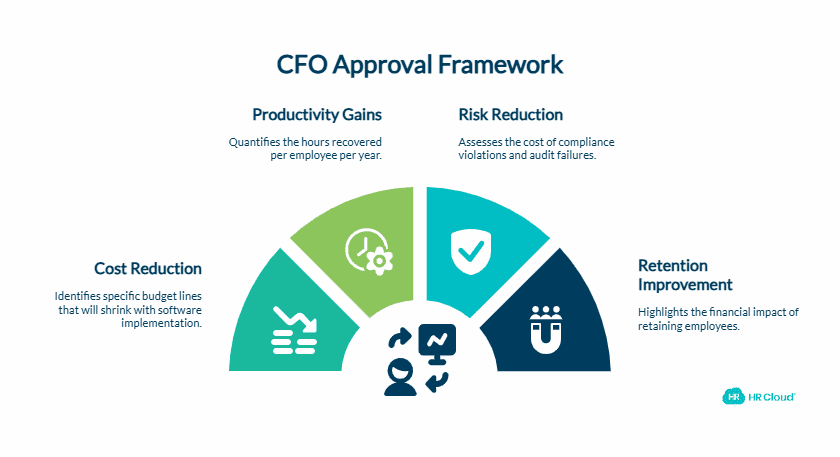
The HR software requests that get funded aren't the ones with the best feature lists. They're the ones that answer the CFO's four core questions before they're asked:
1. Cost Reduction — What specific budget lines shrink when this is implemented? Administrative labor, error correction, manual compliance tracking, and redundant tools are the most defensible.
2. Productivity Gains — How many hours does this recover per employee per year? For organizations with large HR teams or high-volume hiring, this number is significant.
3. Risk Reduction — What is the cost of a single I-9 violation, a missed certification expiry, or a failed audit? Compliance automation converts risk into a quantifiable avoided cost.
4. Retention Improvement — This is the number most business cases undercount. If your annual turnover is 20% at a 500-person company, you're replacing 100 employees per year. SHRM estimates replacement costs at a minimum of 50% of annual salary per departure. Even retaining just 1% more of your workforce annually produces a meaningful budget impact.
CFO insight: HR software is no longer viewed as an HR expense. Organizations that win budget approval present it as an operational efficiency investment with a quantifiable payback period — not a department upgrade.
How To Calculate HR Software ROI
The core formula is straightforward:
ROI (%) = (Total Annual Savings − Annual Software Cost) ÷ Annual Software Cost × 100
The complexity isn't the formula — it's knowing which savings categories to include, and how to calculate them with enough specificity that a finance team can verify the inputs.
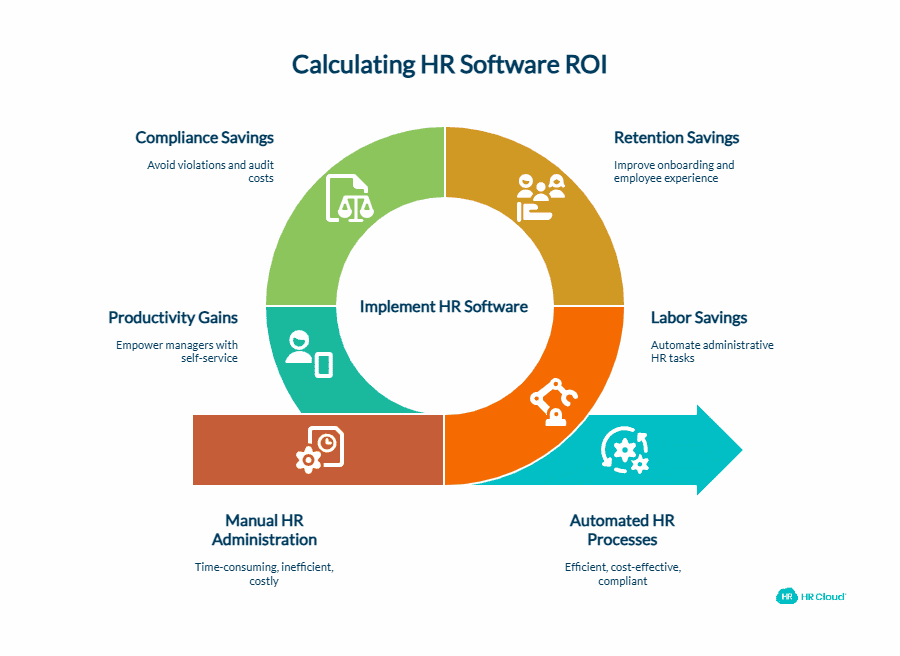
Here are the four categories that belong in every HR software ROI calculation:
Labor Savings
Manual HR administration consumes time that doesn't appear on any budget line but has a real dollar value. Multiply hours saved per task by the loaded hourly cost of the HR team member performing that task.
Common administration tasks to quantify:
- New hire paperwork and onboarding document collection
- Benefits enrollment processing
- PTO request tracking and approvals
- Employee data updates and record maintenance
- Compliance document tracking and renewal reminders
HR Cloud customer data shows the average HR team saves 7–8 hours of administrative time per new hire after automating onboarding — consistent with what Osmose Utilities and Behavioral Progression reported after going live on the HR Cloud onboarding platform. For a company hiring 120 people per year at a loaded HR rate of $35/hour, that's more than $33,000 recovered annually from onboarding alone.
Why this category gets underestimated: Most organizations calculate only the HR team's time. The full calculation includes manager time (approvals, check-in scheduling), IT provisioning time, and the productivity gap while a new hire isn't yet fully operational.
Retention Savings
This is where business cases are won or lost. Employee turnover is the largest variable cost in most HR software ROI models, and it's also the most underreported.
Use this formula:
Retention Savings = Employees Retained × Cost Per Replacement
Cost Per Replacement = Annual Salary × 50% (SHRM conservative baseline)
According to SHRM, replacing an employee costs between 50% and 200% of their annual salary depending on seniority and role. For a CFO business case, use 50% — the lowest defensible figure from the most credible HR research body. It's conservative enough to be bulletproof, and the dollar totals are still significant.
The lever HR software pulls here is primarily through onboarding quality and employee experience. Research by Brandon Hall Group consistently shows that organizations with structured onboarding programs see 82% better new hire retention and 70% higher productivity in the first year. A platform that turns a disorganized week-one experience into a structured, mobile-first process directly reduces the probability of early attrition that triggers a full replacement cycle.
Here's what this looks like in practice: A multi-location healthcare staffing organization using HR Cloud's onboarding module eliminated the paper-based new hire process across 12 facilities. New hires received role-specific task checklists, benefit enrollment reminders, and automated day-30 check-ins — without HR coordinators at each site managing follow-up. First-year retention improved measurably within the first two quarters after go-live.
Compliance Savings
This category quantifies avoided costs rather than active savings. For organizations managing I-9 compliance, certification tracking, policy acknowledgment records, or labor law documentation, the cost of a single violation can dwarf an entire year's software investment.
Calculate compliance savings by:
- Estimating the probability of a violation given current manual processes
- Multiplying by the average penalty for that violation in your industry
- Adding the internal cost of audit preparation when documentation isn't centralized
For HR Cloud's I-9 and E-Verify module, the ROI here is quantifiable: per the Federal Register published January 2, 2025, I-9 paperwork violation fines now range from $288 to $2,861 per form. Organizations managing paper-based I-9s at scale face compounding exposure with every new hire cycle — ICE worksite enforcement activity rose sharply through 2024 and 2025, with immigration attorneys reporting significantly elevated audit activity targeting high-volume employers.
Productivity Gains
Beyond the HR team, calculate time recovered by managers through self-service access to approvals, PTO tracking, and employee record updates.
A conservative estimate: 20% reduction in HR-related administrative time for managers, valued at $35/hour loaded cost. For a 500-employee organization with 40 managers each spending 3 hours per week on HR tasks, recovering 20% of that time represents $43,680 annually — without counting the strategic work that replaces it.
The operational reality looks different depending on your workforce. A healthcare HR coordinator spending mornings chasing incomplete credential packets before a new clinical hire can go on shift is not doing HR work — they are doing avoidable triage. A construction superintendent verifying that a new site worker's safety certifications are current before the morning mobilization call is not doing compliance work — they are absorbing a workflow failure that software should have caught before the hire ever arrived. These hours don't show up on a budget line. They show up in overtime, delayed projects, and compliance exposure.
For your business case: Build a simple three-column table — Current Time, Post-Implementation Time, Annual Hours Saved — and multiply by the loaded hourly cost of the person doing the work. Finance teams respond to tables, not paragraphs.
The 7 Biggest Sources of HR Software Cost Savings
Not all cost savings are equal in a CFO conversation. These seven categories are the most defensible — and the ones most commonly missing from business cases.
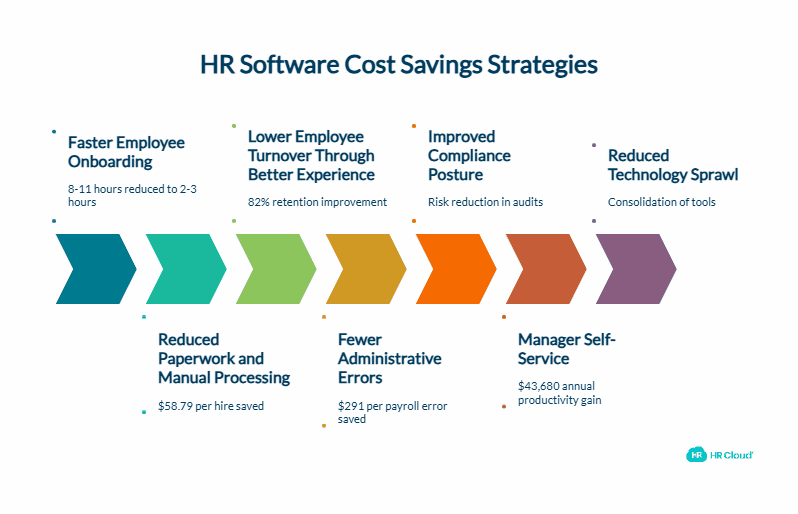
1. Faster Employee Onboarding
Manual onboarding: 8–11 hours of HR time per new hire (HR Cloud customer baseline). After automation: approximately 2–3 hours.
For a company hiring 120 new employees per year at a loaded HR cost of $35/hour, the math is direct:
| Scenario | Hours Per Hire | Annual Hours | Annual Cost |
|---|---|---|---|
| Before automation | 10 hours | 1,200 hours | $42,000 |
| After automation | 2 hours | 240 hours | $8,400 |
| Savings | 8 hours | 960 hours | $33,600 |
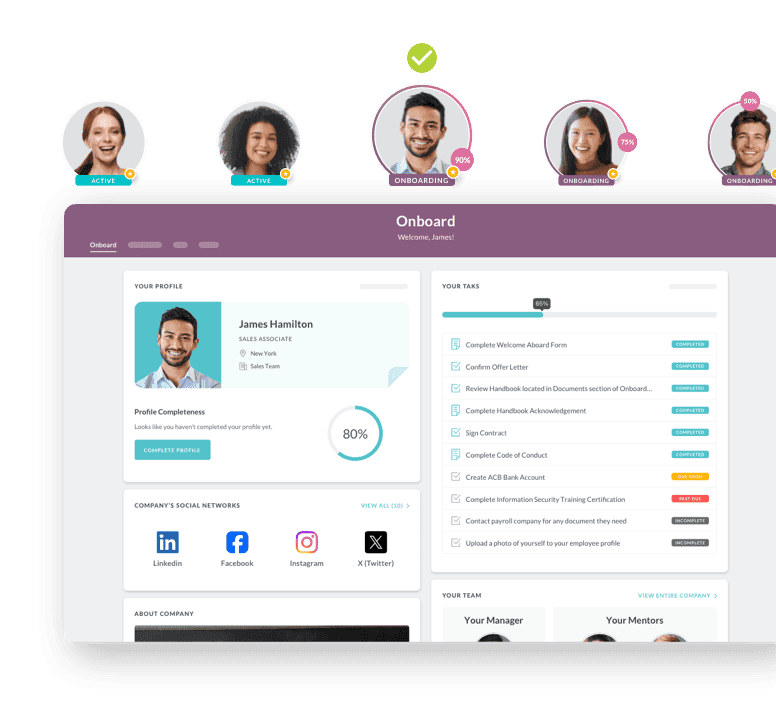
HR Cloud's employee onboarding software automates document collection, task routing, and new hire check-ins from day one — so your team stops chasing paperwork and starts focusing on the new hire's actual integration.
2. Reduced Paperwork and Manual Processing
Digital forms, electronic signatures, and automated workflow routing eliminate paper-based processes that generate costs through printing, storage, mailing, and retrieval. Research from Eddy found that manual onboarding paperwork costs $58.79 per new hire when accounting for I-9 processing, contact information updates, and employee agreements. At 120 hires per year, that's more than $7,000 in avoidable per-hire processing costs.
3. Lower Employee Turnover Through Better Experience
Poor onboarding is a leading driver of first-year attrition. According to Eddy's onboarding research, 20% of employee turnover happens within the first 45 days. Organizations with structured onboarding programs consistently reduce first-year attrition — Brandon Hall Group's research puts new hire retention improvement at 82% for organizations with strong onboarding processes versus those without.
A platform that delivers a consistent, guided experience — regardless of location, shift, or manager — reduces the variance in onboarding quality that drives early departures.
4. Fewer Administrative Errors
Manual HR processes generate errors that cost time and money to correct. According to EY's 2022 HR Processing Risk and Cost Survey — the most cited study on this topic — the average payroll error costs $291 to correct, and one in five payrolls contains at least one error. Automated workflows and connected data reduce error rates by eliminating the manual re-entry that creates most HR record discrepancies in the first place.
5. Improved Compliance Posture
Compliance savings are best framed as risk reduction in a CFO conversation. Quantify exposure across:
- I-9 audit risk given current paper-based or spreadsheet tracking
- Certification expiry management for regulated workforces (healthcare, construction, utilities)
- Policy acknowledgment records required for legal protection
HR Cloud's I-9 and E-Verify tools and HR workflow automation keep every document current, every expiry tracked, and every audit trail intact without manual calendar reminders.
6. Manager Self-Service
Approvals, PTO management, employee record updates, and team reporting currently require HR involvement at most mid-size organizations. Self-service portals give managers direct access and reduce the back-and-forth that consumes both HR and manager time.
For a 500-employee company with 40 managers each spending 3 hours per week on HR-related administrative tasks, recovering just 20% of that time through self-service represents $43,680 in annual productivity — calculated at $35/hour loaded cost.
7. Reduced Technology Sprawl
Many organizations running manual or siloed HR processes are also paying for multiple point solutions that overlap in function. Consolidating onto a single platform eliminates redundant licensing costs across onboarding tools, engagement survey tools, recognition platforms, time-off trackers, and communication apps.
HR Cloud's People HRIS connects onboarding, engagement, recognition, time off, and performance management in one platform — replacing the disconnected tool stack that creates data silos and administrative duplication.
Consolidation tip: Before building your ROI model, audit every HR-related tool invoice from the past 12 months. Tools with overlapping functions are often the fastest and most defensible savings to quantify.
Unlock Success with Osmose’s Story
See how Osmose Utilities Services transformed their employee experience with HR Cloud — and discover how you can too. Download the ebook now!
Download Now
Sample HR Software ROI Calculations by Company Size
These scenarios use conservative, auditable inputs drawn directly from HR Cloud's own published calculator methodology: 50% of salary as replacement cost (SHRM standard), 1% absolute turnover reduction (below HR Cloud's own 2% default), $35/hour loaded HR rate, and 8 hours saved per new hire based on verified customer results.
Results will vary based on your current turnover rate, process maturity, implementation scope, and user adoption. Retention improvement is the largest single driver in these models — and also the hardest to attribute solely to software. The 1% turnover reduction assumption is used precisely because it is the most conservative defensible figure; HR Cloud's own Workmates ROI calculator defaults to 2%. Use these scenarios as a floor, not a ceiling.
250-Employee Company
Inputs and assumptions:
- Average salary: $55,000 | Replacement cost: 50% = $27,500
- Annual turnover: 22% | Turnover reduction: 1% absolute (2–3 employees retained)
- Annual new hires: 60 | Hours saved per hire: 8 | HR rate: $35/hour
| Savings Category | Calculation | Annual Amount |
|---|---|---|
| Labor savings (onboarding) | 60 hires × 8 hrs × $35/hr | $16,800 |
| Retention savings | 2.5 employees × $27,500 | $68,750 |
| Compliance savings (estimated avoided costs) | — | $5,000 |
| Productivity gains (manager self-service) | 20 mgrs × 2 hrs/wk × 52 × 20% × $35 | $14,560 |
| Technology consolidation | — | $8,000 |
| Total Annual Savings | $113,110 | |
| Annual Software Cost | $25,000 | |
| ROI | 352% | |
| Payback Period | ~2.7 months |
500-Employee Company
Inputs and assumptions:
- Average salary: $60,000 | Replacement cost: 50% = $30,000
- Annual turnover: 20% | Turnover reduction: 1% absolute (5 employees retained)
- Annual new hires: 120 | Hours saved per hire: 8 | HR rate: $35/hour
| Savings Category | Calculation | Annual Amount |
|---|---|---|
| Labor savings (onboarding) | 120 hires × 8 hrs × $35/hr | $33,600 |
| Retention savings | 5 employees × $30,000 | $150,000 |
| Compliance savings | — | $8,000 |
| Productivity gains (manager self-service) | 40 mgrs × 3 hrs/wk × 52 × 20% × $35 | $43,680 |
| Technology consolidation | — | $15,000 |
| Total Annual Savings | $250,280 | |
| Annual Software Cost | $40,000 | |
| ROI | 526% | |
| Payback Period | ~1.9 months |
1,000-Employee Company
Inputs and assumptions:
- Average salary: $65,000 | Replacement cost: 50% = $32,500
- Annual turnover: 18% | Turnover reduction: 1% absolute (10 employees retained)
- Annual new hires: 240 | Hours saved per hire: 8 | HR rate: $35/hour
| Savings Category | Calculation | Annual Amount |
|---|---|---|
| Labor savings (onboarding) | 240 hires × 8 hrs × $35/hr | $67,200 |
| Retention savings | 10 employees × $32,500 | $325,000 |
| Compliance savings | — | $18,000 |
| Productivity gains (manager self-service) | 80 mgrs × 3 hrs/wk × 52 × 20% × $35 | $87,360 |
| Technology consolidation | — | $28,000 |
| Total Annual Savings | $525,560 | |
| Annual Software Cost | $75,000 | |
| ROI | 601% | |
| Payback Period | ~1.7 months |
How to read these numbers: Every input in these tables is sourced from either HR Cloud's own published calculator methodology or verified SHRM benchmarks. The 1% turnover reduction assumption is deliberately conservative — HR Cloud's live Workmates ROI calculator uses a 2% default. Organizations in high-turnover industries (healthcare, manufacturing, retail) or those replacing fully manual processes should expect to exceed these baselines. Use the HR Cloud ROI Calculator to model your specific inputs.
What ROI Can Companies Expect From HR Software?
Most organizations report measurable ROI through a combination of five impact areas: administrative time reduction, onboarding automation, lower employee turnover, reduced compliance risk, and consolidation of multiple HR tools.
Organizations using conservative assumptions similar to those modeled in the scenarios above — 50% salary replacement cost, 1% turnover reduction, $35/hour loaded HR rate — may achieve payback within 2–4 months when onboarding automation and self-service workflows are both active. Organizations in high-turnover industries — healthcare, manufacturing, retail, hospitality — often see the fastest returns because retention savings compound from the moment go-live improves new hire experience.
The ROI calculation changes materially based on your starting point. An organization replacing fully paper-based HR processes will see a different first-year return than one that already has a basic HRIS but is missing onboarding automation and engagement tools. Knowing your baseline is the first step — and the HR Cloud onboarding ROI calculator is built to take those inputs and produce a projection in minutes.
HR Software ROI Calculator vs. Spreadsheet Analysis
Both tools can produce an ROI projection. They produce very different conversations in a CFO meeting.
| Factor | Spreadsheet Analysis | HR Software ROI Calculator |
|---|---|---|
| Setup time | 4–8 hours to build | Under 5 minutes |
| Accuracy | Depends on manual inputs and formula integrity | Standardized model with validated assumptions |
| Scenario modeling | Possible, but requires rebuilding formulas | Instant — change one variable and all outputs update |
| CFO credibility | Variable — reviewer can question any formula | Higher — structured output format that finance teams recognize |
| Executive buy-in | Lower — feels like an HR estimate | Higher — reads like a financial analysis |
| Audit trail | Manual | Exportable |
For initial budget conversations, a calculator output supplemented by your own organizational data creates the most credible presentation. It shows the methodology is standardized and the inputs are yours.
How To Build a CFO Business Case for HR Software: A 5-Step Framework
The five steps below represent the structure CFOs find most credible when evaluating HR technology investments. Walk through them in order — each one builds on the previous.
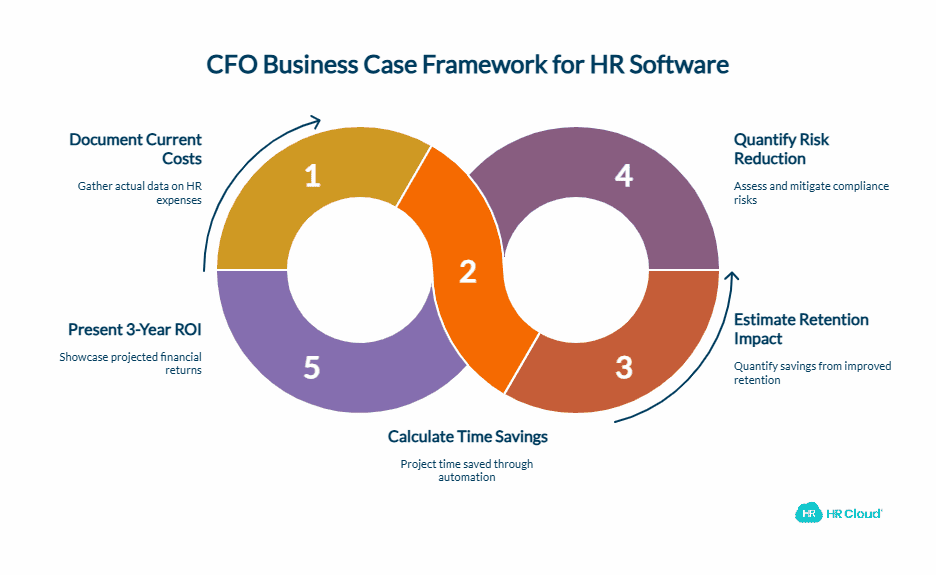
Step 1: Document Current Costs
Pull actual numbers, not estimates. Talk to your payroll team about time spent on HR administration. Check your current vendor invoices for every HR-related tool you're paying for. Ask managers how much time they spend weekly on HR tasks that aren't strategic.
Document the following:
- HR team hours per week spent on administrative tasks
- Average hours per new hire for onboarding and paperwork
- Current point solutions and their annual costs
- Annual turnover rate and average replacement cost by department
Step 2: Calculate Time Savings
For each category of manual work, project the post-implementation time requirement based on automation capabilities. Use conservative estimates — you can always beat them.
Build a table with three columns: Current Time, Projected Time, and Annual Hours Saved. Multiply hours saved by the fully-loaded hourly cost of the person performing that task (not just base salary — include benefits and overhead at a 1.25–1.35x multiplier on base pay).
Step 3: Estimate Retention Impact
Calculate your current replacement cost per employee using the SHRM conservative baseline: annual salary × 50%. Use 50% even though the actual range goes higher — it's bulletproof in a CFO conversation and still produces a significant number.
Then project a 1% absolute turnover improvement as your floor assumption. Multiply the employees retained by the cost per replacement. This becomes your retention savings line.
Step 4: Quantify Risk Reduction
For your industry, identify the two or three compliance areas where manual processes create the most exposure:
- Healthcare: certification tracking, HIPAA documentation, labor compliance
- Construction: safety training verification, license expirations, subcontractor onboarding
- Retail: wage and hour compliance, policy acknowledgment records, multi-state regulations
Research the average penalty for a violation in each category. Estimate your current exposure given your manual process. Frame this as "avoided cost" rather than savings — finance teams understand risk quantification and it removes the need to prove a saving you haven't yet captured.
Step 5: Present 3-Year Projected ROI
Build a three-year view that shows total investment, total savings, net gain, and cumulative ROI. The three-year view almost always strengthens the case because retention improvement compounds — as new hire retention improves, replacement costs continue to fall even without additional intervention.
| Year | Total Investment | Total Savings | Net Gain | Cumulative ROI |
|---|---|---|---|---|
| Year 1 | Software cost + implementation | Annual savings | Net Year 1 | Year 1 ROI % |
| Year 2 | Annual software cost only | Annual savings | Net Year 2 | Cumulative % |
| Year 3 | Annual software cost only | Annual savings | Net Year 3 | 3-Year total % |
Before your next budget meeting: Run your specific numbers through the HR Cloud Onboarding ROI Calculator and the Workmates ROI Calculator to generate baseline projections anchored to your actual workforce — then bring the outputs into the room.
Why HR Cloud Delivers Measurable ROI
HR Cloud is built for organizations with frontline, deskless, and multi-location workforces — the environments where manual HR processes are most costly and where ROI from automation is most immediate.
Where the ROI shows up fastest with HR Cloud:
Onboarding: HR Cloud's onboarding platform reduces new hire paperwork time from 8–11 hours to approximately 2 hours, delivers mobile-first task checklists to employees before day one, and automates manager and IT coordination that currently requires manual follow-up. Osmose Utilities saves 7 hours of HR time per week. Behavioral Progression completed onboarding 3x faster and improved HR efficiency by 66% within three months of go-live.
Employee Engagement: HR Cloud's employee engagement tools give HR teams visibility into team sentiment, early warning signals on disengagement, and communication channels that reach deskless workers who never open a corporate email. Retention improvement starts with early detection — before an employee has already decided to leave.
Recognition and Rewards: The recognition platform enables peer and manager recognition at scale — the kind of consistent culture signal that directly influences whether a 90-day employee decides to stay or start looking elsewhere.
Time Off Management: HR Cloud's time-off tracking software removes the manager-to-HR back-and-forth on approval workflows, giving employees self-service visibility and managers real-time team availability data.
HRIS and Automation: The HR Cloud HRIS and workflow automation connect every module — so data from onboarding informs engagement tracking, time-off management, and performance reviews without manual migration between systems.
Organizations including Osmose Utilities, Team Select Home Care, Interim HealthCare SLC, and Installed Building Products have deployed HR Cloud across frontline and multi-location workforces where the combination of onboarding automation, engagement tools, and recognition infrastructure produced measurable operational improvements within the first year.
How to Turn Your ROI Analysis Into Action
Step 1 — Run your numbers before the meeting. Use the HR Cloud Onboarding ROI Calculator to generate a payback period estimate using your actual headcount, turnover rate, and HR team cost. Bring the output to your first CFO conversation — it frames the discussion as financial analysis, not a department request.
Step 2 — Build your current-state cost map. Pull your existing HR tool invoices, estimate weekly administrative hours from your HR team, and document your last 12 months of turnover at the department level. Current-state documentation is the foundation of a credible business case — without it, projections are speculative.
Step 3 — Request a scoped demo with an implementation timeline. CFOs want to know when savings begin, not just what they'll be. Request a demo that includes an implementation scope and a typical go-live timeline so you can answer "when does this pay for itself?" with a specific month, not a range.
Ready to Build Your Business Case?
You now have the formula, the verified scenarios, and the five-step framework to take an HR software investment request from a department ask to a CFO-approved line item.
The organizations that get this approved fastest are the ones that walk into the conversation with their own numbers — conservative inputs, auditable methodology, and a payback period measured in months, not years.
Run your specific inputs through the HR Cloud Onboarding ROI Calculator and the Workmates ROI Calculator to generate a projection anchored to your actual workforce. Then book a demo and ask for a scoped implementation timeline you can put in front of finance.

Discover how our HR solutions streamline onboarding, boost employee engagement, and simplify HR management
Book Your Free DemoFrequently Asked Questions
How do you calculate HR software ROI?
Calculate total annual savings from automation, retention improvement, compliance risk reduction, and productivity gains. Subtract the annual software cost. Divide by the annual software cost and multiply by 100 for a percentage. Use 50% of annual salary as your replacement cost per employee — the SHRM conservative baseline — and apply a 1%–2% absolute turnover reduction as your starting retention assumption.
What is a good ROI for HR software?
Organizations with 250+ employees using verified, conservative assumptions typically see 300%–600% ROI in year one when onboarding automation, manager self-service, and retention improvement are all included in the model. Results vary by company size, current process maturity, industry turnover rates, and implementation scope.
How long does it take HR software to pay for itself?
Most organizations with active onboarding automation and self-service workflows achieve payback within 2–4 months. High-turnover industries — healthcare, manufacturing, retail — often see faster payback because retention savings compound from go-live.
What costs should be included in an HR software business case?
Include software licensing, implementation, training, and integrations on the cost side. On the savings side, include HR labor hours recovered, manager self-service time savings, turnover reduction (using 50% of salary per SHRM), compliance risk avoided, and technology consolidation. Omitting any of these categories understates the ROI and weakens the case.
Does HR software reduce employee turnover?
Yes, when it improves the areas that drive early attrition: onboarding quality, day-one communication, 30-60-90 day check-ins, manager responsiveness, and recognition. Brandon Hall Group research found that organizations with structured onboarding programs see 82% better new hire retention. Software that automates these touchpoints makes quality consistent — regardless of location, manager, or department.
How do CFOs evaluate HR software investments?
CFOs assess ROI percentage, payback period, total cost of ownership over three years, risk reduction value, and scalability relative to headcount growth projections. They respond most favorably to business cases that use the organization's own data — actual hours, real turnover rates, verified replacement costs — rather than generic industry benchmarks.
About the author

Keep Reading


Like What You Hear?
We’d love to chat with you more about how HR Cloud® can support your business’s HR needs.
Book Your Free Demo