
HR Cloud

Retail HR software · Onboarding

Retail Onboarding Software That Helps Associates Prepare for Their First Shift

Help hourly and seasonal associates complete forms, sign policies and follow store checklists before their first shift.

Take the tour
  • Forms and e-signatures
  • Store checklists
  • Mobile completion

One onboarding process for hourly, seasonal and multi-store retail teams.

A smiling retail associate in a green sweater and apron standing with arms crossed in a store aisle

Example · Tasks

3 of 4 complete

W-4Policies

Example · Status

Ready for review

Forms signed · Tasks done
Store manager review pending

Trusted by leading companies

ToyotaChick-fil-APelotonAmazonBurger KingDunkin'KFCTaco BellBaskin RobbinsInterim HealthcareComfort SystemsOsmoseYMCAPizza Hut

Retail onboarding

How retail onboarding works in HR Cloud?

Retail onboarding software brings new-hire paperwork, store orientation and manager reviews into one process. HR Cloud turns your retail onboarding checklist into role-based tasks, so associates know what to complete and managers can follow progress across stores.

Paperwork complete. First-shift preparation still matters.

  • A signed offer is only the start of preparing an associate for the floor.
  • Policy acknowledgments, store orientation and training tasks need a clear owner.
  • Track each step by role and store, including seasonal and returning hires.

New associate, starts Monday

Example record

1/4 complete

Onboarding checklist

  • Onboarding packetComplete
  • Employee documentsMissing
  • Store policiesAwaiting signature
  • Store orientationNot completed
Onboard module · HR Cloud
3 remaining

Retail onboarding

Every retail onboarding step,
tracked in one place

Set up checklists for your roles and locations. Assign each task to the associate, HR or the store manager.
Typical items retail teams track:

  1. Checklists

    Role and store checklists

    Give cashiers, sales associates and stockroom teams the steps relevant to their roles.
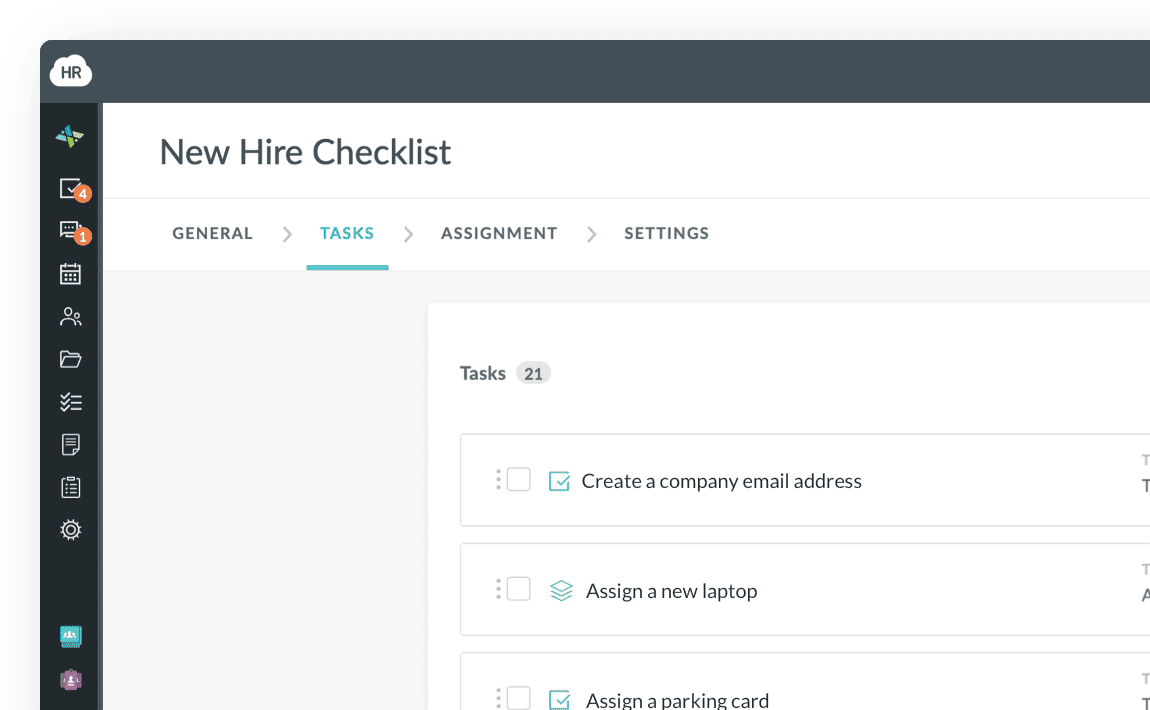
    HR Cloud Onboard New Hire Checklist with tasks, assignees and due dates
  2. Work eligibility

    Form I-9 and E-Verify

    Keep I-9 tasks and your verification process within the onboarding workflow.
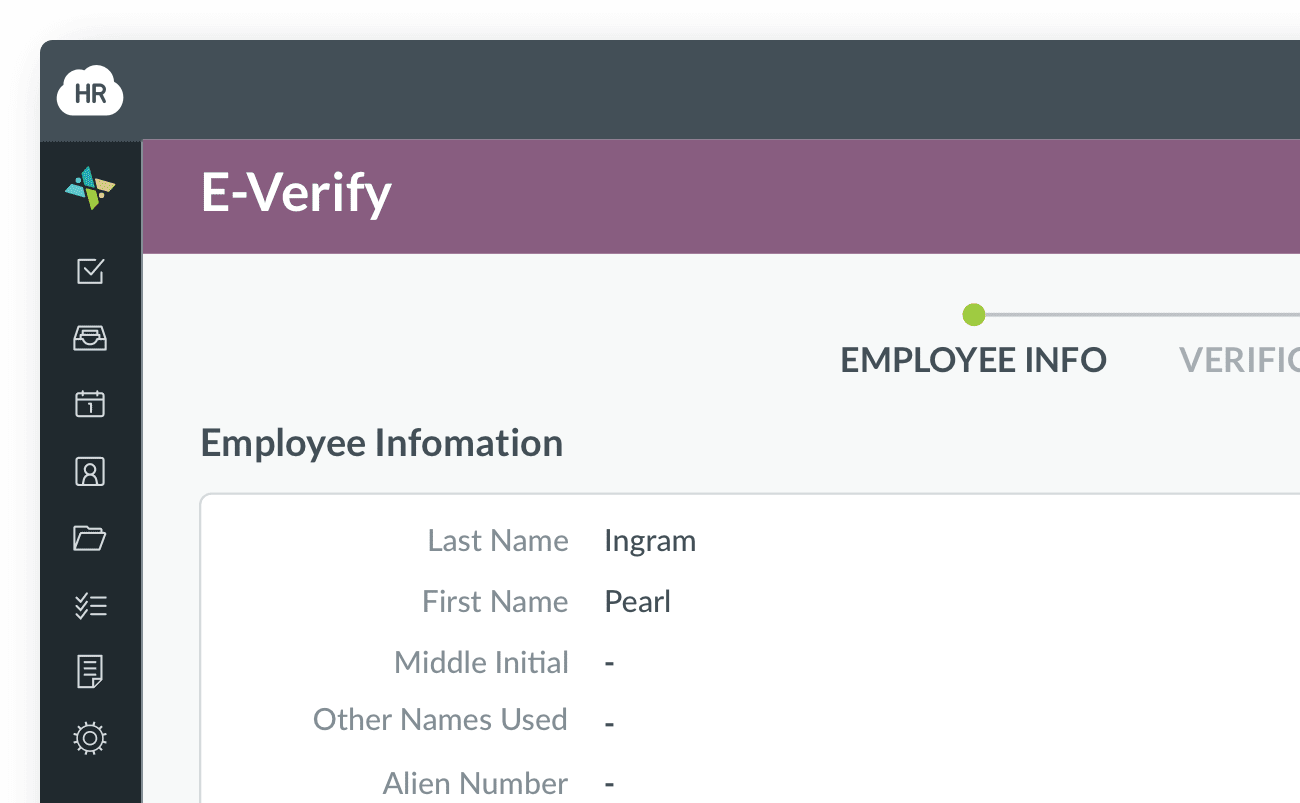
    HR Cloud E-Verify case showing the employee's information
  3. Approvals

    Manager reviews and approvals

    Assign reviewers, track approvals and follow up on incomplete onboarding tasks.
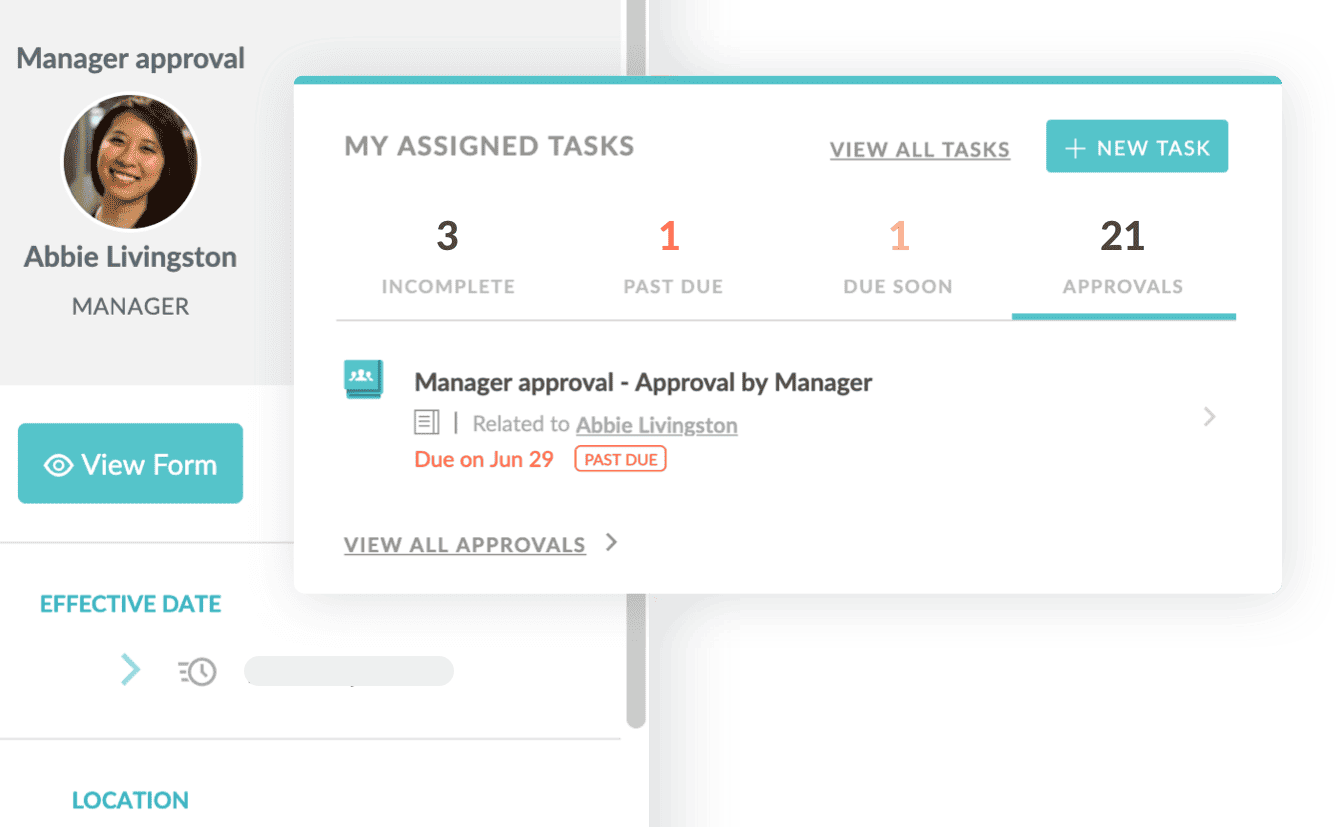
    HR Cloud manager approval request next to the assigned-tasks panel
  4. Documents

    Employee documents and policies

    Collect uploads and keep signed handbooks and policies with the employee record.
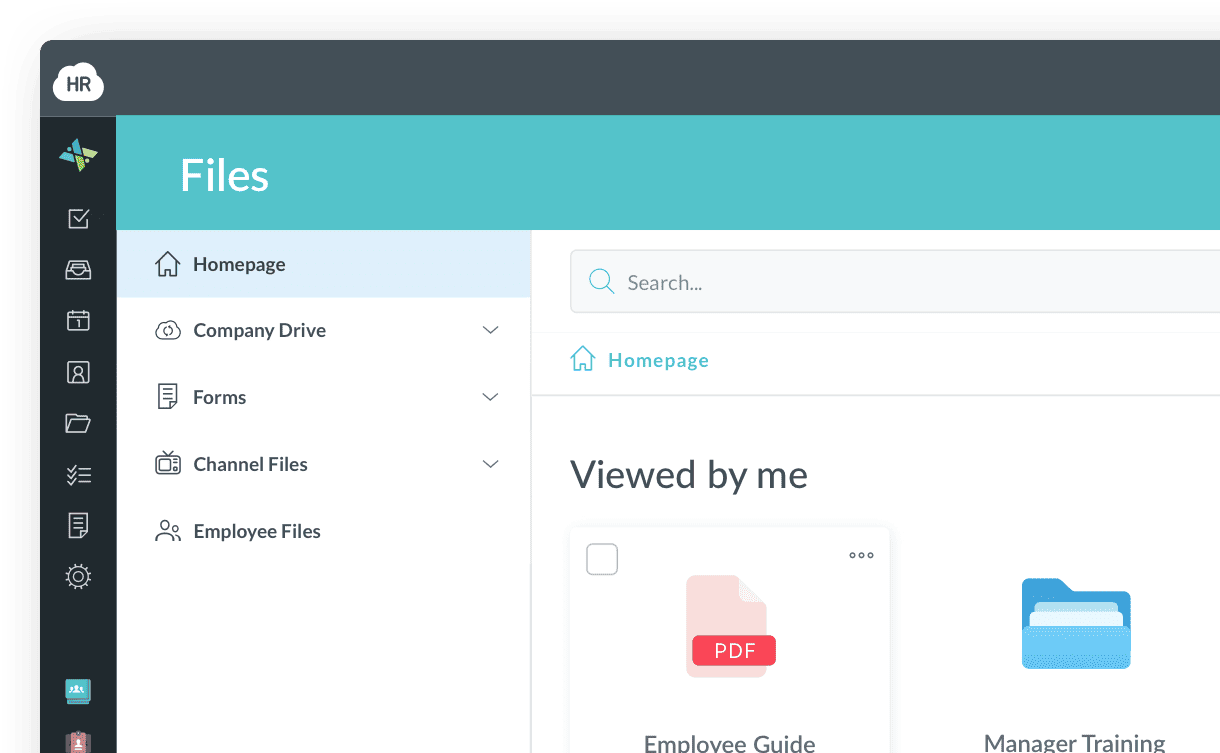
    HR Cloud Files area showing uploaded documents and forms
  5. Orientation

    Store orientation and training

    Assign register, loss prevention, customer service and safety tasks to the right owner.
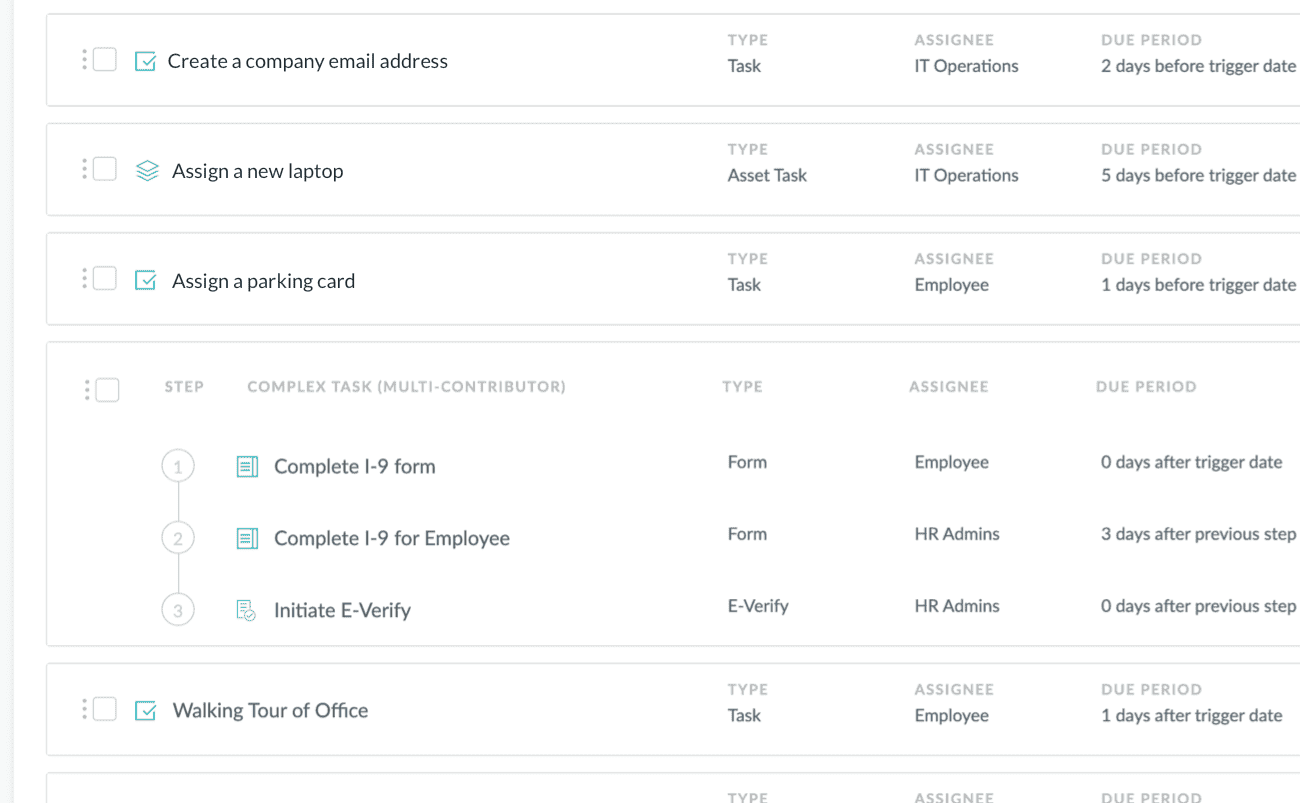
    HR Cloud onboarding checklist with tasks, assignees and due periods
  6. New-hire forms

    W-4 and new-hire forms

    Collect tax forms and employee information during onboarding for use in your payroll provider’s system.
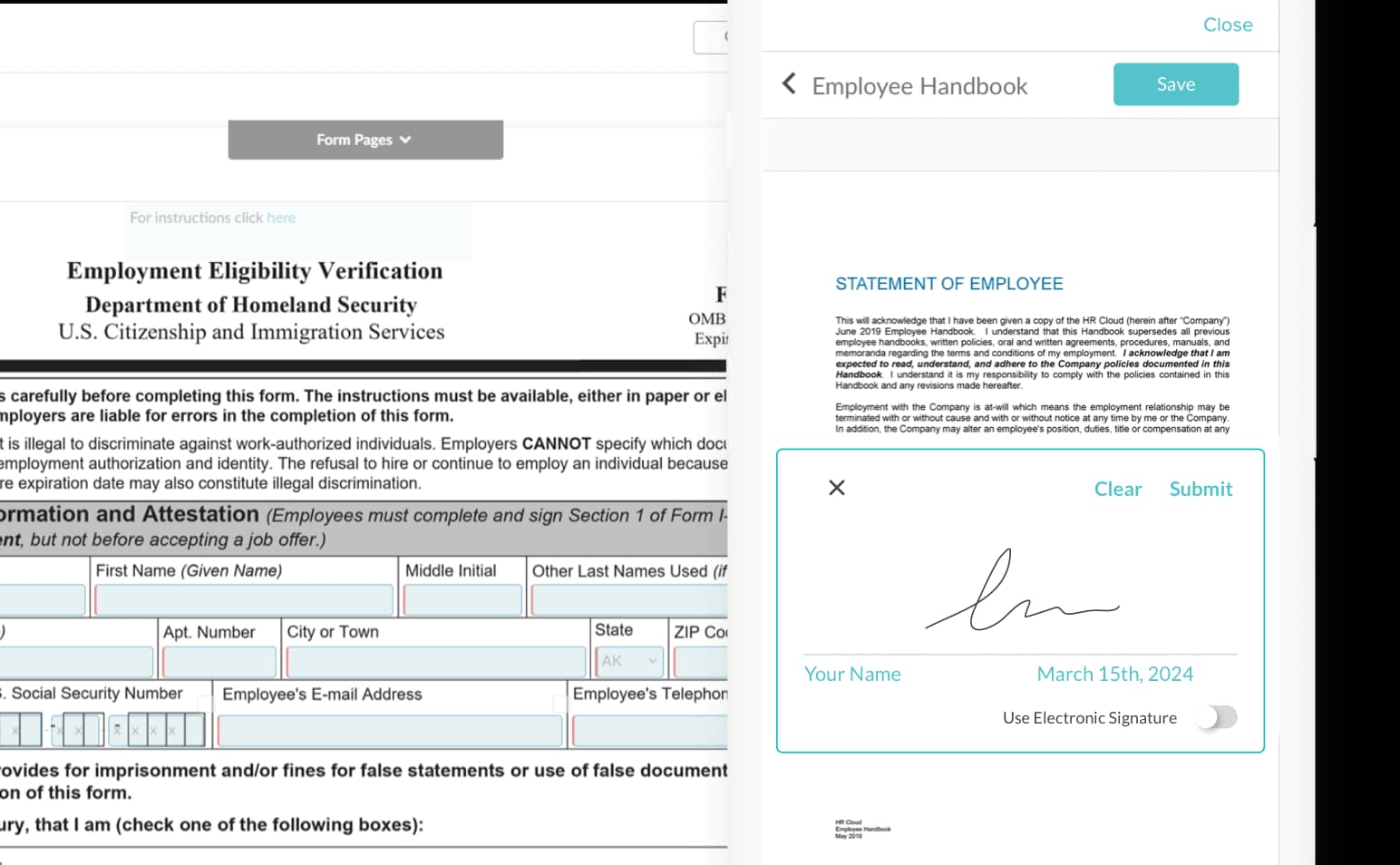

    HR Cloud Onboard form builder next to an employee handbook e-signature

How retail onboarding works in HR Cloud

A store manager in an apron talking with a retail associate between shelves
Retail onboarding

Give every associate a clear path from the first form to store-manager review.

See who has finished, and what each store needs next

  • Track each associate’s onboarding stage and checklist progress in one dashboard.
  • Follow incomplete forms and tasks across your retail locations.
  • Give HR and store managers a shared view of what still needs review.
Onboarding by stageSample data
  • Forms requested5 hires
  • Waiting on the associate3 hires
  • Awaiting manager review4 hires
  • Checklist complete6 hires
Onboard module · HR Cloud
A smiling retail associate checking stock on a tablet beside shelves of boxes

Built for associates who don’t sit at a desk

Seasonal employee onboarding software should work on a phone. Hourly associates can complete forms, upload documents and sign policies before arriving at the store. Managers can follow progress and send reminders without collecting another paper packet.


One retail onboarding process, different store teams

Two stockroom workers carrying boxes between warehouse shelves
Seasonal hiring

Keep holiday hires and peak-season associates on the same onboarding checklist.

A specialty-store associate holding a scanner and tablet in a stock aisle
Specialty and apparel retail

Role-based forms and store orientation for sales associates and stockroom teams.

A grocery associate using a tablet beside fresh produce
Grocery and convenience

Consistent checklists for hourly associates working across departments and shifts.

A distribution-center employee in a safety vest working at a computer between racks
Multi-store retailers

Onboarding software for retail stores, with shared steps and local responsibilities.

Customer success

Retail teams. Real customer stories.

See how retailers use HR Cloud for onboarding, communication and the employee experience.

Public Group
Public Group
Public Group

Retail employee experience

Public Group brought communication, recognition, performance and employee feedback together in one HR Cloud platform, giving more than 2,000 retail employees a mobile experience across 64 stores in Greece and Cyprus.

64
retail stores
2,000+
employees on one platform

Illustrative photo

MCO / La Senza
MCO / La Senza
Read the MCO / La Senza case study
90%
onboarded within five days
MCO / La Senza

Retail acquisition onboarding

After acquiring La Senza, MCO used HR Cloud Onboard for a retail workforce of more than 2,000 employees. Ninety percent completed their employee agreements and onboarding within five days.

2,000+
La Senza employees

Illustrative photo

Konzum
Konzum
Read the Konzum case study
600+
store locations connected
Konzum

Retail frontline communication

Konzum connected store teams through Workmates, replacing fragmented bulletin boards and printed updates with mobile communication. Employees across more than 600 stores can receive updates, recognize colleagues and engage with leadership.

10,000+
retail employees

Illustrative photo

Keep associates connected after Day 1

Bring recruiting, retail employee onboarding, employee records and team communication together with Recruit, Onboard, People HRIS and Workmates.

Recruit · Retail recruiting

Build your store team. Keep hiring moving.

  • Applicant tracking
  • Interviews
  • Offers

Manage store vacancies, candidates and interviews in one applicant tracking system, then move accepted candidates into onboarding.

Explore Recruit ATS
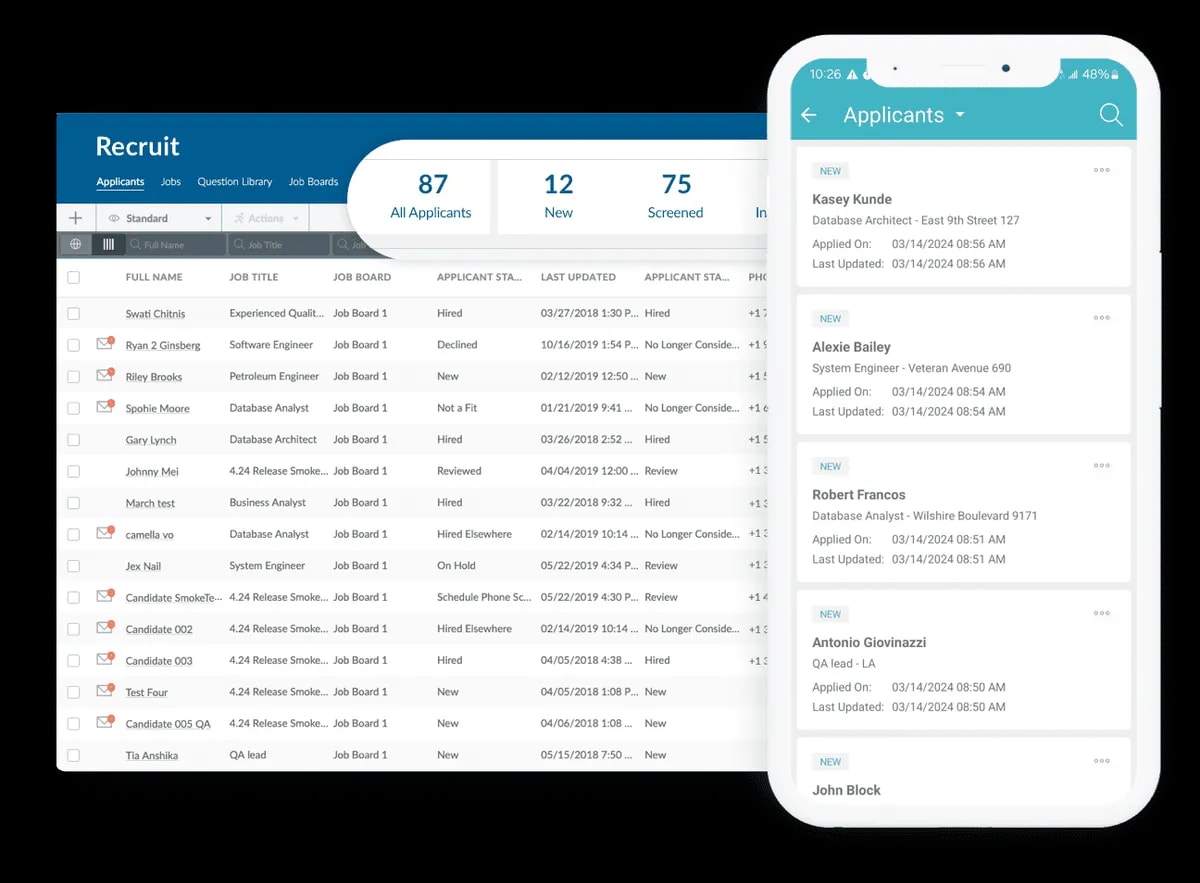
HR Cloud Recruit applicant dashboard and mobile candidate list
Recruit · Applicant tracking

Onboard · Retail onboarding

Help associates prepare for their first shift.

  • Checklists
  • E-signatures
  • Reminders

Guide hourly and seasonal hires through forms, policies and store checklists. Give each task a clear owner and follow progress from one place.

Explore Onboard
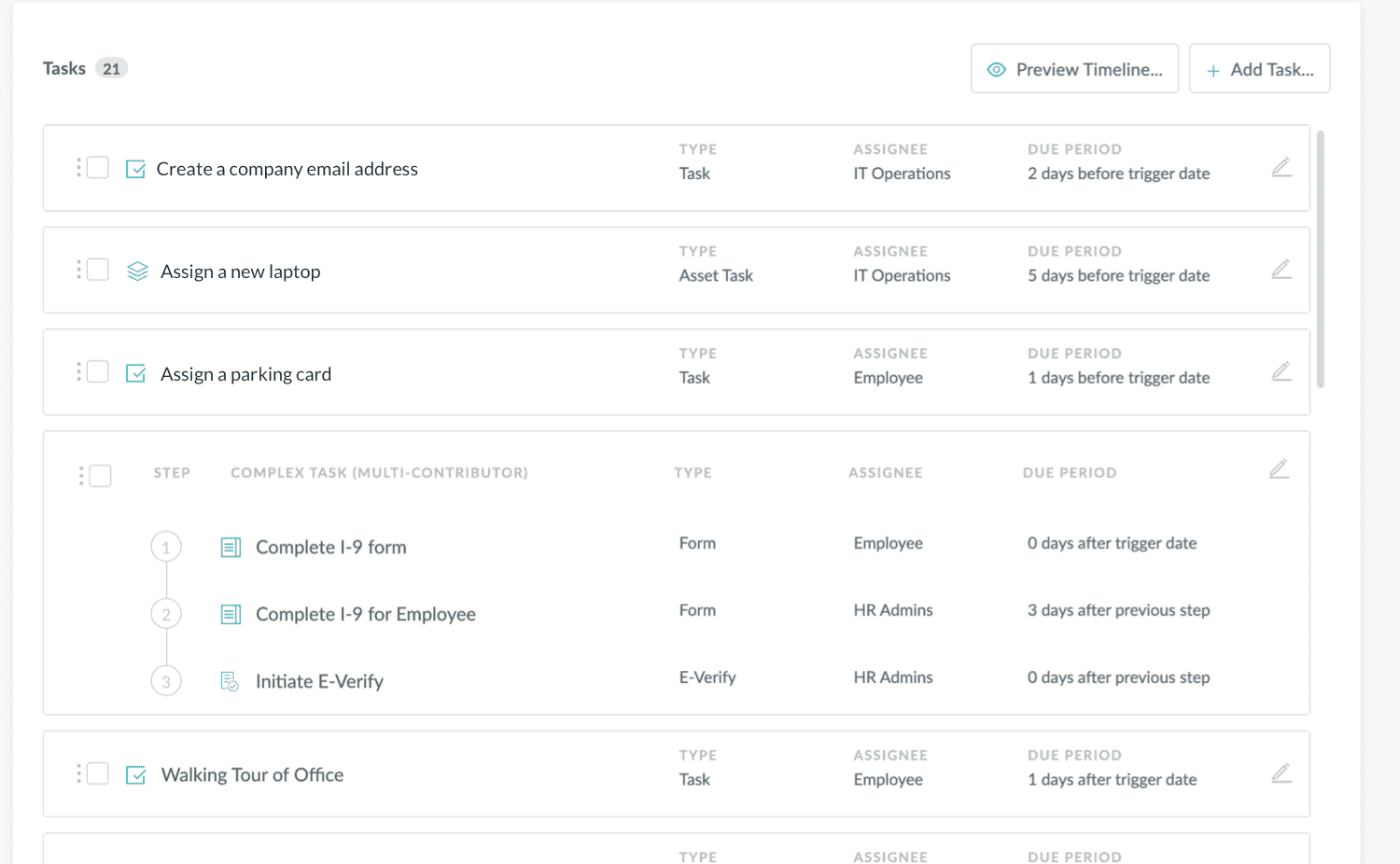
HR Cloud Onboard New Hire Checklist with tasks, assignees and due periods
Onboard · Workflows & checklists

People HRIS · Employee records

One associate record. Less scattered information.

  • Employee records
  • Documents
  • Self-service

Keep employee profiles, documents and job details together, with new-hire information carried forward from onboarding.

Explore People HRIS
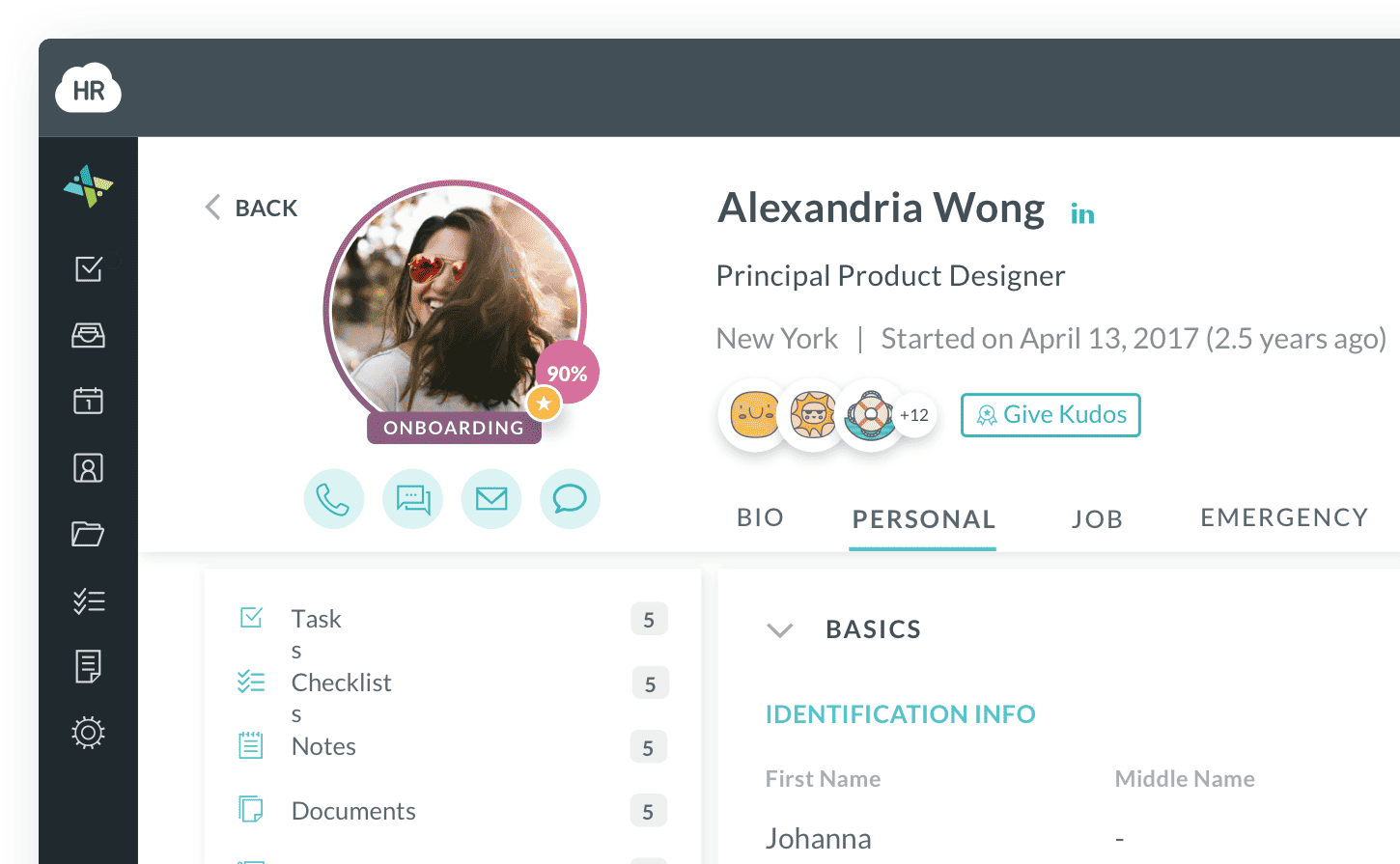
HR Cloud employee profile with personal details, documents and manager
People HRIS · Employee information

Workmates · Employee engagement

Connect associates across every store.

  • Communication
  • Recognition
  • Surveys

Share company updates, recognize helpful work and gather feedback from associates across locations and shifts.

Explore Workmates
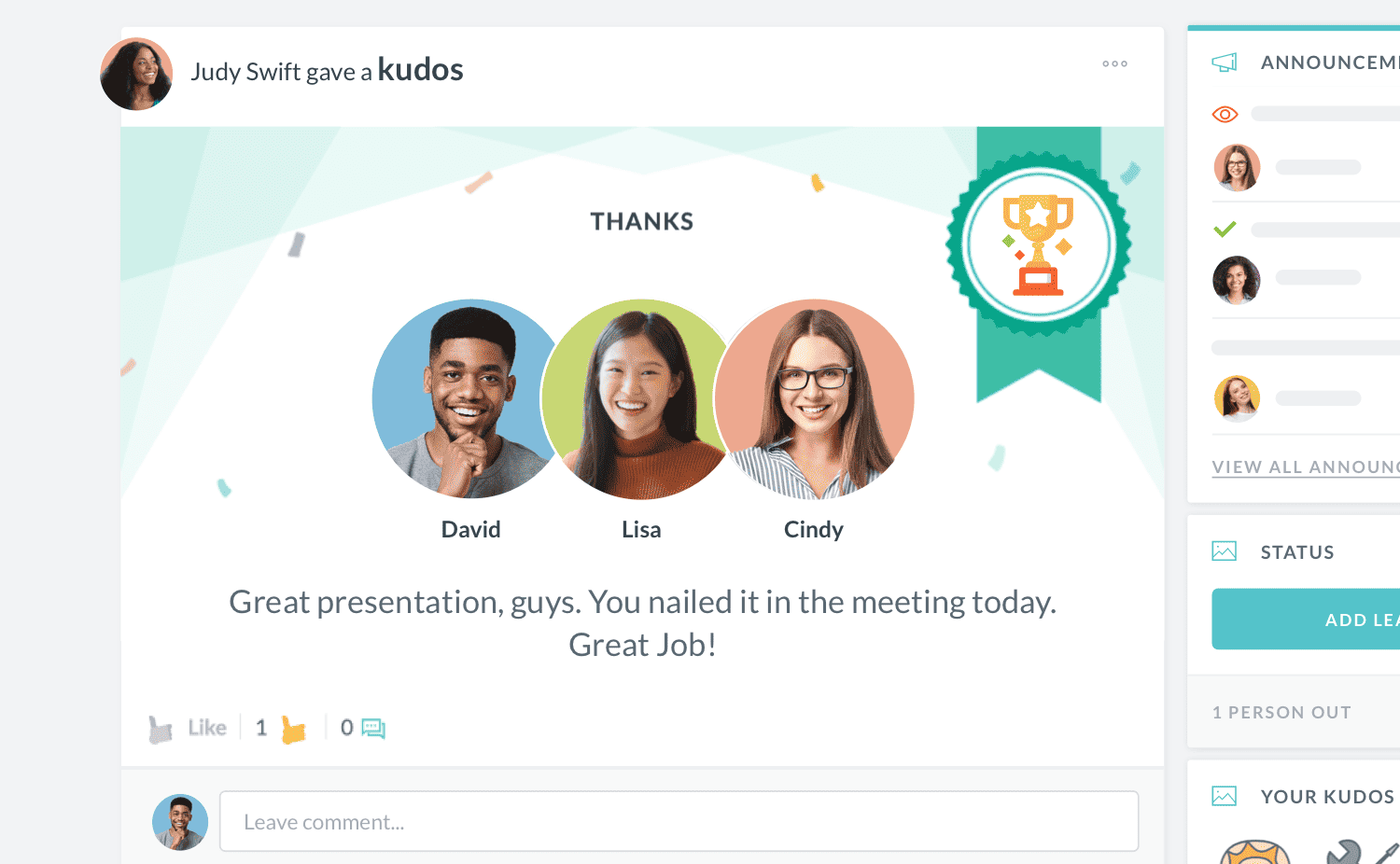
HR Cloud Workmates employee recognition interface
Workmates · Employee engagement

Carry new-hire information into the employee record, and keep store teams connected with updates, recognition and feedback after onboarding.

Compare retail onboarding options

Compare retail onboarding capabilities. HR Cloud integrates with payroll providers; payroll processing remains with the payroll provider.

Compare retail onboarding capabilities
Onboarding capabilityPaper and spreadsheetsPayroll provider’s onboarding toolsHR Cloud
Separate listsVaries by providerConfigurable
Separate forms and filesVaries by providerYes
Manual updatesVaries by providerYes
Manual follow-upVaries by providerYes
Separate recordsVaries by providerConnected modules

Works with the systems you already use

  • Start with Onboard and keep your current payroll platform.
  • Connect retail onboarding with supported payroll, HRIS and recruiting tools. Your payroll provider handles payroll processing.
  • Confirm the available connections, supported fields and data flow for your setup.

Retail onboarding software FAQs

Retail onboarding software is an HR tool that moves new-hire paperwork, compliance and first-week training onto an associate’s phone, so they arrive ready to work the floor. It replaces paper packets for Form I-9, Form W-4 and state tax forms, collects handbook and policy signatures, and shows HR and store managers who is still missing items at each location. HR Cloud Onboard also connects with payroll systems such as ADP, UKG and Workday, and its Maya agent reaches associates by text message without an app download.
A retail onboarding checklist should cover paperwork, compliance, store setup and training. Paperwork includes Form I-9, Form W-4, state withholding forms, direct deposit authorization forms and emergency contacts. Compliance includes handbook and policy acknowledgements, plus work permits for employees under 18 where the state requires them. Store setup covers availability, uniform or name badge, POS login and keys. Training covers the register, loss prevention, customer service and safety. HR Cloud’s free onboarding checklists and templates are a starting point, and HR Cloud Onboard turns them into automated tasks by role and store.
Retailers onboard seasonal employees quickly by sending paperwork the moment an offer is accepted, so it is finished before the first shift. NRF expects retailers to hire 325,000 to 375,000 seasonal workers for the 2026 holidays, which leaves little time for paper. Use one seasonal packet per role, start onboarding for the hiring class in batches, and save the first shift for hands-on POS training. For returning associates, USCIS may allow Supplement B instead of a new Form I-9 when rehiring within three years of the original form’s completion, after checking whether employment authorization requires reverification.
Retailers can onboard hourly associates without a company email by sending onboarding tasks by text message. HR Cloud’s Maya, an AI onboarding agent for HR Cloud Onboard, guides new hires through assigned tasks on their phones without an app download. Associates can complete forms and policy acknowledgements through mobile workflows, while HR tracks their progress. HR Cloud also supports phone-number account activation when enabled. Retailers do not need to create company email accounts solely for onboarding. Ask HR Cloud about enabling Maya and phone-based access for your account.
Retailers can support remote Form I-9 completion through different document-examination options. Employers enrolled in E-Verify and in good standing at participating hiring sites may use the DHS alternative procedure, including document-copy review, a live video interaction and required record retention. Other employers can use an authorized representative who examines original documents in person, even when HR is elsewhere. Section 2 is normally due within three business days of the first day of paid work; shorter jobs have an earlier deadline. Employees may complete Section 1 after accepting an offer. Follow current USCIS instructions for the chosen process.
Many retailers need a state work permit, sometimes called an employment certificate, before an employee under 18 starts. The federal Fair Labor Standards Act generally limits 14- and 15-year-olds to work outside school hours: 3 hours on a school day and 18 hours in a school week, between 7 a.m. and 7 p.m. (9 p.m. from June 1 through Labor Day). States including New York and California require work permits for minors, subject to exceptions. Confirm applicable rules with counsel. HR Cloud Onboard can include a document-collection task in the appropriate checklist; your team determines which hires require it.
Retailers keep onboarding consistent across stores by running one central process with store-level variations, rather than letting each manager build their own. Build packets by role and location, include store details such as address, manager and start time, and configure access for store and district leaders. HR Cloud Onboard supports checklist assignment rules based on position, location and other employee-profile information. Permissions determine which employee records each manager can access. HR and store managers can review outstanding tasks before arranging training and first shifts, while maintaining one process across locations.
Retailers should generally plan for six weeks to launch HR Cloud onboarding. Smaller companies may be ready in around four weeks, while larger companies typically take four to six weeks, depending on the implementation scope. Use the project plan to coordinate payroll integration, data preparation, role- and store-specific checklists, testing and manager training. For seasonal hiring, work backward from the first hiring wave and allow time for review. HR Cloud sales will confirm the timeline and any implementation fees in your quote; these are planning estimates, not guaranteed deadlines.
HR Cloud works with ADP and UKG through configured integrations. Its ADP Workforce Now integration can import employee and company information and create a new employee record when the Add New Hire to ADP task is completed. The UKG integration supports employee-data imports and a one-time new-hire export; it does not continuously send later changes from HR Cloud to UKG. HR Cloud also lists integrations with Workday and Paylocity. Confirm the supported fields, document transfers and setup requirements for your payroll product during the demo. Your payroll provider continues to handle payroll processing.
Retail onboarding software pricing depends on your organization’s needs and the modules you choose. HR Cloud offers Onboard, Growth and Full Suite plans, with a quote for your organization. Review the current pricing page to compare the features included in each package. When comparing vendors, confirm how I-9 and E-Verify, SSO, payroll integrations, implementation and support are covered in the quote. Share your store count, employee population and seasonal hiring volume with HR Cloud to discuss the appropriate package and any applicable fees.

Build a better first shift for every associate

Bring us your retail onboarding checklist, store roles and seasonal hiring plans. We’ll show you how to manage them in HR Cloud.