Best 10 HRIS Software in 2027

You booked three HRIS demos, and each one looked good until you asked where the employee record actually lives. HRIS software is the system of record for your people data, so a wrong pick shows up in each hire, change and audit. This guide covers 10 options, grouped by the situation that usually decides a shortlist rather than ranked by score. Use it to narrow ten names to two or three, then test those with your own data.
Many lists of the best hris software rank vendors by feature counts and star ratings. That hides the question that matters: which constraint does your team actually have? A 40-person clinic group and a 900-person manufacturer can both need an HRIS, and they need different things.
If you are replacing spreadsheets with a cloud hris for the first time, start with the situations below. Ignore rank orders you have seen elsewhere.
Key Takeaways
- An HRIS is the system of record for employee data, so test record changes, change history and permissions before you compare feature lists.
- This guide groups 10 options by situation and does not rank them. The order is not a score.
- Facts come from each vendor's own pages, read on November 20, 2026. No prices or review scores appear here.
- HR Cloud publishes this guide and is one of the 10. Its section also states what its help articles do not document.
- Payroll differs by option: some run their own, some sell it as an add-on, some connect to it. Ask for the data flow to the payroll you already run.
- Time 7 tasks live in each demo. The test section lists them.
What Should an HRIS Own Before You Compare Vendors?
An HRIS holds the facts about each person: job, pay basis, manager, location, documents and status. It also holds the history of how those facts changed. If it stores records but does not show who changed what, you own the storage and not the answer.
Three jobs decide whether an HRIS earns its place. It keeps one current record per person, keeps a history you can read, and limits who sees each field and document.
Everything else, from performance to engagement, is a module that sits on that record.
Recordkeeping rules show why the second job matters. The EEOC's rule at 29 CFR 1602.14 covers personnel records. Employers keep them for one year from the date the record was made or the personnel action was taken, whichever is later.
After a discrimination charge, relevant records must be kept until final disposition. The Department of Labor's FLSA recordkeeping fact sheet says payroll records must be kept for at least three years. Wage-computation records, such as time cards, are kept for two. These are minimums for the records the rules cover, and this guide is general information, not legal advice.
AI features now appear in many pitch decks, so it helps to know where buyers actually are. SHRM's State of AI in HR 2026 insights report that 39% of organizations have implemented AI in HR. Another 31% have no plans to. Treat AI as one feature to test, not the reason to buy.
Why this matters when you read feature lists: A long feature list says little about whether the record is trustworthy. Ask each vendor to show a change, its history and its permissions in one sitting.
How Were These 10 HRIS Options Chosen?
The 10 options cover a spread of company sizes, payroll models and buying situations. Each one describes itself as HR software, an HCM platform or an employee management app on its own pages. HR Cloud is included because it publishes this guide, and that is a conflict of interest you should weigh. HR Cloud's section holds itself to the same rule as the others: facts only from its own pages and help center.
Each vendor fact comes from that vendor's own site, read on November 20, 2026. Each name links to the page that supports the claim, so you can read the same words. This guide does not quote prices or review scores, because both change faster than a blog post can. Where a page does not state something, the section says so instead of guessing.
Payroll platforms that appear on HR Cloud's integrations page are left out, because this guide compares HRIS options rather than integrations. If you already run one of those payroll platforms, the question to ask every option below is how its data flows to it.
Which HRIS Fits Which Situation? A Quick Map
| Situation | Option | Payroll, as its own page states it | Pricing, as its own page shows it |
| Frontline teams across many locations | HR Cloud | Lists integrations with payroll providers | Annual license by headcount band; personalized demo |
| An HR department of one | BambooHR | Add-on payroll, per its FAQ | Quote; varies with employee count |
| HR and IT sharing one record | Rippling | Payroll appears as a separate product | Not shown on its HRIS page |
| Mid-market people data and planning | HiBob | Own payroll for the US and UK; connects to outside providers | Not shown on its homepage |
| Small team in the Intuit family | GoCo | Embedded payroll powered by Gusto | Not shown on its homepage |
| Frontline operations first | Connecteam | Timesheets go to payroll; no payroll product described | "Pay only for what you need"; no-cost tier under 10 employees |
| Payroll first, no HR department | Gusto | Full-service payroll in the same system | Published on its page |
| Teams already on Zoho apps | Zoho People | Zoho Payroll listed as an integration | Per-user plans; 30-day trial |
| Midsize teams that may outsource work | Namely | Payroll in its core offering | Not shown on its homepage |
| European growth and multiple entities | Personio | Personio Payroll listed | Per-employee pricing in three tiers |
Which HRIS Fits a Frontline Team With Many Locations?
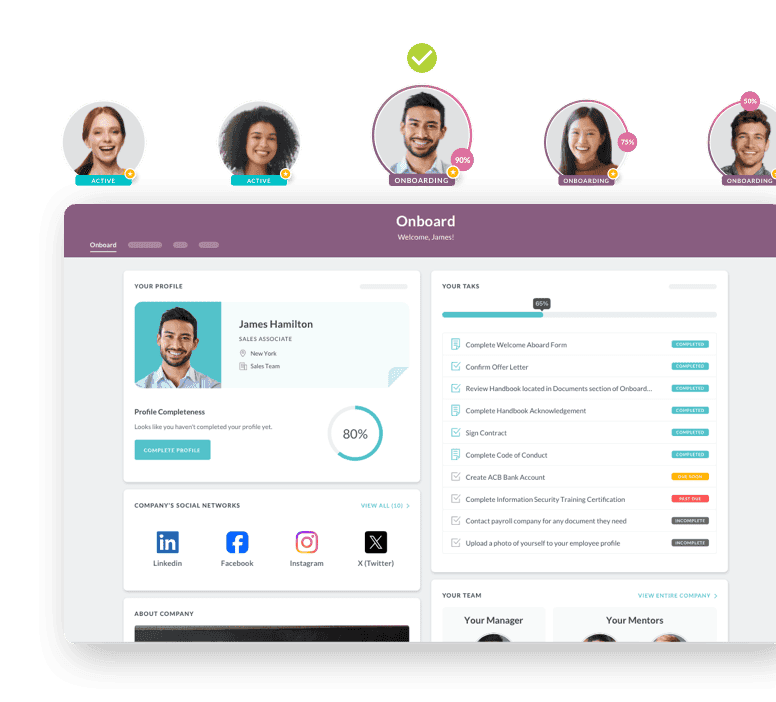
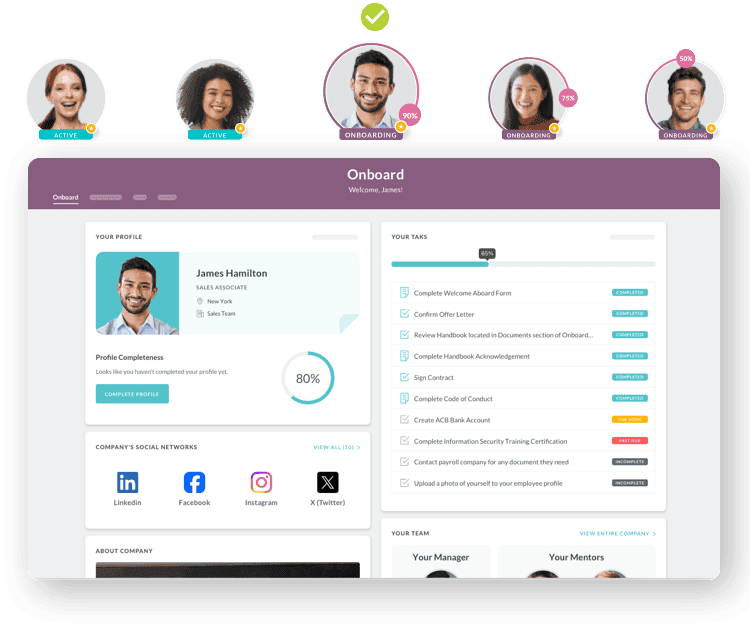
HR Cloud's People HRIS page describes the product as a cloud hris for small and mid-size businesses, built for growing and frontline teams. It lists role-based access, custom fields per profile, document storage with version tracking and automated org charts. It also says new hires get an SMS invitation. They can finish an I-9, W-4 and direct deposit from a phone, with no company email.
The help center shows how the record behaves.
From the People tab in the People app, you add an employee and choose a checklist, per the add-an-employee article. The Initiate Hire article says saving the Initiate Hire action changes a Prehire employee to Active and triggers any Onboard checklists you have set up. Its summary line and its steps differ on whether the change happens by itself on the effective date. Ask for a live demonstration.
History and permissions are documented too. The audit article describes a log of who changed a profile or form and when. The Snapshot and Activity reports article adds old and new values, and the data as it stood on a chosen date. Document privacy offers four settings, including a custom choice by security role, per the privacy article.
Three bulk actions exist: change position, configure security role and create tasks, per the bulk changes article. Reports are built from custom views and export to CSV, PDF or Excel, per the reports article.
Know the limits before the demo. The add-an-employee article lists no required fields and does not describe custom fields. The reports article does not document scheduling or grouping.
The audit article does not say which roles can open the log. For payroll, the integrations page lists payroll providers, and the People HRIS page describes syncing with your payroll system.
On packaging, People HRIS is in the Onboard, Growth and Full Suite plans. Time Off, Performance and Recruit sit in Growth and Full Suite, per the pricing page.
Pricing is an annual license tied to headcount bands, with no per-seat fees. HR Cloud offers a personalized demo instead of a self-serve trial, and its pages cite a 6-week go-live.
Bracken Christian School, a K-12 school with 100+ staff, replaced paper storage and scattered files with digital records and e-signatures. That story does not name People HRIS and reports no numbers, so read it as context.
A fair test for this fit: Ask HR Cloud to add a prehire and start the hire. Then ask for the audit log and Activity report for that change.
Which HRIS Fits an HR Department of One?
BambooHR's homepage answers this directly. Its FAQ says that "even a one-person HR department can use BambooHR". The navigation groups the product into hiring and onboarding, HR data, payroll and time, benefits, performance and compensation. The page describes an applicant tracking system and says you can track hours and manage multi-rate pay.
Payroll is the detail to check. The FAQ says BambooHR has its own add-on payroll solution, so payroll is a separate decision. The page also lists a mobile app and 150+ pre-built integrations, which matter if you keep a payroll provider you like.
Pricing is not on the homepage. The FAQ says pricing varies with the number of employees and points you to a quote. The page does not state a target company size, so ask the vendor where its typical customer sits.
Pro tip: If you are the only HR person, ask for a demo built around your own week. Request one hire, one pay-rate change and one termination from start to finish.
Which HRIS Fits Teams Where HR and IT Share One Record?
Rippling's HRIS page calls the product HR software that powers your team with data and automation. When buyers ask for an all-in-one hris, this is the pattern they usually mean: one employee record that other systems read. The page says details such as manager or department sync across that record automatically. It lists workflow automation, custom reports and dashboards with role-based permissions, onboarding, document management, time-off tracking and self-service.
The IT link is the distinctive part. Onboarding is described as automating tasks from offer letters to device shipping. Identity and access, device management and inventory management appear as separate products in the navigation, as do payroll, time and attendance, recruiting and performance management.
That packaging deserves a question in the demo. The page presents Rippling as a single HCM platform, yet it lists related products as separate offerings. Ask which ones your quote includes. The page also cites 650+ integrations and compliance help across all 50 states and 180+ countries, and it does not publish per-employee pricing.
Why this matters for HR and IT leads: A shared record only helps if both teams agree who owns each field. Decide that before the demo, not after the contract.
Which HRIS Fits Mid-Market Teams That Want People Analytics?
HiBob's homepage describes Bob as an Organizational Intelligence platform. Its navigation sorts customers by size: startup, SMB, mid-market and enterprise. The page lists core HR, analytics, workflows and self-service, plus talent modules for hiring, performance, learning and skills. It also lists planning, compensation and a finance area with dashboards and headcount planning.
Payroll is split by country. HiBob says it offers its own payroll for the US and the UK, and a Payroll Hub that centralizes payroll data. It also integrates with outside payroll providers such as ADP and PapayaGlobal, so a team that keeps its payroll can still connect.
The page does not state a target company size or publish prices, and its main calls to action are demo requests. With this many modules, the quote depends on which ones you buy. Ask for a line-by-line list, and ask which modules you need on day one.
What to ask in the demo: Request the analytics view your CFO would use, built from your own sample data. A dashboard that needs your data cleaned first tells you something about setup effort.
Which HRIS Fits a Small Team in the Intuit Family?
GoCo's homepage targets small and mid-sized businesses and says GoCo is part of Intuit. Its description lists digital onboarding, benefits administration, payroll and compliance. The page names no HRIS label and calls the offering a human capital management solution.
Read this page as a transition notice. It says GoCo's embedded payroll is powered by Gusto and will continue to work as usual. It also says paying GoCo through an Intuit account is not yet possible but is being worked toward. Billing, it says, stays with GoCo for now.
That means packaging may change.
The page names Gusto for embedded payroll and a possible future QuickBooks connection. It lists no other integrations and shows no prices, saying only that pricing is unchanged for now. Beyond the meta description it gives no feature detail. If GoCo is on your shortlist, ask for the current feature list, the payroll arrangement and any planned changes in writing.
Worth knowing: A product in transition is not a bad product. It is a reason to put the current terms and the renewal terms in the same document.
Which HRIS Fits Teams Where Scheduling and Time Come First?
Connecteam's homepage calls the product an employee management app built for frontline teams. It does not call itself an HRIS, and that honesty is useful. Its operations hub lists a time clock, scheduling, forms and checklists, and task management. Its communications hub lists chat, updates, a directory and a knowledge base.
The HR hub lists hiring and onboarding, training, documents and e-sign, time off, recognition and an org chart. The industries named include construction, cleaning, healthcare, food and beverage, retail, field services and security. Employees complete tasks and forms from their phones, and the page links to both app stores.
Pricing is described as paying only for what you need, with a no-cost tier for teams under 10 employees. The homepage mentions sending timesheets to payroll but does not describe a payroll product or name a payroll provider. So test the HR hub against the three jobs of an HRIS: a current record, a readable history and field-level permissions. If it passes, you may not need a separate system.
Watch for this: Operations tools often start with the schedule and add records later. Ask where a terminated employee's documents live and who can still see them.
Which HRIS Fits a Company With No HR Department?
Gusto's HR product page describes the product as "purpose-built for teams without a dedicated HR department". It describes a single system for full-service payroll, benefits, hiring, onboarding and time tracking, which is one version of an all-in-one hris. Onboarding covers checklists, document storage, e-signatures and background checks through Checkr.
Support is part of the pitch. The page mentions compliance alerts and access to HR professionals and expert resources. It also says Gusto can handle state tax registration when an employee moves.
Payroll leads here, and HR depth follows. The page gives no employee-count range and says little about time tracking beyond listing it. Pricing is published on the page, so compare it against your headcount yourself. If payroll is your main need, check how the HR side handles records, history and permissions using the seven tasks below.
Why this matters when payroll drives the decision: Test any payroll-led product on the same seven tasks. Test it again when you add locations or managers.

Ready to pass your next audit—without the stress?
See how you can simplify compliance and eliminate gaps before they become problems.
Book Your Free Demo
Which HRIS Fits Teams Already Running on Zoho Apps?
Zoho People's product page calls it AI-first HR software and says it serves businesses of all types and sizes. It lists core HR with an employee database, time and attendance, performance evaluation and onboarding workflows. Onboarding includes offer letters with e-sign. A mobile app is available for Android and iOS.
The case for Zoho People is the neighbors. The page says it integrates with native Zoho apps, and it names Zoho Payroll, Zoho Expense, Zoho Sign and Zoho Recruit. It also lists Microsoft 365, Google Workspace and Zapier.
Pricing is described as per-user plans with a 30-day trial on all plans. Per-user models grow with headcount, so price your full employee count and not only your HR users. The page does not describe leave rules in text, only a screenshot captioned for leave approval. It lists standard reports, advanced analytics, custom reports and dashboards, so ask to see your own leave policy and a report built from your data.
What to ask in the demo: Ask which Zoho apps share data with People and which need a separate setup. The seams are where the hours go.
Which HRIS Fits Midsize Teams That May Outsource Some Work?
Namely's homepage calls the product "an HCM solution for midsized companies." Its core offering is HR, payroll and time. Benefits, scheduling, talent and compliance are listed as add-ons. The page mentions 360-degree performance feedback and employee self-service for enrollment.
The unusual line is the outsourcing option. The page says Namely can manage your HR, payroll and benefits processes while you focus elsewhere. For a team that is short on HR staff, that can change the buying question from software to service.
The homepage does not name an applicant tracking system. The closest item is a line about improving the hiring process under talent. It also links to packages and pricing but does not publish them. Ask which add-ons your quote includes, and what the outsourced service covers and costs.
Why this matters when you are short on staff: A service layer helps only if you can still see and correct the record yourself. Ask what access you keep.
Which HRIS Fits European Growth and Multiple Entities?
Personio's homepage describes an HR platform that connects core HR, talent, payroll and employee finance for growing organizations. It sorts customers into growth (under 200 employees), scale (200 to 1,000), enterprise (1,000 and up), and international and multi-entity. It also says it is trusted by HR teams across Europe and stresses data stored in Europe and GDPR readiness.
The feature list covers onboarding, time tracking, absence management, people analytics, workflow automation, documents and e-signatures, workforce planning and an AI assistant. Personio Payroll is listed. Recruiting and performance and development are add-ons, and the page cites 200+ integrations.
Pricing is per employee across three tiers: Core, CorePro and CoreEnterprise. The page shows no figures. It also does not list supported countries, so a US employer should ask which US payroll, tax and compliance needs it covers before going further.
A question to settle early: For a mostly US workforce, ask how Personio supports US employment rules. The homepage's emphasis is Europe.
That's 10 HRIS options across 10 situations. The next section turns the list into a test you can run.
How Should You Prepare Your Employee Data Before the Demo?
Demos go better when the vendor loads your data, not theirs. That means your spreadsheet has to be ready. Most migration trouble starts in the source file, not in the new system.
Build one row per person with a stable employee ID. Standardize job titles, locations, departments and status values, and write the manager's ID next to each name rather than the manager's name. Keep a separate inventory of documents: what exists, where it lives and who may see it.
Share sample data carefully. Remove Social Security numbers and bank details from anything you email, and ask the vendor how it wants sensitive fields transferred. Collect only the fields you need for the test.
HR Cloud's add-an-employee article documents adding one record at a time. It does not describe bulk imports, so ask every vendor, including HR Cloud, for its import template and its list of required fields. Then load five records and compare them to the source before you load the rest.
Common mistake: Teams clean the data after the vendor asks for it, which pushes the demo back. Spend two hours on the sample first.
What Should an HRIS Contract Say Before You Sign?
An all-in-one hris can hide add-ons behind a single name, so read the pricing basis first.
The pages here show several models. Zoho People uses per-user plans and Personio uses per-employee tiers. BambooHR prices by employee count and features, while Connecteam says you pay only for what you need. HR Cloud uses an annual license tied to headcount bands.
Ask each vendor for the total at your headcount.
On HR Cloud's pricing page, Time Clock is an optional add-on, and employee engagement (Workmates) is optional for the Onboard and Growth plans. That is the kind of line item to find in every quote.
Then check the terms that surface later. Ask what renews automatically and when price changes can apply. Ask which integrations cost extra, and what support is included. Ask how you export your records if you leave, and in what format.
The last question matters because records rules follow you out the door. A cloud hris that holds your history should return it on request. The best hris software on paper is a poor fit if exit terms are unclear. This guide is general information, so have your counsel review the contract.
Watch the fine print: Ask for the add-on list and the exit terms in writing before the final demo, not after the quote.
What Should You Test Before You Sign an HRIS Contract?
Brochures describe the happy path, so make each vendor run your path. Use your own sample records, a stopwatch and a note-taker. Write down every step that needs a ticket, a consultant or a second login, because those steps are calendar time you will pay for.
- Add a prehire and start the hire. Note which checklist or workflow fires, and whether the status changes on the right date.
- Change a manager and a location for one employee. Then read the history. Can you see who made the change, when, and the old and new values?
- Change one field for 40 employees at once. Time the bulk step and note any limits.
- Hide a document from the employee it belongs to. Then log in as that employee and check.
- Build a headcount report by location and export it. Check the file format, and whether the report can be scheduled or grouped.
- Open the org chart from an employee profile and from a directory. Check who can see it.
- Show how data reaches the payroll you already run. Ask how often it syncs and who fixes a failed sync.
Here is a hypothetical example. A 150-person employer reorganizes and must change the manager on 40 records. At 3 minutes per record by hand, that is 120 minutes, or 2 hours.
No real company is behind these numbers, and the 3-minute figure is an assumption. Your time on task 3 gives you the real comparison.
What a good answer sounds like: The vendor does the task on your screen and names the limit before you ask. It also says what the demo environment does not show. Vague answers about "configuration" usually mean extra scope.
Reading across the 10 sections, notice how often a page says nothing on a point you care about. That silence is not a flaw by itself. It is your list of questions.
What Should You Do in the Next 48 Hours?
You do not need a vendor to start. Three steps, each doable within two working days:
- List the last five times your team could not answer a records question quickly. Examples: who approved a pay change, where a signed document is, or how many people work in one location. These become your demo tasks.
- Pick your row in the quick map. Choose the situation closest to yours and add one option from a neighboring row. Two or three names is enough.
- Send the seven tasks to each vendor before the demo. Ask them to run the tasks live, with your sample data, and to name any limits first.
Choosing hris software is a records decision before it is a feature decision.
The best hris software for your team is the one that passes your seven tasks with your own data. Once you know your tasks and your constraint, the quick map and the vendor pages above give you a place to start. For more on terms and definitions, read HR Cloud's explainers on what an HRIS is and HRIS vs HRMS vs HCM. If compliance across states is your main concern, HR Cloud's multi-state compliance comparison takes that angle.
Discover how our HR solutions streamline onboarding, boost employee engagement, and simplify HR management
Book a DemoFrequently Asked Questions
How much does HRIS software cost?
It depends on the pricing model, not one number. The vendors in this guide use per-user plans, per-employee tiers, quotes that vary with headcount, or an annual license tied to headcount bands. Ask each vendor for the total at your headcount, including payroll, add-ons and implementation, and compare the totals in one table.
How do I choose an HRIS for a growing company?
Start with your constraint, not the feature list. Decide whether payroll, frontline access, analytics or IT sharing drives your decision, then shortlist two or three options from the quick map. Time seven tasks with your own data in each demo, and compare how each handles records, history and permissions.
How do I move employee data from Excel into a new HRIS?
Clean the sheet first: one row per person, with consistent job titles, locations and manager names. Ask the vendor for its import template and its required fields. Load five records as a test and check them against the source. Then load the rest, and keep the original file until your first review passes.
How to calculate ROI for HRIS?
Count the hours your team spends each month on record changes, document requests and report building, then multiply by loaded hourly cost. Add avoided errors you can name, such as missed document expirations. Subtract the annual license, implementation and add-ons. Use your own time log, not vendor averages, and measure again after 90 days.
How do applicant tracking, payroll, and HRIS systems work together?
The applicant tracking system holds candidates until an offer is accepted. The HRIS then holds the employee record, and payroll uses that record to pay people. Integrations move the new-hire data between them. Ask each vendor which fields sync, how often, and who fixes a failed sync.
How is workforce planning software different from HRIS?
An HRIS records who works for you now: job, manager, location and history. Workforce planning software models who you need later, using headcount scenarios and budgets. Some HRIS products add planning modules, such as HiBob's planning area, but the record and the plan are different jobs. Confirm both read the same data.
Does HRIS include payroll?
It varies, because an HRIS is the system of record and payroll is a separate function that vendors run, sell or connect to. HR Cloud lists integrations with payroll providers, so you can keep the payroll you already run. Ask each vendor which applies.
How to switch HR software/HRIS/talent management software?
Export your current data first, and check what the old system keeps after you leave. Map each field to the new system, run a small pilot group and compare records line by line. Keep the old system read-only through your first month-end and your first records request. Plan the cutover for a quiet payroll week.
About the author

Keep Reading


Like What You Hear?
We’d love to chat with you more about how HR Cloud® can support your business’s HR needs.
Book Your Free Demo