HR Software Evaluation Checklist for 500–5,000 Employees

Somewhere between 500 and 5,000 employees, HR software stops being a convenience and starts being a liability if you get it wrong. If a platform that worked fine at 300 people now buckles every time you open a new location, your team rebuilds the same onboarding workflow by hand for every new hire, or your payroll integration breaks every time someone changes departments — you're not imagining it.
This guide gives you a six-category, weighted framework for evaluating HR software at this size, built around the specific places platforms break down between 500 and 5,000 employees rather than a generic feature list. According to SHRM's 2025 State of the Workplace research, only 43% of HR professionals and executives rate their organization's HR technology as effective — a sign that most evaluations are missing something that matters later, and that an ineffective platform at this size doesn't just slow HR down, it becomes a bottleneck for the company's growth.
An HR software evaluation checklist is a structured framework HR teams use to compare platforms against weighted criteria — covering core HR data, onboarding, communication, integrations, compliance, and scalability — rather than a flat list of features to check off one by one.
Key Takeaways
• Companies between 500 and 5,000 employees hit different failure points than smaller businesses — multi-location operations, frontline workforce management, and compliance density change what "good" HR software looks like. The six-category framework below maps each one.
• Use the weighted vendor scorecard later in this guide to score each platform you evaluate on the same scale. At this size, onboarding and integrations should carry as much weight as core HR features — not less.
• Only 43% of HR leaders rate their current HR technology as effective, according to SHRM's 2025 State of the Workplace research — a sign that most evaluations are missing something that matters later.
• Employee onboarding and internal communication should be evaluated as part of the core HR platform, not purchased separately later. Tools like HR Cloud's employee onboarding software fold both into one system from day one.
• HR software evaluations at this size typically take longer than buyers expect, since payroll, IT, finance, and operations stakeholders all need to test their part of the system before anyone signs. Build your project timeline around stakeholder testing and integration validation, not just vendor demos.
• Before your first vendor call, calculate what your current onboarding process is actually costing you with HR Cloud's free onboarding ROI calculator — it gives your evaluation team a real baseline to measure every proposal against.
Why Most Mid-Market HR Software Evaluations Go Wrong
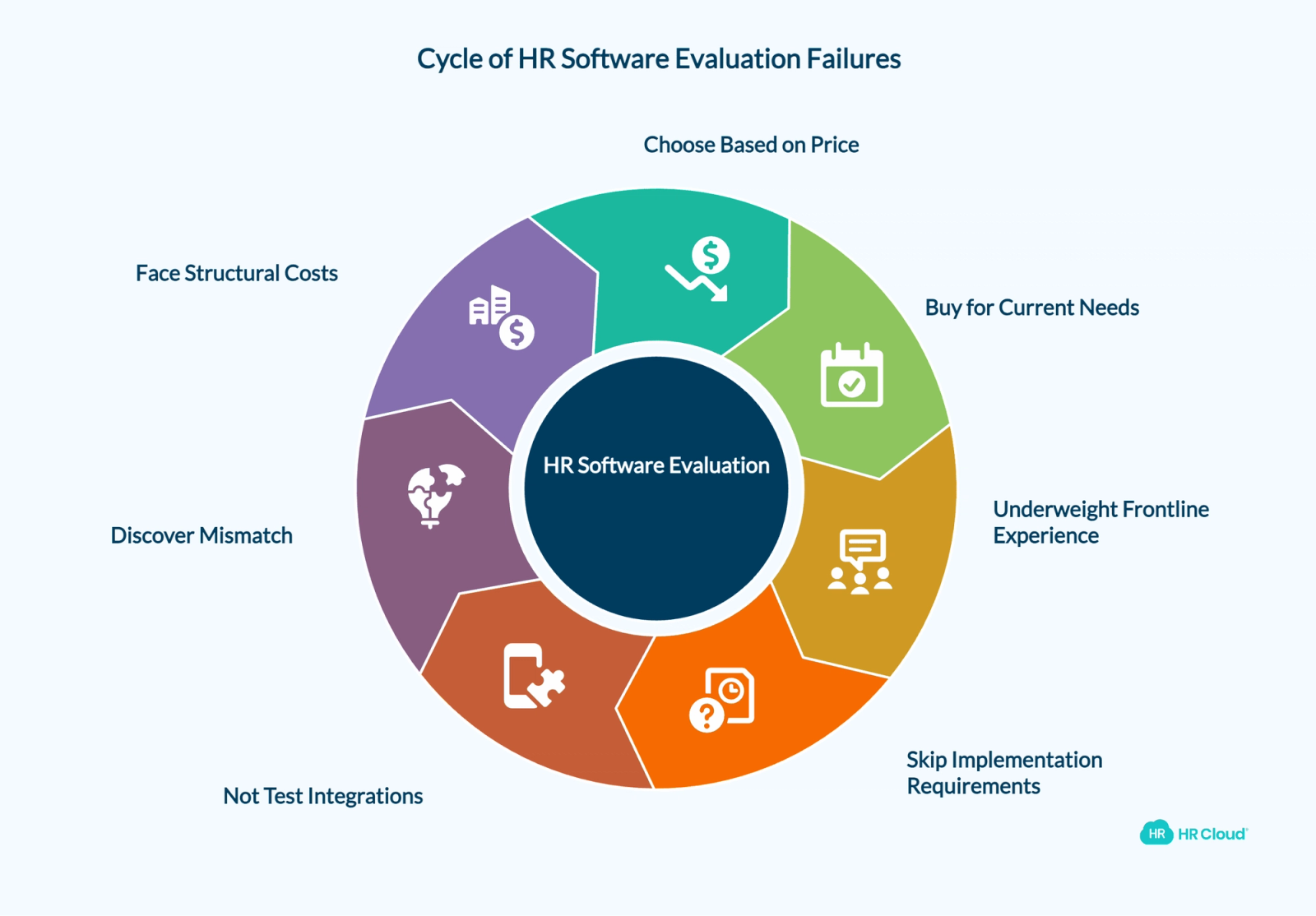
Most HR software evaluations fail quietly. Nobody picks an obviously bad platform — they pick a platform that looks complete on a feature list and then discover, six months into implementation, that it can't do the one or two things their organization actually needed.
The most common mistakes look like this:
• Choosing based on price alone, without modeling what the platform costs at your headcount in 24 months, not just today.
• Buying for current needs instead of where the company is headed — a platform sized for 500 employees often can't absorb the complexity that shows up at 1,500.
• Underweighting the frontline and field employee experience, because the buying committee mostly interacts with desk-based tools.
• Skipping implementation requirements until after the contract is signed, when data migration and configuration timelines suddenly become someone's emergency.
• Not testing integrations before purchase — assuming payroll, time tracking, and applicant tracking systems will "just connect" because a vendor lists them as supported.
The cost of these mistakes is real and measurable. A 2022 Gartner survey found that the average HRIS is used by only 32% of employees, and roughly one in four organizations report that new HR technology implementations fail to meet adoption expectations, according to reporting from SHRM on why HR technology implementations fail. Low adoption isn't a training problem you fix after launch — it's almost always a selection problem you created during evaluation.
Why this matters at 500+ employees: At smaller companies, a mismatched HR platform is an annoyance HR works around. At 500 to 5,000 employees, that same mismatch multiplies across dozens of managers, multiple locations, and thousands of employee records — turning a workaround into a structural cost.
The Six Places HR Software Breaks Down Between 500 and 5,000 Employees
Generic HR software checklists treat every company the same way: list the features, check the boxes, pick the highest score. That approach misses what actually changes as a company grows past 500 employees — the operational failure points, not just the feature gaps.
The table below maps the six categories that matter most at this scale, what tends to break first in each one, and how much weight each category should carry in your final scorecard.
| Category | What Breaks First at This Scale | Scorecard Weight |
|---|---|---|
| Core HR & Employee Data | Org structure and reporting can't reflect multiple locations or business units | 20% |
| Employee Onboarding | Manual, paper-based onboarding can't scale to high-volume or multi-location hiring | 20% |
| Employee Communication & Engagement | No way to reach frontline or multi-location employees outside of email | 15% |
| Integrations & Ecosystem | Payroll, ATS, and SSO connections require manual workarounds or middleware | 15% |
| Compliance & Security | Audit trails, role-based access, and I-9/E-Verify can't keep pace with headcount and locations | 15% |
| Scalability Beyond 5,000 | Per-user pricing and automation limits make the platform more expensive to keep than to replace | 15% |
1. Core HR Management and Employee Data
This is the foundation every other category depends on, which is why it carries the highest weight alongside onboarding.
What to evaluate:
• A central employee database that's the single source of truth — not one of three systems that all claim to be
• Organizational charts that reflect multiple locations, departments, and reporting lines
• Custom fields HR can add without a developer ticket or vendor change request
• Reporting dashboards that go beyond headcount and turnover to support workforce planning
• Document management with role-based visibility
• Workflow automation for routine HR processes (transfers, promotions, status changes)
Questions to ask vendors:
1. Can the system represent our actual org structure across locations and business units today — not after a customization project?
2. Can our HR team create and modify custom fields and reports without vendor involvement?
3. What happens to historical data during a system change — is it migrated, archived, or lost?
Why this matters for HR at this scale: A 200-person company can run on a single flat employee list. A 1,500-person company with three locations cannot — and platforms built for the smaller use case often "support" multi-location structures only through workarounds like duplicate employee records or spreadsheet exports. If a vendor needs a workaround to show you your own org chart during a demo, that's a preview of what your team will be doing every week after go-live.
2. Employee Onboarding Capabilities
This is the category where the wrong choice creates visible extra work fastest — and where most evaluations underinvest in scrutiny.
What to evaluate:
• Digital forms and e-signatures for offer letters, policy acknowledgments, and tax documents
• Compliance documentation, including I-9 and E-Verify workflows
• Mobile-first onboarding for employees who don't sit at a desk on day one
• Automated, role-based task assignments and reminders for managers
• New hire portals that consolidate documents, training, and introductions in one place
• Pre-boarding capability — work that happens before an employee's start date
Questions to ask vendors:
1. Can a new hire complete onboarding paperwork on a phone, before Day 1?
2. Do managers receive automated reminders for their onboarding tasks, or does HR have to chase them manually?
3. How are onboarding workflows configured differently by role, department, or location?
The real cost of getting this wrong: Onboarding isn't just an administrative process — it's a retention lever. Jobvite's 2022 Job Seeker Nation Report found that nearly one in three new hires leave a job within their first 90 days, and a slow, paper-heavy onboarding process is one of the most common reasons why. At 500 to 5,000 employees, with dozens or hundreds of new hires per quarter, a broken onboarding process doesn't cost you one bad hire — it costs you a percentage point of turnover across the whole organization, every quarter.
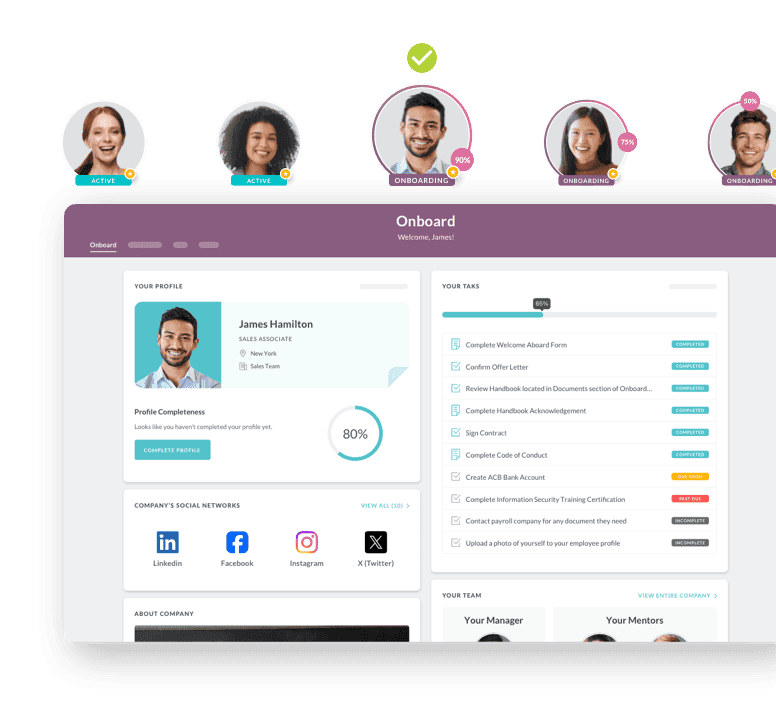
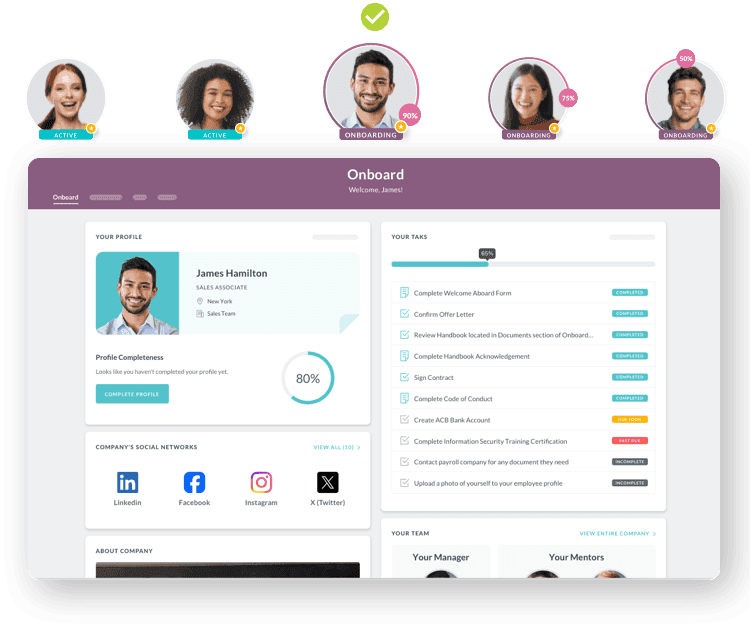
Platforms purpose-built for this — like HR Cloud's employee onboarding software — combine digital forms, e-signatures, role-based task automation, and I-9/E-Verify workflow support in one system, so onboarding doesn't depend on an HR generalist remembering 40 manual steps for every new hire.
3. Employee Communication and Engagement
This is the category most evaluation committees forget — and the one most likely to get purchased as a separate tool 12 months after the HRIS contract is signed.
What to evaluate:
• A company-wide news feed or social feed that works on mobile
• A dedicated mobile app for employees without company email or desk access
• Peer-to-peer and manager recognition tools
• Pulse surveys and structured feedback channels
• The ability to target communications by location, department, or shift
Why this category gets overlooked: Buying committees are usually made up of people who already feel connected to the company — HR, IT, and finance leaders with desk jobs and company email. They evaluate HRIS and payroll integrations carefully because that's what affects their daily work. Frontline and field employees, who make up a large share of headcount at 500 to 5,000 employees in healthcare, manufacturing, retail, and hospitality, are often an afterthought — until engagement scores drop and someone asks why.
If your organization has any meaningful frontline, field, or multi-location workforce, evaluate communication and engagement tools — such as HR Cloud's employee engagement and communication software — as part of this evaluation, not as a separate purchase next year.
4. Integration and Ecosystem Requirements
At 500 to 5,000 employees, your HR platform is rarely the only system in play. The question isn't whether a vendor "supports" an integration — it's how that integration actually works in production.
What to evaluate:
| Integration Type | Why It Matters |
|---|---|
| Payroll (ADP, UKG, Paychex, Paylocity) | Errors here directly affect employee pay and compliance |
| Recruiting / ATS | Prevents re-entering candidate data as new hires |
| SSO (Microsoft, Google, Okta) | Reduces password fatigue and IT support tickets |
| Learning management systems | Connects onboarding to ongoing training requirements |
Questions to ask vendors:
1. Is this integration certified by the payroll or HR provider (for example, an ADP Marketplace partnership), or is it a custom build your team will need to maintain?
2. Is data sync bidirectional and real-time, or does it require manual exports and imports?
3. What happens when the integration breaks — whose responsibility is it to fix it, and what's the typical resolution time?
Red flag to watch for: "We integrate with everything" is a sales answer, not a technical one. Ask for the certification level of the specific integration you depend on most. HR Cloud, for example, holds Platinum Partner status on the ADP Marketplace — ADP's highest certification tier — for its ADP integration, meaning the connection is validated and actively maintained by both companies, not a one-time custom build.
Here's what this looks like in practice: SHELTER Inc., a nonprofit serving people experiencing homelessness, took on management of a new facility that nearly doubled its workforce — while still running onboarding on paper. Jim Stanley, SHELTER Inc.'s HR Assistant and Payroll Specialist, found HR Cloud's Onboard application through the ADP Marketplace on his ADP rep's recommendation. After integrating the two systems, he reported per-employee onboarding time dropping from nearly five hours to an hour or less, an estimated 60–70% time savings overall — with employee data flowing between systems automatically instead of being re-entered by hand. That's the difference between an integration that exists on a feature list and one that removes work from your team's day.
5. Compliance and Security
Compliance complexity doesn't scale in a straight line with headcount — it scales with the number of locations, states, and regulatory categories your workforce touches.
What to evaluate:
• Role-based permissions that limit who can view or edit sensitive employee data
• Audit trails for changes to employee records, pay, and status
• I-9 and E-Verify workflows that are built into onboarding, not bolted on as a separate process
• Data retention policies that match your industry's recordkeeping requirements
• Security certifications and how often the vendor undergoes audits
Questions to ask vendors:
1. Is I-9/E-Verify a native, built-in workflow, or does it require a third-party add-on?
2. How granular are role-based permissions — can a regional manager see only their location's data?
3. What security certifications does the vendor maintain, and how recently were they audited?
Pro tip: Ask to see the audit trail for a single employee record during your demo. If the vendor can't pull up a clear history of who changed what and when, that's a preview of what your next compliance audit will look like. HR Cloud's I-9 and E-Verify workflow tools support these steps inside onboarding rather than as a separate process, which matters most for healthcare, construction, and multi-state employers, where incomplete or inconsistent I-9 records can create audit risk and potential penalties.
6. Scalability Beyond 5,000 Employees
Even if you're at 500 employees today, the platform you choose now should still make sense at 2,000 — because migrating HR software again in three years is one of the most disruptive projects an HR team can run.
What to evaluate:
• How the platform performs with multi-location and, if relevant, global workforces
• Whether automation depth increases as headcount grows, or stays flat
• How pricing is structured as you add employees and locations
Red flags:
• Per-user pricing that increases linearly with no volume consideration
• Workflow automation that's limited to a small number of "recipes" regardless of plan tier
• Reporting that's adequate for 500 employees but has no enterprise-level analytics tier
Why this matters for HR at this scale: The hidden cost of outgrowing a platform isn't the new software contract — it's the migration project, the retraining, and the months of running two systems in parallel. Evaluating scalability now, even if you won't need it for two years, is far cheaper than re-running this entire evaluation in 2028. Platforms with built-in HR automation tend to absorb growth better, because workflows that were manual at 500 employees become structurally necessary at 2,000 — and the platform either already supports that automation or doesn't.
The Mid-Market HR Software Vendor Scorecard
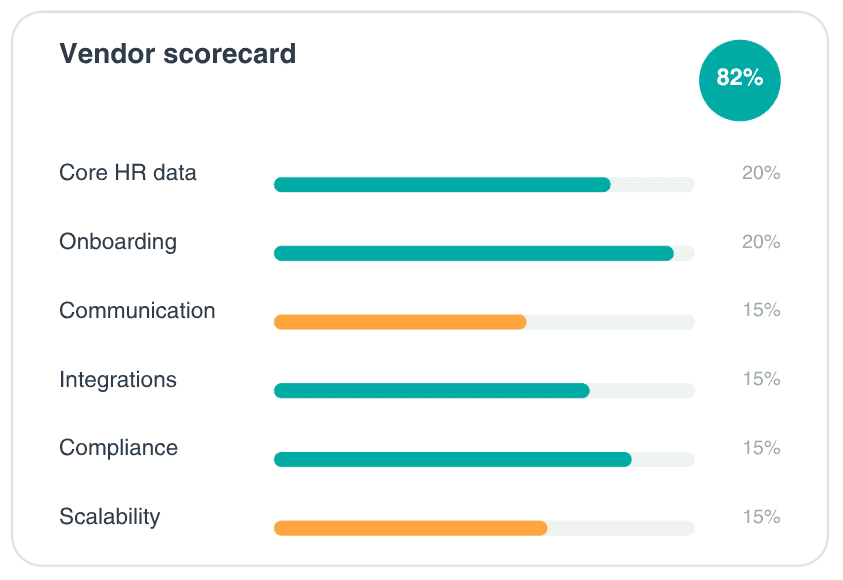
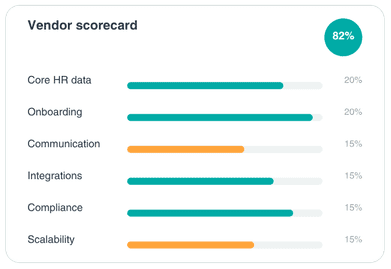
Once you've used the six categories above to generate your questions for each vendor, score every platform against the same weighted scale. This turns "Vendor A felt more polished" into a comparable, defensible number you can bring to your leadership team.
| Category | Weight | Vendor A Score (1–5) | Vendor B Score (1–5) | Vendor C Score (1–5) |
|---|---|---|---|---|
| Core HR & Employee Data | 20% | |||
| Employee Onboarding | 20% | |||
| Communication & Engagement | 15% | |||
| Integrations & Ecosystem | 15% | |||
| Compliance & Security | 15% | |||
| Scalability | 15% | |||
| Weighted Total | 100% |
To calculate each vendor's weighted total, multiply each category score by its weight and sum the results. Here's a worked example using an illustrative vendor — not a real platform, just the math made concrete:
| Category | Weight | Illustrative Score (1–5) | Weighted Contribution |
|---|---|---|---|
| Core HR & Employee Data | 20% | 4 | 0.80 |
| Employee Onboarding | 20% | 5 | 1.00 |
| Communication & Engagement | 15% | 3 | 0.45 |
| Integrations & Ecosystem | 15% | 4 | 0.60 |
| Compliance & Security | 15% | 4 | 0.60 |
| Scalability | 15% | 3 | 0.45 |
| Weighted Total | 100% | — | 3.90 / 5 (78%) |
A vendor that scores a perfect 5 on Communication but only a 2 on Integrations and Compliance — both worth 15% each — will lose more points overall than a vendor with consistent 3s and 4s across every category. That's the point: this scorecard is designed to surface vendors that are strong everywhere that matters at your scale, not just exceptional in the one area your demo happened to focus on. As a general rule, treat any single category scoring below 3 out of 5 as worth a direct follow-up conversation with that vendor, even if the overall weighted total looks strong — a single weak category often becomes the operational bottleneck regardless of how well the platform scores everywhere else.
Build this scorecard in a shared spreadsheet before your first vendor call, and have every member of your evaluation committee — HR, IT, finance, and at least one operations or frontline manager — score independently before discussing as a group. Including a frontline or location manager in at least one live demo, not just in the post-demo scoring discussion, surfaces usability problems the HR/IT/finance committee alone is unlikely to notice. Independent scoring surfaces disagreements early, which is far easier to resolve during evaluation than six months into implementation.
Ready to compare vendors without the guesswork? Score every platform the same way — onboarding, compliance, integrations, and more — before you sit through another demo. Get the vendor scorecard
How HR Cloud Supports HR Teams Between 500 and 5,000 Employees
If your evaluation surfaces gaps in onboarding, communication, compliance, or payroll integration specifically, it's worth understanding how a platform built for this size handles each one.
HR Cloud's employee onboarding software combines digital forms, e-signatures, role-based task automation, and I-9 and E-Verify workflow support, so onboarding doesn't rely on HR manually tracking 40 steps per new hire. On the engagement side, Workmates extends communication, recognition, and pulse surveys to frontline and multi-location employees who don't sit behind a company email address. Underneath both, HR Cloud's people HRIS centralizes employee records, custom fields, and reporting — instead of leaving HR to reconcile data across separate onboarding, engagement, and payroll systems.
For organizations on ADP, HR Cloud holds Platinum Partner status on the ADP Marketplace — ADP's highest certification tier — with connected workflows for ADP Workforce Now, ADP RUN, ADP Vantage, ADP TotalSource, and ADP Lyric. Separately, HR Cloud also supports payroll and HR data sync with UKG Pro through its own dedicated integration. The goal isn't to replace your payroll system; it's to give HR an onboarding, engagement, and compliance-aware workflow layer on top of it.
If you're currently on an entry-level HRIS that's starting to show the strain of growth, HR Cloud's guide on why HR teams switch from BambooHR after 200 employees walks through the specific signals that indicate it's time for a structured evaluation like the one in this guide.
Turning This Checklist Into a Vendor Shortlist
Reading a checklist doesn't change anything — using it this week does. Here's how to convert this guide into action within 48 hours.
1. Build your scorecard spreadsheet today, using the six categories and weights above, and score your current platform first. This gives your committee a baseline. Any vendor you evaluate should be scored against the same categories — and ideally should outscore your current platform by a meaningful margin, not a marginal one.
2. Identify your top two or three "what breaks first" categories from this guide, and turn those into specific demo requests. Don't accept a generic vendor walkthrough. If integrations are your weak point, ask the vendor to demo your actual payroll integration live, with your data structure, not a generic sandbox.
3. Calculate your current onboarding cost using HR Cloud's free onboarding ROI calculator before your first vendor call. Having a real baseline number — hours spent per hire, cost per hire, time-to-productivity — turns vague vendor promises ("we'll save you time") into a number you can hold every proposal accountable to.
Ready to see how a platform built for companies between 500 and 5,000 employees handles onboarding, engagement, compliance, and ADP integrations in one system? Request a Demo →

Discover how our HR solutions streamline onboarding, boost employee engagement, and simplify HR management
Book Your Free DemoFrequently Asked Questions
What should be included in an HR software evaluation checklist?
An HR software evaluation checklist should include core HR capabilities, onboarding, employee communication, integrations, security and compliance, reporting, and scalability requirements. At 500 to 5,000 employees, it should also include a weighted scoring method, since not every category matters equally at this size — onboarding and integrations typically carry more weight than they would for a smaller company.
How long does it take to evaluate HR software?
There's no single industry-standard number, and timelines vary widely based on how many stakeholders are involved and how complex your integrations are. For mid-market companies, evaluation often takes longer than expected because HR, IT, finance, operations, and payroll all need to test the parts of the system that affect them directly. Build your project timeline around stakeholder review, integration validation, and security review — not just vendor demos — and you'll have a more realistic estimate than any generic benchmark could give you.
What is the most important factor when choosing HR software?
Scalability and workflow automation often have the biggest long-term impact, because they determine how efficiently HR can support the company as it grows. A platform that handles 500 employees well but requires manual workarounds at 1,500 will cost more in HR time than the price difference between vendors ever saves.
How many vendors should you evaluate?
There's no fixed number that works for every organization, but comparing too few vendors makes it hard to tell whether a limitation is industry-standard or specific to one platform, while comparing too many slows the decision down without meaningfully improving it. What matters more than the count is making sure every vendor you do compare gets scored against the same weighted criteria, so the comparison is actually apples-to-apples.
Should employee onboarding be evaluated separately from HRIS functionality?
No. Onboarding directly affects compliance, productivity, and early retention, and should be evaluated as part of the overall HR software decision rather than as a separate purchase. Splitting onboarding into a different system later often means employee data has to sync between two platforms — one more integration point that can break.
What questions should executives ask HR software vendors?
Executives should ask about implementation timelines, integration certifications (not just integration "support"), security standards and audit history, how pricing scales with headcount, and what measurable outcomes — like onboarding time or compliance audit readiness — similar-sized customers have achieved.
About the author


Like What You Hear?
We’d love to chat with you more about how HR Cloud® can support your business’s HR needs.
Book Your Free Demo