Key Components of Human Resource Software Development

Modern HR software components are transforming how organizations manage their workforce from hiring through retirement. The right HRIS system consolidates employee data, automates repetitive tasks, and enables HR teams to focus on strategic initiatives rather than administrative burden. According to Fortune Business Insights, the global HR technology market is projected to reach $81.84 billion by 2032, growing at a 9.2% CAGR, with cloud-based HRIS solutions leading adoption across mid-market to enterprise organizations.
The seven core HR software components include payroll management, analytics and document management, onboarding automation, recruitment and applicant tracking, performance management, time tracking and leave management, and benefits administration. Organizations implementing comprehensive HR platforms report 40-50% reductions in administrative time and 82% higher retention rates when structured onboarding processes are deployed effectively.
What Are HR Software Components and Why They Matter
HR software components are modular features within human resources information systems (HRIS) that automate specific workforce management functions. Think of them as building blocks—payroll processing, employee onboarding, performance tracking—that work together to create a unified employee experience platform.
For mid-market organizations with 100-1,000+ employees, managing HR processes through spreadsheets and disconnected systems creates data silos, compliance risks, and administrative bottlenecks. Modern HR Cloud platforms address these challenges by centralizing employee information, automating workflow approvals, and providing real-time visibility into workforce metrics.
Behind these platforms, effective software development plays a crucial role in building scalable, secure, and customizable HR systems that adapt to evolving organizational needs.
The business case is compelling: Organizations using comprehensive HRIS platforms save HR professionals approximately 2 hours per document through digital workflows and electronic signatures, according to AIHR research. When you're processing dozens of documents weekly across onboarding, performance reviews, and compliance tracking, those hours compound quickly.
How to Know If You Need Comprehensive HR Software
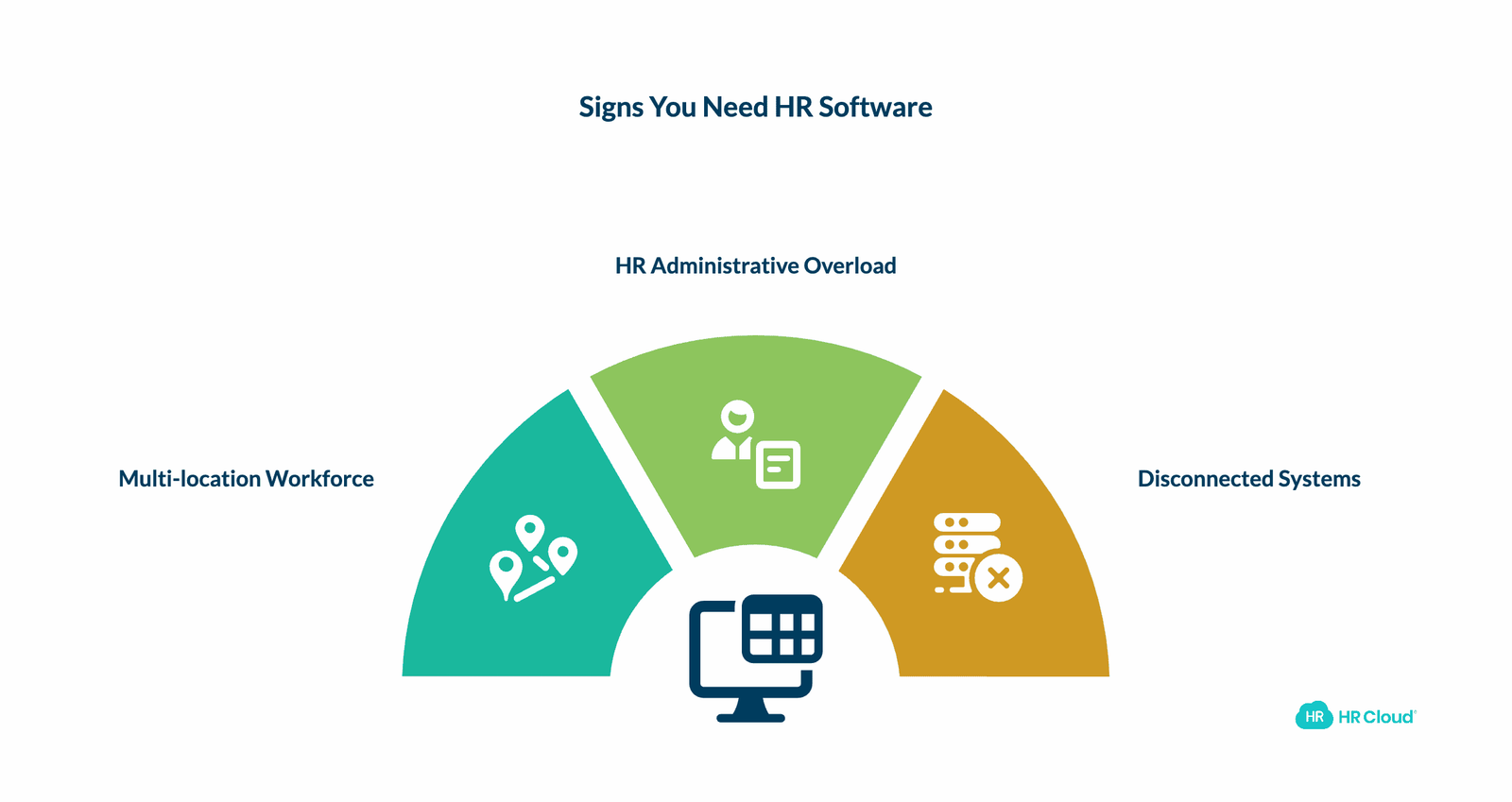
Three scenarios indicate it's time to invest in integrated HR software components:
1. Multi-location or distributed workforce challenges
If your employees work across multiple sites, shifts, or remotely, and you lack a centralized communication platform, you're likely experiencing coordination problems. Healthcare systems, manufacturing facilities, construction companies, and retail operations particularly benefit from mobile-first HR solutions that reach frontline workers where they work.
2. HR administrative overload
When your HR team spends more time on paperwork than strategic initiatives—managing onboarding forms, tracking PTO requests, coordinating performance reviews—automation becomes essential. Workflow automation tools can reduce onboarding time by 60% and cut scheduling conflicts by 40-50%, based on industry benchmarks from Deloitte's HR Technology Survey.
3. Disconnected systems and compliance concerns
If managing applications, payroll, and employee records across multiple platforms creates data inconsistencies and audit risks, unified HR software addresses these gaps. Organizations in regulated industries like healthcare and construction particularly need integrated compliance tracking for certifications, licenses, and safety training. If you can't manage applications, onboardings, and payrolls efficiently, then it's high time to pick one of the best software development companies.
7 Core HR Software Components Every Organization Needs
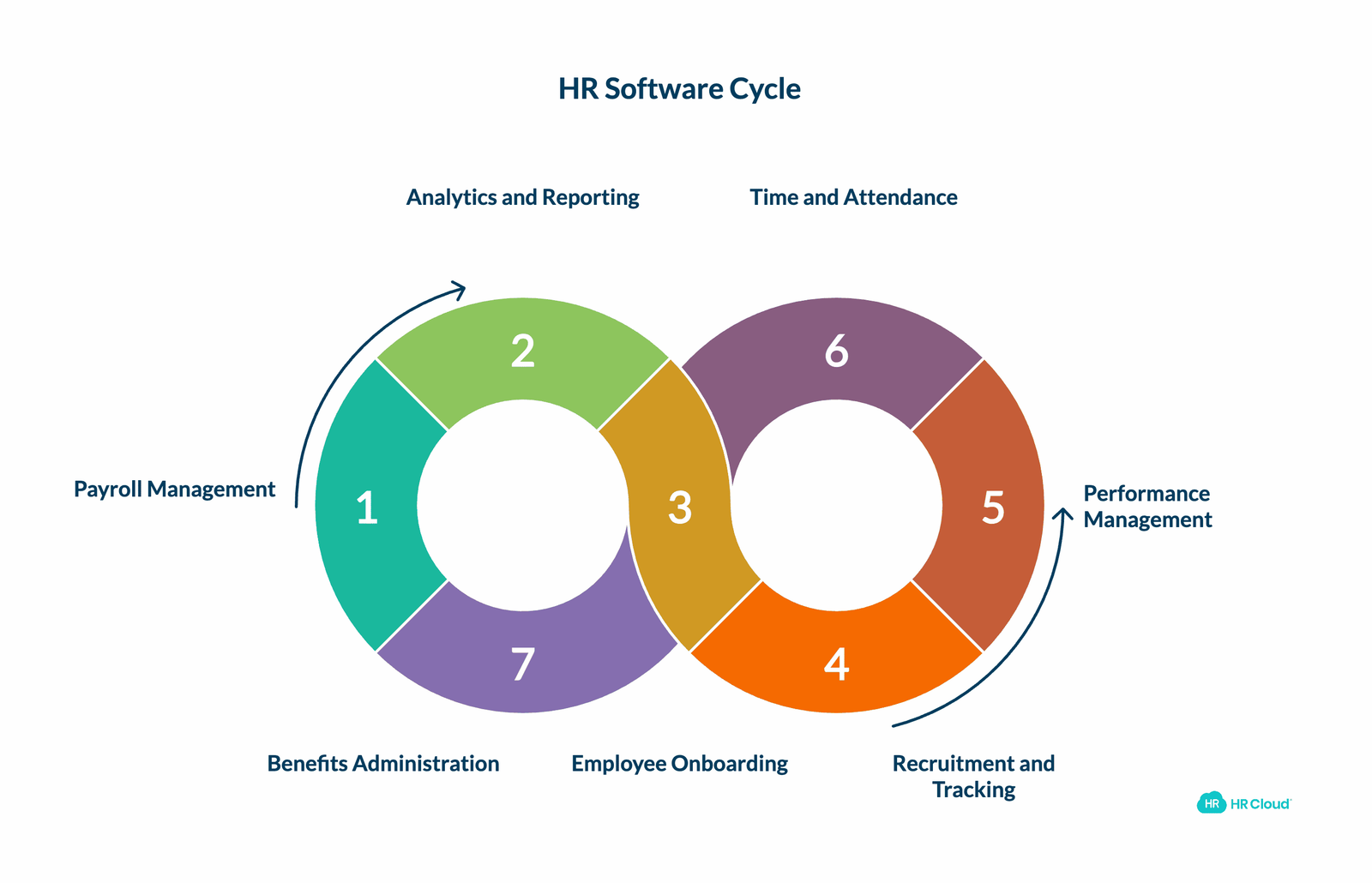
1. Payroll Management and Integration
Payroll management is the foundation of any HRIS, but modern solutions go far beyond basic paycheck calculation. The best platforms integrate bi-directionally with major payroll providers like ADP, UKG, Workday, and SAP, ensuring employee data flows seamlessly between systems without manual re-entry.
What advanced payroll components include:
- Automated tax computation that adapts to federal, state, and local regulations
- Multi-state and multi-currency payroll processing for distributed workforces
- Direct deposit management with employee self-service setup
- Overtime calculation rules that accommodate shift differentials and union agreements
- PTO balance tracking integrated with time-off requests and approvals
The integration between payroll and other HR components creates efficiency gains that compound across your organization. When an employee completes onboarding in your HRIS, their information automatically populates in your payroll system. When they request PTO in your time-off module, approved leave flows directly to payroll for accurate compensation.
Organizations implementing HR Cloud with ADP integration report 42% reductions in payroll processing time related to absence calculations, according to industry benchmarks. This automation eliminates the spreadsheet juggling and manual data transfer that creates errors and delays.
The automatic tax computation functionality of the payroll management feature helps you avoid errors in taxation. Moreover, automating payroll can offer even more great advantages, such as:
- Tasks can be done with minimal time and effort.
- No need to put manual data inputs.
- Easy access to everything that you want to check in a fraction of a second.
Any inaccuracy in payroll can lead to a disaster for an organization. It is important that it should be well-managed. So, you should adopt this technology to minimize human errors and increase accountability in order to efficiently manage paychecks, control pay schedules, and ensure accuracy.
Key consideration: Not all HR platforms include built-in payroll processing. Many organizations prefer integration with specialized payroll providers rather than managing payroll directly within their HRIS. Verify your platform offers native integrations with your payroll vendor—HR Cloud provides Platinum ADP Marketplace Partnership status, meaning bi-directional data sync and full vendor support.
2. Analytics, Reporting, and Secure Document Management
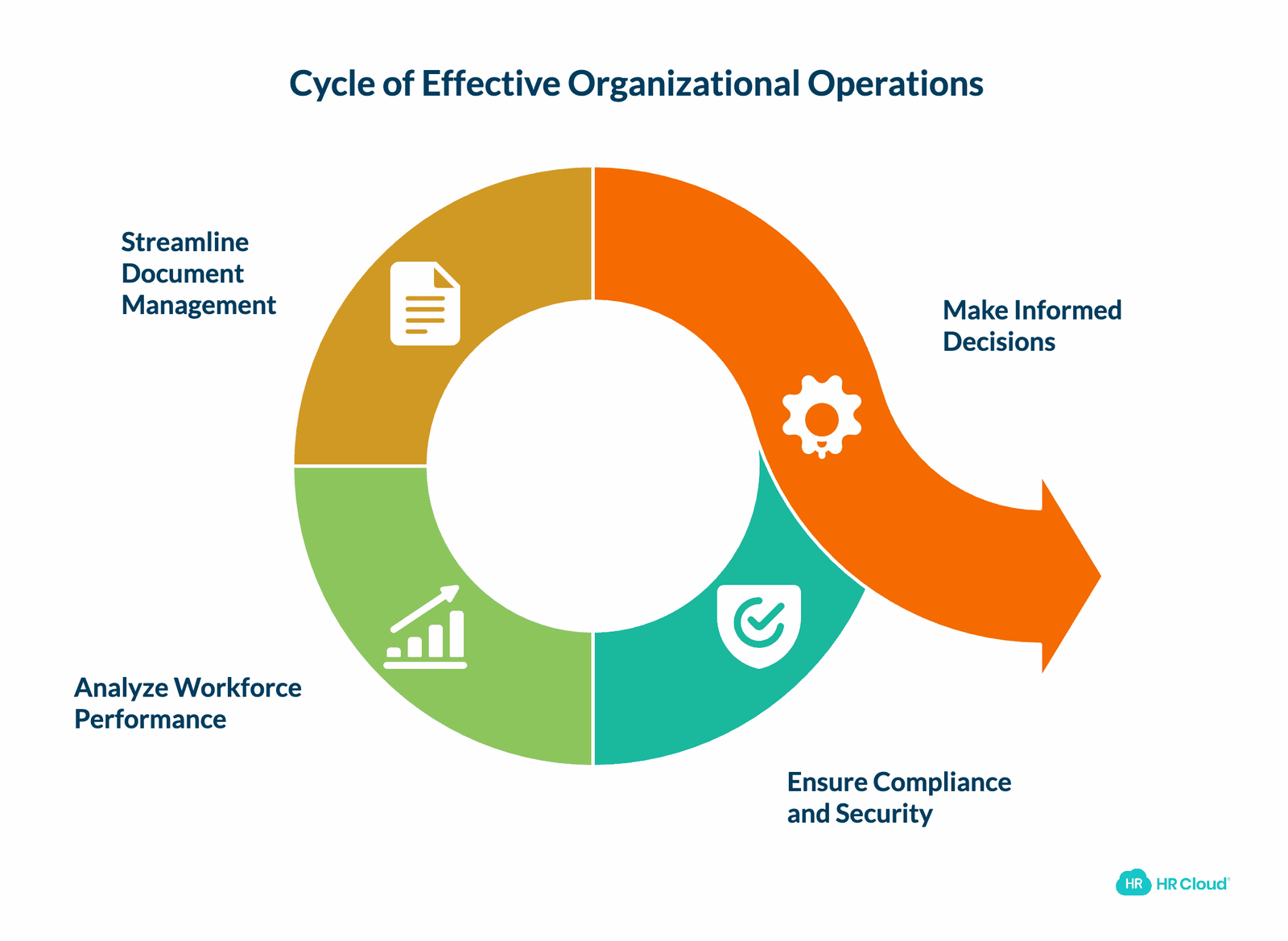
Data security and actionable insights form the strategic core of modern HR software. This component transforms raw employee information into workforce intelligence that drives business decisions.
Essential analytics and document capabilities:
Compliance and security infrastructure
- SSL encryption for data transmission
- Role-based access controls that limit visibility to authorized users
- Audit trails tracking all system changes and document access
- GDPR and SOC 2 compliance frameworks for data protection
- Document version control maintaining complete change history
HR Cloud's security protocols ensure sensitive information—Social Security numbers, banking details, health records—remains protected while remaining accessible to those who need it.
Workforce analytics and reporting
Modern HRIS platforms offer pre-built and customizable reports that surface patterns in your workforce data:
- Headcount analysis by department, location, and tenure
- Turnover metrics identifying flight risks before they resign
- Time-to-fill tracking for recruitment efficiency
- Compensation analysis ensuring market competitiveness
- Performance distribution across teams and managers
According to SHRM research, organizations leveraging HR analytics make more informed decisions about hiring, compensation, and retention strategies. The difference between reactive HR (responding to problems after they occur) and proactive HR (anticipating challenges through data patterns) often determines competitive advantage in tight labor markets.
Document management functionality
- Centralized storage for employee files, policies, and compliance documents
- Electronic signature capabilities expediting approvals
- Automated retention policies ensuring document lifecycle compliance
- Search functionality finding specific documents in seconds rather than minutes
- Employee self-service access reducing HR support tickets
Content management systems within platforms like Workmates ensure company policies, training materials, and announcements remain accessible to all employees, whether they work at headquarters or remote locations.
It also helps your organization to analyze information in real time and make the best decisions. Basically, it works on a data-driven approach. It includes images, messages, emails, electronic documents, files, MIS reports, document sharing, employee mood monitoring, and exit process management.
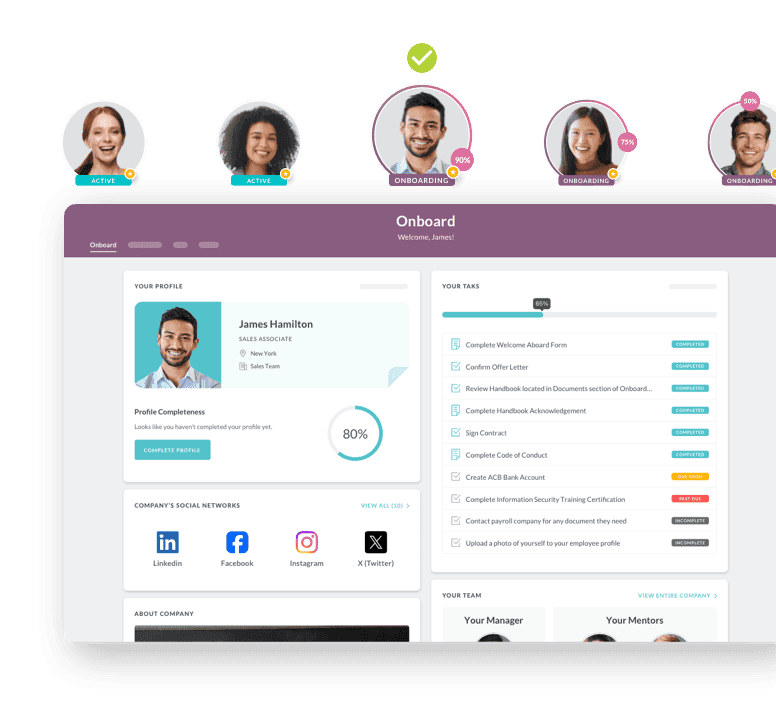
3. Employee Onboarding Automation
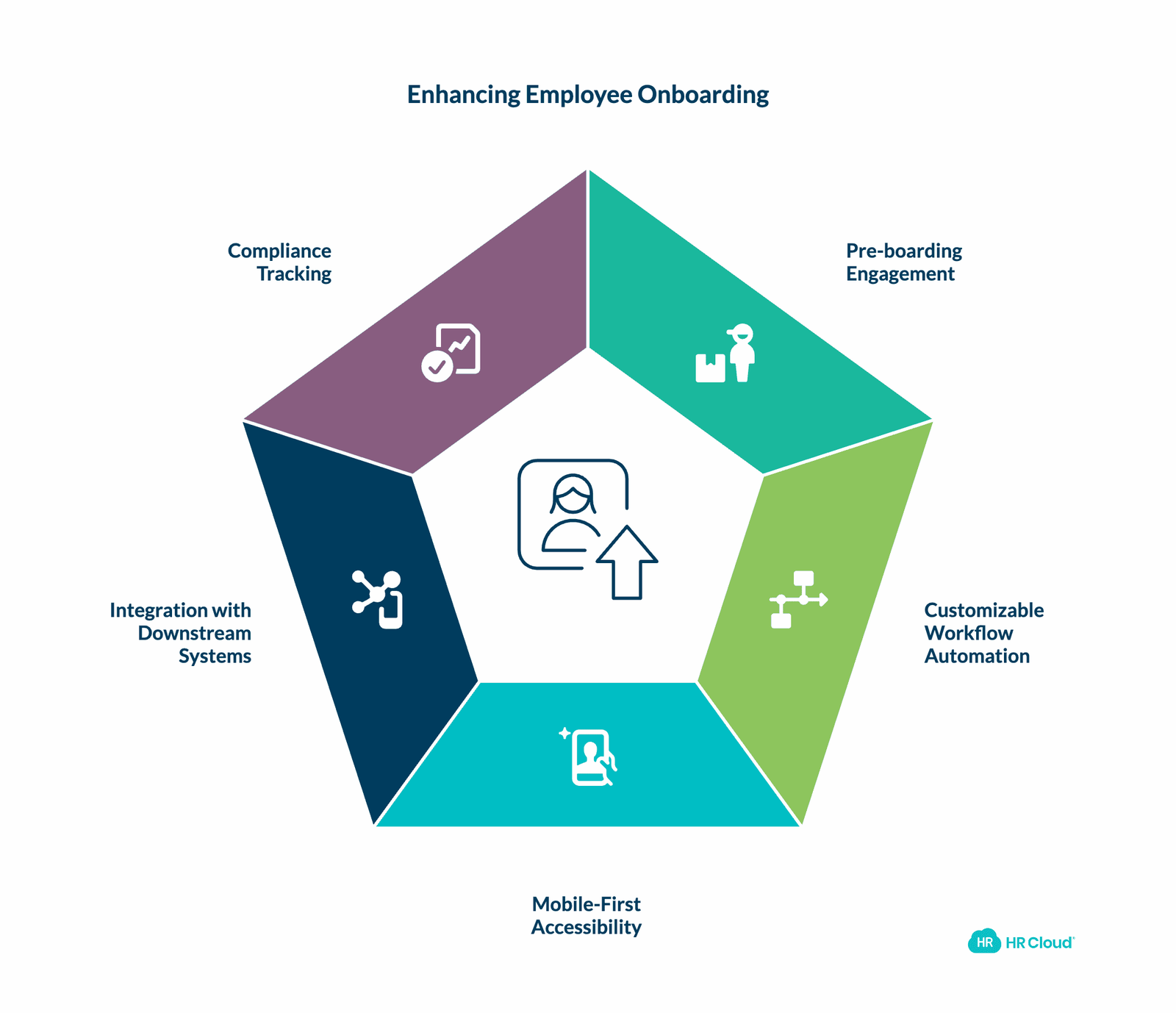
Onboarding directly impacts retention, productivity, and new hire satisfaction. Organizations with structured onboarding processes achieve 82% higher retention rates and 70% greater productivity, according to Brandon Hall Group research.
Traditional onboarding—paper forms, manual task tracking, disconnected systems—creates friction when you should be creating excitement. Automated onboarding software transforms this critical phase.
Comprehensive onboarding components:
Pre-boarding engagement
New hires access personalized portals before day one, completing:
- Tax forms (W-4, state withholding)
- Direct deposit setup
- Benefits enrollment
- Company policy acknowledgments
- Emergency contact information
This advance completion means new employees arrive ready to contribute, not buried in paperwork.
Customizable workflow automation
Create role-specific onboarding paths for different positions:
- Engineering hires might need laptop ordering, GitHub access, and code environment setup
- Healthcare workers require license verification, clinical credential checks, and shift scheduling
- Retail associates need point-of-sale training, cash handling certification, and uniform ordering
HR Cloud's smart flows route tasks automatically to responsible parties—IT provisions accounts, facilities assigns workspace, managers schedule check-ins—ensuring nothing falls through coordination gaps.
Mobile-first accessibility
Frontline workers in manufacturing, healthcare, and construction often lack desk access. Mobile onboarding applications enable new hires to complete requirements from smartphones or tablets, whether in facility break rooms or at home.
Integration with downstream systems
When onboarding connects with your HRIS, payroll, and access management systems:
- New hire data automatically creates employee records
- Payroll setup occurs without duplicate entry
- System access provisions through single sign-on integration
- Training assignments trigger in learning management systems
Organizations using HR Cloud's Onboard solution report 3X faster onboarding completion and 60% reductions in new hire questions, according to customer implementations.
Compliance tracking
- I-9 form completion with E-Verify integration
- Section 2 deadline alerts (within 3 business days of hire)
- License and certification tracking with expiration reminders
- Mandatory training completion verification
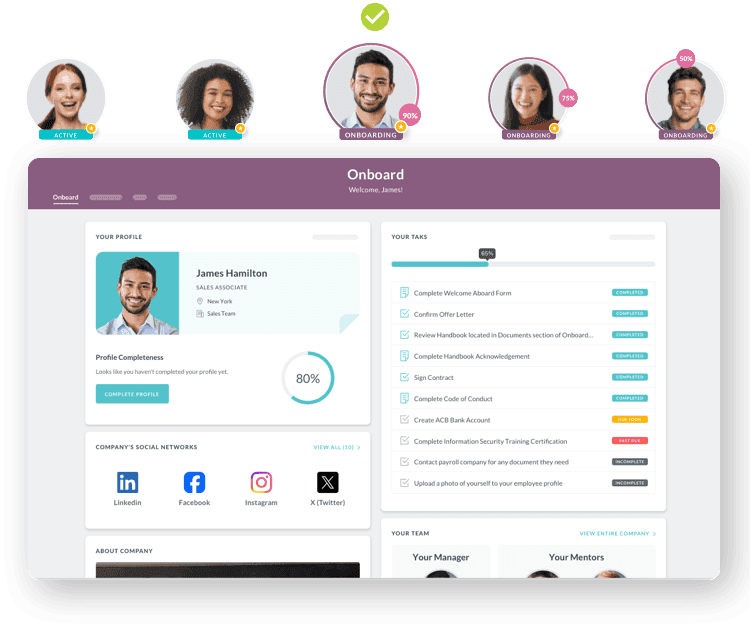
Onboarding is a process in which new employees are integrated into the organization. When it comes to the onboarding module of an HRMS, it automates the whole process of introducing new employees to their respective managers and teams. With less effort and minimal time, it can be done effectively.
It cuts down the time and helps to be productive by automating lengthy paperwork. Therefore, new employees can start carrying out their responsibilities sooner.
4. Recruitment and Applicant Tracking
Recruitment components, often called Applicant Tracking Systems (ATS), streamline hiring from job posting through offer acceptance. Research shows top candidates leave the market within 10 days, making speed and organization essential.
Core recruitment software features:
Multi-channel job posting
Distribute openings automatically to:
- Company career pages
- Job boards (Indeed, LinkedIn, Glassdoor)
- Social media platforms
- Industry-specific sites
- Internal mobility boards for existing employees
HR Cloud's Recruit ATS enables one-click posting across multiple channels, maximizing candidate reach without repetitive data entry.
Candidate pipeline management
- Application parsing extracting resume information into structured profiles
- Customizable hiring stages reflecting your process
- Collaborative evaluation tools for hiring team feedback
- Interview scheduling with calendar integration
- Automated candidate communications maintaining engagement
Screening and assessment capabilities
- Resume keyword matching against job requirements
- Knockout questions filtering unqualified applicants early
- Skills assessments and pre-employment testing
- Video interview integration for remote screening
- Background check integration (HR Cloud partners with Checkr for comprehensive verification)
Analytics driving better hiring decisions
- Time-to-fill metrics by position and department
- Source effectiveness showing which channels yield quality candidates
- Hiring manager performance and collaboration patterns
- Diversity analytics ensuring inclusive recruiting practices
The connection between recruitment and onboarding creates seamless transitions. When candidates accept offers in your ATS, their information automatically populates in your onboarding system, HRIS, and payroll—with zero manual data entry.
Recruitment is one of the essential yet daunting tasks of the human resource department. Finding an ideal candidate with the right experience, attitude, and skill set is often challenging. The recruitment component is particularly designed to streamline the lengthy recruitment process. It helps with job postings, talent acquisition, the interviewing process, and the selection of suitable candidates.
5. Performance Management and Employee Development
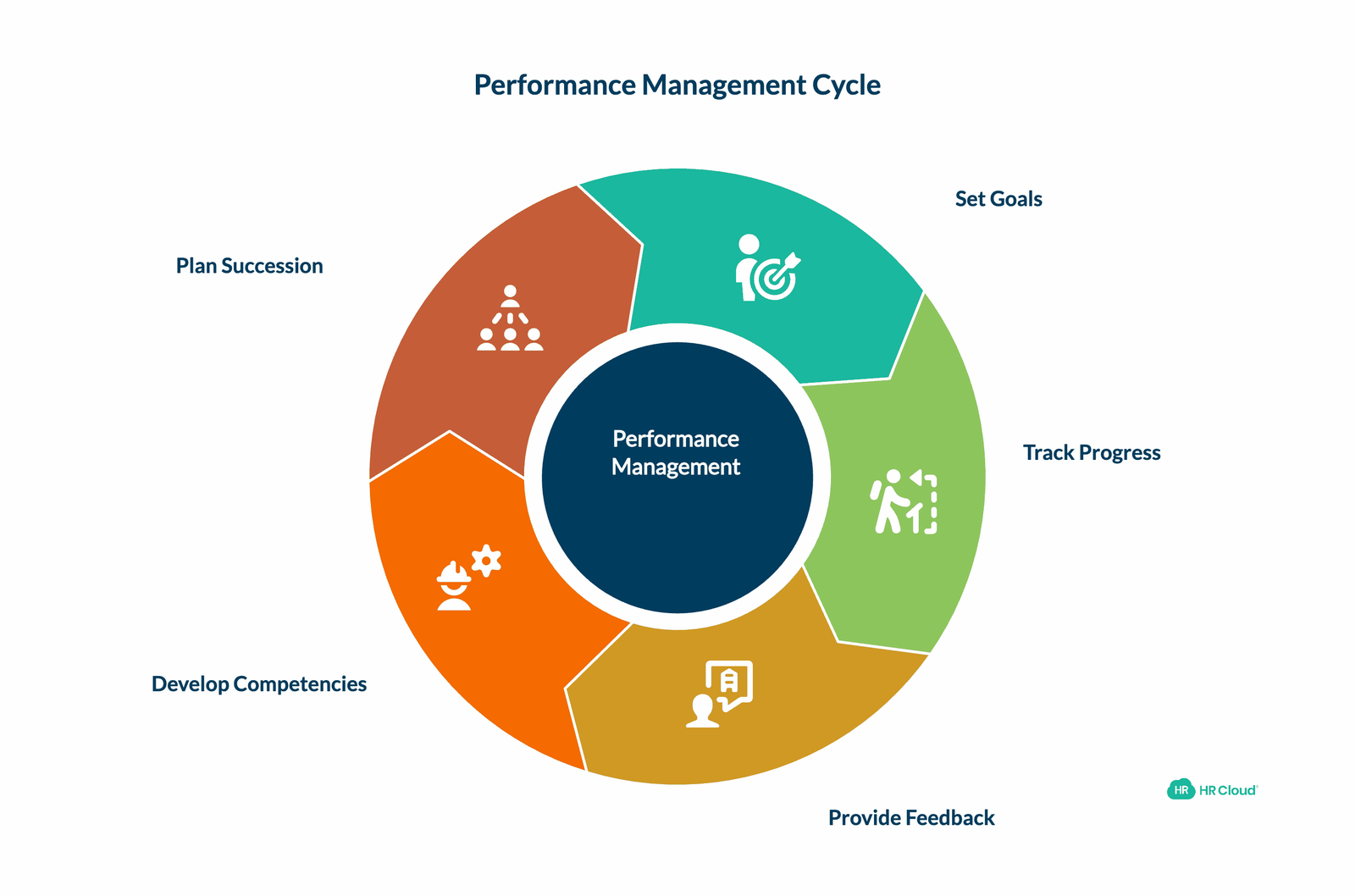
Performance management has evolved from annual reviews to continuous feedback systems supporting employee growth. Modern components facilitate regular check-ins, goal tracking, and development planning.
Contemporary performance management features:
Flexible review cycles
- Annual, semi-annual, and quarterly review scheduling
- 360-degree feedback collecting input from peers, managers, and direct reports
- Project-based reviews for specific initiatives
- Probationary period evaluations for new hires
Performance management software automates review workflows, sends reminders to participants, and tracks completion rates across your organization.
Goal setting and OKR tracking
- Cascading organizational objectives connecting individual work to company strategy
- SMART goal frameworks ensuring clarity and measurability
- Progress tracking with regular check-in prompts
- Achievement recognition integrated with rewards programs
Continuous feedback and 1:1 documentation
Move beyond annual reviews with:
- Real-time feedback tools enabling immediate recognition and coaching
- Regular 1:1 meeting agendas and note templates
- Development plan creation tied to career progression paths
- Skills assessment tracking employee capabilities
Competency frameworks and succession planning
- Job-specific competency libraries defining required skills
- Skill gap identification highlighting training needs
- Internal mobility tracking showing promotion readiness
- Succession planning identifying future leadership candidates
Performance data integrates with other HR components to create comprehensive employee profiles. When managers identify training needs during reviews, those requirements flow to learning management systems. When employees achieve goals, recognition triggers through rewards and acknowledgment platforms.
Now, the next must-have component of HRMS is the performance management system. It allows you to measure employee performance based on different parameters. You can set goals, and keep track of their progress and performance. The component organizes all the relevant information in one place. You can quickly evaluate the performance against the KPIs (Key Performance Indicators) assigned to the system.
6. Time Tracking, Attendance, and Leave Management
Accurate time tracking ensures payroll accuracy, supports compliance with labor laws, and provides visibility into workforce utilization. This component becomes particularly valuable for shift-based operations and organizations with complex PTO policies.
Comprehensive time and attendance features:
Flexible time capture methods
- Web-based clock-in/out from desktops
- Mobile time tracking for remote and field workers
- Biometric devices preventing buddy punching
- Geofencing ensuring on-site attendance
- Offline mode synchronizing when connectivity resumes
Schedule management capabilities
- Shift planning tools accommodating rotating schedules
- Drag-and-drop schedule creation and adjustment
- Shift swap requests with manager approval workflows
- Coverage gap alerts preventing understaffing
- Schedule distribution via mobile notifications
Leave management and PTO tracking
Time-off management software simplifies the request and approval process:
- Self-service PTO requests from any device
- Manager approval workflows with team calendar visibility
- Accrual calculation based on tenure and role
- Multiple leave types (vacation, sick, personal, bereavement)
- Blackout date enforcement during busy periods
- Integration with shared calendars showing team availability
Compliance and reporting
- Overtime calculation ensuring Fair Labor Standards Act compliance
- Break time tracking meeting state and local requirements
- Worked hours reports by employee, department, and project
- Exception management flagging attendance policy violations
The integration between time tracking and payroll eliminates manual timesheet transfer. Approved hours flow automatically to payroll processing, ensuring accurate compensation without spreadsheet exports and imports. Organizations using HR Cloud's ADP integration report real-time PTO balance synchronization between systems.
This must-have component can store time information and generate reports, attendance, and leave records. It can also have employee self-service (ESS) functionality, which empowers employees to see their schedules, check-ins & check-outs, leave requests, and balances.
Retail and food-related businesses should not miss out on this component in their HRMS. Since, such businesses work on a shift basis, staying in touch with employees from various shifts becomes difficult for the management. With the help of HRMS, the communication between employers and employees gets streamlined. Ultimately, it leads to efficient workforce management. If you have more than 50 employees, then you should go with this since managing the attendance and leaves of a great number of employees can be a strenuous task. Better automate it to stay behind the hassles.
7. Benefits Administration and Enrollment
Benefits management coordinates one of HR's most complex administrative challenges: health insurance, retirement plans, flexible spending accounts, and supplemental benefits. Modern software streamlines enrollment, tracks eligibility, and ensures compliance.
Benefits administration components:
Open enrollment management
- Self-service enrollment portals guiding employees through options
- Plan comparison tools showing coverage and cost differences
- Dependent verification ensuring eligible family member addition
- Election confirmation and electronic signatures
- Deadline reminders preventing missed enrollment windows
Life event processing
Automated workflows handle qualifying events:
- Marriage, divorce, or domestic partnership changes
- Birth or adoption of children
- Change in employment status
- Loss of other coverage
Employees initiate changes through self-service, HR reviews documentation, and updates flow to carriers and payroll automatically.
Carrier integration and data exchange
- EDI file generation for insurance carriers
- Eligibility file transmission ensuring accurate coverage
- Premium deduction calculation integrated with payroll
- Consolidated billing reconciliation
- Cobra administration managing continuation coverage
Employee communication and decision support
- Benefits education resources explaining plan options
- Cost calculators helping employees model scenarios
- Total compensation statements showing full value
- Mobile access enabling enrollment from any device
Benefits data integrates with onboarding for new hire enrollment and with time-off systems for leave coordination. When employees take parental or medical leave, benefits administration ensures premium payments continue and coverage remains active.
A must-have component in HRMS is benefits management. It helps with delivering benefits to employees, including extra perks, healthcare insurance, pension schemes, parental leaves, etc. This benefits administration module helps organizations streamline the whole process and tracks data for compliance purposes.
How HR Software Components Work Together
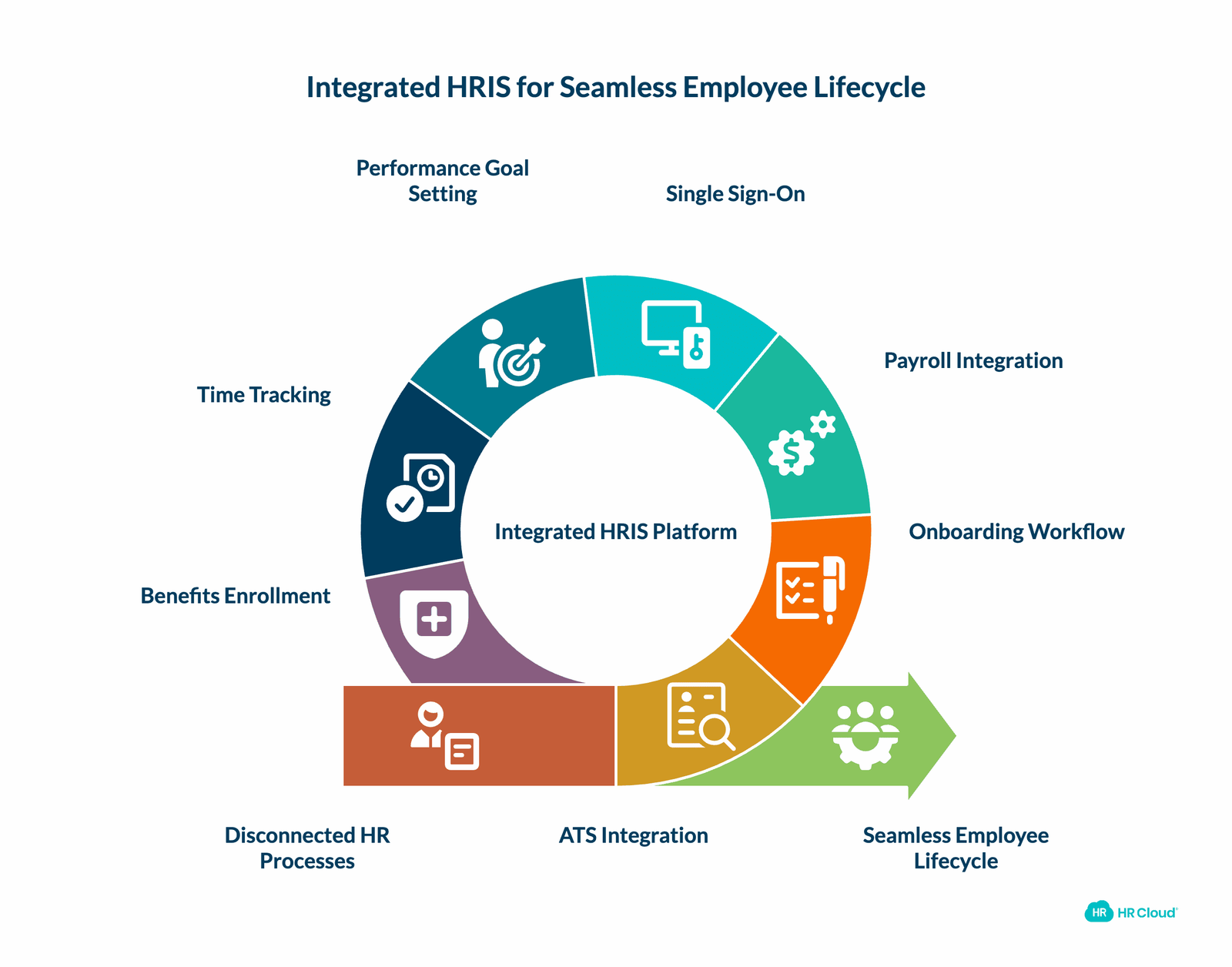
The true power of comprehensive HRIS platforms comes from integration between components. Consider a typical employee scenario:
Hiring to active employment:
1. Candidate applies through your ATS
2. Hiring team collaborates on evaluation
3. Offer acceptance triggers onboarding workflow
4. New hire completes pre-boarding from home
5. Employee record auto-creates in HRIS
6. Payroll setup occurs through ADP integration
7. System access provisions via single sign-on
8. Performance goals set during onboarding
9. Time tracking begins on day one
10. Benefits enrollment completes within 30 days
Without integration, each step requires manual data entry, creating errors and delays. With unified HR platforms like HR Cloud, employee information flows seamlessly between systems.
The frontline worker advantage:
Organizations with deskless employees—healthcare nurses, manufacturing technicians, construction crews, retail associates—face unique challenges. Traditional HR systems assume employees have computer access and email addresses. HR Cloud's mobile-first design ensures frontline workers complete HR tasks from smartphones, receive shift notifications, access pay stubs, and request time off without visiting HR offices.
Selecting HR Software: Component Considerations
When evaluating HRIS platforms, assess component depth and integration quality:
Essential evaluation criteria:
1. Modular flexibility: Can you implement core components now and add others later as needs evolve?
2. Native integrations: Does the platform integrate with your existing payroll, communication, and business systems?
3. Mobile accessibility: Can employees complete tasks from smartphones, not just desktops?
4. Compliance support: Does the software maintain audit trails and support industry-specific requirements?
5. Scalability: Will the platform grow with your organization from 100 to 1,000+ employees?
6. Implementation timeline: How quickly can you deploy? HR Cloud's typical implementation is 2-3 weeks from kickoff to go-live.
7. Training and support: What resources help your team maximize the platform's value?
Industry-specific considerations:
- Healthcare: License tracking, shift scheduling, credential management
- Manufacturing: Safety training compliance, multilingual support, kiosk mode
- Construction: Mobile time tracking, certification expiration alerts, project-based assignments
- Retail: Schedule flexibility, high-turnover onboarding, seasonal hiring surges
HR Cloud serves these industries specifically because our platform addresses frontline workforce challenges that traditional HR software overlooks.
If you have made up your mind to select the best human resource software, it is essential to have a software solution with full-fledged features that can meet your business needs. If you can't manage applications, onboardings, and payrolls efficiently, then consider custom software development services.
Implementation Best Practices
Successful HRIS deployment requires strategic planning:
Phase 1: Foundation (Weeks 1-2)
- Data cleanup and employee record standardization
- Payroll integration testing and validation
- Administrator training and workflow configuration
- Core feature activation (HRIS, onboarding, time-off)
Phase 2: Expansion (Weeks 3-6)
- Additional module deployment (performance, recruiting)
- Advanced workflow customization
- Manager training and rollout
- Employee self-service enablement
Phase 3: Optimization (Ongoing)
- Adoption monitoring and user feedback
- Process refinement based on usage patterns
- Feature expansion as confidence builds
- ROI measurement against initial success metrics
Organizations following phased approaches achieve higher adoption rates and better outcomes than attempting full-system launches, according to Gartner research on HR technology implementations.

Discover how our HR solutions streamline onboarding, boost employee engagement, and simplify HR management
Book Your Free DemoConclusion: Building Your HR Technology Foundation
The seven core HR software components—payroll management, analytics and document security, onboarding automation, recruitment tracking, performance management, time and attendance, and benefits administration—form the foundation of modern workforce management.
Organizations implementing comprehensive HRIS platforms report measurable benefits:
- 40-50% reduction in administrative time
- 60% faster onboarding completion
- 82% higher retention rates with structured processes
- 42% reduction in payroll processing time
- 27% higher benefits satisfaction scores
The question isn't whether to invest in HR software, but rather which components best address your organization's specific challenges. For mid-market companies with distributed workforces, mobile-first platforms that integrate deeply with payroll providers offer the greatest immediate value.
HR Cloud's unified platform delivers all seven components with specialized capabilities for frontline workers across healthcare, manufacturing, construction, and retail industries. Our native integrations with ADP, UKG, Workday, and SAP eliminate data silos while our mobile applications reach employees wherever they work.
Undeniably, the HR department of every organization is packed with responsibilities. However, implementing a proven & modern solution like HRMS can help you provide more quality control and allow you to collaborate seamlessly with your employees.
It's high time to invest in HR software solutions that best fit your needs. It not only helps your business grow faster but also makes your business efficient enough to stay ahead of the competition.
Now you have a good understanding of must-have components that every organization should invest in. If you think we've left some, then you can share it by commenting below. We'd like to hear from you!
Ready to transform your HR operations? Schedule a demo to see how HR Cloud's integrated components can reduce administrative burden, improve employee experience, and scale with your growing organization.
Frequently Asked Questions
What are HR software components in a human resource management system?
HR software components are the core modules within a human resource information system (HRIS) that automate workforce management tasks. These components handle processes like payroll, recruitment, onboarding, performance tracking, and benefits administration. Together, they create a centralized system that helps organizations manage employee data, streamline HR operations, and improve overall workforce efficiency.
Why are HR software components important for modern organizations?
HR software components help organizations automate repetitive HR tasks and centralize employee information in one system. This reduces administrative workload and improves data accuracy across HR processes. Companies using integrated HR platforms can focus more on strategic initiatives such as employee engagement, talent development, and workforce planning instead of manual paperwork.
What are the main components of HR software?
The main components of HR software typically include payroll management, analytics and reporting, employee onboarding automation, recruitment and applicant tracking, performance management, time and attendance tracking, and benefits administration. These modules work together to manage the entire employee lifecycle—from hiring and onboarding to development and benefits management.
How does payroll management work in HR software?
Payroll management is a core HR software component that automates employee salary processing, tax calculations, and compensation tracking. Modern HR systems integrate payroll with time tracking and leave management so employee data flows automatically between modules. This integration helps reduce payroll errors, ensure compliance with regulations, and simplify payroll administration for HR teams.
What role does recruitment and applicant tracking play in HR software?
Recruitment and applicant tracking systems streamline the hiring process by managing job postings, candidate applications, and interview scheduling. These tools help HR teams track candidates through each stage of the hiring pipeline while collaborating with hiring managers. Automated recruitment systems also improve candidate experience and help organizations hire qualified talent more efficiently.
How does employee onboarding automation improve HR processes?
Employee onboarding automation simplifies the process of introducing new hires to an organization. HR software allows employees to complete forms, submit documents, and access company resources digitally before their first day. Automated workflows ensure tasks are assigned to the right teams, reducing paperwork and helping new employees become productive more quickly.
What is the purpose of performance management in HR software?
Performance management modules help organizations track employee goals, performance reviews, and professional development. These tools allow managers to set objectives, monitor progress, and provide feedback throughout the year. By centralizing performance data, companies can better support employee growth and align individual performance with business goals.
How does time and attendance management work in HR systems?
Time and attendance management software tracks employee working hours, schedules, and leave requests. Employees can submit time-off requests or check schedules through self-service portals, while managers can approve requests and monitor attendance. Integrating attendance data with payroll systems helps ensure accurate compensation and simplifies workforce scheduling.
What is benefits administration in HR software?
Benefits administration is a component of HR software that helps organizations manage employee benefits such as health insurance, retirement plans, and other perks. The system allows employees to enroll in benefits through self-service portals while HR teams track eligibility, plan selections, and compliance requirements efficiently.
How do different HR software components work together in an HRIS platform?
In a modern HRIS platform, different HR software components are integrated to create a unified employee management system. Data flows between modules such as recruitment, onboarding, payroll, and performance management without manual entry. This integration improves data accuracy, reduces administrative tasks, and provides HR teams with better insights into workforce performance.
About Author:
Hardik Shah is a Tech Consultant at Simform, a digital product engineering company. He leads large scale mobility programs that cover platforms, solutions, governance, standardization, and best practices. Connect with him to discuss the best practices of digital product engineering & cloud transformation @hsshah.
Keep Reading


Like What You Hear?
We’d love to chat with you more about how HR Cloud® can support your business’s HR needs.
Book Your Free Demo