
HR Software for Frontline Workers: A Complete Guide (2026)

Why do so many frontline employees fall through the cracks of HR systems?
Most platforms were built for employees who have a company laptop, a corporate email address, and a dedicated workstation. Frontline workers rarely have any of those.
What does a frontline worker actually need from HR software?
Access on a personal phone, task completion via SMS, document submission without a company login, and communication that reaches them during shift changes — not just 9-to-5 email hours.
Does HR software for frontline workers really perform differently than standard platforms?
Yes. The design decisions are fundamentally different: SMS over email, mobile-first over desktop-first. The difference shows up in adoption rates, compliance completion, and day-one readiness.
Frontline workers make up roughly 80% of the global workforce, according to research cited by Microsoft and Beekeeper's 2024 frontline statistics report. They staff hospital wards, run production lines, build infrastructure, stock retail shelves, and keep food service operations moving. And for decades, they have been an afterthought in HR technology.
Most HR software was built for employees who sit at desks. It assumes a corporate email address for login. It sends notifications by email. Its onboarding portals work best on a desktop browser. Its compliance forms were designed for employees with time to navigate complex workflows between meetings.
For a nurse finishing a 12-hour night shift, a machine operator without a company email, or a construction crew member onboarding on a job site — that design assumption creates a wall.
This guide explains what frontline HR software actually is, what separates effective platforms from standard ones, what to look for by industry, and how HR leaders can choose a system that reaches every employee — not just the ones with a desk.
Key Takeaways
- Frontline workers make up approximately 80% of the global workforce but are consistently underserved by HR technology built for desk-based employees
- Effective frontline HR software requires SMS delivery, mobile-first design, and no dependency on corporate email or IT-provisioned devices
- Core capabilities include mobile onboarding, configurable license and certification tracking, time clock access, compliance workflows, and employee communication — all accessible from a personal phone
- Healthcare, manufacturing, construction, education, and retail have distinct compliance and workflow needs that generic platforms do not address by default
- HR Cloud's Onboard, Workmates, Time Clock, and Time Off products are designed specifically for deskless teams, with SMS-first onboarding that works from a personal phone without corporate email or IT involvement
What is HR Software for Frontline Workers?
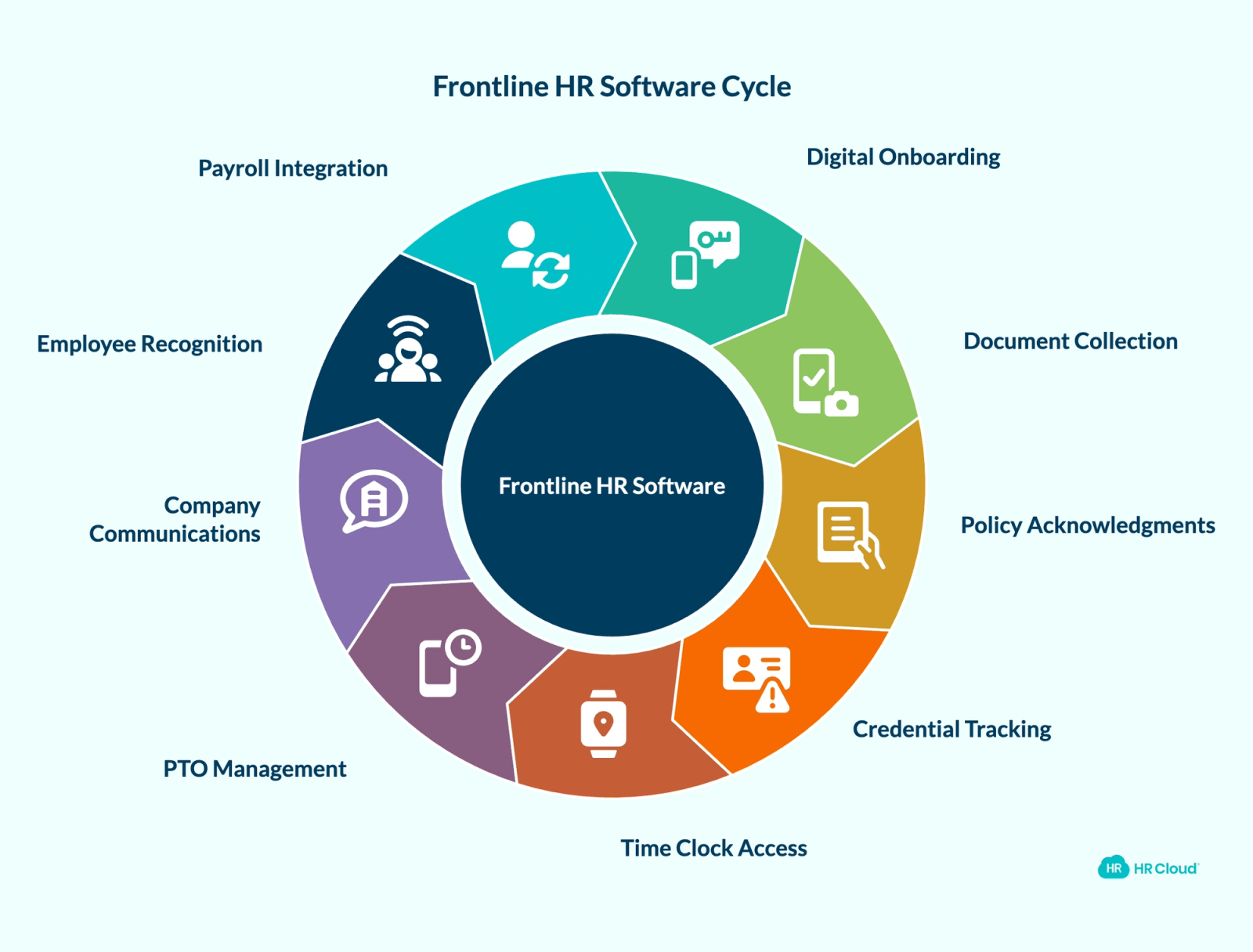
HR software for frontline workers is a mobile-first HR platform that enables deskless employees to complete HR tasks from a personal device — without a corporate email address, company-issued laptop, or IT-provisioned account.
A complete frontline HR software platform covers:
- Digital onboarding and preboarding through SMS or a mobile app
- I-9 verification, W-4 completion, and document collection from a phone camera
- Policy acknowledgments and e-signatures on mobile
- Configurable tracking of license, certification, and credential expiration through custom workflows and automated alerts
- Time clock access with geolocation restrictions for hourly workers
- PTO requests and balance visibility on mobile
- Company announcements and internal communications that reach employees during shifts
- Employee recognition and engagement tools accessible without email
- Payroll system integrations that sync data downstream after onboarding is complete
The distinction from traditional HRIS is intentional and significant. Traditional platforms centralize HR data well. They process payroll, store employee records, and manage benefits. What they rarely do is deliver that functionality in a format a nurse, welder, or retail associate can actually use on a 6-inch screen mid-shift.
Why Traditional HR Software Fails Frontline Teams
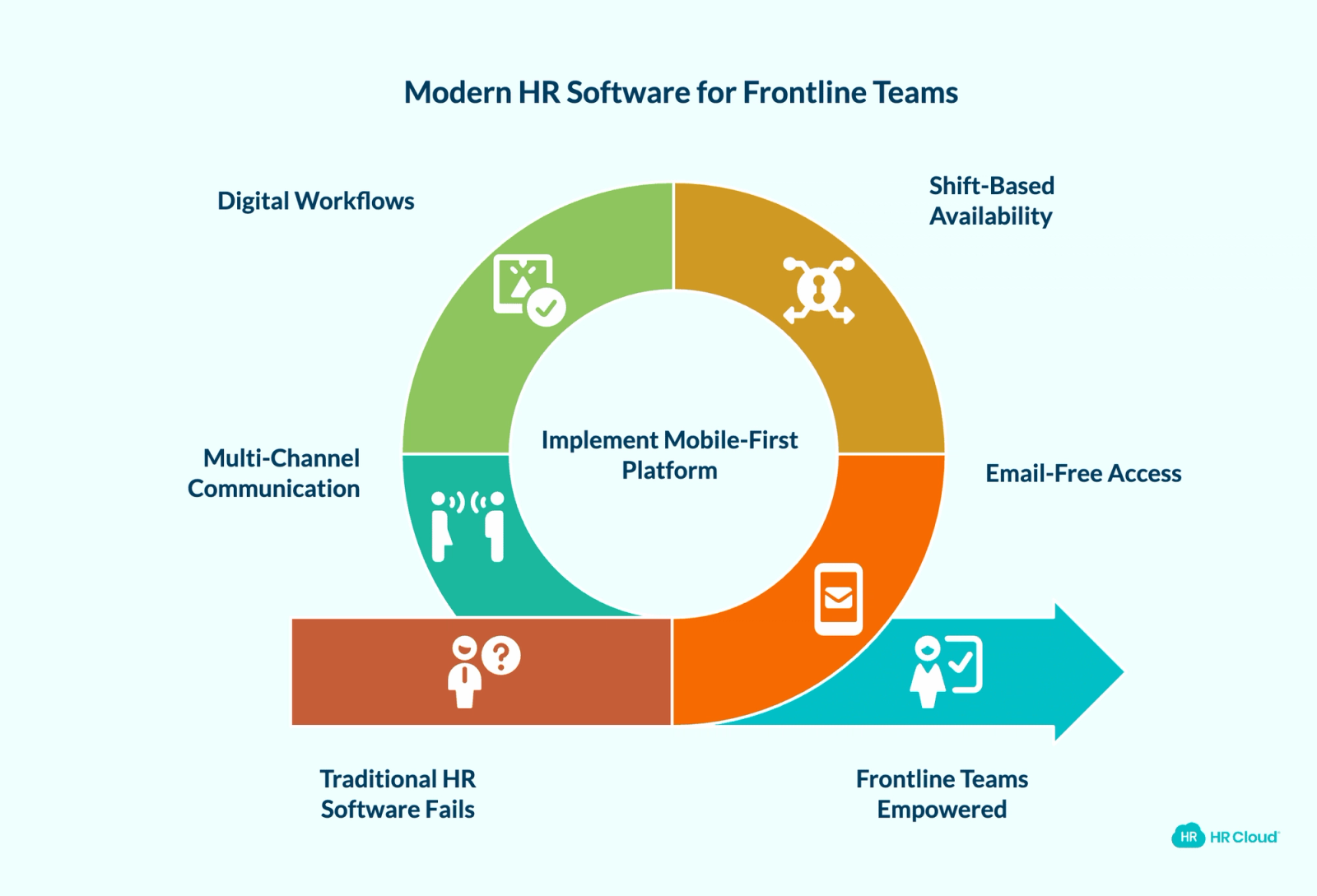
Understanding the failure mode is as important as understanding the fix.
No Corporate Email Means No Access
The majority of frontline workers do not have company email addresses. In industries like construction and food service, many never will. A platform that sends onboarding links, task reminders, and compliance notifications by email has already lost a significant portion of its intended users before they even start.
When a new hire cannot complete their I-9 or upload their certifications because the system requires a corporate login they do not have, the gap becomes a compliance liability — not just a convenience problem.
Shift-Based Work Makes Office Hours Irrelevant
Frontline employees work nights, weekends, rotating shifts, and remote job sites. HR software that assumes a Monday-to-Friday, 9-to-5 availability pattern fails employees the moment they try to access it at 10pm on a Sunday before a 6am shift.
Mobile-first platforms designed for frontline teams allow employees to complete tasks during breaks, before shifts, or at home — on any device, at any hour.
Paper Processes Create Auditable Risk
When onboarding workflows, compliance forms, licenses, and certifications live in spreadsheets, email inboxes, and filing cabinets, the audit trail disappears. HR teams cannot confirm at a glance which employees have completed required safety training, which nursing licenses expire next month, or which new hires have submitted all required documents.
Communication Does Not Reach Deskless Employees
A UKG global study of nearly 13,000 frontline workers found that employees widely report feeling underappreciated and disconnected from their organizations — with poor communication and lack of flexibility among the top drivers of turnover intent. When important updates travel through email alone, employees who do not check email — or do not have company email — are structurally excluded from the information flow. Policy changes, safety alerts, shift updates, and company announcements quietly bypass large portions of the workforce.

Frontline Workforces Need Different Tools
- Mobile-first access for frontline staff
- One hub for documents and tasks
- Fewer HR follow-ups and errors
Key Features to Look For in Frontline HR Software
Not every platform marketed as "mobile-friendly" is genuinely built for frontline teams. Here is what separates effective platforms from desktop software with a mobile skin.
SMS-Based Onboarding
This is the clearest dividing line between a platform built for frontline teams and one that is not. Effective frontline HR software sends a secure SMS invitation to a personal phone number. The new hire clicks the link, verifies identity, and completes onboarding — including I-9, W-4, direct deposit, and policy acknowledgments — entirely from their phone, without IT involvement, without a corporate email, and without requiring app installation as a prerequisite.
HR Cloud's Onboard product delivers SMS invitations through Twilio, enabling new hires to complete the full onboarding workflow from a personal device with no corporate account required.
Download your free employee onboarding checklist
Using this checklist ensures that you are not scrambling to make the new employees feel welcomed, prepared, and set up for long-term success.
Download Now
Mobile-First Design (Not Mobile-Responsive)
Mobile-responsive means a desktop website that scales to fit smaller screens. Mobile-first means the interface was designed for a 6-inch touchscreen first. The distinction matters significantly when an employee is completing a multi-page compliance form on a phone between shifts, uploading a photo of a state nursing license, or signing a policy document with a finger.
Look for platforms where every workflow — forms, signatures, document uploads, task completion — is designed for touch input, not cursor navigation. HR Cloud's mobile HR app is built specifically for this use case.
Automated Onboarding Workflows by Role, Location, and Employee Type
Frontline organizations are rarely uniform. A healthcare system onboards RNs differently than it onboards administrative staff. A manufacturing plant in Texas has different compliance requirements than one in California. A construction company onboarding a subcontractor needs different documentation than one onboarding a full-time site supervisor.
Effective employee onboarding software allows HR teams to configure onboarding workflows by role, department, location, employment type, and state — without building each one from scratch.
License and Certification Expiration Tracking
In healthcare, a nursing license that expires undetected is a regulatory event. In construction, an OSHA certification gap creates liability. In manufacturing, a forklift certification lapse affects both safety and compliance audits.
Effective frontline HR software gives HR teams the ability to configure custom tracking for licenses, certifications, and credentials tied to each employee — with automated alerts before expiration, not after. Look for platforms that allow this to be built as part of the employee record and onboarding workflow, so nothing falls through the cracks between hiring and active employment.
Time Clock Access for Hourly Teams
Frontline and hourly workers need to clock in and out, view their hours, and submit time off requests from their phones. Time clock functionality built into an HR platform removes the friction of separate systems and gives managers real-time visibility into attendance across multiple locations.
HR Cloud's Time Clock product supports geolocation-restricted clock-ins, so managers can verify employees are on-site when they clock in — a common requirement in healthcare, construction, and manufacturing.
Employee Communication That Reaches Every Shift
Frontline employees are often the last to receive company news. Announcements sent through email-only channels miss workers who do not use company email. Platforms that combine mobile push notifications, in-app news feeds, and SMS alerts ensure that a policy change, a safety update, or a company announcement reaches employees on night shifts, weekends, and remote locations.
HR Cloud's Workmates product delivers announcements with mandatory-read acknowledgment tracking — giving HR and operations leaders confirmation that critical information was received, not just sent.
Payroll and HRIS Integrations
Frontline HR software should not replace payroll systems. It should work alongside them. Look for confirmed integrations with ADP, UKG, Paylocity, Paycor, Intuit QuickBooks, and other payroll systems your organization already uses.
A well-integrated frontline HR platform completes onboarding and collects compliance documentation before employee data moves downstream into payroll — reducing duplicate data entry and ensuring new hires are set up correctly before their first paycheck processes.
HR Software by Frontline Industry
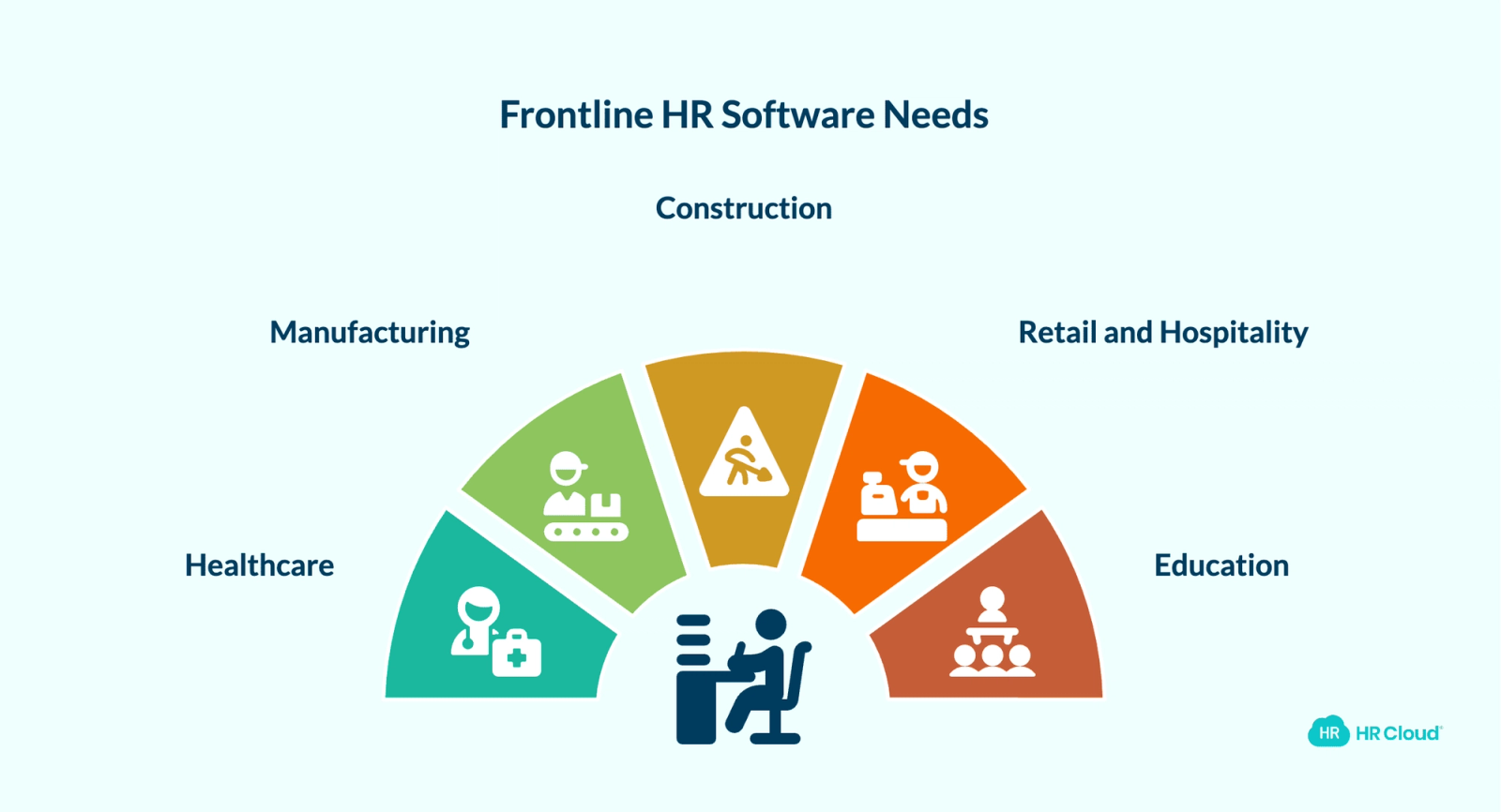
Frontline industries have materially different HR requirements. A platform that works for retail may not address the compliance depth required in healthcare. Here is what matters by industry.
Healthcare
Healthcare HR teams manage credential expiration for nursing licenses, CPR certifications, TB test results, and state-specific compliance documentation. New hire onboarding must be completed before employees can work with patients — which means delays in paperwork create operational disruptions, not just administrative inconveniences.
Healthcare-specific frontline HR software needs: configurable tracking for license and certification expiration, HIPAA-adjacent document handling, mobile forms for clinical staff who work without desktop access, and onboarding workflows that can be completed before the first scheduled shift.
HR Cloud serves healthcare staffing organizations and multi-facility health systems. Medlinks, a healthcare staffing organization, manages more than 70 onboarding workflows in HR Cloud with a 96% monthly active usage rate — a figure HR Cloud attributes to the platform's mobile-first design and SMS-based access that works without corporate email.
Manufacturing
Manufacturing frontline teams deal with OSHA compliance documentation, equipment certifications, safety acknowledgments, and multi-location hiring. Many manufacturing facilities have workers who speak English as a second language, making multi-language support a practical requirement, not a nice-to-have.
Manufacturing-specific frontline HR software needs: mobile onboarding that works without desktop access on a plant floor, multi-language form support, safety document acknowledgments, configurable tracking for equipment certifications and expiration dates, and time clock with geolocation for shift-based teams.
Construction
Construction teams are project-based, meaning the workforce composition changes regularly. Field workers are onboarded on job sites, often without access to an office or a company device. Document collection must work entirely from a personal phone.
Construction-specific frontline HR software needs: SMS-based onboarding, field-ready document upload via phone camera, safety compliance documentation, and integrations with project management platforms. HR Cloud's integration with Procore, for example, automatically exports employees from HR Cloud to Procore as soon as they are added to the system.
Retail and Hospitality
Retail teams face high-volume seasonal hiring, rapid turnover, and shift-based schedules that make standard HR processes difficult to execute. New hires need to be onboarded quickly and reached through channels they actually check — which is almost never a corporate email address.
Retail-specific frontline HR software needs: fast mobile onboarding for high volumes, employee recognition tools that reach shift workers, company communication through mobile apps, and PTO visibility for hourly teams.
Education
Education organizations manage seasonal onboarding cycles for teachers, substitute staff, paraprofessionals, and administrative hires. Many have procurement requirements that mandate paperless onboarding, electronic signatures, and documented compliance records.
Education-specific frontline HR software needs: digital I-9 and onboarding workflows, document collection without paper forms, ATS-to-onboarding handoff for approved candidates, and background check documentation storage.
How to Choose HR Software for Frontline Workers
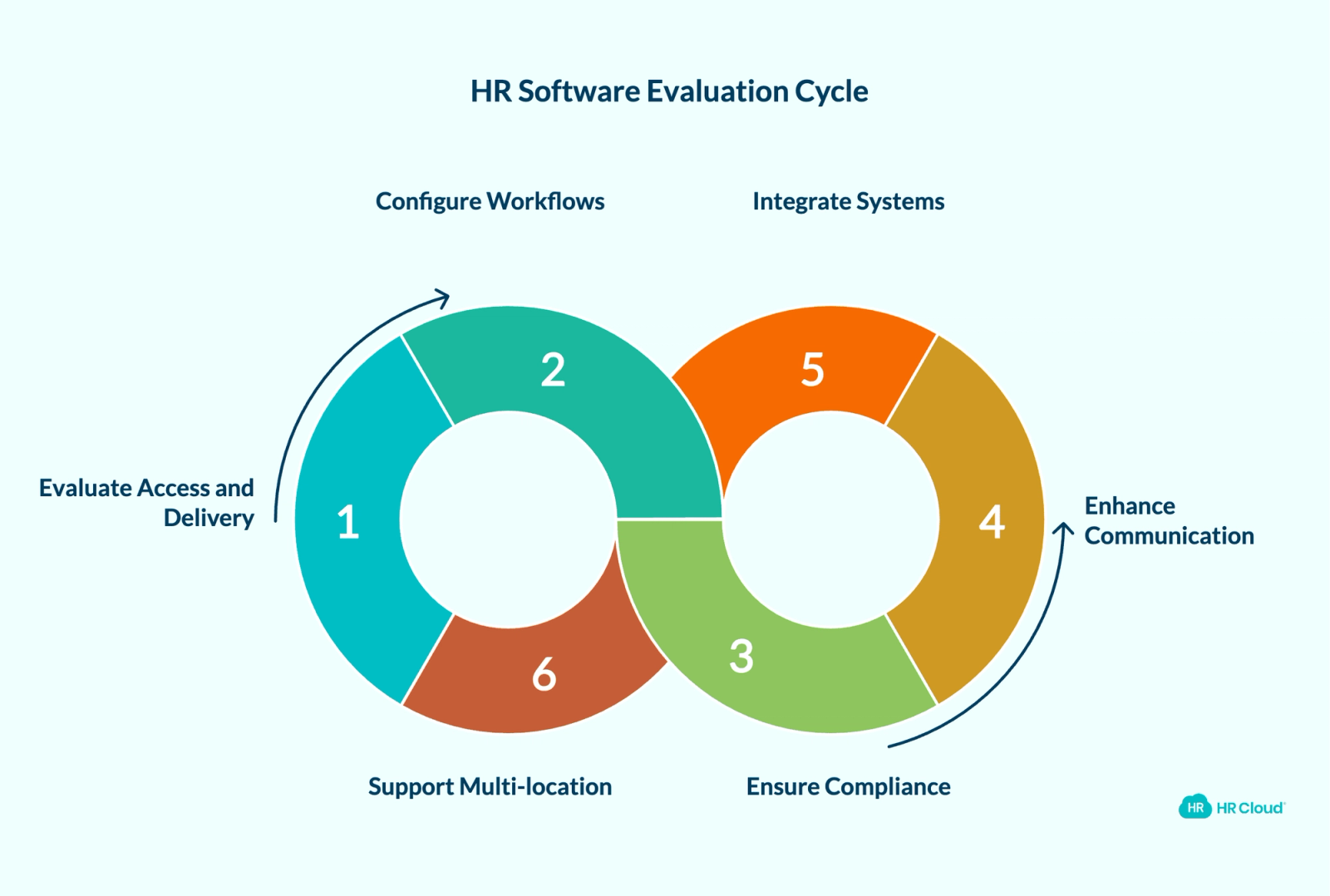
Use this checklist when evaluating platforms.
Access and delivery
- Can employees complete onboarding tasks without a corporate email address?
- Does the platform deliver tasks and reminders by SMS, not just email?
- Does the mobile experience work on a personal phone without app installation as a requirement?
- Can employees clock in, submit time off, and access pay information from a personal device?
Workflow configuration
- Can HR configure onboarding workflows by role, location, department, and employment type?
- Can the system trigger different document sets based on state or facility?
- Can HR configure custom tracking for license and certification expiration, with automated alerts?
Compliance and documentation
- Does the platform generate audit-ready I-9 records from mobile submissions?
- Can employees upload license and certification documents from a phone camera?
- Does the system track training completion automatically?
Communication and engagement
- Can the platform send company announcements to employees who do not have company email?
- Are mandatory-read acknowledgment tracking available for critical communications?
- Can employees access recognition and engagement tools from a mobile app without a company account?
Integrations
- Does the platform integrate with your existing payroll system — ADP, UKG, Paylocity, Paycor, or Intuit QuickBooks?
- Does onboarding data flow into payroll automatically after completion, without re-entry?
Multi-location support
- Can HR manage onboarding, license tracking, and communication across multiple facilities from a single system?
- Does the reporting give real-time visibility into completion status across locations?
How HR Cloud Supports Frontline Teams
HR Cloud is built specifically for organizations with large frontline or deskless workforces. The platform serves verified customers across healthcare, manufacturing, construction, education, food and beverage, retail, hospitality, and public sector.
| Product | What It Does for Frontline Teams | Best For |
|---|---|---|
| HR Cloud Onboard | SMS-first onboarding — I-9, W-4, direct deposit, policy acknowledgments, and document uploads from a personal phone. No corporate email or IT involvement required. Workflows configurable by role, location, department, and employment type. | Healthcare, manufacturing, construction, education — any team onboarding workers without company devices |
| Maya, AI Onboarding Assistant | Helps new hires answer onboarding questions and complete tasks. Reduces repetitive follow-up for HR teams from preboarding through day one. | Organizations with high new hire volume and limited HR bandwidth |
| HR Cloud Workmates | Company communications, recognition, announcements, and engagement tools via mobile app and push notifications. Reaches shift workers and deskless staff without company email. | Retail, hospitality, manufacturing — any team where email doesn't reach the floor |
| HR Cloud Time Clock | Geolocation-restricted clock-in and clock-out for hourly teams. Manager dashboards show real-time attendance across multiple locations. | Hourly and shift-based teams in construction, healthcare, and manufacturing |
| HR Cloud Time Off | Mobile access to PTO balances, time off requests, and approval status — without requiring manager involvement in every transaction. | Any frontline team where hourly workers need self-service PTO visibility |
The platform integrates with ADP, UKG, Paylocity, Paycor, Workday, Intuit, and others — allowing HR Cloud to complete onboarding and compliance documentation before employee data moves into payroll downstream.
Key Takeaways for HR Leaders
Frontline workers are the operational core of healthcare systems, manufacturing plants, construction projects, retail operations, and education institutions. They are also consistently the employees least served by standard HR technology.
The right frontline HR software does not require IT infrastructure, corporate email addresses, or desktop computers. It reaches employees through the device they already have and the channels they already use. It tracks compliance automatically, communicates across shifts, and gives HR teams real-time visibility into onboarding completion, license and certification status, and employee engagement — across every location, every shift, every role.
If your current HR platform requires a company email to onboard a new hire, your frontline team is already starting from a disadvantage. The technology exists to fix that. The question is whether your platform is actually built for the workforce you have.
Book a demo to see how HR Cloud helps frontline teams complete onboarding, track compliance, and reach every employee — from day one through their full tenure.

Struggling to Support Frontline Workers?
- Centralize onboarding, policies, and updates
- Reach deskless workers without email
- Reduce confusion from day one
Frequently Asked Questions
What is HR software for frontline workers?
HR software for frontline workers is a mobile-first human resources platform designed for employees who work without a desk, corporate laptop, or company email. It enables deskless workers — in industries like healthcare, manufacturing, construction, retail, and education — to complete onboarding, submit documents, access time tracking, request time off, receive company communications, and engage with their employer entirely from a personal mobile device. Unlike traditional HRIS platforms built for office-based staff, frontline HR software uses SMS delivery, mobile app interfaces, and simplified workflows that function without IT-provisioned accounts.
Why do frontline workers need different HR software?
Traditional HR software assumes employees have a corporate email address, a company-issued laptop, and regular access to a desktop browser. Frontline workers typically have none of these. A hospital nurse completing a 12-hour night shift, a construction crew member onboarding on a job site, or a retail associate starting a new position does not have time or access to navigate a desktop-based HR portal. Frontline HR software addresses this by delivering onboarding tasks, compliance forms, and communications through SMS and mobile apps — meeting employees where they are, not where a desktop assumes they will be.
What features should frontline HR software include?
Effective frontline HR software should include: SMS-based onboarding that works without a corporate email, mobile-first forms and e-signatures, I-9 and compliance document collection via phone camera, configurable tracking for license and certification expiration through custom workflows and automated alerts, mobile time clock with geolocation for hourly workers, PTO access from a personal device, company communication tools that reach employees on shift, employee recognition accessible without a company account, and integrations with existing payroll systems including ADP, UKG, Paylocity, and Paycor.
Which industries benefit most from frontline HR software?
Healthcare, manufacturing, construction, retail, hospitality, and education benefit most because their workforces are primarily deskless, shift-based, or field-based. Healthcare organizations need configurable license and certification tracking and HIPAA-adjacent document workflows. Manufacturing plants need OSHA compliance documentation and multi-language support. Construction companies need field-ready document collection and project management integrations. Retail and hospitality need high-volume mobile onboarding and shift-based communication. Education organizations need paperless onboarding and background check documentation management.
How does HR Cloud support frontline onboarding?
HR Cloud's Onboard product sends a secure SMS invitation to a new hire's personal phone number, enabling them to complete I-9 verification, W-4 completion, direct deposit setup, policy acknowledgments, and required document uploads without a corporate email address or IT involvement. Onboarding workflows are configurable by role, location, department, and employment type. Maya, HR Cloud's AI onboarding assistant, helps new hires answer onboarding questions and complete tasks, reducing repetitive manual follow-up for HR teams.
Can frontline HR software integrate with our existing payroll system?
Yes. Effective frontline HR software integrates with major payroll platforms rather than replacing them. HR Cloud integrates with ADP, UKG, Paylocity, Paycor, Workday, and Intuit QuickBooks, among others. The integration model is additive: HR Cloud completes onboarding workflows and collects compliance documentation, then syncs employee data downstream into payroll — eliminating duplicate data entry and reducing the time between an offer letter and a fully provisioned employee record.
About the author

Keep Reading


Like What You Hear?
We’d love to chat with you more about how HR Cloud® can support your business’s HR needs.
Book Your Free Demo