Best Human Resource Software in 2027

A new hire's start date sits in an email, a spreadsheet and a payroll screen, and no two of them agree. That gap is why HR teams shop for human resource software, and it is also why the shopping goes wrong. Teams compare feature lists when they should compare breakdowns.
The best human resource software is the one that fixes your first breakdown without adding a second. This guide sorts the choice into six buying scenarios, shows how named vendors describe themselves on their own pages, and ends with an eight-case demo test you can run on any shortlist.
HR Cloud publishes this guide and is one of the vendors in it, so we hold ourselves to a strict rule. Legal and research statistics come from sources we link. Statements about other vendors come only from those vendors' own pages. Statements about HR Cloud come from our product pages, pricing page, customer stories and help center.
We do not rank vendors. A ranked list implies one winner for every company, and the evidence does not support that. If you want a size-based list, our roundup of HR platforms by business size covers it. This guide answers a different question: which situation are you in?
Key Takeaways
- Human resource software covers several layers: the employee record, onboarding, time off, hiring, performance, engagement and payroll. No buyer needs all of them on day one, so name your first breakdown before you open a demo.
- Six scenarios drive most shortlists: leaving spreadsheets, a frontline workforce, payroll you want to keep, one platform for HR, IT and payroll, heavy hiring and onboarding volume, and an engagement gap. The scenario table below pairs each with what to require.
- Adoption decides value. SHRM reports that a 2022 Gartner survey found the average HRIS is used by only 32% of employees, so test the employee and manager experience, not only the admin screens.
- Run the same eight cases on every vendor: a manager change with an effective date, an audit trail, a bulk change, a custom report, a payroll sync, a phone-only task, an access removal and a pricing question. HR Cloud's People HRIS page shows how it handles several of them.
- Read pricing for structure, not for a number. Vendors describe pricing by headcount, features or modules, and some add costs for integrations, so ask what is included before you compare quotes.
What Counts as Human Resource Software in 2027?
Human resource software is a system that stores employee records and runs the HR work around them. Vendors and review sites use several names for it. Review sites such as G2 group this software under headings like core HR and HCM, and vendors also say HRIS and HRMS. The terms often overlap in practice.
The label matters less than the layers. Most platforms start with a system of record and add modules around it. The table shows the layers we use in this guide, what each one replaces and the question to ask about it.
| Layer | What it replaces | Question to ask a vendor |
|---|---|---|
| Employee record | Spreadsheets and paper files | Can I see one profile with documents, history and who changed what? |
| Onboarding | Email chains and paper packets | Can a new hire finish every task from a phone? |
| Time off | Shared calendars and manual balances | Does the balance follow the policy I wrote? |
| Hiring | Inbox-based recruiting | Does an accepted offer create the employee record without retyping? |
| Performance | Annual forms in documents | Who sees the review and when? |
| Engagement | Notice boards and group chats | Do deskless employees get the same message as office staff? |
| Payroll | Separate pay system | Is payroll built in, or does the platform connect to the payroll I already run? |
Payroll is the layer where vendors differ most. Some platforms bundle it, and others connect to a separate system. HR Cloud does not run payroll. It connects to the payroll you already run, so for HR Cloud the payroll row is a question about integration depth, not a missing feature.
Why this matters for HR: A feature list hides the layer you actually need. If your payroll contract runs for two more years, a platform that only makes sense with its own payroll is a poor fit however good its screens look. Naming the layer first protects you from buying a suite for one module.
Why Do So Many Human Resource Software Rollouts Stall?
Rollouts stall at the employee, not the admin. SHRM reports that a 2022 Gartner survey found the average HRIS is used by only 32% of employees. In the same article, SHRM cites a Sapient Insights Group survey in which nearly 1 in 4 organizations say new HR technology implementations fail to meet adoption expectations. The article does not state the year of that survey.
Those figures describe HR systems in general, not any vendor. They point to a test you can run: ask who will use the system and on what device. A system built around an HR desk fails when the people it serves are on a warehouse floor, a hospital unit or a job site.
For example, take a hypothetical 400-person manufacturer with three plants. If 32% of its employees use the system, about 128 people do, and the other 272 keep asking HR questions by text and in the hallway. The software exists, but the record is still kept by hand. Raising that number means shorter tasks, phone access and managers who can approve from the floor.
Customer stories show what a mobile-first rollout can look like. Veolia reports that it onboarded 10,000+ field employees through HR Cloud, with over 75% of onboarding completed on mobile and over 80% of workflows managed by HR without IT. These figures are published on HR Cloud's own story page, and they describe one customer's rollout, not a guaranteed result.
What this means for your shortlist: Put the employee experience in the first demo, not the last. Ask each vendor to complete one onboarding task on a phone, with no desktop, while you watch.
Which Human Resource Software Fits Which Buying Scenario?
Start with the scenario that sounds most like your last quarter. The table pairs each one with what to require and the vendors whose own pages speak to it. A vendor can appear in more than one row, and a row is not a ranking.
| Scenario | What breaks first | What to require | Vendors whose pages speak to it |
|---|---|---|---|
| Leaving spreadsheets | Records, documents and permissions live in too many places | One employee record, document storage, role-based access, reports | HR Cloud, BambooHR, GoCo |
| Frontline workforce | Staff have no desk, so tasks and requests happen by text | Phone-first onboarding and requests, location-specific checklists | Connecteam, HR Cloud |
| Payroll you want to keep | Data is retyped between HR and payroll | A named integration with fields, direction and frequency stated | HR Cloud |
| One platform for HR, IT and payroll | Three systems disagree on who works here | Bundled modules and a single employee record | Rippling, HiBob |
| Heavy hiring and onboarding volume | New hires wait on paperwork and reminders | Automated tasks, bulk start, e-forms, e-signatures | HR Cloud, BambooHR |
| Engagement gap | Announcements and recognition miss deskless staff | Surveys, recognition and messages that reach every location | HR Cloud, HiBob, Connecteam |
Which Human Resource Software Fits a Team Leaving Spreadsheets?
Teams in this scenario need a clean employee record before anything else. The test is simple: can HR open one profile and see documents, history and permissions together? If not, the other modules sit on a weak base.
BambooHR describes its product as a complete HR platform covering HR data and reporting, payroll, benefits, hiring, onboarding and performance. Its FAQ says a one-person HR department can use it. GoCo says it serves small and mid-sized businesses and lists onboarding, benefits administration, payroll and compliance.
HR Cloud's People HRIS page lists a single employee record with profiles, history, documents and permissions in one place. It also lists role-based access, custom fields per profile, document storage with version tracking and automated org charts. HR Cloud's pricing page says People HRIS is included in its Onboard plan.
What to ask for in the demo:
- A profile with documents attached and permissions set by role
- A change to one field, then the history of that change
- A report built from the fields you use, exported to a file
HR Cloud's help center shows the last two. Its audit article says the History Log's Audit view shows who made each change and when. The article does not say whether the log shows old and new values, so ask. Its reports article says a report starts as a custom view and exports to CSV, PDF or Excel.
Which Human Resource Software Fits a Frontline, Mobile-First Workforce?
Frontline teams fail on access, not on features. A nurse, a driver or a line worker will not log in to a desktop portal for a five-minute task. The software has to meet them on a phone.
Connecteam describes itself as an employee management app built for frontline teams. Its page lists a time clock, scheduling, forms and checklists, chat, hiring and onboarding, training and time off. It also says teams under 10 employees get full access free, which is the vendor's own claim.
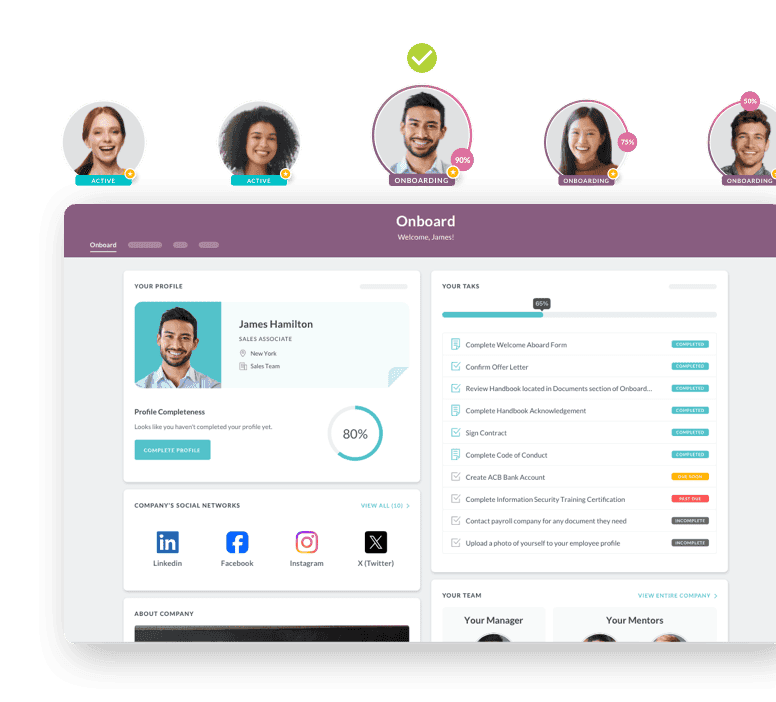
HR Cloud's healthcare page describes mobile-first onboarding for field and frontline staff. It says new hires can complete I-9s, upload license photos and sign acknowledgments from a smartphone. It also lists role- and location-specific checklists. The Veolia figures above are one customer's version of the same idea.
Two limits are worth knowing. HR Cloud's help center says its Custom Mobile App, a branded version with your name, logo and colors, is an add-on with an extra charge. The same article does not describe what employees can do in the standard mobile app, so ask for that in the demo.
Why this matters on the floor: A frontline workforce measures software by taps. If a task needs a laptop, it waits for a shift change. Count the steps for one request on a phone and use that count to compare vendors.
Which Human Resource Software Works Next to the Payroll You Already Run?
Many teams do not want to replace payroll. Their payroll system works, their accountant knows it and their contract has time left. They want an HR layer that talks to it without retyping.
HR Cloud does not run payroll. It connects to the payroll you already run. Its integrations page lists connections to ADP, UKG Pro, UKG Ready, Paylocity, Paycor and Dayforce, among others.
The ADP connection is the one with documented detail. HR Cloud's ADP Workforce Now article says it imports employee and company information, plus custom fields from the Personal and Employment sections. It exports state tax forms, W4 forms, custom fields and employee records created in ADP when the Add New Hire to ADP task is completed. The article says the integration does not carry all data and forms from the HR Cloud profile, and it does not say how often syncs run.
That last gap is the point of this scenario. Ask every vendor, including us, for three things in writing:
- Which fields move, in which direction
- How often the sync runs
- What a person must do by hand, such as completing a task before an export
Platforms with built-in payroll, such as BambooHR and GoCo, describe payroll as part of the product. If you keep your own payroll, ask whether their HR modules work well without it.
Which Human Resource Software Fits One Platform for HR, IT and Payroll?
Some buyers want fewer systems, not better connections. Three tools that each hold a copy of the employee record produce three versions of who works here. One platform removes the copies.
Rippling calls its product HR management software and lists HRIS, recruiting, performance, benefits administration and time and attendance. It also lists payroll, global payroll, identity and access, and device management. Its page cites 650+ integrations, which is the vendor's own figure.
HiBob presents itself as an all-in-one HR, payroll and finance platform. It lists solutions by company size from startup to enterprise, and its page includes UK and US payroll. It reports 5,500+ companies on its platform, which is also the vendor's own figure.
The tradeoff to test is flexibility. A bundled platform is easiest when you adopt it whole. If you plan to keep your own payroll, a bundle that assumes its own payroll may leave you paying for a layer you do not use. Ask for the price with and without it.
Pro tip: Count the systems that hold an employee record today. If the answer is two or fewer and they already connect, a bundle may add cost without removing a breakdown.
Which Human Resource Software Fits Heavy Hiring and Onboarding Volume?
High-volume hiring breaks on paperwork and reminders. A hundred starts in a month means a hundred sets of forms, document requests and manager tasks. Automation matters more than any single feature.
HR Cloud's help center describes the pieces. A Smartflow assigns modules to employees when conditions are met, triggered by an employment status change, a job detail update or a fixed date. Assignment rules can filter by department, location, manager, position and other fields. Ask how quickly assignments reach a new hire after a trigger fires, and get the answer in writing.
A bulk onboarding article says an admin can select employees in the People tab and choose Bulk Start Onboarding. It says bulk onboarding can be started once for employees whose onboarding has never been triggered. For more than 100 employees, the admin repeats the process for the rest.
Its Maya assistant walks new hires through tasks one at a time and refers questions it cannot answer to an HR administrator. It must be enabled and turned on in AI settings first. BambooHR's page lists hiring and onboarding, including applicant tracking and onboarding tasks, for teams that want recruiting and onboarding in the same product.
For example, a hypothetical staffing firm that starts 60 people in one week needs the first day to finish itself. Each hire should receive the right checklist for role and location, with reminders going out and a manager task attached, without HR clicking through each record.
Which Human Resource Software Fits an Engagement Gap?
Engagement is a gap when announcements, recognition and surveys do not reach deskless staff. A noticeboard in the break room does not reach a field crew. A group chat reaches them unevenly.
HR Cloud's pricing page says its Full Suite plan adds Workmates engagement features: recognition, announcements, channels, surveys and digital signage. Employee Engagement is also an optional add-on for the Onboard and Growth plans. HiBob lists AI-powered company surveys on its page, and Connecteam lists chat, updates, and recognition and rewards.
The test here is reach, not features. Ask each vendor to send one announcement and show who received it, on what device, and how a deskless employee without a work email would see it. Engagement tools that depend on a work email address miss the people you most want to reach.
How Do You Test Human Resource Software in a Demo?
A demo is a sales performance unless you control the script. Send the script ahead of time, ask each vendor to run the same eight cases live, and score what you see, not what the slides promise. Cases that need a backstage trick are a finding in themselves.
| Case | What you ask the vendor to do | What a good answer shows |
|---|---|---|
| 1. Manager change with an effective date | Move one employee to a new manager starting next month | The org chart today and next month both display correctly |
| 2. Audit trail | Edit a pay-related or job field, then open the change history | Who changed it, when, and what the old and new values were |
| 3. Bulk change | Update one field for 25 employees at once | One action, a preview and a record of what changed |
| 4. Custom report | Build a report from the fields you actually use and export it | A usable file in a format your finance team opens |
| 5. Payroll sync | Walk through the field map for the payroll you run | Fields, direction, frequency and manual steps stated in writing |
| 6. Phone-only task | Finish a new hire task from a phone, with no laptop | A short path with a signature or upload completed on the device |
| 7. Access removal | Remove a departing manager's access and reassign their approvals | Approvals reroute, and the history stays intact |
| 8. Pricing question | Ask what is included and what costs extra | A structure you can write down, including implementation and add-ons |
Score each case from 0 to 2: 0 for "not available or not shown," 1 for "available with a workaround or a manual step," and 2 for "shown live without help." A tool that scores 2 on cases 1 through 4 and 0 on case 6 is an office system. A tool that scores 2 on case 6 and 0 on case 2 is a frontline tool with weak records. Your scenario decides which score matters more.
Three cases need extra care because vendors tend to answer them with a promise instead of a screen.
First, the audit trail. HR Cloud's help center says the Audit view in a profile's History Log shows who made each change and when. It does not say whether the old and new values appear. We would rather you ask us that in the demo than assume. The same question belongs in every other vendor's demo, because an audit log that records only the fact of a change is much less useful in a dispute.
Second, the payroll sync. Ask for the field map in writing. A verbal "it connects" tells you nothing about which fields move or what a person must click first. HR Cloud's ADP article, covered earlier, is an example of the level of detail to ask for, along with the gaps it leaves.
Third, pricing. HR Cloud prices through an annual license by headcount band, with no per-seat fees. Pricing is by quote only, and the company offers a personalized demo, not a free trial. Its pricing page lists three plans: Onboard, Growth and Full Suite. Setup, configuration, data import, training and support are included in the license. Those are the questions to ask every vendor: how is it priced, what is included, and what costs extra.

Ready to pass your next audit—without the stress?
See how you can simplify compliance and eliminate gaps before they become problems.
Book Your Free Demo
Why this matters for budget: A pricing structure you cannot write on one line will surprise you in year two. Write each vendor's structure down in the same format before you compare any total.
Where Does HR Cloud Fit, and Where Do Others Fit Better?
HR Cloud fits best when your workforce is frontline or mobile, you want to keep the payroll you already run, and onboarding is your biggest breakdown. It is a weaker fit when you want payroll, IT and device management inside the same product.
Here is the plain version of that tradeoff, using each vendor's own pages.
| If this describes you | Look hard at | Why |
|---|---|---|
| You run payroll you like and need an HR layer on top | HR Cloud | It connects to the payroll you already run and lists named integrations |
| Your team has no desks and works from phones | HR Cloud, Connecteam | Both describe mobile-first or frontline-first products |
| You want HR, payroll and IT in one system | Rippling, HiBob | Both list payroll and a wider platform on their pages |
| You are a small team that wants HR and payroll together | BambooHR, GoCo | Both describe payroll as part of the product |
HR Cloud serves 760+ organizations and reports a 6-week go-live. Veolia is one customer example: its story page reports 10,000+ field employees onboarded, over 75% of onboarding done on mobile and over 80% of workflows managed by HR without IT. Those figures come from HR Cloud's own story page, not an independent study, and they are not a promise for your company.
We will not tell you HR Cloud is the right answer for everyone. If your payroll contract is ending and you want one vendor for pay, benefits and devices, test Rippling or HiBob first. If you run a small office team and want payroll in the same product from day one, test BambooHR or GoCo. If you have a frontline workforce and a payroll system you plan to keep, put HR Cloud on the shortlist and run the eight cases.
Pro tip: Ask each vendor for a reference customer with your headcount and workforce type, not just a logo. A reference from a similar business tells you more than any feature page.
What Should You Do in the Next 30 Days?
Treat the next 30 days as a short project with four steps and one decision. The goal is a shortlist of two or three vendors, scored on the same eight cases, with pricing structures written down.
- Name your first breakdown in one sentence. Use the scenario table above and pick the row that matches your last quarter, not your five-year plan. This takes about an hour.
- Write down your constraints. List your payroll system and contract end date, your headcount, how many employees work without a desk, and the systems that must connect. This takes about half a day.
- Pick two or three vendors from the scenario row. Read each vendor's own pages and note anything you cannot verify. Send the eight-case script to each one before the demo.
- Run the demos in the same week. Score every case from 0 to 2 while it happens, and ask for the payroll field map and the pricing structure in writing.
- Ask for one reference customer per vendor with a similar workforce, and call them. Ask what they wish they had tested.
At the end, add up the scores, weigh the cases that match your scenario twice, and decide. If two vendors tie, choose the one whose pricing structure you can explain to your finance lead in one sentence.
For a size-based comparison to read alongside this guide, see our roundup of top HR software platforms and our guide to HR software for startups under 50 employees.
Why this matters for your calendar: A rushed purchase usually repeats the breakdown it was meant to fix. Four demos in one week with one script gives you comparable evidence without a six-month project.
What Is the Best Human Resource Software for Your Team?
The best human resource software is the one that fixes your first breakdown, passes your eight cases and has a pricing structure you understand. For a team with a frontline workforce and payroll it plans to keep, that points to an HR layer that connects to payroll, such as HR Cloud. For a team that wants one system for HR, payroll and IT, it points to a bundle. For a small office team, it may point to an all-in-one tool with payroll built in.
Choosing human resource software well comes down to three habits: name the breakdown first, test the employee experience early, and write down the pricing structure before you compare totals. Adoption is the number to protect, because a system that only HR uses leaves the rest of the record in text messages.
Ready to see how HR Cloud handles the eight cases? Book a demo and bring this script.
Discover how our HR solutions streamline onboarding, boost employee engagement, and simplify HR management
Book a DemoFAQ
What is human resource software?
Human resource software stores employee records and runs HR work around them, such as onboarding, time off, hiring, performance and engagement. Some platforms include payroll, and others connect to a separate payroll system. Vendors also call it HRIS, core HR, HCM or HRMS, and the labels overlap in practice.
What is the difference between an HRIS, an HRMS and an HCM?
The terms overlap, and vendors use them differently. An HRIS usually means the employee record plus core HR tasks. HRMS and HCM often add talent and workforce features. Ignore the label and ask each vendor which layers it covers: record, onboarding, time off, hiring, performance, engagement and payroll.
How much does human resource software cost?
Pricing varies by vendor and is often by headcount, features or modules. HR Cloud prices through an annual license by headcount band with no per-seat fees, by quote only. Setup, configuration, data import, training and support are included. Ask every vendor what is included and what costs extra before comparing totals.
How long does it take to implement human resource software?
It depends on the vendor, your data and your integrations. HR Cloud reports a 6-week go-live. Ask any vendor for a written timeline that names who does what each week, including data import and payroll mapping, so you can plan around real dates.
Does HR Cloud replace my payroll system?
No. HR Cloud does not run payroll. It connects to the payroll you already run, and its integrations page lists named payroll connections. Before you sign, ask for the field map in writing: which fields move, in which direction, how often, and what a person must do by hand.
Can human resource software work for employees without desks?
Yes, if it is built for phones. Test it by asking each vendor to complete one new hire task on a phone with no laptop. HR Cloud and Connecteam both describe frontline or mobile-first products, so include them in a frontline shortlist and compare the number of steps for the same task.
How do I choose between an all-in-one platform and an HR layer?
Count the systems that hold an employee record today. If payroll is locked in for years or already connects well, an HR layer avoids paying for a layer you do not use. If you run three disconnected systems and want one record, an all-in-one platform removes the copies. Ask for pricing with and without payroll.
How do I get employees to actually use new HR software?
Start with the tasks employees do most, such as onboarding steps and time off, and make them possible from a phone. SHRM reports a 2022 Gartner survey found average HRIS use of 32% of employees, so plan training and manager support early. Measure usage monthly after launch.
About the author

Keep Reading


Like What You Hear?
We’d love to chat with you more about how HR Cloud® can support your business’s HR needs.
Book Your Free Demo