How to Build an HR Tech Stack That Scales: A 2026 Guide for Growing Companies

You didn't build a broken HR tech stack on purpose. You added an ATS when hiring picked up, pulled in an onboarding tool when the spreadsheet process collapsed, and bolted on a time tracking app because payroll demanded it. Now you're managing five or six disconnected systems, manually reconciling data between them, and spending more time maintaining tools than actually supporting your people.
Here's the part most consolidation guides skip: the majority of that damage isn't happening in your headquarters. It's happening on a construction site in Phoenix when a hiring manager can't open your ATS on a phone. It's happening at a healthcare facility at 6 a.m. when a new nurse shows up and HR doesn't have her I-9 complete. It's happening at a retail distribution center when a shift worker's timesheet doesn't match payroll and nobody catches it until after the pay period closes. Most HR tech stacks were designed around office employees who check email, log into systems, and complete tasks on schedule. Growing companies with hourly, mobile, field-based, or multi-location teams need workflows built around how those employees actually work — and that's a different problem entirely.
This guide walks you through how to assess your HR tech stack at each stage of growth, what signals tell you it's time to consolidate, and how to evaluate and implement a unified platform without losing momentum.
Key Takeaways
- A fragmented HR tech stack is manageable at 50 employees and actively harmful at 300+. The inflection point isn't size alone — it's when manual reconciliation and inconsistent processes become operational risk.
- Most HR tech stacks fail not because of bad tools, but because those tools were built for office-based workflows. If your workforce is hourly, field-based, or spread across locations, the gap between policy and execution is where the real cost lives.
- The five core layers of a complete HR tech stack are: HRIS/employee records, recruiting, onboarding, time tracking, and performance and engagement. Gaps in any layer compound across the others.
- According to Brandon Hall Group research, companies with structured onboarding programs see up to 82% higher new hire retention — one of the most direct payoffs of a connected HR tech stack.
- Use the Fragmentation Signal Scorecard below to self-diagnose. If three or more signals apply today, the cost of staying fragmented is almost certainly higher than the cost of switching. Use HR Cloud's Cost of Employee Turnover Calculator to put a number on it.
Why the Same HR Tech Stack That Works at 50 Employees Fails at 500
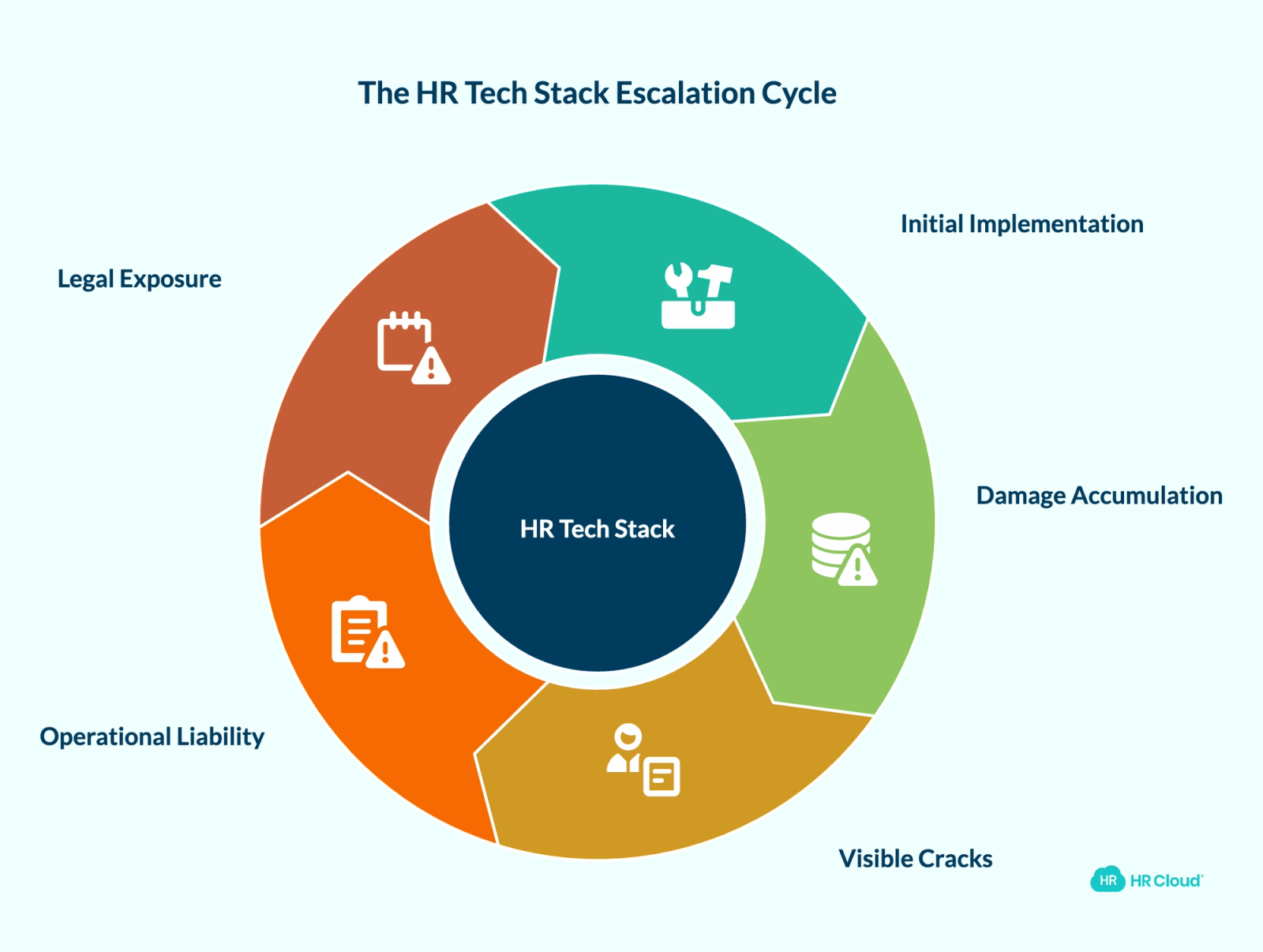
Most HR leaders don't set out to build a disjointed tech stack. They make rational decisions under pressure: a fast hire here, a compliance need there, a manager requesting a performance tool that "only takes an afternoon to set up." Point solutions solve immediate problems. The damage accumulates quietly.
At 50 employees, a handful of unconnected tools works fine. Hiring is infrequent. Onboarding is manageable. One HR generalist can manually reconcile data across systems without too much pain.
At 300 employees, the cracks become visible. HR spends hours re-entering data between systems. New hire onboarding is inconsistent depending on which team member runs the process that week. Managers can't pull answers without going through HR. Reporting requires pulling from three or four sources and reconciling manually — a task that takes days instead of minutes.
At 1,000 employees, a fragmented stack is an operational liability. Compliance gaps emerge because records aren't current across systems. Turnover climbs, partly because the employee experience feels disjointed from day one — and in industries like healthcare and construction, where credential tracking and shift compliance are non-negotiable, a broken stack isn't just inefficient. It's a legal exposure.
The problem isn't the individual tools. It's that they were never designed to work together. Every integration is a potential failure point. Every data sync is a chance for something to go wrong at exactly the moment your team can least afford it. For a detailed breakdown of what manual processes actually cost in hours and dollars, see HR Cloud's analysis of the real cost of manual HR processes.
The 5 Functional Layers Every HR Tech Stack Must Cover
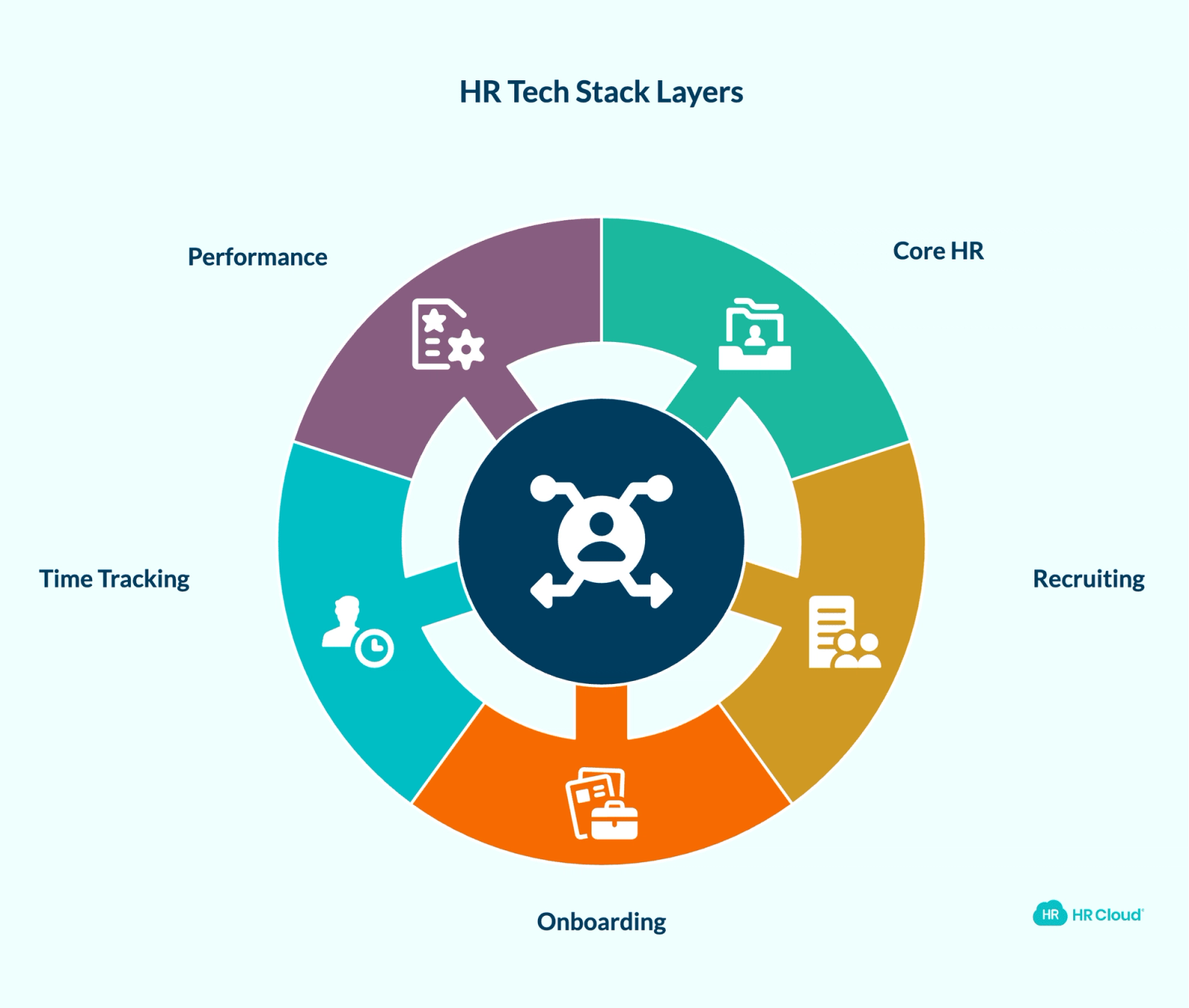
Understanding what your stack needs to do is more important than knowing which tools to buy. Most fragmentation problems trace back to gaps or disconnects between these five layers — not bad software selection.
Layer 1: Core HR and Employee Records (HRIS)
This is the foundation everything else depends on. Your HRIS should be the single source of truth for headcount, job history, compensation, org structure, and compliance records. When that data is scattered across a payroll system, a spreadsheet, and a separate HR platform that sync on a delay, every downstream process inherits the errors.
For multi-location companies — construction firms, healthcare systems, retail chains — this is especially acute. A nurse whose certification renewal isn't tracked in a central system creates compliance exposure. A field worker whose termination isn't reflected in payroll creates cost. Getting Layer 1 right doesn't just improve HR operations; it makes every other system in your stack accurate by default.
Why HR leaders feel this first: When records are fragmented, even basic decisions — which departments are overstaffed, whether a termination was properly documented, who's due for a 90-day review — require manual detective work instead of a 30-second report. For more on how HRIS, HRMS, and HCM differ in practice, see HR Cloud's HRIS vs. HRMS breakdown.
HR Cloud's HRIS platform centralizes employee records and connects directly to onboarding, time tracking, and performance — so data entered once is accurate everywhere it needs to be.
Layer 2: Recruiting and Hiring (ATS)
Your applicant tracking system manages job postings, candidate pipelines, interview scheduling, and offer letters. At 200+ employees hiring continuously, recruiting tools need to handle volume without becoming administrative bottlenecks.
Mobile access matters more here than most HR leaders expect. In healthcare, construction, manufacturing, and retail, hiring managers are on floors and job sites — not at desks. If your ATS requires a laptop to review candidates or advance a pipeline stage, response times slow and candidates drop. That's a recruiting problem that originates with a technology choice.
Key integration requirement: New hire data should flow directly from your ATS into your HRIS the moment an offer is accepted — not after a manual entry step that adds lag and introduces errors before the employee's first day. HR Cloud's Recruit ATS connects directly to the HRIS so that a candidate record created during hiring becomes the employee record automatically at offer acceptance, with no duplicate entry.


Layer 3: Onboarding
Onboarding is where compliance requirements are most concentrated and where first impressions are set simultaneously. I-9 verification, tax forms, policy acknowledgments, credential submissions, equipment requests, and system access provisioning all need to happen in a coordinated, documented sequence — often before Day 1, and often for employees who won't be sitting at a desk to complete them.
According to Brandon Hall Group research, companies with structured onboarding programs see up to 82% higher new hire retention. Poor onboarding is consistently one of the most expensive retention failures in the first year — and for industries with high baseline turnover, the compounding effect is significant.
When onboarding is split across email checklists, paper forms, and a disconnected portal, new hires feel the friction immediately. The nurse who shows up on day one without complete credentials. The warehouse associate who waits two hours while HR tracks down an IT login. The construction worker whose first paycheck is wrong because timesheet data didn't sync. These aren't edge cases — they're what manual onboarding looks like at scale. For a full walkthrough of how automation eliminates those bottlenecks, see HR Cloud's guide to employee onboarding automation.
HR Cloud's employee onboarding software helps manage onboarding workflows from pre-boarding through early check-ins, with I-9 and E-Verify support and a direct connection to your HRIS. HR teams at healthcare organizations like Team Select Home Care and construction companies like Installed Building Products use it to run consistent onboarding across distributed locations.
Why this matters in dollars: If your onboarding process is still manual, the retention cost is calculable. Use HR Cloud's Cost of Employee Turnover Calculator to run the numbers for your headcount and average salary — and see the real cost of employee turnover broken down by role and industry.
Layer 4: Time Tracking and Scheduling
For hourly workforces in healthcare, manufacturing, retail, and construction, time tracking and shift planning are non-negotiable. Errors here create payroll problems, wage and hour compliance exposure, and employees who notice immediately when their check doesn't match what they worked.
A field crew supervisor who submits timesheets by text. A retail associate whose shift swap isn't captured before payroll closes. A home health aide whose travel time classification creates overtime liability. These are the real time tracking problems at growing companies — and they require a system that works where employees actually are, not just where HR sits.
This layer must connect directly to payroll. If time tracking data requires a manual export and re-entry into a separate system every pay period, you're introducing risk at the most time-pressured moment in your HR cycle.
Key integration requirement: Time tracking data should flow to payroll where configured, with discrepancies flagged before a pay period closes — not surfaced after the fact when a correction is already required.
Layer 5: Performance and Engagement
Performance reviews, goal tracking, pulse surveys, and recognition programs belong in your stack as active tools managers use — not annual exercises that HR administers in Q4 and nobody looks at until review season.
This layer is consistently the last to get attention in a growing company. It's also where the most expensive problems hide longest. By the time turnover spikes in a department, the engagement signals were readable months earlier — but only if someone was looking. For growing companies with frontline workforces, this layer is also where manager accountability lives. A retail district manager overseeing 12 locations can't track team health without visibility tools built into the HR stack. See how HR Cloud approaches performance management for growing teams for a practical view of what this layer looks like when it's working.
The Fragmentation Signal Scorecard: When to Consolidate
Not every company needs to consolidate immediately. But there are clear signals that your current stack is costing more than it saves. Use this scorecard to assess your situation honestly — one signal at a time.
| Fragmentation Signal | Your Situation | Risk Level |
|---|---|---|
| HR team spends 5+ hours/week re-entering data between systems | Yes / No | High |
| Reporting requires pulling from 3+ sources manually | Yes / No | High |
| New hire onboarding varies based on who runs the process | Yes / No | High |
| Managers can't self-serve basic information (headcount, PTO balances) | Yes / No | Medium |
| You've had compliance gaps or near-misses due to outdated records | Yes / No | Critical |
| Headcount is growing faster than your current tools can handle | Yes / No | High |
| IT is managing integrations that break regularly | Yes / No | Medium |
| You can't generate a real-time headcount or turnover report in under 5 minutes | Yes / No | Medium |
Scoring guide:
- 0–2 signals: Your stack may be working. Revisit in 6 months or at your next hiring ramp.
- 3–4 signals: You're absorbing preventable operational costs. Start evaluation now.
- 5+ signals: The cost of staying fragmented exceeds the cost of switching. Act within the next quarter.
According to the Torii 2025 SaaS Benchmark Report, 61% of SaaS applications in the average organization are inactive — carrying paid licenses with no active users in the past 30 days. Tool accumulation without integration isn't a strategy. It's a budget leak with a compliance tail.
There's a subtler problem the scorecard above doesn't fully capture: fragmented stacks create operational blind spots that leadership doesn't see until the metrics are already moving. A location manager who stops completing onboarding tasks in a disconnected portal. A department whose engagement scores have been declining for two quarters but whose data lives in a survey tool nobody looks at between annual reviews. A credential renewal that expires without a flag because the system that tracks it doesn't talk to the system that manages scheduling. These aren't visible failures — they're silent gaps that surface as turnover spikes, audit findings, or payroll corrections after the fact. That's what fragmentation actually costs: not just time, but the decision window between when a problem begins and when leadership has enough visibility to act on it.
How to Evaluate a Unified HR Platform: 6 Criteria That Actually Predict Success
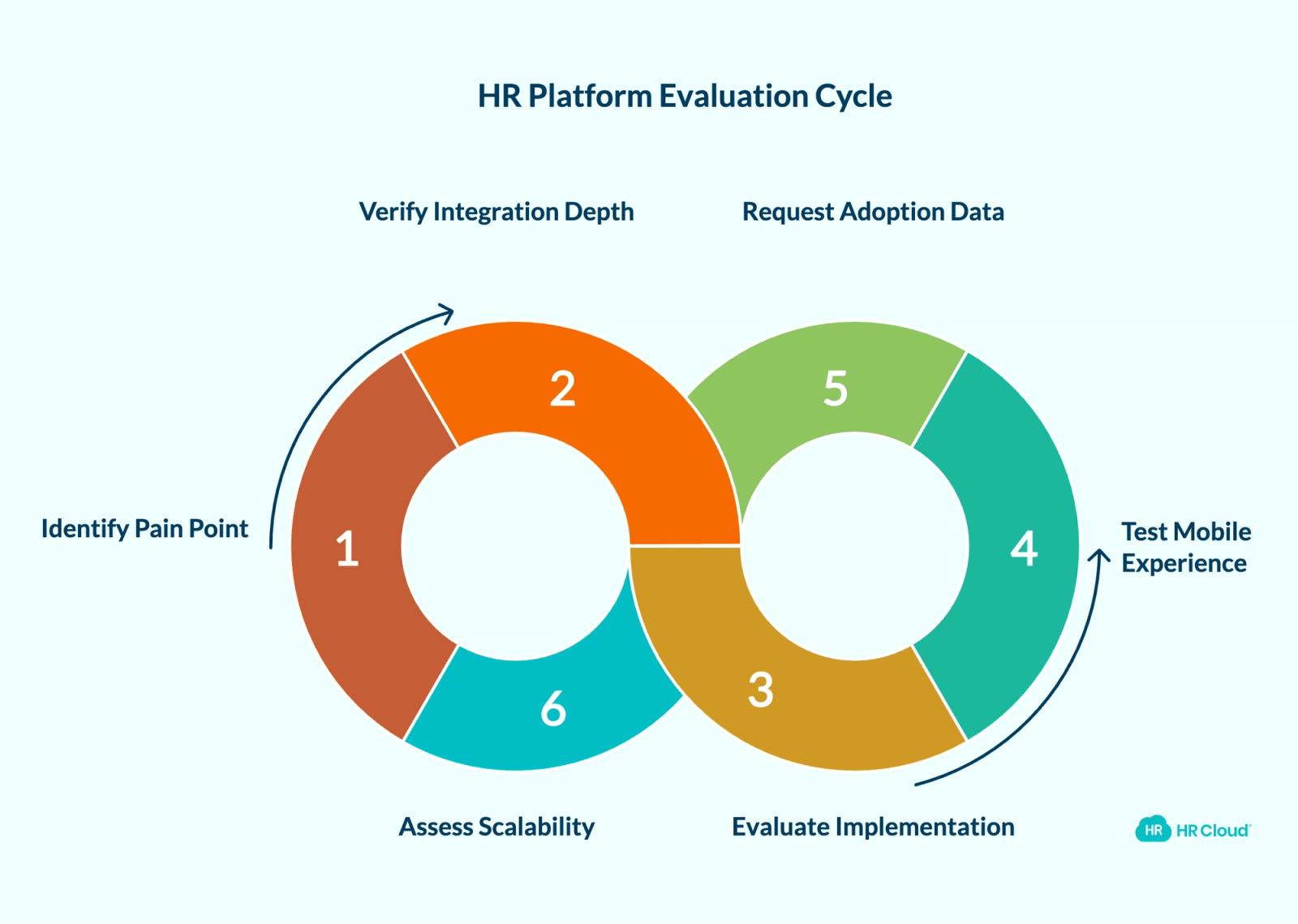
When you're ready to evaluate options, the feature checklist matters less than whether the platform was built for organizations that look like yours — in industry, workforce type, and growth trajectory.
1. Start with Your Biggest Operational Pain Point
Don't try to solve everything at once. Identify the one area where your current stack causes the most damage — slow hiring, inconsistent onboarding, manual time tracking errors, compliance gaps — and make sure any platform you evaluate handles that area demonstrably well. If your biggest problem is onboarding inconsistency across locations, a platform that solves payroll integration elegantly but requires managers to still chase paper forms hasn't solved your problem. Start there, prove the value, then expand.
2. Verify Integration Depth, Not Just Integration Existence
Most platforms claim to integrate with everything. What matters is how deep those integrations go. Does data sync automatically or does someone trigger it? Does it sync in real time or on a 24-hour delay? Can you connect to your existing payroll provider, SSO system, and communication tools without custom development?
Pro tip: Ask the vendor to demo a complete hire-to-payroll data flow live — from an accepted offer in the ATS through time tracking to payroll. If they can't show that sequence without switching screens, the integration is shallower than they're describing.
3. Ask About Implementation Timeline and Ongoing Support
Enterprise HR software has a well-earned reputation for implementations that run 12 to 18 months and consume far more internal resources than the original estimate. Ask vendors for the average implementation timeline for organizations of your size — not their fastest or most complex case. Ask what post-launch support looks like at 30, 60, and 90 days. Most HR implementations fail quietly after go-live — when managers stop completing tasks, frontline employees stop logging in, and HR loses visibility again. The go-live date is a milestone, not a finish line.
4. Test the Mobile Experience on an Actual Device
If any portion of your workforce is distributed, field-based, or hourly, mobile access is the platform — not a feature. A screenshot during a demo is not a usability test. Put the mobile experience in front of someone who represents your frontline workforce and watch what happens. Adoption for hourly and field teams is almost entirely determined by whether the mobile experience works the way they work.
5. Ask for Adoption Data from Similar Customers
A platform your team doesn't use is operationally worse than no platform at all. Ask vendors for adoption rate data from customers of similar size, industry, and workforce type. Check G2 and Capterra for recurring friction patterns in reviews from users two or more years post-implementation — that's when real usage behavior shows up, not launch enthusiasm.
6. Evaluate Whether It Scales to Your Three-Year Headcount
Your HR tech stack needs to support your organization at 500 employees and again at 2,000. Ask specifically how the platform handles multi-location management, credential tracking at scale, and workforce complexity if your growth involves new geographies or new employee classifications.
What a Consolidated HR Tech Stack Looks Like in Practice
The following scenario illustrates the operational pattern that plays out across industries when a growing company moves from a fragmented stack to a unified one. The specific outcomes here represent the typical patterns described across consolidation conversations — not a single verified customer case.
A multi-location company in a frontline industry running five separate systems — a standalone ATS, a disconnected onboarding portal, a time tracking app that exports to payroll manually, and performance reviews in spreadsheets — faces a predictable set of problems. New hire data gets entered multiple times across systems before a first paycheck is issued. Onboarding completion varies significantly by location, depending on which manager is running the process. Compliance documentation is scattered, surfacing as a problem only when an audit arrives. Reporting on something as basic as current headcount requires pulling from three sources and reconciling manually.
When those systems are replaced with a unified platform, data entered at the point of hire can flow through onboarding, into the HRIS, and connect to time tracking and payroll — significantly reducing manual re-entry. Onboarding completion becomes consistent across locations because the process is standardized and workflow-driven, not dependent on individual managers remembering the steps. Compliance documentation is centralized and current. A headcount report takes minutes, not a half-day.
| Function | Fragmented Stack | Consolidated Stack |
|---|---|---|
| Employee records | Spreadsheet + payroll system | Single HRIS, always current |
| Recruiting | Standalone ATS, manual status updates | Integrated ATS, syncs to HRIS at offer |
| Onboarding | Email checklists, paper forms | Structured workflows, e-signatures, compliance tracking |
| Time tracking | Separate app, manual payroll export | Integrated, can sync to payroll where configured |
| Performance reviews | Annual process in spreadsheets | Continuous, tied to employee records |
| Engagement data | Occasional surveys, results in email | Ongoing pulse surveys, analytics in one view |
| Reporting | Multi-system pulls, hours of work | Centralized dashboards, minutes to generate |
When HR data is accurate and current across a single platform, the questions HR leaders can answer change entirely. Not just headcount and PTO balances — but which locations are running 30 days behind on onboarding completion, which departments have engagement scores trending toward attrition, which managers haven't completed a performance check-in in two quarters. That's the visibility gap a fragmented stack creates and a unified one closes. Retention risk by department. Onboarding completion by location. Headcount variance against plan. Those are CFO-level conversations, not HR admin tasks.
The behavioral shift at the manager level is just as important. In a fragmented stack, managers avoid HR systems because the systems don't work the way they work — a construction foreman won't log into a desktop ATS from a job site, and a floor manager won't complete an onboarding checklist buried in an email thread. When the platform is mobile-first and the workflows match the actual environment, completion rates follow. That's not a technology outcome. It's an adoption outcome enabled by better technology design.
Download your free employee onboarding checklist
Using this checklist ensures that you are not scrambling to make the new employees feel welcomed, prepared, and set up for long-term success.
Download Now
How to Manage the Transition Without Derailing Your Team
Switching HR platforms is a significant project. The companies that get it right treat the transition as carefully as the platform selection.
Get executive alignment before you start talking to vendors. HR platform decisions affect every department. Your CHRO, CFO, and IT lead need to be aligned on budget, data migration scope, and change management expectations before vendor conversations begin. Disagreements that surface during implementation cost more to resolve than disagreements caught upfront — in time, in trust, and in momentum.
Frame the conversation for your CFO and COO, not just HR. The CFO's concern isn't which onboarding tool you're switching to — it's whether scattered HR data is creating audit exposure, payroll liability, or headcount reporting they can't rely on. The COO's concern is whether operational managers have the visibility to run their teams without routing every question through HR. A fragmented HR tech stack is a governance problem as much as an HR problem. When you walk into that budget conversation, lead with compliance risk and operational visibility — not feature lists or per-user pricing comparisons.
Audit your current data before you migrate. Dirty data in your current systems becomes dirty data in your new one. Before migration, clean up employee records: remove terminated employees who haven't been properly offboarded, standardize job titles and department names, and reconcile any duplicates. This step is consistently the one teams skip and the one that creates the most post-launch problems.
Run a pilot with a single department or location. Test the new platform with a defined group before rolling out organization-wide. This surfaces configuration issues before they affect everyone. It also creates a cohort of early advocates — particularly valuable if you include at least one manager who was skeptical going in.
Be specific with employees and managers about what's changing for them. General change messaging ("this will make HR better") lands flat. Specific messaging lands: faster onboarding paperwork, mobile access for schedule requests, PTO balances visible without calling HR. Tell people exactly what's different in their day.
Build a 90-day post-launch plan before you go live. Edge cases, process refinements, and adoption gaps surface in the first 90 days. Schedule a 60-day post-launch review before you launch, not after problems appear.
How to Turn Your HR Tech Stack Assessment Into Action
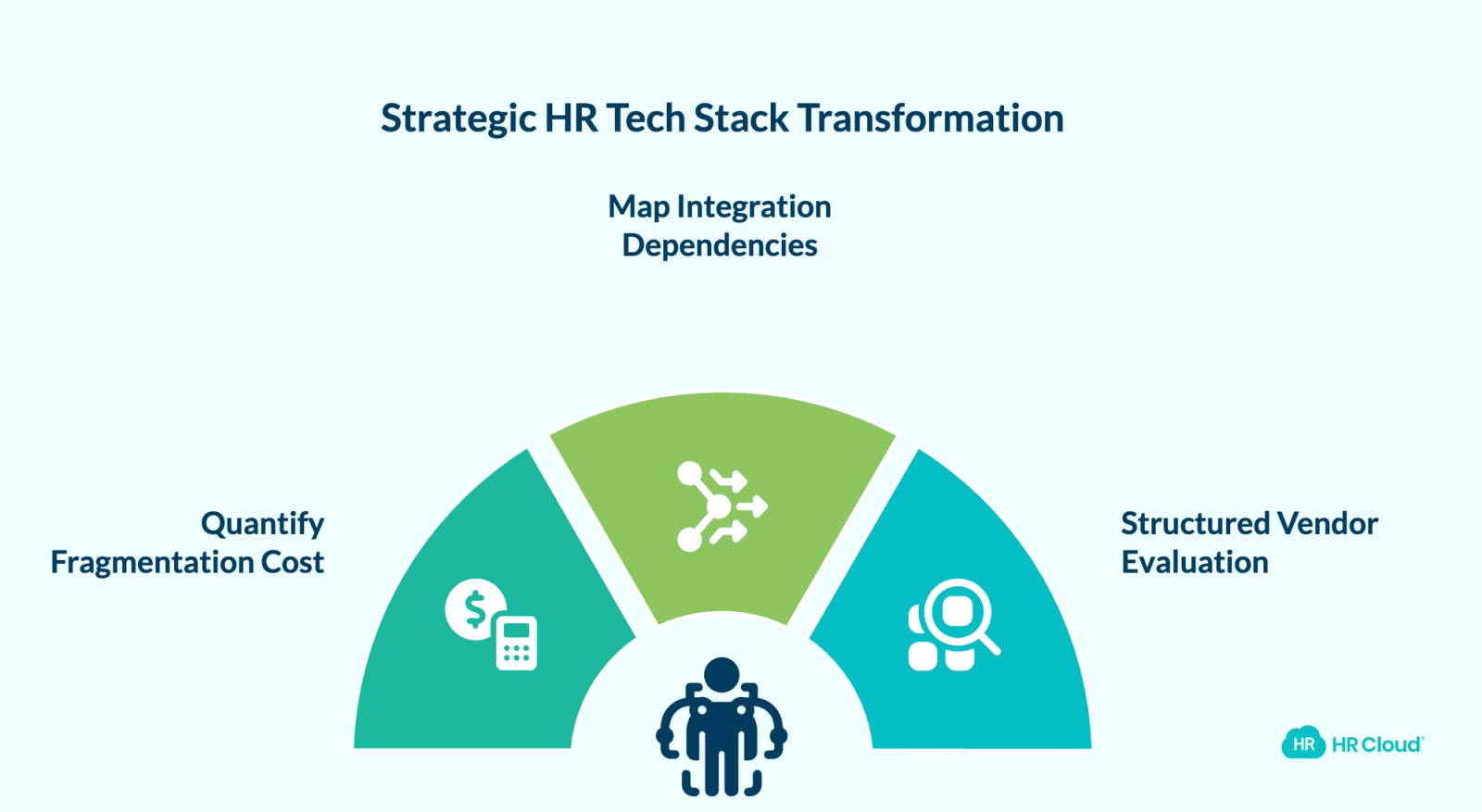
The scorecard tells you whether consolidation is overdue. These three steps move you from diagnosis to decision within 48 hours.
Step 1: Quantify your fragmentation cost before any vendor conversation. For each signal that applies, estimate the weekly hours your team loses to that specific problem. Multiply by your average HR team hourly cost. That number — not a feature comparison — is the business case your CFO will respond to. For turnover-related signals, HR Cloud's Cost of Employee Turnover Calculator generates a defensible dollar figure quickly.
Step 2: Map your current integration dependencies. List every system you use in HR, what data each holds, and where data is manually moved between systems. A competent implementation team will ask for this map regardless — having it before vendor conversations puts you in a stronger position and cuts the discovery phase of any implementation.
Step 3: Run a structured two-vendor evaluation. Don't evaluate more than two or three platforms in depth. Every week your team spends in vendor demos and procurement cycles is a week your current broken stack keeps running — re-entering data, producing inconsistent onboarding, and creating payroll risk. Score each candidate against the six criteria above. Ask for a reference from a customer of similar size and industry — and reach out to that reference directly, not through the vendor's recommended contact list.
Building the right HR tech stack isn't about accumulating the most tools. It's about building a foundation that reflects how your workforce actually operates — whether that's across shifts, locations, credentials, mobile devices, or payroll cycles that don't allow for error.
If you're ready to see what a practical, connected HR platform looks like for an organization at your stage — from recruiting and onboarding through performance, time tracking, and compliance — HR Cloud is worth a conversation. Book a Free Demo

Discover how our HR solutions streamline onboarding, boost employee engagement, and simplify HR management
Book Your Free DemoFrequently Asked Questions
What is an HR tech stack?
An HR tech stack is the collection of software tools your HR team uses to manage people operations across the employee lifecycle. A complete stack covers an HRIS for employee records, an ATS for recruiting, onboarding software, time tracking, and performance management — connected so data flows between them without manual transfers.
When should a growing company consolidate its HR tools?
Most companies feel the consolidation pressure clearly between 300 and 500 employees. Earlier signals that warrant action: manual data re-entry consuming significant HR time, inconsistent onboarding across locations or managers, compliance near-misses due to outdated records, or managers who can't answer basic workforce questions without going through HR. Three or more of those signals together make the case.
What's the difference between an HRIS and an HCM?
An HRIS stores and manages core employee data. An HCM extends that foundation to include talent management, workforce planning, and advanced analytics. In practice, vendors use the terms interchangeably. The more useful question to ask any vendor: does your system connect employee records, recruiting, onboarding, time tracking, and performance in real time — or do those modules still require manual data transfers between them? That answer matters more than the label. HR Cloud's HRIS vs. HRMS guide breaks the distinctions down in plain language.
How long does it take to implement a new HR platform?
Large enterprise systems like Workday typically require six to eighteen months. Mid-market platforms built for growing companies are designed to get teams live significantly faster. The variables that drive timeline are data migration complexity, integration requirements, and the number of workflows requiring custom configuration. Always ask vendors for average implementation timelines from customers of your size and complexity — not their fastest case or their largest.
What integrations should an HR platform support at minimum?
At minimum: your payroll provider, your SSO system, and your primary communication tools. Payroll integration is the most operationally critical — especially for hourly workforces where time tracking accuracy directly affects both compliance and employee trust. HR Cloud connects natively with ADP, which matters for organizations that want to extend their HR workflow capability without replacing their payroll infrastructure. See the full HR Cloud ADP integration for specifics.
How do I build the business case for HR tech consolidation?
Quantify what fragmentation costs today, not just what a new platform costs. Hours lost to manual data entry. First-90-day turnover rate and the cost per departure. Compliance gaps or near-misses and their potential exposure. That conversation with your CFO is different from a feature comparison. HR Cloud's Cost of Employee Turnover Calculator makes the turnover side of that calculation concrete and fast.
About the author

Keep Reading


Like What You Hear?
We’d love to chat with you more about how HR Cloud® can support your business’s HR needs.
Book Your Free Demo