What Is Employee Onboarding Automation — And How Much Time Can It Actually Save?

You know exactly what your first week looks like when a new hire starts. Documents that should have been signed three days ago are still sitting in someone's inbox. IT hasn't received the provisioning request. The manager is asking HR for a status update, and HR is asking the same question to five different people. By Friday, the new employee has spent more time waiting than working.
This isn't a people problem. It's a process problem — and it's more expensive than most HR leaders realize. According to the Brandon Hall Group, organizations with strong onboarding improve new hire retention by up to 82% and productivity by over 70%. Yet Gallup research shows that only 12% of employees feel their organization actually does onboarding well. That 88% gap translates directly into early exits, re-hiring costs, and delayed productivity — costs that compound with every hire.
Employee onboarding automation closes that gap by removing the manual handoffs that slow everything down. This guide breaks down exactly which bottlenecks cost your team the most time, how automation addresses each one, and what you can realistically expect to save — with verified data to back it up.
Key Takeaways
- Manual onboarding takes an average of 8–11 hours of HR time per new hire; automation reduces that to roughly 2 hours, freeing up 6–8 hours per hire for strategic work.
- The five highest-cost bottlenecks — document collection, IT provisioning, manager coordination, training enrollment, and check-in scheduling — can all be automated without losing the personal touch.
- According to the Brandon Hall Group, organizations with structured onboarding see 82% better retention and 70% higher new hire productivity.
- Automation can create measurable savings by reducing manual HR coordination, printing and materials, duplicate data entry, and preventable onboarding delays. The exact ROI depends on hiring volume, HR labor cost, manager involvement, and current process complexity.
- Use the HR Cloud Onboarding ROI Calculator to model your specific time and cost savings before evaluating platforms.
- The framework table in this post maps each bottleneck to its automation solution and per-hire time savings, so you can prioritize by impact rather than ease.
Why "Onboarding" and "Onboarding Automation" Are Not the Same Thing
Most organizations have an onboarding process. Very few have an automated one.
A process is a list of steps someone follows when they remember to follow them. Automation is a system that triggers those steps based on rules and timelines — whether or not anyone remembers. The difference shows up in your data: according to SHRM, organizations with standardized onboarding processes see 50% greater new hire productivity compared to those relying on informal or manual approaches.
Onboarding automation begins the moment a candidate accepts an offer and continues through the first 90 days. It handles the administrative layer — document delivery, form collection, IT provisioning, manager notifications, training enrollment, and check-in scheduling — automatically. What's left for your HR team is the work that actually requires judgment: relationship building, culture integration, and coaching managers through their responsibilities with new hires.
The critical point: automation doesn't replace the human element of onboarding. It protects it. When your team isn't chasing incomplete I-9 forms or manually writing IT provisioning tickets, they have time to call a new hire on Day 3 to ask how things are going. That's the interaction that matters.
HR leader callout: HR leaders at companies with 200–1,000 employees consistently identify a hidden equity problem in manual onboarding. High-visibility new hires get more attention and faster access than others. Automation standardizes the experience so every hire gets the same quality start, regardless of department or manager.
The 5 Onboarding Bottlenecks That Cost HR Teams the Most Time
One fast-growing company discovered it was spending 10 hours of staff time across three departments to onboard a single employee — handling more than six emails per hire and entering data across six different systems. That's not unusual. It's the predictable result of a manual process running at scale.
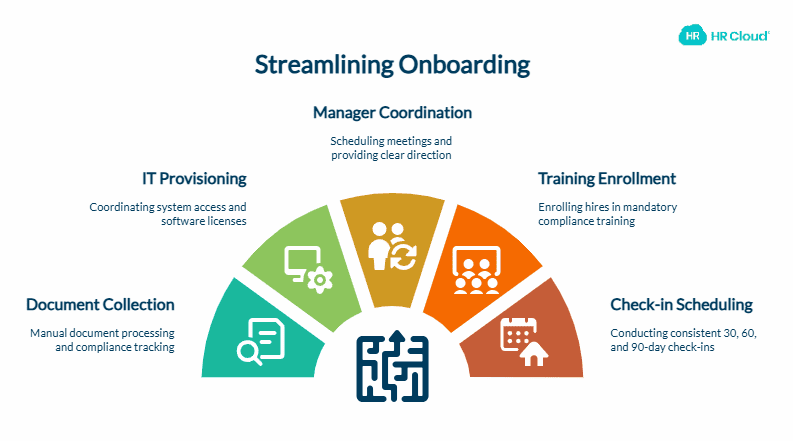
Here are the five bottlenecks that account for the majority of that administrative burden:
Bottleneck 1: Document Collection and Compliance Paperwork
Manual document processing averages 2 hours per new hire — printing forms, tracking completions, following up on missing fields, and entering data into your HRIS. I-9 verification alone creates a compliance exposure window every time a form is completed late.
Automation fixes this by sending digital forms immediately after offer acceptance, with automatic reminders for incomplete sections and built-in compliance tracking. I-9 and E-Verify workflows can be fully integrated so HR receives a flagged notification only when intervention is actually required — not for every routine verification.
Bottleneck 2: IT and Systems Provisioning
Coordinating system access between HR, IT, and department managers typically consumes 1.5 hours of back-and-forth per hire. In healthcare and manufacturing environments, where access controls are tightly regulated, that number is often higher.
Automated provisioning workflows create email accounts, assign software licenses, and set up role-based system access based on predefined templates — triggered automatically when a new hire's record is created. A real-world example: one credit union implemented robotic process automation to handle IT onboarding across 12 different systems. A provisioning task that previously required manual setup in each system now runs automatically in seconds.
Bottleneck 3: Manager Coordination and Communication
Managers often arrive at a new hire's first day without clear direction on what they're responsible for. HR fills the gap — scheduling welcome meetings, sending first-day agendas, and briefing managers — manually, for every hire.
Automation delivers manager checklists, first-day schedules, and milestone reminders without HR intervention. Managers receive the right information at the right time, and HR can monitor real-time progress without chasing status updates.

Make Internal Communication Actually Work
- Share updates in one trusted place
- Encourage two-way employee engagement
- Improve clarity without extra meetings
Bottleneck 4: Training Enrollment and Compliance Tracking
Manually enrolling new hires in mandatory compliance training — and tracking completion — is one of the most persistent sources of audit risk for HR teams. It's also among the most tedious recurring tasks.
Automated training enrollment places new hires in the correct courses based on role, department, and location as soon as their hire record is created. Completion data flows back to the HR system, so compliance reports generate automatically rather than through spreadsheet maintenance.
Bottleneck 5: The 30/60/90-Day Check-in Gap
Many organizations intend to conduct 30, 60, and 90-day check-ins with new hires. In practice, without automation, those check-ins are inconsistent — they depend on a manager or HR coordinator remembering to schedule them during an already full workload.
Automated check-in scheduling sends calendar invites with pre-built agenda templates at the correct intervals, along with satisfaction surveys that capture new hire feedback at the moments it's most actionable. For a structured approach, see HR Cloud's step-by-step onboarding guide covering preboarding through 90 days.
Time savings at a glance:
| Bottleneck | Manual Time per Hire | Automated Time per Hire | Time Saved |
|---|---|---|---|
| Document collection + compliance | 2 hours | 15 min (review only) | 1 hr 45 min |
| IT / systems provisioning | 1.5 hours | 10 min (verification) | 1 hr 20 min |
| Manager coordination | 45 minutes | 10 min (personalization) | 35 min |
| Training enrollment | 30 minutes | 5 min | 25 min |
| Check-in scheduling + surveys | 20 minutes | Near zero (auto-triggered) | 20 min |
| Total per hire | ~5 hours | ~40 minutes | ~4 hrs 20 min |
At the broader scale, one industry analysis found that automation cut HR's active involvement per new hire from 10 hours down to approximately 2 hours. For a company onboarding 240 employees annually, that's roughly 1,900 hours of HR time recaptured — enough capacity to launch retention programs, manager coaching initiatives, and strategic HR projects that stay permanently on the back burner when paperwork runs the team's calendar.
What the ROI of Onboarding Automation Actually Looks Like
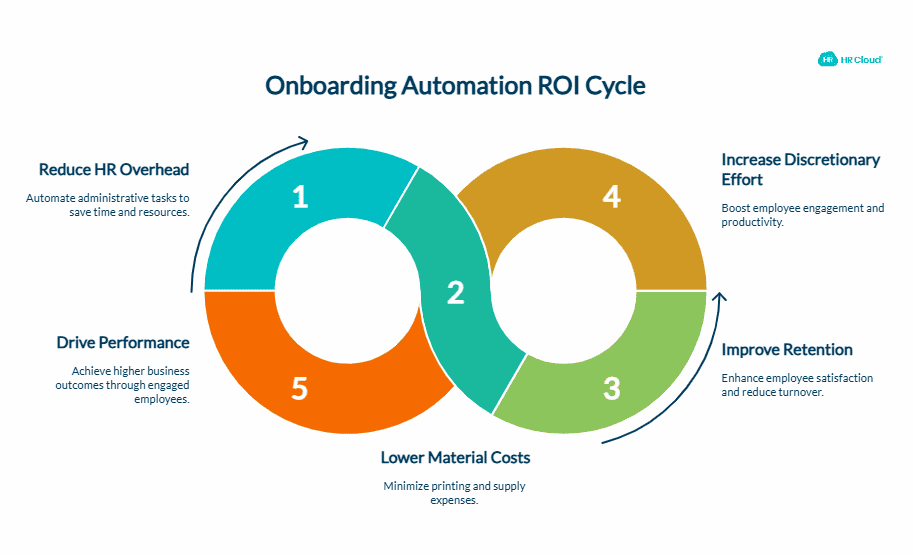
The financial case for automation is more concrete than most HR leaders expect when they first model it.
Industry research tracking AI-powered and automated onboarding finds that organizations save an average of $18,000 annually — driven by reduced HR and manager administrative overhead, lower materials and printing costs, and improved early retention rates. Separately, Gartner reports that effective onboarding can increase an employee's discretionary effort by more than 20% and drive performance by up to 15%.
The retention impact is where the numbers compound. According to SHRM, 20% of employee turnover happens within the first 45 days. Replacing an employee costs an estimated 20% of their annual salary at minimum — and considerably more for specialized roles. When automation eliminates the delays and disorganization that drive early dissatisfaction, you're not just saving HR hours. You're reducing the probability of an early exit that triggers a full recruitment cycle.
Here's what this looks like in practice:
Consider a mid-size healthcare organization onboarding 30 employees per month across multiple locations. If HR spends several hours per hire on forms, provisioning requests, training setup, and manager follow-up, even a modest reduction in manual work can reclaim significant monthly capacity. After implementing automated onboarding workflows integrated with their HRIS, HR involvement per hire dropped to under 2 hours. That reclaimed 180 hours per month — enough to launch the structured 90-day check-in program and manager readiness initiative that had been on the roadmap for two years but was consistently deprioritized due to capacity.
For HR Directors: The business case for onboarding automation isn't just time savings — it's the strategic work that becomes possible when the administrative burden is removed. Model your specific numbers using the HR Cloud Onboarding ROI Calculator before bringing the conversation to leadership.
The Integration Question: Why Automation Fails Without It
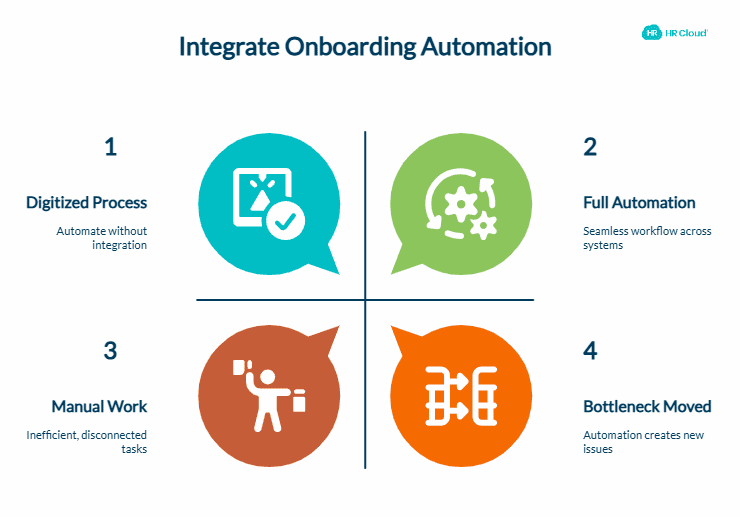
Onboarding automation delivers its full ROI only when it connects with the systems where your HR data actually lives.
A standalone onboarding platform that doesn't connect to your HRIS, payroll system, IT provisioning tools, and learning management system creates a different kind of manual work: data re-entry, reconciliation errors, and compliance gaps. You've digitized the process without automating it.
The integration checklist for any onboarding automation platform should include:
- HRIS connectivity — new hire records created in your HR system should automatically trigger onboarding workflows, not require manual data entry in a separate tool
- Payroll integration — compensation and tax document workflows should connect directly to payroll processing
- IT provisioning systems — role-based access templates should trigger automatically without manual IT ticketing
- Learning management platforms — training enrollment and completion tracking should flow back to a single compliance record
- E-signature and I-9/E-Verify — digital signing and federal compliance verification should happen within the onboarding system, not through a separate vendor
HR Cloud's onboarding platform connects natively with ADP, UKG, Paylocity, Greenhouse, and other major HR and payroll systems — so automation extends across your existing tech stack without creating a new data silo. For organizations already running ADP Workforce Now, HR Cloud functions as an onboarding layer that fills the experience and workflow gaps without replacing the payroll infrastructure already in place.
Integration reality check: Before evaluating any platform, list every system involved in your current onboarding process — including tools your IT and operations teams manage. If a platform can't connect to a critical system in your stack, the automation won't close the bottleneck. It will move it.
Compliance Automation: The Aspect Most Organizations Underestimate
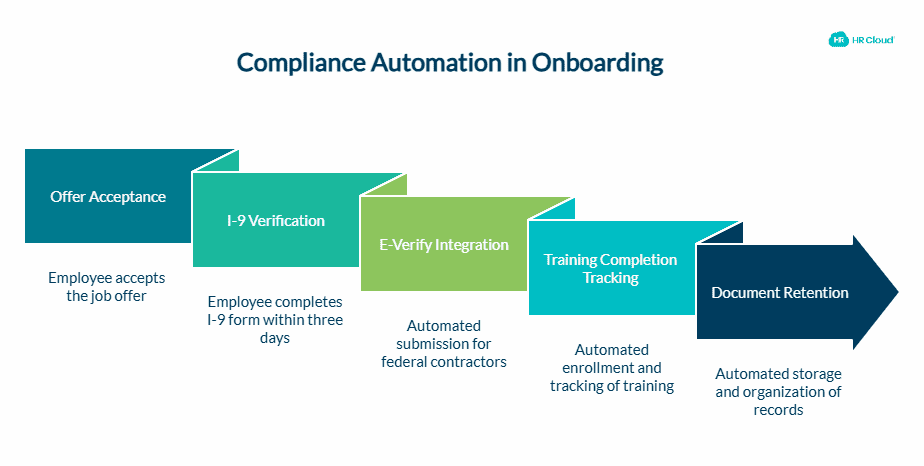
Compliance tracking is frequently treated as a feature rather than a core requirement of onboarding automation — until an audit surfaces a gap.
Automated onboarding systems should handle:
- I-9 verification with automated reminders — the I-9 must be completed within three business days of a hire's start date. Manual processes frequently miss this window during high-volume hiring. Automated workflows trigger the digital I-9 immediately after offer acceptance, with escalating reminders before the deadline.
- E-Verify integration — for federal contractors and employers in E-Verify mandate states, automated submission eliminates the manual coordination that creates compliance exposure.HR Cloud can support I-9 and E-Verify workflows by helping teams initiate, track, and document required verification steps within the onboarding process.
- Training completion tracking — mandatory compliance training (harassment prevention, safety, data privacy) must be documented per hire. Automated enrollment and completion tracking generates audit-ready records without spreadsheet maintenance.
- Document retention — I-9 forms, signed policies, and training records carry specific federal retention requirements. Automated systems store and organize these records according to retention schedules rather than relying on file management discipline.
For regulated or documentation-heavy industries, automation can help teams maintain better visibility into required onboarding steps, training completion, documents, and reminders. Organizations should still confirm legal and compliance requirements with qualified experts. HR Cloud's I-9 and E-Verify workflow automates the entire federal verification process within the onboarding platform, maintaining audit trails without manual record-keeping. For a deeper look at healthcare-specific compliance, see I-9 compliance for healthcare organizations.
Compliance callout: Healthcare organizations face HIPAA training requirements in addition to standard federal compliance. Construction companies manage OSHA safety training timelines. Automated onboarding platforms that support industry-specific training libraries and completion tracking reduce the compliance coordination burden unique to these environments.
What Onboarding Automation Looks Like for Distributed and Frontline Workforces
The business case for onboarding automation is strongest in industries where HR teams support distributed workforces — employees across multiple locations, shifts, and roles who don't have a dedicated workstation or regular computer access.
Retail, healthcare, manufacturing, and hospitality organizations face a specific challenge: their new hires are often completing onboarding from a personal smartphone between shifts, not from a desk during a structured orientation session.
Mobile-accessible onboarding addresses this reality directly. New hires complete forms, view training content, and acknowledge policies from their phones — on their schedule, before their first shift. Digital document signing eliminates the logistics of coordinating an in-person visit to sign paper forms. Automated reminders reach new hires through mobile notifications rather than emails that go unread.
For organizations like Dutch Bros Coffee or Stater Bros. Markets — where HR teams support thousands of frontline employees across dispersed locations — mobile-first onboarding automation isn't a convenience. It's the only workable model at scale. See HR Cloud's frontline onboarding guide for a full breakdown of mobile-first implementation across high-turnover industries.
Distributed workforce callout: If your workforce is predominantly frontline or field-based, the mobile accessibility of your onboarding platform is as important as its feature set. Test the new hire experience from a smartphone before committing to any platform. If it's clunky on mobile, it won't get done.
How to Turn Onboarding Automation Into Action Within 30 Days
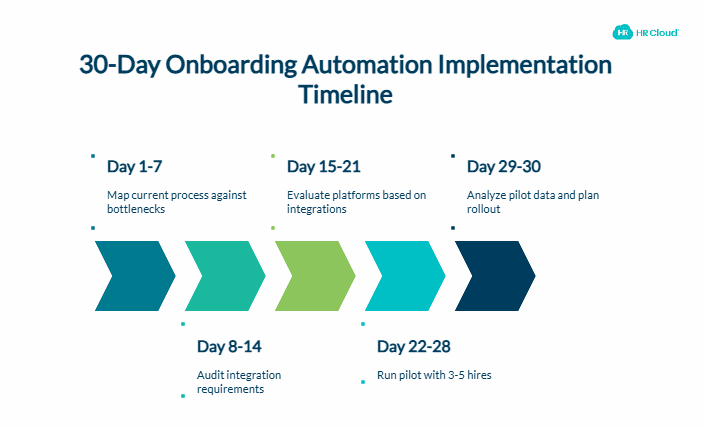
Most organizations that succeed with onboarding automation follow a consistent implementation sequence. Here are three concrete steps you can take in the next 30 days:
Step 1: Map your current process against the five bottlenecks. Document every step from offer acceptance to 90-day check-in. Identify which steps involve manual data entry, email follow-up, or coordination between more than two people. Those are your automation targets. Prioritize document collection and IT provisioning first — they generate the most hours wasted and the most compliance risk. Use HR Cloud's free onboarding checklists to see what a structured process looks like across each phase.
Step 2: Audit your integration requirements before evaluating platforms. List every system involved in your current onboarding: HRIS, payroll, IT provisioning tools, LMS, communication platforms. Match this list against each platform's native integration library. Platforms that require middleware to connect with your core systems add implementation complexity and ongoing maintenance cost. Confirm integration depth — not just integration availability.
Step 3: Run a pilot with your next 3–5 hires and track hours per hire. Before full rollout, implement automated workflows for a small cohort of new hires. Track HR hours per hire before and after. Track new hire satisfaction scores and task completion rates. This 30-day pilot gives you the data to confirm ROI and identify process gaps before scaling — and it gives you the numbers to present to leadership with confidence.
The Bottom Line
Your HR team isn't slow. Your onboarding process is.
Document collection, IT provisioning, manager coordination, training enrollment, and check-in scheduling each consume time that could be spent on the work that actually retains people: conversations, culture, and coaching. Onboarding automation handles the administrative layer so your team can focus on the human one.
The data is consistent: organizations that automate onboarding see better retention, faster time-to-productivity, and recaptured HR capacity — with a financial return that compounds as hiring volume grows.
The question isn't whether automation pays off. It's which bottleneck you tackle first.
Managing onboarding at scale takes more than good intentions — it takes the right system. See how HR Cloud helps growing organizations automate the entire new hire experience, from offer acceptance through 90 days.

Discover how our HR solutions streamline onboarding, boost employee engagement, and simplify HR management
Book Your Free DemoFrequently Asked Questions
What is employee onboarding automation?
Employee onboarding automation uses software to trigger onboarding tasks automatically based on predefined rules and timelines — rather than relying on HR coordinators to manually send forms, follow up on incomplete documents, or coordinate system access. It begins at offer acceptance and typically covers the first 90 days of employment.
How much time can onboarding automation save HR teams?
Industry research shows that automated onboarding systems reduce HR involvement per new hire from an average of 8–11 hours to approximately 2 hours — saving 6–8 hours per hire. For a company onboarding 20 employees per month, that's more than 100 hours of recaptured HR time each month that can be redirected to retention and engagement programs.
Can onboarding automation work for remote or frontline employees?
Yes — and for distributed workforces, automation is often more critical than for office-based teams. Automated workflows deliver the same onboarding experience regardless of location, with mobile-accessible forms and digital document signing that new hires can complete from any device. This eliminates the geographic inconsistency that makes manual onboarding unreliable across multiple locations.
What systems need to integrate with onboarding automation software?
At minimum, your onboarding automation platform should integrate with your HRIS, payroll system, IT provisioning tools, and learning management platform. Without these connections, you're digitizing manual processes rather than eliminating them. HR Cloud integrates with major HR, payroll, and recruiting systems. Confirm the specific integration depth, data flow, and implementation requirements for your existing stack during evaluation.
How do you maintain the personal touch with automated onboarding?
Automation handles the administrative layer so HR and managers can focus on relationship-building. The system can also prompt personal interactions at the right moments: a manager check-in reminder on Day 5, a culture conversation prompt at the 30-day mark. Personal connection actually improves when HR isn't spending the majority of their time chasing paperwork.
How do you measure whether onboarding automation is working?
Track four metrics: HR hours per hire before and after implementation; task completion rate for required onboarding items; new hire satisfaction scores at 30 and 90 days; and early turnover rate for the first 90 days. Organizations with properly implemented automation typically see task completion rates exceed 95% and measurable improvement in 90-day retention.
About the author

Keep Reading


Like What You Hear?
We’d love to chat with you more about how HR Cloud® can support your business’s HR needs.
Book Your Free Demo