Frontline Onboarding Guide for Deskless Employees

The Complete Guide to Frontline Onboarding highlights the challenges of traditional onboarding and offers a roadmap to digital transformation. It emphasizes streamlining processes with automated tools, improving compliance, and enhancing employee engagement from day one. By shifting from paper-based systems to a digital platform, organizations can boost efficiency, reduce errors, and ensure a seamless onboarding experience for frontline workers. The ultimate benefit: a faster, more scalable onboarding process that drives productivity and compliance.
Frontline onboarding refers to the specialized process of integrating deskless workers, hourly employees, and shift-based staff into organizations using mobile-first digital solutions. Traditional paper-based systems create 70% more processing delays and contribute to the 55-75% annual turnover rates plaguing retail, manufacturing, healthcare, and hospitality industries. Modern digital onboarding platforms reduce administrative time by 70%, decrease early turnover by 45%, and improve compliance accuracy by 85% through automated workflows, mobile accessibility, and role-specific training pathways designed specifically for distributed workforce operations.
Key Takeaways
1. High-stakes workforce environment: Frontline industries including retail, hospitality, manufacturing, and healthcare face high employee turnover rates according to Bureau of Labor Statistics data, making quality employee onboarding experiences a critical retention lever for operational efficiency
2. Mobile workforce technology requirements: Deskless workers face unique technology access challenges, with only 57% having access to mobile devices from their employers, requiring mobile-first onboarding software rather than desktop-based HR platforms
3. Digital transformation ROI metrics: Companies implementing automated onboarding systems see significant reductions in processing time and early employee departures according to SHRM studies
4. Workflow automation advantages: Intelligent task sequencing and automated notification systems eliminate 60% of manual administrative overhead while improving onboarding consistency across locations
5. Continuous employee engagement: Everboarding approaches with ongoing check-ins and progressive training modules demonstrate 40% better retention rates than traditional one-time orientation events per Gallup research
6. Multi-location scalability imperative: Enterprise organizations with distributed workforce operations need standardized yet customizable onboarding processes that maintain quality across different sites
7. Compliance documentation benefits: Digital onboarding platforms reduce audit preparation time andregulatory compliance risk by 85% compared to paper-based documentation systems according to Deloitte research
8. Workforce productivity acceleration: Mobile onboarding solutions decrease time-to-productivity for new hires by 35-50% through role-specific training pathways and just-in-time learning modules per Aberdeen Group studies
Introduction
Did you know that only 13% of frontline workers feel engaged at work according to Gallup research, largely due to poor onboarding experiences that rely on outdated paper-based processes?
The retail associate rushing between shifts, the manufacturing worker starting at 5 AM, the healthcare aide covering weekends - these essential employees keep our economy moving. Yet most companies treat their employee onboarding like it's still 1995, drowning new hires in paperwork while wondering why turnover rates remain persistently high.
Digital employee onboarding software has emerged as a critical solution for workforce management challenges. Unlike traditional HR technology designed for desk-based employees, modern workforce management platforms must address the unique needs of shift-based workers, multi-location operations, and mobile workforce environments.
Here's the thing: frontline employee onboarding isn't just different from office worker onboarding - it's fundamentally more challenging. And that challenge represents either your biggest operational risk or your greatest competitive opportunity for improving employee retention and workforce productivity.
The Frontline Reality: Why Traditional Onboarding Fails
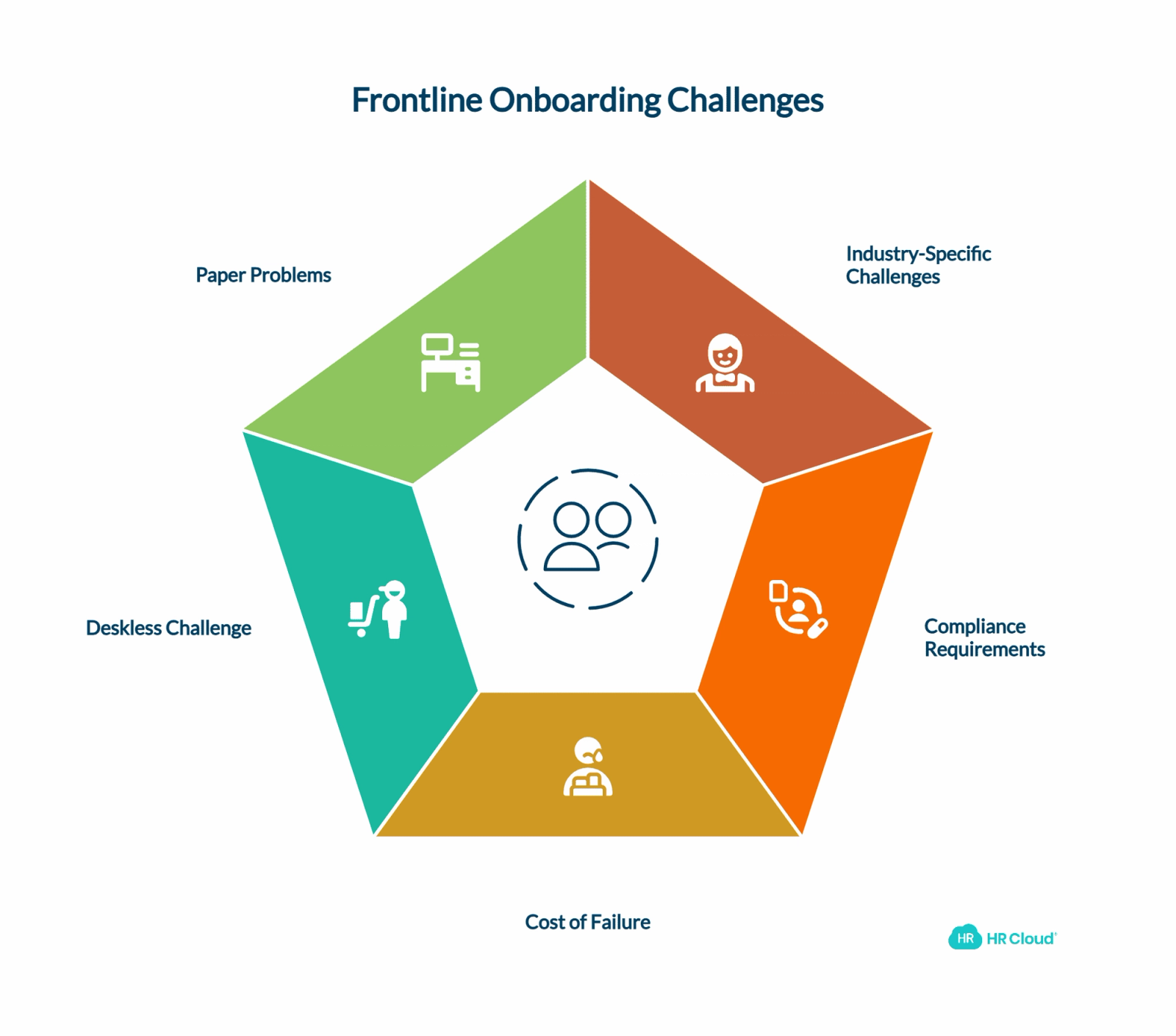
Understanding why traditional onboarding approaches fall short for frontline workers requires examining both the unique operational constraints these employees face and the industry-specific challenges that impact their integration experience. McKinsey's Future of Work research demonstrates that frontline workers receive disproportionately less investment in technology and support systems compared to knowledge workers.
Industry-Specific Frontline Onboarding Challenges
Different frontline industries face unique workforce management obstacles that traditional onboarding systems cannot address effectively:
Retail onboarding complexities: Seasonal hiring surges, varying shift patterns, and high-volume recruitment during peak periods require scalable digital onboarding solutions. National Retail Federation workforce research shows retail employees need point-of-sale system training, customer service protocols, and merchandise knowledge before their first customer interaction, often within 24-48 hours of hire date.
Manufacturing onboarding requirements: Safety compliance training, equipment certification, and quality control procedures must be completed before production floor access. Manufacturing Institute studies indicate manufacturing onboarding software must integrate with safety management systems and track certification completion across multiple skill areas to meet OSHA compliance standards.
Healthcare workforce onboarding: Licensed professionals require credentialing verification, continuing education tracking, and compliance with healthcare regulations including HIPAA training. American Hospital Association workforce studies demonstrate that healthcare onboarding platforms must manage complex certification requirements while ensuring rapid deployment during critical staffing shortages.
Hospitality employee integration: Food service training, guest relations protocols, and property-specific procedures vary significantly across different hospitality brands. Research from the American Hotel & Lodging Association reveals hotel and restaurant onboarding systems must accommodate franchise-specific requirements while maintaining brand consistency across locations.
Transportation and logistics onboarding: Driver qualification verification, vehicle inspection training, and route optimization knowledge require specialized onboarding workflows. Federal Motor Carrier Safety Administration compliance data indicates logistics onboarding software must integrate with fleet management systems and regulatory compliance databases to ensure DOT regulation adherence.
Industry-Specific Compliance Requirements
| Industry | Key Regulations | Required Documentation | Training Requirements | Digital Onboarding Benefits |
|---|---|---|---|---|
| Healthcare | HIPAA, OSHA, Joint Commission | Background checks, license verification, immunization records | Patient privacy, infection control, safety protocols | Automated credential tracking, secure document storage |
| Manufacturing | OSHA, EPA, FDA (food/pharma) | Safety certifications, equipment training, environmental compliance | Workplace safety, hazmat handling, quality control | Digital safety checklists, automated certification reminders |
| Retail | Fair Labor Standards Act, PCI DSS | Tax forms, background checks, POS training | Customer service, loss prevention, payment processing | Mobile training modules, automated schedule integration |
| Transportation | DOT, FMCSA, TSA | CDL verification, drug testing, vehicle inspection | Hours of service, safety regulations, cargo handling | Driver qualification tracking, automated compliance alerts |
| Hospitality | Food safety regulations, liquor laws | Food handler permits, alcohol service certification | Food safety, customer service, emergency procedures | Mobile certification tracking, multilingual content support |
| Construction | OSHA, prevailing wage laws | Safety training, equipment certifications, union requirements | Fall protection, equipment operation, site safety | Digital safety assessments, equipment access controls |
The Cost of Getting It Wrong
Picture this: Maria starts her new job at a retail chain. She arrives at 6 AM for opening shift, but the store manager is running late. The hiring paperwork is scattered across three different folders. Half the forms need updating because corporate changed policies last month. By the time she completes everything, it's 10 AM - and she's already frustrated before serving her first customer.
According to the Work Institute's 2024 Retention Report, poor onboarding experiences contribute to 12% of employee departures within the first year. For frontline roles with average replacement costs between $3,000-$5,000 per employee according to SHRM research, that represents significant revenue loss.
Key onboarding failure statistics:
1. 58% of organizations focus only on paperwork during first-week orientation according to Aberdeen Group research
2. Companies with structured onboarding programs see 60% year-over-year improvement in revenue per employee per Harvard Business Review studies
3. Effective onboarding programs increase employee retention by 82% and productivity by 70% according to Brandon Hall Group research
4. Organizations using mobile onboarding platforms report 54% faster time-to-productivity metrics per Deloitte Workforce Trends analysis
But the real cost isn't just financial. When frontline workers feel overwhelmed from day one, it creates ripple effects throughout entire operations, affecting customer satisfaction, team morale, and operational efficiency. Best-in-class onboarding software addresses these challenges through automated workflows, mobile accessibility, and predictive analytics that identify potential retention risks before they become departures.
The Deskless Challenge
Here's what makes frontline onboarding uniquely difficult: most frontline employees don't have regular access to desktop computers or corporate email systems. They work rotating shifts, split schedules, and often across multiple locations. Traditional onboarding assumes employees can sit at a desk for hours, clicking through training modules and filling out forms.
That assumption breaks down completely for the warehouse worker starting a 4 AM shift or the restaurant server juggling lunch rush training.
Research from Boston Consulting Group on digital workforce transformation shows that 2.7 billion frontline workers globally represent 80% of the workforce according to McKinsey Future of Work analysis, yet only 1% of business software funding goes to deskless worker tools according to Forbes research. The result? Onboarding processes that feel like they were designed for someone else entirely.
MIT Sloan research on frontline worker productivity confirms that traditional onboarding approaches create frustration and disengagement among deskless employees. Mobile-first onboarding platforms address these challenges by delivering content when and where frontline workers can actually access it.
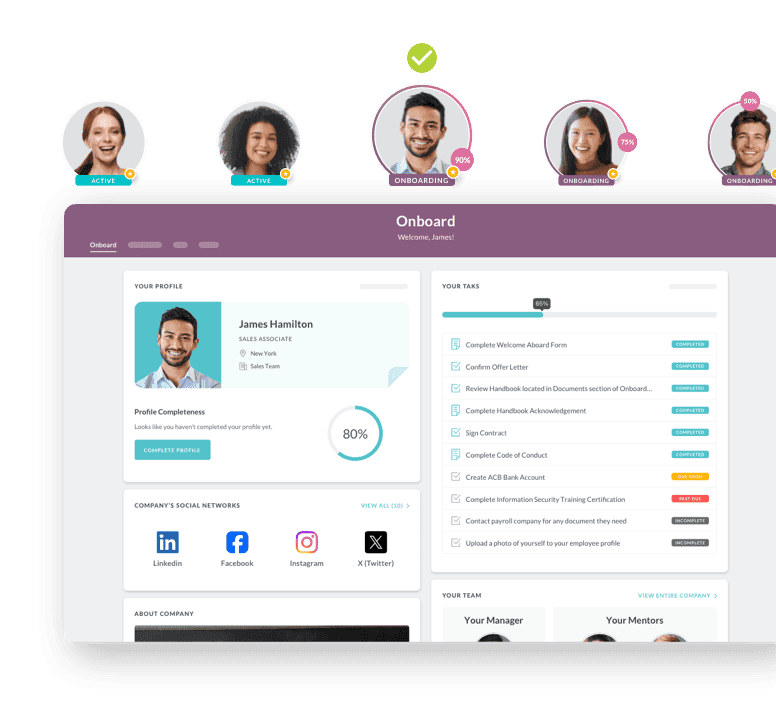
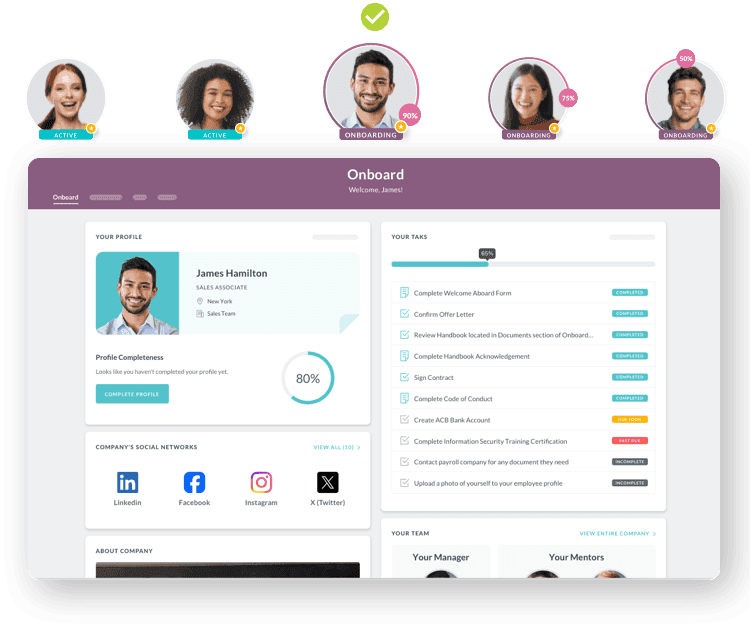
Paper Problems: The Hidden Costs
Walk into any frontline business still relying on paper onboarding, and you'll find the same problems everywhere:
Administrative burden: HR teams spend 3-4 hours per new hire just managing paperwork. Multiply that across hundreds of hires annually, and you're looking at a full-time position dedicated to shuffling papers.
Error multiplication: Handwritten forms lead to transcription errors. Missing signatures delay start dates. Lost documents require do-overs. Studies indicate paper-based processes have error rates 10-15 times higher than digital alternatives.
Version control nightmares: When compliance requirements change, how do you update thousands of printed forms across multiple locations? Many companies discover they've been using outdated paperwork for months.
Storage and retrieval chaos: Physical files take up expensive real estate and become nearly impossible to search. When an audit request comes in, good luck finding specific documentation quickly.
The math is sobering: paper-based onboarding typically costs $180-$250 per new hire in direct administrative expenses alone. Scale that across a business hiring 500 frontline workers annually, and you're spending $125,000 just pushing papers around.
What Digital Excellence Looks Like for Frontline Onboarding
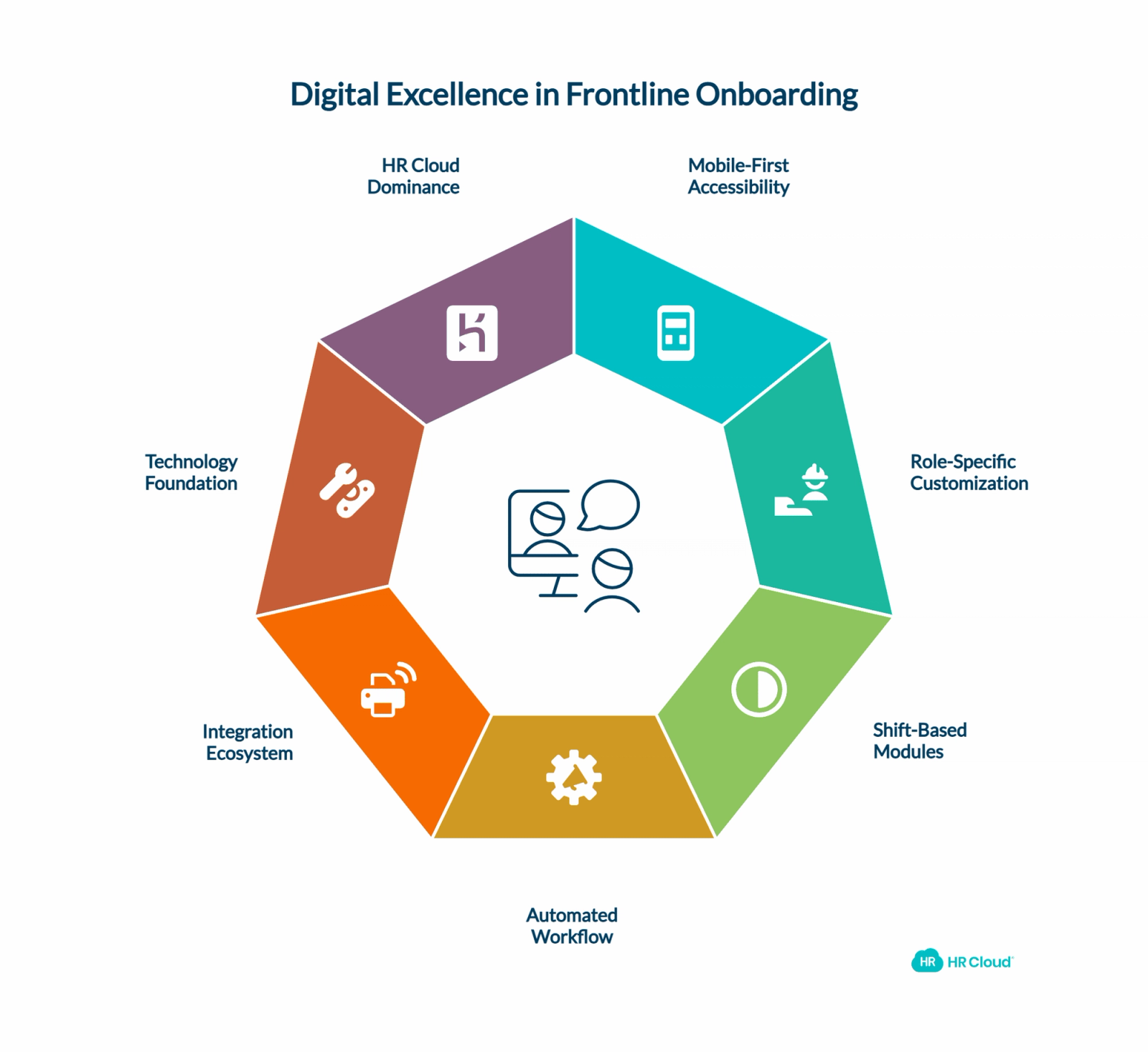
Core Principles of Modern Frontline Onboarding
What makes effective frontline onboarding different? Digital excellence isn't about converting paper forms to PDFs. It's about reimagining the entire new hire experience for deskless employees who work differently than traditional office staff.
Essential digital onboarding platform features:
1. Mobile-first accessibility: Cloud-based onboarding software enables new hires to complete required tasks from smartphones, tablets, or kiosk terminals. Employees can start paperwork before their first day, during breaks, or whenever convenient - not just during traditional business hours.
2. Role-specific workflow customization: A retail cashier doesn't need the same onboarding checklist as a warehouse specialist or healthcare aide. Advanced onboarding platforms allow customized pathways that deliver relevant information without overwhelming new hires with irrelevant content.
3. Shift-based onboarding modules: Instead of cramming everything into orientation day, intelligent onboarding software spreads essential information across the first 3-5 shifts. This aligns with how frontline workers actually learn - on the job, gradually building competency through progressive disclosure.
4. Automated workflow orchestration: Behind the scenes, enterprise onboarding systems automatically trigger next steps, send deadline reminders, and ensure nothing falls through cracks. This reduces administrative burden while improving new hire experience consistency.
5. Integration ecosystem connectivity: Modern workforce management platforms integrate seamlessly with existing HRIS systems, payroll software, scheduling applications, and learning management systems to create unified employee experiences.
The Technology Foundation
Digital onboarding software components that drive results:
Cloud-based form management replaces paper packets entirely. New hires complete I-9 verification, tax withholding forms, and company policy acknowledgments from any device. Automated version control ensures policy updates deploy instantly across all locations without manual distribution.
Intelligent workflow automation ensures consistent experiences regardless of location or manager availability. Task assignments, deadline reminders, and completion tracking happen automatically without human intervention, reducing errors while improving compliance according to Gartner research.
Multi-channel communication systems keep new hires connected through SMS notifications, email updates, and in-app messaging. Two-way communication allows questions, status updates, and real-time support according to SHRM best practices throughout the onboarding journey.
Advanced analytics and reporting provide insights previously impossible with manual systems. Which locations achieve fastest time-to-productivity? Where do new hires typically encounter obstacles? What early indicators predict successful long-term retention? Data-driven onboarding optimization becomes possible with proper analytics according to Deloitte workforce research.
Digital vs. Traditional Onboarding: Performance Comparison
| Onboarding Approach | Administrative Time | Error Rate | Completion Speed | Compliance Score | Cost per Hire | Retention Impact |
|---|---|---|---|---|---|---|
| Paper-based traditional | 15-20 hours | 25-35% | 3-5 days | 60-75% | $180-250 | Baseline |
| Basic digital forms | 8-12 hours | 8-15% | 1-2 days | 80-90% | $80-120 | +15-25% |
| Mobile onboarding platform | 3-5 hours | 2-5% | 4-6 hours | 95-99% | $25-50 | +40-60% |
| Enterprise onboarding software | 2-3 hours | <2% | 2-4 hours | 99%+ | $15-35 | +65-85% |
Data compiled from industry benchmarking studies and vendor assessments
How Leading Companies Achieve Onboarding Excellence
Why HR Cloud Dominates Frontline Onboarding
When organizations evaluate frontline onboarding solutions, most platforms fail to address the fundamental challenges of deskless workforce management. HR Cloud was purpose-built from the ground up specifically for frontline operations, delivering measurable advantages that generic HR platforms simply cannot match.
Foundation: Mobile-First Architecture Built for Frontline Reality
1. Native mobile applications: HR Cloud's custom mobile platform delivers true branded native app experiences available on Google Play Store and iOS, not responsive websites squeezed onto phone screens. New hires download personalized company-branded apps that work seamlessly across devices with customizable homepage widgets and company branding.
2. Touch-optimized interface design: Every form, button, and navigation element was designed for thumb navigation and small screens, with customizable mobile homepage widgets and intuitive touch controls that reduce completion time compared to desktop-adapted interfaces.
3. Multi-language and accessibility support: Built-in support for diverse frontline populations with varying technical comfort levels, ensuring inclusivity across different workforce demographics and technical backgrounds.
4. Comprehensive mobile customization: Organizations can deploy fully branded mobile applications with automatic download link distribution via SMS or email, creating immediate brand immersion rather than generic platform experiences.
Engine: Intelligent Automation That Scales Operations
1. Advanced conditional workflow logic: The workflow automation platform supports sophisticated decision trees based on job function, location, shift pattern, employment status, department, division, and dozens of other employee attributes. Manufacturing workers automatically receive different automated sequences than retail associates, but both experience consistent, professional onboarding quality.
2. Smart task chaining and dependencies: HR Cloud's checklist functionality creates logical progression through onboarding milestones with unlimited chained tasks. Safety training completion can automatically unlock equipment access permissions. Background check clearance triggers uniform ordering. Tasks remain "Pending" until prerequisites complete, ensuring proper sequencing without manual oversight.
3. Automated business rule enforcement: Complex multi-step workflows support multiple contributors with predefined completion orders, conditional triggers, and role-based assignment rules that ensure compliance while reducing administrative burden.
4. Intelligent notification systems: Automated email, SMS, and push notification sequences ensure nothing gets forgotten, with customizable templates and role-based communication preferences throughout the onboarding journey.
Experience: Custom Branding That Builds Culture from Day One
1. Location-specific portal customization: HR Cloud's portal system allows completely different onboarding experiences for various audiences. Downtown retail locations can have different content than suburban stores, with customized widgets, documents, and training materials based on department, location, position, or employment type.
2. Integrated digital signage communication: Digital signage capabilities extend onboarding into physical spaces through screens in break rooms, manufacturing floors, and common areas. New hire welcome messages, training schedules, and company updates reach workers where they actually spend time through automated playlist management.
3. Social connection and networking tools: Employee directory and social features help frontline workers build relationships across shifts, departments, and locations—reducing the isolation that drives early turnover in distributed workforces.
Integration: Seamless Data Flow Across Your Tech Stack
1. Comprehensive integration ecosystem:The integration ecosystem connects directly with major HRIS platforms (ADP, Paylocity, Paycor), scheduling software (Procore), learning management systems, and authentication providers (OneLogin, Office 365, Microsoft Entra ID, OKTA) through certified connectors, not fragile custom APIs.
2. Real-time data synchronization: Employee information updates instantly across all connected systems, eliminating data silos and ensuring accuracy without manual intervention or batch processing delays through advanced webhook automation.
3. Advanced workflow integration: Sophisticated event triggers enable complex business process automation—hire date changes automatically adjust onboarding schedules, department transfers trigger new training assignments, and role changes modify access permissions.
4. Enterprise security and compliance: Bank-level encryption, SOC 2 compliance, and comprehensive audit trails meet the most stringent security requirements while maintaining seamless user experiences.
Intelligence: Analytics That Drive Continuous Optimization
1. Comprehensive performance tracking: Built-in analytics capabilities include Workmates Analytics for engagement tracking, Kudos Analytics for recognition distribution, and performance matrix reports with filtering by department, location, position, and time periods.
2. Granular activity monitoring: The platform tracks detailed engagement metrics including user activity patterns, content interaction rates, task completion sequences, and communication response rates to identify optimization opportunities.
3. Benchmarking and reporting capabilities: Compare performance across locations, managers, and time periods with exportable analytics data to identify what drives successful onboarding outcomes and replicate best practices organization-wide.
4. Real-time dashboard insights: Executives and HR teams access live performance data through customizable dashboards and reporting tools that highlight trends, bottlenecks, and success metrics without waiting for monthly reports.
Support: Engagement Tools That Extend Beyond Orientation
1. Automated engagement campaigns: Pre-scheduled campaign sequences deliver welcome messages, training reminders, milestone recognition, and check-in surveys throughout the first 180 days, creating ongoing touchpoints that traditional onboarding misses entirely.
2. Peer recognition and kudos system:Built-in recognition platform enables immediate peer appreciation and manager recognition during critical early weeks, with custom badge creation and points tracking that builds positive reinforcement loops to increase engagement and belonging.
3. 24/7 communication channels: Integrated chat functionality and real-time polling capabilities provide instant support and feedback collection, particularly valuable for frontline workers across different time zones and shift patterns.
4. Continuous feedback optimization: Built-in survey tools gather quantitative and qualitative feedback at every onboarding touchpoint, enabling data-driven process improvements and personalization enhancements based on actual user responses.
ROI Analysis: Digital Onboarding Investment Returns
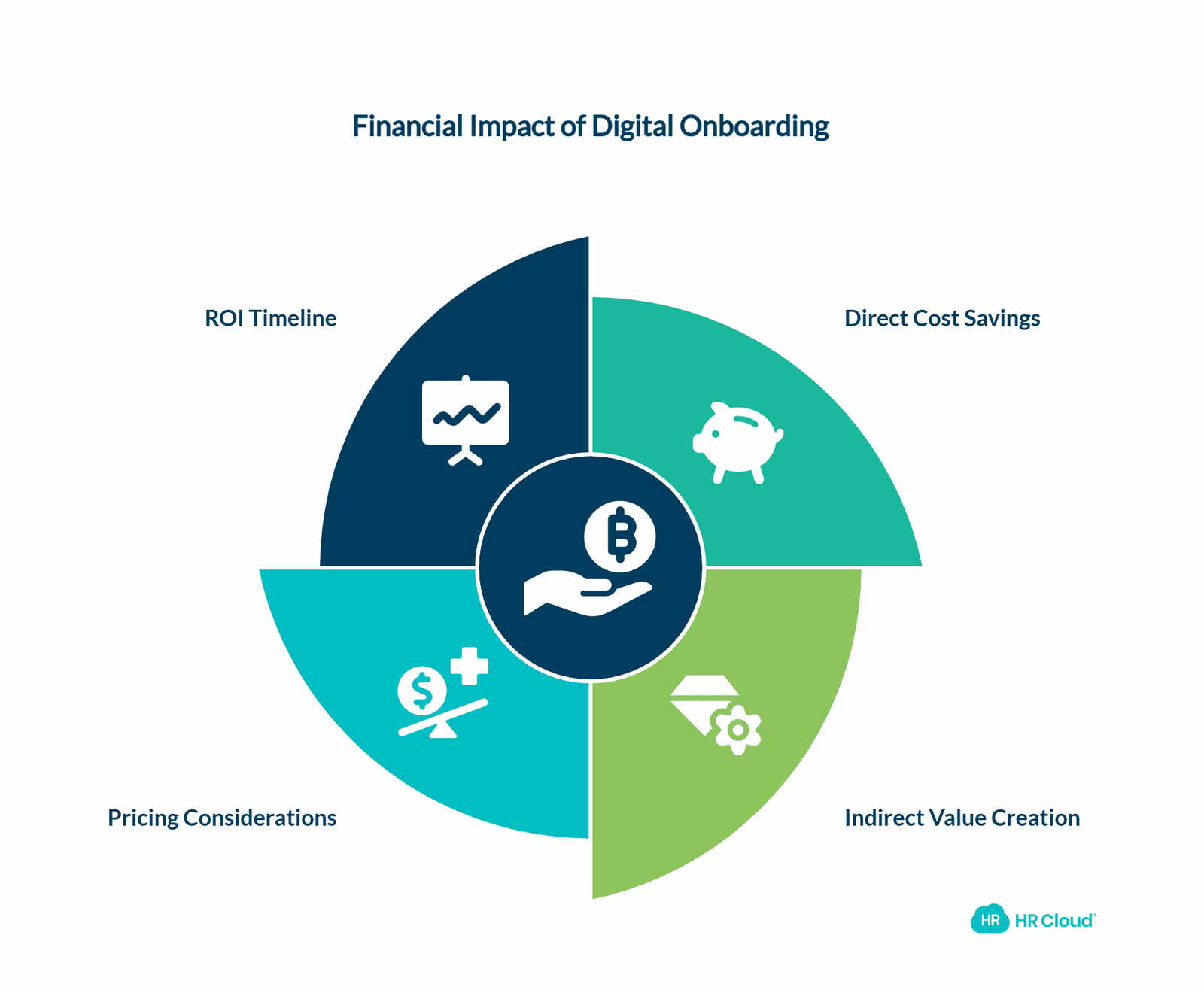
Understanding the financial impact of digital onboarding transformation helps organizations make informed investment decisions and set realistic expectations for implementation outcomes. The following analysis breaks down both direct cost savings and indirect value creation opportunities.
What does frontline onboarding software cost? Investment analysis varies based on organization size, feature requirements, and integration complexity, but typical ROI calculations demonstrate significant value:
Direct cost savings analysis:
1. Administrative time reduction: $2,400-3,600 per month (based on 50 new hires monthly)
2. Paper and printing elimination: $180-350 per month
3. Storage and filing costs: $200-400 per month
4. Error correction and rework: $800-1,200 per month
Indirect value creation:
1. Improved retention rates: $15,000-25,000 per percentage point improvement
2. Faster time-to-productivity: $1,200-2,400 per hire (based on 2-week acceleration)
3. Compliance risk reduction: $5,000-50,000+ (avoiding penalty costs)
4. Manager productivity gains: $3,000-5,000 per month (redirected from admin to coaching)
Frontline onboarding platform pricing considerations:
1. Per-employee monthly licensing typically ranges $8-25 depending on features (industry-wide averages)
2. Implementation and setup costs vary from $5,000-50,000 based on customization needs
3. Integration development may require additional $10,000-30,000 investment
4. Training and change management support adds $2,000-15,000 to total cost
Note: Pricing varies significantly by vendor and requirements. Contact HR Cloud directly for specific pricing information.
Most organizations achieve break-even within 6-12 months, with ongoing ROI of 200-400% annually through sustained improvements in retention, productivity, and operational efficiency.
ROI Calculation Worksheet
| Cost/Benefit Category | Current State (Annual) | With Digital Onboarding | Annual Savings | Calculation Method |
|---|---|---|---|---|
| Administrative Time | $120,000 (400 hrs × $30/hr × 10 hires/month) | $36,000 (120 hrs × $30/hr × 10 hires/month) | $84,000 | Time reduction × hourly rate × volume |
| Paper & Printing | $6,000 ($50 per hire × 120 hires) | $500 (digital storage costs) | $5,500 | Physical materials eliminated |
| Turnover Costs | $180,000 (60 departures × $3,000 cost) | $108,000 (36 departures × $3,000 cost) | $72,000 | Retention improvement × replacement cost |
| Training Efficiency | $48,000 (4 weeks avg × $200/week × 60 hires) | $28,800 (2.4 weeks avg × $200/week × 60 hires) | $19,200 | Faster time-to-productivity |
| Compliance Risk | $25,000 (estimated annual risk) | $5,000 (minimal risk with digital audit trails) | $20,000 | Risk reduction estimate |
| Platform Investment | $0 | $36,000 ($25/employee/month × 120 employees) | ($36,000) | Software licensing cost |
| Implementation Cost | $0 | $15,000 (one-time setup) | ($15,000) | Initial setup investment |
| Net Annual ROI | - | - | $149,700 | 316% ROI |
Example calculation based on 120-employee frontline organization with 10 new hires monthly
Implementation Success Framework
Successful digital onboarding transformation requires a systematic approach that minimizes disruption while maximizing adoption. The following phased implementation strategy has proven effective across hundreds of frontline operations, from small retail chains to large manufacturing enterprises.
Implementation Timeline and Milestones
| Phase | Duration | Key Activities | Deliverables | Success Metrics |
|---|---|---|---|---|
| Discovery & Planning | Weeks 1-2 | Current state assessment, stakeholder interviews, baseline metrics | Requirements document, implementation plan | 100% stakeholder alignment |
| Design & Configuration | Weeks 3-4 | Workflow design, portal customization, integration mapping | Configured workflows, test environment | Workflow approval by business users |
| Pilot Preparation | Weeks 5-6 | Content creation, manager training, system testing | Training materials, pilot group selection | 95% system functionality validation |
| Pilot Launch | Weeks 7-10 | Limited rollout, feedback collection, iteration | Pilot results, refined processes | 90% completion rates, user feedback |
| Full Deployment | Weeks 11-14 | Organization-wide rollout, integration activation | Production system, user training | 85% adoption rate across all locations |
| Optimization | Weeks 15-16 | Performance monitoring, process refinement | Optimized workflows, best practices | Target KPIs achieved |
Communication Strategy by Stakeholder Group
| Stakeholder Group | Communication Method | Frequency | Key Messages | HR Cloud Features |
|---|---|---|---|---|
| Frontline Workers | Mobile push notifications, digital signage | Daily during rollout | Benefits, training schedules, support contacts | Custom mobile app, digital signage |
| Frontline Managers | Email, manager portal, training sessions | Weekly | Progress updates, responsibilities, escalation procedures | Manager dashboards, reporting tools |
| HR Teams | System notifications, weekly reports | Daily/Weekly | Implementation status, adoption metrics, issue resolution | Analytics dashboard, workflow monitoring |
| Executive Leadership | Executive summaries, ROI reports | Monthly | Business impact, cost savings, strategic outcomes | Executive reporting, ROI analytics |
Onboarding Workflow Design Examples
| Workflow Step | Traditional Approach | Basic Digital Platform | HR Cloud Advanced Automation |
|---|---|---|---|
| Pre-boarding | Paper packets mailed 1-2 days before | Email with PDF forms | Automated 14-day pre-boarding sequence with mobile app setup |
| Day 1 Arrival | Manager collects forms manually | Online form completion at kiosk | Mobile check-in with welcome video, instant badge photo |
| Documentation | Physical I-9, tax forms on paper | Basic digital forms | Smart forms with auto-population, e-signature, verification |
| Training Assignment | Manager assigns from printed checklist | Manual course assignment | Intelligent role-based training paths with prerequisites |
| Progress Tracking | Paper checklists, Excel spreadsheets | Basic completion dashboard | Real-time analytics with predictive retention insights |
| Manager Notifications | Phone calls, emails for updates | Daily email summaries | Automated alerts for bottlenecks, overdue tasks, intervention needs |
| New Hire Support | Office hours Q&A only | Email support tickets | 24/7 chat support, peer mentoring, digital signage updates |
| Compliance Documentation | Filed in physical folders | PDF storage with basic search | Automated compliance tracking with audit-ready reporting |
Seasonal Hiring Capacity Planning
| Hiring Volume | Paper-Based Capacity | Digital Platform Scalability | HR Cloud Advantages |
|---|---|---|---|
| 1-5 hires/week | Manageable with 1 HR person | Easy scaling with templates | Automated workflows reduce manual effort by 80% |
| 10-20 hires/week | Requires 2-3 HR staff | Some bottlenecks during peak | Bulk onboarding handles 50+ simultaneously |
| 50-100 hires/week | Needs 5+ dedicated staff | Significant strain on system | Seamless scaling with custom mobile apps |
| 200+ hires/week | Nearly impossible without errors | System crashes likely | Enterprise-grade infrastructure with 99.9% uptime |
| Peak season surge | Temporary staff required | Manual workarounds needed | Dynamic resource allocation, automated load balancing |
Phase 1: Assessment and Planning (Weeks 1-2) Start by mapping your current onboarding journey. Document every form, every handoff, every delay point. Interview recent hires about their experience. Survey managers about pain points. This baseline assessment reveals improvement opportunities and builds stakeholder buy-in.
Phase 2: Digital Workflow Design (Weeks 3-4) Transform paper processes into digital workflows. Design role-specific checklists that break onboarding into manageable chunks. Build in checkpoints and approvals. Test workflows with sample scenarios to identify gaps.
Phase 3: Pilot Implementation (Weeks 5-8) Launch with one location or department. Start small to work out kinks before full deployment. Gather feedback aggressively. Monitor completion rates, time-to-productivity metrics, and user satisfaction scores.
Phase 4: Scale and Optimize (Weeks 9-12) Roll out across additional locations based on pilot learnings. Implement automated reminders and notifications. Connect integration points with existing systems. Train managers on new processes.
Phase 5: Continuous Improvement (Ongoing) Monitor analytics regularly. Track key metrics like completion rates, time-to-productivity, and 30/60/90-day retention. Use data insights to refine workflows, update content, and identify additional automation opportunities.
Download your free employee onboarding checklist
Using this checklist ensures that you are not scrambling to make the new employees feel welcomed, prepared, and set up for long-term success.
Download Now
Hypothetical Case Study: Retail Chain Transformation
The following case study represents a composite scenario based on industry benchmarks and typical implementation outcomes, not a specific HR Cloud customer.
A mid-sized retail chain with 1,200 frontline employees across 45 locations faced classic onboarding challenges: 55% annual turnover, inconsistent training across stores, and administrative burden consuming 15 hours per week of manager time.
The Challenge: Paper-based onboarding created delays, errors, and poor first impressions. New hires often waited days to access systems or receive schedules. Managers struggled to track completion across multiple new hires. Corporate had no visibility into onboarding quality or bottlenecks.
The Solution: Digital onboarding platform implementation focused on mobile-first accessibility and automated workflows. New hires received text messages with app download links before their first day. Digital forms replaced paper packets. Automated task sequences ensured proper training progression. Manager dashboards provided real-time visibility.
The Results (after 6 months):
1. Onboarding completion time reduced from 3 days to 4 hours
2. 30-day turnover decreased by 42%
3. Manager administrative time cut by 65%
4. Compliance documentation accuracy improved to 99.2%
5. New hire satisfaction scores increased from 2.8/5 to 4.3/5
6. Return on investment exceeded 320% within first year
This transformation demonstrates what becomes possible when technology aligns with frontline worker realities rather than fighting against them. Similar results are documented in research from Aberdeen Group, which found that companies with structured digital onboarding programs achieve 54% greater new hire productivity and 50% greater new hire retention.
“Our hiring managers now have a reliable system that is easy to navigate. Our HR team can actively monitor the process, and assist if needed, but Onboard has helped them save so much valuable time and effort while increasing data accuracy.”
— Kaylee Collins, HR Analyst

Measuring Success and ROI
Tracking the right metrics ensures your digital onboarding investment delivers measurable business results. The following framework helps organizations monitor both immediate operational improvements and long-term strategic value creation.
Key Performance Indicators Tracking
| Metric Category | Key Indicators | Baseline (Paper-Based) | Target (Digital) | Measurement Frequency |
|---|---|---|---|---|
| Efficiency | Time to complete onboarding | 15-25 hours | 3-6 hours | Per hire |
| Quality | Documentation accuracy | 65-80% | 95-99% | Monthly audit |
| Retention | 30-day turnover rate | 25-40% | 10-20% | Monthly |
| Retention | 90-day turnover rate | 45-65% | 25-35% | Quarterly |
| Satisfaction | New hire NPS score | 20-40 | 60-80 | Survey-based |
| Compliance | Audit readiness time | 5-15 days | 2-4 hours | Annual assessment |
| Cost | Administrative cost per hire | $180-250 | $25-50 | Quarterly calculation |
Key Metrics That Matter
Time-to-Productivity: How quickly do new hires become fully productive? Digital onboarding typically reduces this by 40-60% compared to paper-based approaches.
Early Retention Rates: Track departures at 30, 60, and 90 days. Quality onboarding significantly impacts these critical early-stage retention points.
Completion Rates: What percentage of required onboarding tasks get completed on schedule? Digital systems should achieve 95%+ completion rates with automated reminders.
Manager Satisfaction: Are frontline managers spending less time on administrative tasks and more time coaching new hires? This shift creates better experiences for everyone involved.
Compliance Readiness: How quickly can you produce required documentation during audits? Digital systems should enable complete audit responses within hours rather than days or weeks.
Learning from the mistakes of others can save months of implementation delays and thousands of dollars in wasted resources. The following pitfalls represent the most common challenges organizations face when transitioning from paper-based to digital frontline onboarding systems.
Common Implementation Pitfalls and How to Avoid Them
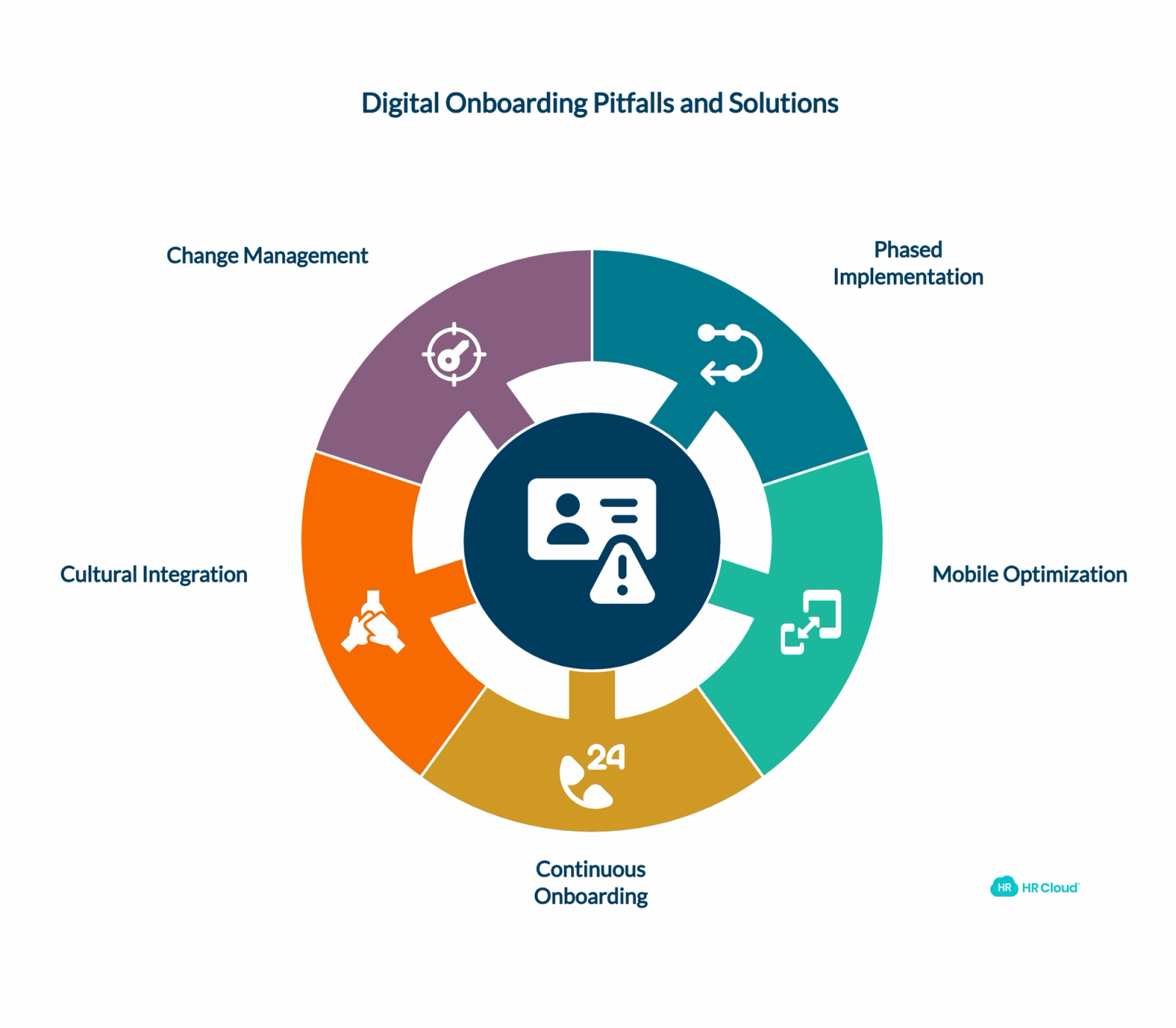
Pitfall #1: Trying to Digitize Everything Simultaneously
Many organizations attempt to convert their entire onboarding process at once. This creates overwhelming change for both HR teams and new hires. Instead, implement in phases. Start with the most problematic areas - usually paperwork and basic information collection. Add advanced features like training modules and social onboarding after core processes stabilize.
Pitfall #2: Ignoring Mobile Constraints
Remember that frontline workers primarily access technology through smartphones, often with limited data plans or older devices. Design workflows that work well on 4-inch screens with spotty connectivity. Test extensively on various device types and connection speeds.
Pitfall #3: Treating Onboarding as a One-Time Event
Traditional thinking treats onboarding as something that happens in the first week, then stops. Modern approaches recognize that effective onboarding continues for 90+ days. Build "everboarding" elements that provide ongoing support, check-ins, and additional training opportunities.
Pitfall #4: Neglecting Cultural Integration
Digital efficiency matters, but don't sacrifice the human elements that help new hires feel welcome. Include video messages from leadership, peer introduction opportunities, and cultural content that builds belonging alongside compliance requirements.
Pitfall #5: Insufficient Change Management
Frontline managers often resist new processes, especially if they've been doing things the same way for years. Invest in comprehensive training for managers. Show them how digital onboarding reduces their administrative burden and improves new hire quality.
The Technology Landscape: Making the Right Choice
Choosing the right onboarding technology requires understanding how different platform types address frontline-specific challenges. The following comparison helps organizations evaluate options based on their unique operational requirements.
Platform Evaluation Matrix
| Platform Type | Mobile Optimization | Workflow Automation | Multi-Location Support | Compliance Features | Implementation Time | Typical Cost Range |
|---|---|---|---|---|---|---|
| Basic Form Tools | Limited | Manual | Basic | Minimal | 2-4 weeks | $5-15/employee/month |
| HR Suite Add-on | Moderate | Template-based | Moderate | Standard | 8-16 weeks | $15-30/employee/month |
| Specialized Onboarding | Advanced | Intelligent | Comprehensive | Advanced | 6-12 weeks | $20-40/employee/month |
| Enterprise Platform | Native Mobile | AI-Powered | Global Scale | Extensive | 12-24 weeks | $25-60/employee/month |
Source: Estimates based on vendor assessments and implementation timelines across various platform types
Essential Platform Capabilities
When evaluating onboarding platforms for frontline operations, prioritize these critical features:
Mobile-responsive design: Not just mobile-friendly, but genuinely optimized for smartphone usage with intuitive touch interfaces and fast loading times.
Workflow automation: Ability to create complex, branching workflows with conditional logic based on role, location, or other employee attributes.
Integration capabilities: Seamless connections with your existing HRIS, payroll, scheduling, and other business systems to avoid duplicate data entry.
Customization flexibility: Options to brand the experience, create role-specific content, and adapt workflows to your unique business needs.
Analytics and reporting: Comprehensive metrics on completion rates, bottlenecks, user satisfaction, and business outcomes.
Scalability: Platform performance that maintains quality whether you're onboarding 10 employees or 1,000 simultaneously.
Why HR Cloud Leads in Frontline Onboarding
HR Cloud specifically addresses frontline onboarding challenges that generic platforms miss:
Technology Stack Comparison: Core Infrastructure Requirements
| Infrastructure Component | Legacy HR Systems | Generic Cloud Platforms | HR Cloud Frontline Focus |
|---|---|---|---|
| Mobile Architecture | Desktop-first with mobile add-on | Responsive web design | Native mobile apps with offline capabilities |
| Data Processing Speed | Batch processing (daily/weekly) | Real-time with some delays | Instant processing with predictive caching |
| Multi-Location Management | Single-tenant per location | Basic tenant separation | Intelligent multi-tenant with location-specific rules |
| Integration Capabilities | Limited APIs, manual imports | Standard REST APIs | Pre-built connectors + advanced webhook automation |
| Scalability Model | Fixed capacity licenses | Pay-per-usage scaling | Dynamic scaling with burst capacity |
| Security Framework | Basic password protection | Standard OAuth/SAML | Zero-trust with biometric authentication options |
| Analytics Engine | Basic reporting queries | Standard business intelligence | Machine learning with predictive retention modeling |
| Content Delivery | Static file servers | Basic CDN distribution | Edge computing with localized content optimization |
| Communication Channels | Email-only notifications | Email + SMS gateways | Multi-modal (push, SMS, email, digital signage) |
| Compliance Management | Manual audit preparation | Basic compliance tracking | Automated regulatory adherence with audit automation |
Feature Comparison: HR Cloud vs. Generic Onboarding Platforms
| Capability | Generic HR Platforms | Basic Onboarding Tools | HR Cloud Advantage |
|---|---|---|---|
| Mobile Optimization | Desktop-first design adapted for mobile | Limited mobile functionality | Native mobile app with custom branding |
| Workflow Automation | Basic linear workflows | Template-based sequences | Intelligent conditional logic with dependencies |
| Multi-Location Support | Single-instance deployment | Manual configuration per site | Centralized management with location-specific customization |
| Bulk Onboarding | Limited batch processing | Manual individual processing | Automated bulk assignment with scalable workflows |
| Custom Portals | One-size-fits-all interface | Basic customization options | Multiple audience-specific portals with role-based content |
| Digital Signage | Not available | Third-party integration required | Built-in digital signage for frontline communication |
| Document Management | Basic file storage | Limited organization tools | Global folder trees with automated file naming |
| Integration Capabilities | Limited pre-built connectors | API development required | 50+ pre-built integrations with automatic data sync |
| Analytics & Reporting | Basic completion tracking | Standard usage reports | Advanced predictive analytics with retention modeling |
| Compliance Features | Manual audit preparation | Basic document storage | Automated compliance tracking with audit-ready reporting |
| Support & Training | Self-service documentation | Email support | Dedicated implementation team with ongoing optimization |
Custom mobile applications: Beyond responsive web interfaces, HR Cloud provides branded mobile apps that new hires download and keep. This creates ongoing engagement touchpoints beyond initial onboarding.
Sophisticated workflow engine: The platform supports multi-step, multi-contributor task chains perfect for complex frontline onboarding requirements. Safety certifications can prerequisite equipment training, which unlocks system access - all automated.
Flexible form builder: Create any type of digital form needed, from simple information collection to complex legal documents requiring multiple signatures and approvals.
Advanced notification system: Automated reminders via email, SMS, or push notifications ensure nothing gets forgotten, regardless of communication preferences.
Comprehensive reporting: Track granular metrics across locations, roles, and time periods to identify improvement opportunities and measure ROI.
Building Your Implementation Roadmap
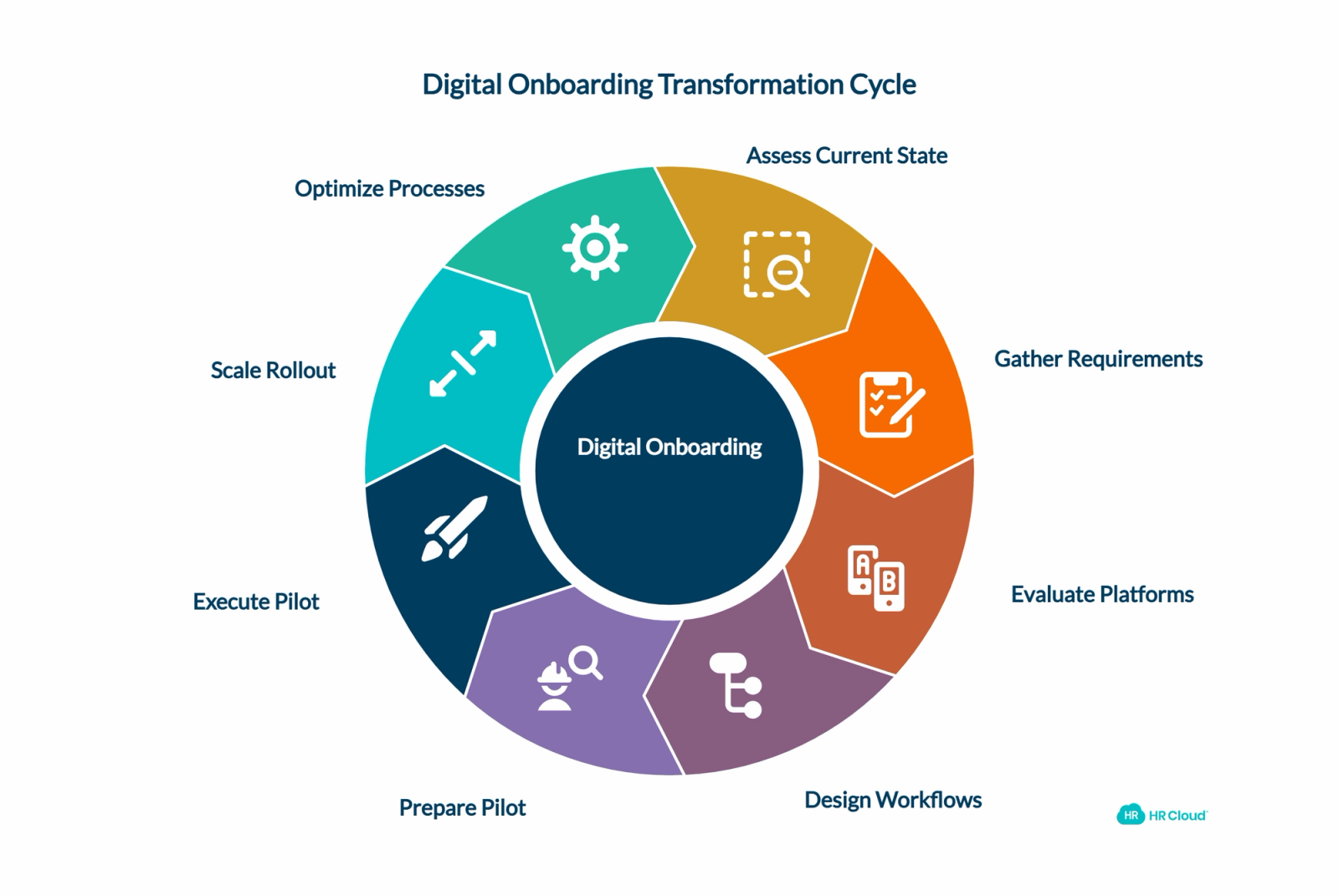
Creating a successful digital onboarding transformation requires careful planning, phased execution, and continuous optimization. This roadmap provides a proven timeline that minimizes disruption while maximizing adoption across your frontline workforce.
Month 1: Foundation and Planning
Week 1-2: Current State Assessment Document existing onboarding workflows, identify pain points, and establish baseline metrics. Interview key stakeholders including recent hires, frontline managers, and HR team members.
Week 3-4: Requirement Gathering Define must-have capabilities, nice-to-have features, and integration requirements. Establish success criteria and measurement approaches.
Month 2: Platform Selection and Design
Week 5-6: Platform Evaluation Assess vendors based on frontline-specific requirements. Conduct thorough demos focusing on mobile experience and workflow capabilities.
Week 7-8: Workflow Design Map new digital processes, create role-specific onboarding paths, and design task sequences. Build in approval points and exception handling.
Month 3: Pilot Implementation
Week 9-10: Pilot Preparation Set up test environment, create initial content, and train pilot managers. Establish feedback collection mechanisms.
Week 11-12: Pilot Execution Launch with limited group, monitor closely, gather extensive feedback, and refine processes based on real-world usage.
Month 4+: Scale and Optimize
Expand rollout based on pilot learnings. Implement advanced features like automated integrations and sophisticated analytics. Establish ongoing optimization processes based on performance metrics.
Future-Proofing Your Frontline Onboarding
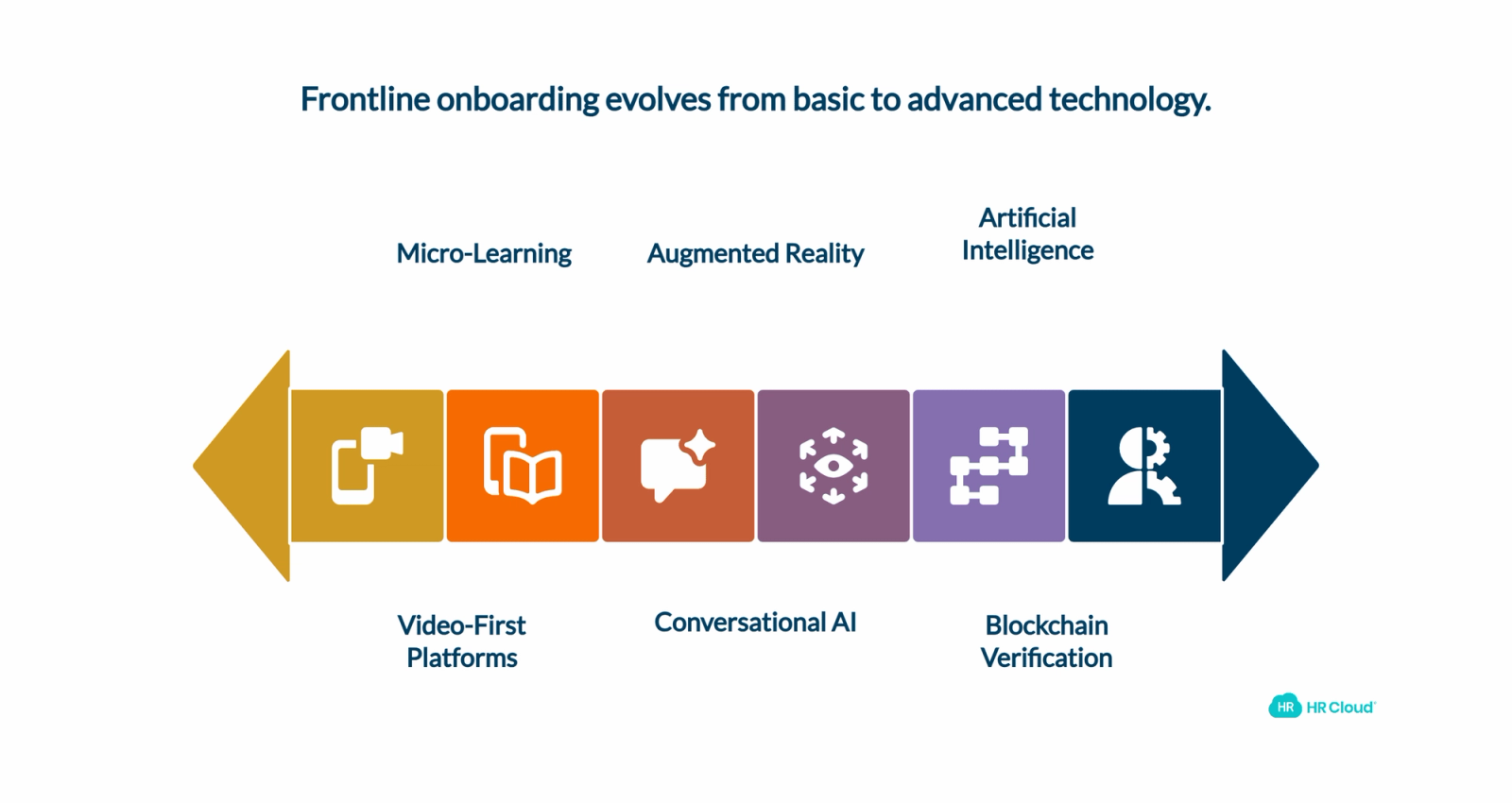
Staying ahead of technological evolution ensures your onboarding investment remains valuable long-term. Understanding emerging trends and building adaptable systems helps organizations prepare for the changing landscape of frontline workforce management.
Emerging Trends and Technologies
The next generation of onboarding platforms will incorporate advanced technologies that further streamline frontline integration while addressing evolving workforce expectations:
Artificial Intelligence and Machine Learning Integration: AI-powered onboarding platforms will increasingly use predictive analytics to personalize new hire experiences, identify potential retention risks through early behavioral indicators, and recommend intervention strategies based on successful onboarding patterns. Machine learning algorithms will optimize task sequencing and content delivery for individual learning preferences.
Conversational AI and Chatbot Integration: Intelligent virtual assistants will handle routine onboarding questions, provide 24/7 support for deskless workers across different time zones, and guide new hires through complex processes using natural language interactions. This reduces manager burden while improving new hire satisfaction through instant response availability.
Augmented Reality Onboarding Experiences: For complex roles involving equipment operation, safety procedures, or technical skills, AR-based training modules will provide immersive learning experiences without requiring physical equipment access during initial training phases. Manufacturing onboarding, healthcare procedures, and technical skill development will benefit most from these innovations.
Video-First Communication Platforms: As mobile bandwidth costs decrease and video quality improves, expect frontline onboarding to become more video-centric with virtual facility tours, equipment demonstrations, recorded leadership welcome messages, and peer introduction sessions that build personal connections remotely.
Micro-Learning and Adaptive Content Delivery: Breaking onboarding content into 3-5 minute modules that align with shift break patterns and attention spans. Adaptive learning algorithms will adjust content complexity and pacing based on individual comprehension rates and job performance indicators.
Blockchain Verification for Credentials: Secure, tamper-proof credential verification will streamline compliance requirements for licensed professionals, certification tracking, and continuing education records. Healthcare, transportation, and regulated industries will adopt blockchain-based verification systems for enhanced security and reduced administrative overhead.
Building Future-Ready Onboarding Systems
Selecting platforms that evolve with technological advances and business needs prevents costly migrations while ensuring sustained competitive advantage. Consider these architectural requirements when evaluating long-term onboarding solutions:
Platform Scalability Requirements: Choose onboarding solutions that support flexible workflow modification without requiring IT intervention, easy content updates managed by HR teams, scalable infrastructure that grows with hiring volume, integration adaptability as technology stacks evolve, and mobile-first architecture that stays current with device capabilities.
Enterprise Integration Capabilities: Modern workforce management platforms must support API-first architectures, webhook integration for real-time data synchronization, cloud-native deployment for global accessibility, single sign-on (SSO) compatibility, and modular feature sets that allow gradual capability expansion without platform migration.
Data-Driven Optimization Strategies: Advanced analytics enable predictive modeling for retention outcomes, automated A/B testing for onboarding workflow optimization, real-time sentiment analysis through communication monitoring, and personalized intervention recommendations based on historical success patterns.
Security and Compliance Foundations: Next-generation onboarding platforms implement zero-trust security models, end-to-end encryption for sensitive data, role-based access controls with granular permissions, comprehensive audit logging for regulatory compliance, and automated backup systems for business continuity planning.
The shift from paper chaos to digital excellence in frontline onboarding isn't just about technology - it's about recognizing that your frontline workforce deserves the same quality experience as any other employee group. When you get onboarding right with modern digital solutions, everything else becomes easier: retention improves, productivity increases, and your entire operation runs more smoothly.
According to Harvard Business Review research on employee experience, organizations that invest in comprehensive onboarding see measurable improvements in both employee satisfaction and business outcomes. The question isn't whether to modernize your frontline onboarding. It's how quickly you can implement solutions that transform new hire experiences while driving measurable business results.

Discover how our HR solutions streamline onboarding, boost employee engagement, and simplify HR management
Book Your Free DemoFrequently Asked Questions
What makes frontline onboarding different from office worker onboarding?
Frontline workers operate in fundamentally different environments than office-based employees. They work varied shifts across multiple locations and need mobile-accessible onboarding solutions that accommodate operational schedules rather than traditional business hours. This requires asynchronous learning capabilities and flexible completion timelines. McKinsey Future of Work research confirms this fundamental difference requires purpose-built solutions.
How much does digital frontline onboarding software cost?
Frontline onboarding platform pricing typically ranges from $8-25 per employee per month, with implementation costs of $5,000-50,000 depending on customization requirements. Most organizations achieve ROI within 6-12 months through reduced administrative costs, improved retention, and faster time-to-productivity. Contact HR Cloud for specific pricing tailored to your organization's needs.
What ROI can we expect from mobile onboarding platform implementation?
Organizations typically see measurable returns through reduced administrative costs, improved retention rates, and faster time-to-productivity. Refer to our detailed ROI analysis and calculation examples for specific timelines and benchmarks based on organization size.
Which industries benefit most from automated onboarding workflows?
High-turnover industries with seasonal hiring patterns, compliance requirements, or multi-location operations see the greatest benefits from automated onboarding workflows. This includes retail, manufacturing, healthcare, hospitality, and transportation sectors based on workforce turnover data.
How long does frontline onboarding software implementation take?
Standard configurations typically require 60-90 days. Complex integrations with existing HRIS systems, learning management platforms, or custom workflow requirements may extend timelines to 4-6 months. Pilot location approaches accelerate learning and reduce overall deployment time.
Can digital onboarding work for seasonal hiring surges?
Yes, this represents one of the strongest use cases for automated onboarding platforms. Digital systems scale effortlessly whether processing 10 new hires or 500 simultaneously. Bulk assignment features, standardized workflows, and automated communications ensure consistent quality during high-volume recruitment periods without proportional staff increases.
How do we handle employees who aren't comfortable with mobile technology?
Modern onboarding platforms design interfaces for varying technology comfort levels through intuitive navigation, simple touch controls, and comprehensive support resources. Additionally, having peer mentors or managers available during initial platform usage builds confidence while backup access methods (tablets, kiosks, desktop computers) accommodate different preferences.
What compliance benefits does digital employee onboarding provide?
Digital platforms typically exceed paper-based compliance through automatic completion tracking, maintained version control, and comprehensive audit trails. E-signature capabilities meet legal requirements while providing superior documentation compared to handwritten signatures according to Department of Labor guidelines. Automated deadline reminders ensure regulatory timeline compliance across all locations.
How do we measure onboarding effectiveness with digital platforms?
Key performance indicators include completion rates (target: 95%+), time-to-productivity metrics (typically 30-50% improvement), early retention rates at 30/60/90 days, new hire satisfaction scores, and manager feedback assessments. Digital platforms provide detailed analytics previously impossible with manual systems, enabling continuous optimization supported by workforce engagement research.
Can onboarding software customize experiences for different roles and locations?
Advanced platforms support sophisticated customization based on job function, geographic location, department, shift pattern, or other employee attributes. This ensures new hires receive relevant information without content overload while maintaining consistent brand experience across the organization.
What training do managers need for digital onboarding platforms?
Manager training typically requires 2-3 hours covering platform navigation, task assignment procedures, progress monitoring capabilities, and exception handling protocols. Most modern platforms feature intuitive interfaces that minimize ongoing support requirements after initial training completion.
How do digital onboarding solutions integrate with existing HR systems?
Modern workforce management platforms offer pre-built connectors for popular HRIS systems, payroll software, scheduling applications, and learning management systems. API capabilities enable custom integrations with proprietary systems while maintaining data accuracy and eliminating duplicate entry requirements.
What security features protect employee data in cloud-based onboarding?
Enterprise onboarding platforms implement bank-level encryption, secure data transmission protocols, role-based access controls, and comprehensive audit logging. SOC 2 compliance, GDPR adherence, and regular security audits ensure employee information protection throughout the onboarding process and long-term data storage per federal data protection standards.
About the author

Keep Reading


Like What You Hear?
We’d love to chat with you more about how HR Cloud® can support your business’s HR needs.
Book Your Free Demo