The Era of Machines: What Automation Means for HR

Key Takeaways
- HR automation reduces workforce planning errors and cuts recruitment and training costs significantly. Companies with strong HR tech report up to 22% higher profitability. (Gallup)
- Without automation, workforce data is largely guesswork — generalized, assumed, and imprecise — leading to overstaffing, understaffing, and lost profitability.
- WFM software handles 11 core HR functions simultaneously, from scheduling and payroll to performance monitoring and crisis preparedness.
- Flexible scheduling enabled by automation is no longer optional — it’s essential for mental health, work-life balance, and preventing toxic workplace culture.
Automated time tracking, pulse surveys, and exit interviews give HR real-time signals to catch disengagement and toxicity before they damage culture. Explore HR Cloud’s employee engagement tools.
What is Workforce Management?
Workforce management (WFM), sometimes known as Human Resources Management, is simply the process of ensuring that you have the right number of right workers operating at the right time and place, and performing the right tasks. The objective of this process is to meet your company’s goals in an efficient and cost-effective manner while fostering a positive company culture and ensuring employee satisfaction.
Workforce management software handles a broad range of HR tasks. See the full breakdown below:
| WFM Function | What It Does |
|---|---|
| Employee Time Tracking | Monitors hours worked, overtime, and attendance to ensure accurate payroll and compliance |
| Employee Scheduling | Builds and manages shifts based on business demand and employee preferences |
| Demand Prediction | Forecasts staffing needs to prevent over- or under-staffing |
| Payroll Administration | Automates pay calculations, deductions, and compliance across employee types |
| Talent Acquisition | Streamlines recruiting, job postings, applicant tracking, and hiring workflows |
| Talent Management | Tracks performance, career development, and succession planning |
| Benefits Administration | Manages employee benefits enrollment, eligibility, and reporting |
| Training Programs | Delivers and tracks mandatory and optional employee learning and development |
| Vacation & Leave Planning | Manages time-off requests, approvals, and leave balances |
| Performance Monitoring | Tracks KPIs and productivity metrics to identify high performers and at-risk employees |
| Crisis Preparedness | Ensures staffing continuity plans exist for emergencies or sudden workforce disruptions |
These tools are essential for maintaining a healthy organizational culture and supporting business performance.
HR Before Automation
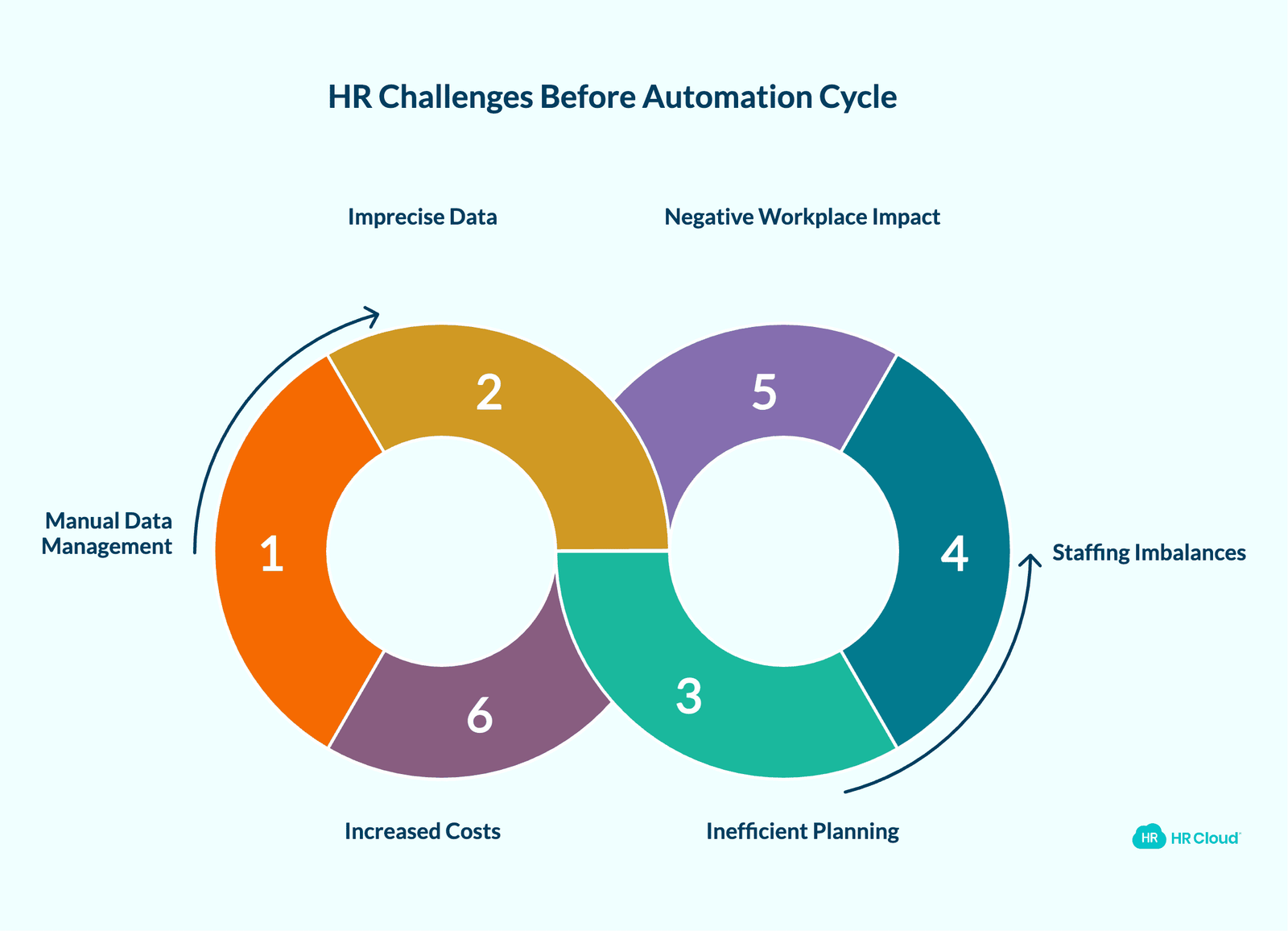
What was Human Resources like before the invention of Workforce Management software? Before automation, any HR manager will tell you that the struggle was real. The Human Resources Department was, and continues to be, responsible for the recruitment of talents, the development of talents, and the retention of talents. And all of that was done manually, often leading to conditions that could foster a toxic workplace and role confusion across teams.
They had to make sure that they find the right number of people who have the right skills to perform the right tasks at the right time on a day-to-day or hour-to-hour basis. Can you imagine tracking all of that data manually? This means that some of the information gathered will probably be generalized. Most likely, some of the data will be assumed. This results in a lot of imprecise workforce data which will be used to plan for present and future needs, often contributing to lack of communication between departments.
Without automation, workforce planning is more like looking into a crystal ball and trying to see whether you’ll have a talent surplus or shortage in the future. No company wants to be understaffed, nor do they want to have too many people on their staff which means increased costs and unnecessary manpower. Either of these situations will decrease profitability, reduce productivity, create a toxic workplace, and frustrate your customers. These challenges often resulted in low morale, high turnover rates, and diminished workplace morale that affected overall business performance.
But if a lot of your data is based on guesswork, inefficiencies in both time and cost abound. To prevent guesswork, a company will need to employ a much larger team that will be responsible for managing and maintaining the data. This is an added cost that also cuts into a company’s profitability, increasing both recruitment costs and training costs while contributing to employee turnover.

HR After Automation
We have already intimated that the role of HR in workforce management is to maximize the value of an organization's human capital. Well, the only way to do that effectively is through automation, which helps prevent toxic workplace environments and supports employee wellbeing. Workforce management software enables the Human Resources Department to gather and analyze big data on their workforce. This, in turn, allows them to make better decisions that will help them win the war for talent while avoiding toxic workplace culture. Workforce analytics can help HR understand and react to the dynamic, competitive environment of today’s world, identifying signs of a toxic work environment before it impacts organizational success.
We all know how today’s workforce is much different from yesterday’s workforce. When it comes to scheduling shifts, HR should not only be concerned with meeting business demand but also with employee preference and mental health. Companies today have to provide more flexible work schedules to prevent work-life imbalance and chronic stress. Some employees will prefer to work early in the day in order to leave early in the afternoon. Some prefer that opposite. Others would like to work from home or set their own hours to suit their current lifestyle. Scheduling would be a nightmare if WFM software wasn’t available, potentially creating a toxic workplace where micromanagement and lack of trust thrive.
And what about employee time tracking? With automation, HR can not only ensure that employees are paid fairly but they can prevent payroll leakage from going unchecked while monitoring sick days and patterns that might indicate workplace toxicity or employee disengagement.
Changes to the workforce have also made automation a real lifesaver for HR. No longer do we have long-term, full-time employees. Today’s workers are made up of full-time, part-time, freelance, and contingent workers. There’s also the increased importance of providing a work-life balance and psychological safety. Without automation, how would HR ever schedule these workers’ shifts in such a way that would mean less cost for the company but favorable outcomes for both the employee and the company? Poor workplace policies and lack of recognition can quickly transform a healthy culture into a toxic culture characterized by office gossip, workplace bullying, and fear-based leadership.
Naturally, with the rise of new types of workers comes rules and regulations that govern the pay and benefits that each type receives, ensuring transparent communication and adherence to core values.
Automating workforce management does not only deal with recruitment, scheduling, and time tracking. With the right tools, HR can foster ongoing employee engagement , conduct employee surveys, gather employee feedback, and increase talent retention while preventing toxic work culture. Some companies use time tracking applications with pop-up survey questions which allows upper management to keep their finger on the pulse and provide appropriate reactions/programs. This approach supports professional development, leadership development, and helps maintain team dynamics and team cohesion. Exit interviews can also be automated to identify patterns that might indicate toxic organizations or areas where lack of communication is creating problems.
In short, workforce management is not just about scheduling, time tracking, planning, and forecasting. Today, HR is required to strategically manage the workforce to ensure that the people are productive in their work. And what that means is that they are happy or content with their pay, their schedule, their benefits, and everything else that they’ve deemed important enough to influence their “employee experience.” By promoting open communication, employee recognition, and avoiding cutthroat competition, companies can prevent the development of a toxic workplace that leads to employee disengagement and organizational decline.

Experience how Workmates can transform communication and strengthen culture—all in one powerful platform
Book Your Free DemoFrequently Asked Questions
1. What is HR automation and why does it matter?
HR automation uses software to reduce manual work across hiring, onboarding, scheduling, time tracking, leave management, employee communication, and engagement. Instead of chasing forms, approvals, and updates through spreadsheets or emails, HR teams can manage workflows in one place. This helps reduce errors, improve visibility, and give employees a smoother experience from hiring through retention.
For growing companies, HR automation matters because manual processes break as teams expand. HR Cloud helps automate key HR workflows so teams can spend less time tracking tasks and more time supporting employees.
2. What is workforce management software?
Workforce management software helps companies plan, schedule, track, and support employees more effectively. It often includes tools for employee scheduling, time tracking, leave planning, payroll support, performance tracking, workforce analytics, and compliance workflows.
The goal is simple: make sure the right people are working at the right time, in the right roles, while keeping costs, productivity, and employee experience under control. HR Cloud supports this broader workforce management strategy through onboarding, engagement, HRIS, time off, performance, and employee communication tools.
3. How does HR automation improve employee onboarding?
HR automation improves onboarding by turning scattered manual steps into a structured, trackable process. New hires can complete forms, upload documents, review policies, finish assigned tasks, and receive important updates before day one.
For HR teams, this means fewer missing documents, fewer follow-ups, and better visibility into each new hire’s progress. HR Cloud’s Onboard solution helps companies create custom onboarding workflows, automate task assignments, collect documents, and give new hires a mobile-friendly experience.
4. How can HR automation help reduce employee turnover?
HR automation helps reduce turnover by improving the employee experience at critical moments: hiring, onboarding, communication, recognition, time off, and performance conversations. When employees receive clear communication, fast support, flexible workflows, and timely recognition, they are less likely to feel disconnected or ignored.
HR Cloud helps companies support retention through automated onboarding, employee engagement tools, recognition features, pulse surveys, and internal communication. These tools give HR leaders better visibility into employee sentiment and workplace issues before they become bigger problems.
5. What HR tasks should companies automate first?
Companies should start by automating the HR tasks that create the most manual work and the highest risk of error. These usually include:
| HR Task | Why Automate It |
|---|---|
| Employee onboarding | Reduces paperwork and missed steps |
| Document collection | Improves compliance and recordkeeping |
| Time off requests | Speeds up approvals and improves visibility |
| Employee communication | Keeps employees informed across locations |
| Recognition and engagement | Supports morale and retention |
| Performance workflows | Creates structure around reviews and feedback |
HR Cloud helps companies automate many of these workflows through its product suite, including Onboard, Workmates, People HRIS, Time Off, and Performance Management.
6. How does workforce management software improve scheduling and time tracking?
Workforce management software improves scheduling by helping HR and managers plan shifts based on business needs, employee availability, location, and workforce demand. It also improves time tracking by giving teams a clearer view of attendance, hours worked, overtime, and time-off patterns.
This matters because poor scheduling creates stress, payroll issues, understaffing, and employee frustration. HR Cloud’s Time Off and related workforce tools help companies manage employee availability, leave requests, approvals, and visibility across teams.
7. Can HR automation improve company culture?
Yes. HR automation improves company culture when it helps people communicate better, recognize good work, collect feedback, and create consistent employee experiences. Automation alone does not fix culture. That is the part many companies get wrong. Bad processes automated badly still create bad outcomes.
The right HR automation platform helps HR leaders spot disengagement, reduce confusion, support managers, and create more consistent communication. HR Cloud’s Workmates platform supports culture through employee communication, recognition, engagement surveys, and social features that help employees feel seen and connected.
8. Why choose HR Cloud for HR automation?
HR Cloud helps companies automate and improve core HR workflows across the employee journey. Instead of relying on spreadsheets, emails, and disconnected systems, HR teams can use HR Cloud to manage onboarding, employee data, internal communication, recognition, time off, performance, and engagement in one platform.
HR Cloud is especially useful for growing teams that need flexible workflows, mobile-friendly employee experiences, and better visibility across locations. It also works well for companies that want to strengthen onboarding, improve employee engagement, and reduce manual HR follow-up
About Author: Meggie is a freelance writer and communication manager atAMGtime. Meggie is deeply convinced that marketing is a key to get success in all spheres and it’s a crucial part of our lives. Regularly, she delivers various concepts on how to market products, services, and events effectively. Meggie believes in a win-win formula and utilizes it on a daily basis in staff management.
Keep Reading


Like What You Hear?
We’d love to chat with you more about how HR Cloud® can support your business’s HR needs.
Book Your Free Demo