




- What Are Recruitment ATS Systems?
- How Does a Recruitment ATS System Work?
- What Core Features Do Recruitment ATS Systems Include?
- Who Uses Recruitment ATS Systems and Why?
- How Is an ATS Different From an HRIS?
- What Should HR Teams Evaluate When Choosing a Recruitment ATS?
- How HR Cloud Supports Recruiting and Onboarding
- Frequently Asked Questions
What Are Recruitment ATS Systems?
Recruitment ATS systems, where ATS stands for applicant tracking system, are software platforms that manage the end-to-end hiring process. They centralize job postings, applications, candidate communications, interview scheduling, and offer management in one system. HR teams use them to replace spreadsheets and email chains with a structured, auditable recruiting workflow that scales as hiring volume grows.
The term "recruitment ATS systems" is sometimes used redundantly, since ATS already implies recruitment software. In practice, it reflects how HR professionals search for these tools, and the category is well understood to mean platforms that track candidates from application through hire.
How Does a Recruitment ATS System Work?
An ATS operates as a pipeline. Each open role has defined stages, and every applicant moves through those stages as the hiring team evaluates them. Recruiters post jobs, review incoming applications, score or tag candidates, schedule interviews, collect feedback, and extend offers, all within the same platform. The system logs every action, creating a complete history of each candidate's hiring process from first contact to decision.
Most modern ATS platforms connect directly to job boards like Indeed, LinkedIn, and ZipRecruiter, so a single posting reaches multiple channels simultaneously. Resume parsing pulls structured data from uploaded files, reducing manual data entry and allowing recruiters to search and filter the applicant pool by skills, experience, or location.
What Core Features Do Recruitment ATS Systems Include?
Features vary by vendor and pricing tier, but the following capabilities appear across most enterprise and mid-market ATS platforms:
|
ATS Feature |
What It Does for HR Teams |
|---|---|
|
Job posting distribution |
Publishes open roles to multiple job boards and the careers page from a single interface |
|
Resume parsing |
Extracts candidate data from uploaded resumes and populates structured applicant profiles automatically |
|
Candidate pipeline tracking |
Moves applicants through defined stages (applied, screened, interviewed, offered, hired) with status visible to all reviewers |
|
Interview scheduling |
Coordinates availability between candidates and interviewers, reducing back-and-forth email |
|
Automated communications |
Sends status updates, rejection notices, and next-step emails triggered by pipeline stage changes |
|
Reporting and analytics |
Tracks time-to-fill, source of hire, offer acceptance rate, and pipeline conversion at each stage |
|
Compliance recordkeeping |
Stores applicant data and disposition codes to support EEOC and OFCCP reporting requirements |
According to SHRM's HR technology research, organizations using an ATS report significantly shorter time-to-fill compared to those managing recruiting manually. The efficiency gains are largest in high-volume roles where screening volume would otherwise overwhelm a small HR team.
Who Uses Recruitment ATS Systems and Why?
ATS adoption spans company sizes and industries, though implementation complexity varies:
• Small businesses (under 100 employees): often use lightweight ATS tools to organize applicants and avoid losing track of candidates across email threads
• Mid-size companies (100 to 2,500 employees): rely on ATS platforms to coordinate multiple open roles simultaneously, standardize hiring stages, and give hiring managers visibility into pipelines without involving HR in every status update
• Enterprise organizations: require ATS systems that integrate with HRIS platforms, support complex approval workflows, and produce compliance reports for federal contractors and regulated industries
HR Cloud serves mid-size companies across healthcare, manufacturing, construction, and retail, where frontline hiring volume is high and recruiter bandwidth is limited. The Workmates platform connects recruiting activity directly to onboarding, so a new hire moves from offer accepted to day-one ready without manual handoffs between systems.
How Is an ATS Different From an HRIS?
An ATS manages candidates before they become employees. An HRIS, or human resource information system, manages employee data after hire. The two systems serve different parts of the employee lifecycle. Some platforms combine both functions, while others require integration between a standalone ATS and a separate HRIS.
The handoff point is typically the offer acceptance. Once a candidate accepts an offer, their data needs to move into the HRIS for onboarding, payroll setup, and benefits enrollment. A clean integration between ATS and HRIS reduces duplicate data entry and the errors that come with it.
What Should HR Teams Evaluate When Choosing a Recruitment ATS?
Selecting an ATS is a long-term commitment. The evaluation should weigh:
• Integration depth: does the ATS connect to your HRIS, payroll system, background check vendors, and job boards without custom development?
• Candidate experience: does the application process work on mobile, and does the system send timely status updates that reflect well on the employer brand?
• Reporting capability: can recruiters pull time-to-fill, source of hire, and stage conversion data without exporting to a spreadsheet?
• Compliance support: does the system store required applicant records, generate EEOC data reports, and support audit trails for federal contractor obligations?
• Scalability: does the pricing and feature set still fit at 2x or 3x your current hiring volume?
The Forbes HR technology buying guide and Gallup's research on candidate experience both emphasize that recruiter efficiency and candidate-facing quality are equally important evaluation criteria.
How HR Cloud Supports Recruiting and Onboarding
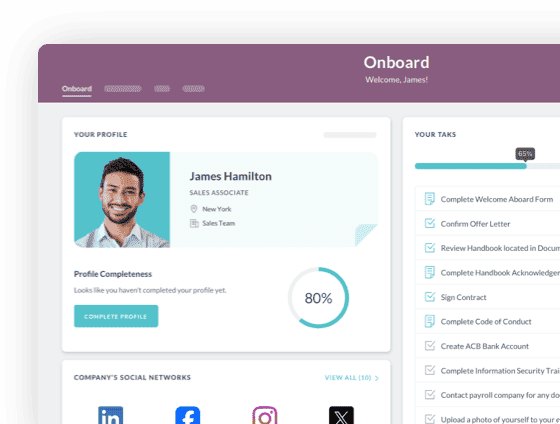
HR Cloud's onboarding software picks up where the ATS leaves off. Once a candidate is hired, HR Cloud automates the paperwork, compliance tasks, and day-one experience so new employees arrive prepared and HR teams spend less time on administrative follow-up. The platform is built for companies with high frontline hiring volume who need onboarding to scale without adding headcount to HR.
Learn more about how HR Cloud connects recruiting and onboarding workflows, or explore the Workmates employee engagement platform for teams managing the full employee lifecycle in one place.
 Discover how our HR solutions streamline onboarding, boost employee engagement, and simplify HR managementBook Your Free Demo
Frequently Asked Questions
Q: What does ATS stand for in recruiting?
A: ATS stands for applicant tracking system. In recruiting, it refers to software that manages the hiring pipeline from job posting through offer, tracking every candidate's status and storing their application data in a centralized system.
Q: Do small companies need a recruitment ATS system?
A: Even companies hiring 10 to 20 people per year benefit from a basic ATS. Without one, applicant data lives in email inboxes and spreadsheets, which makes it easy to lose track of strong candidates and nearly impossible to report on hiring metrics or meet recordkeeping obligations.
Q: Can an ATS reject candidates automatically?
A: Yes, most ATS platforms support automatic disqualification based on knockout questions, such as whether a candidate has a required license or is eligible to work in the required location. HR teams should review auto-disqualification rules regularly to avoid screening out qualified candidates due to overly strict filters.
Q: How does an ATS affect candidate experience?
A: A well-configured ATS improves candidate experience by delivering timely status updates, enabling mobile-friendly applications, and reducing the time between stages. A poorly configured one creates the opposite: slow responses, duplicate form fields, and silence after submission, all of which damage employer brand.
Q: What is the difference between an ATS and a CRM in recruiting?
A: An ATS tracks active applicants for open roles. A recruiting CRM, or candidate relationship management tool, manages passive talent, including past applicants, referred candidates, and sourced prospects who are not yet in an active pipeline. Some platforms combine both; others treat them as separate modules.
Keep Reading
AI in HR: The 2026 Opportunities, Challenges, and Implementation Playbook
According to Deloitte's 2026 Global Human Capital Trends report, which surveyed 9,000+
Why New Hires Still Feel Lost on Day One (And How an AI Onboarding Agent Fixes the Problem)
Only 12% of employees strongly agree their organization does a great job onboarding them.
7 Signs Your Employee Onboarding Process Is Costing You New Hires
Why do new hires who seemed like a great fit leave within 60 to 90 days?
In most cases,
Ready to streamline your onboarding process?
Book a demo today and see how HR Cloud can help you create an exceptional experience for your new employees.