How to Automate Employee Onboarding with HR Cloud

How to automate employee onboarding comes down to replacing manual emails, paper forms, and spreadsheet tracking with software that triggers tasks, collects signatures, and routes compliance documents on its own once a candidate accepts an offer. The process runs in eight steps: map your current workflow, identify repetitive tasks, choose software built for your compliance needs, digitize your forms, automate e-signatures and I-9/E-Verify, connect your HRIS and payroll, automate training and manager checklists, then track completion data and refine. Done well, it turns a multi-day paper chase into a self-running sequence a new hire can complete from a phone before their first day.
Only 12% of employees strongly agree their company does a great job of onboarding, according to Gallup. That gap is rarely a people problem. It's usually a process problem: forms that live in three different systems, IT tickets that sit for a week, and a manager who forgot the new hire starts Monday. Automation fixes the process, not the people.
What Does It Mean to Automate Employee Onboarding?
Onboarding automation replaces manual, one-off tasks with a workflow that runs itself once it's triggered. The mechanics are the same across most platforms: an event triggers the workflow (usually "offer accepted" in your applicant tracking system), the software activates a pre-built sequence, tasks get assigned to the right people (new hire, manager, IT, payroll), reminders fire automatically if something is overdue, and the system tracks progress until every task is marked complete.
That's different from digitizing onboarding, which just means moving paper forms to PDFs someone still has to email around. Automation means the software decides what happens next and who needs to do it, without a person manually kicking off each step.
For most companies, the parts worth automating first are the ones that repeat every single hire: collecting the same compliance documents, sending the same welcome email, assigning the same IT ticket. Those are exactly the tasks a workflow engine handles without judgment calls, freeing HR to spend time on the parts of onboarding that actually need a human: the first 1:1, the culture conversation, the manager relationship.
A useful way to tell the difference in practice: in a manual process, a new hire accepting an offer on a Friday means an HR coordinator has to remember, on Monday, to start sending forms, notify IT, and loop in the hiring manager, all as separate individual actions. In an automated process, that same offer acceptance is the trigger itself. The workflow starts the moment the offer is signed, over the weekend if needed, so nothing is waiting on someone's Monday-morning to-do list.
Why Should You Automate Employee Onboarding?
Four reasons show up consistently in the companies that make the switch.
Compliance risk drops. Manual onboarding means someone is tracking I-9 deadlines, E-Verify submissions, and state-specific new-hire paperwork by memory or spreadsheet. Miss a deadline and you're looking at real fines, not a hypothetical. Automated workflows enforce deadlines by default: a task doesn't disappear from the queue until it's done, and reminders escalate instead of getting lost in an inbox.
New hires get a consistent experience regardless of who's managing their onboarding. A manager onboarding their fifth new hire this quarter and a manager onboarding their first one produce wildly different day-one experiences without a system enforcing the same steps for both. Automation removes that variance.
HR gets its time back. Every manual step (chasing a missing form, re-explaining benefits enrollment, re-sending IT provisioning requests) is time an HR team isn't spending on retention, culture, or the next open req. Osmose Utilities Services replaced an onboarding process that took up to two hours per new hire, plus recurring data-entry errors, with an automated workflow built for field-based employees working outside a central office, according to the company's published case study.
Hiring volume stops requiring proportional HR headcount growth. A manual process that works fine for 5 new hires a month usually breaks down at 20, not because the steps changed but because there simply aren't enough hours in an HR team's week to manually push each one through by hand. Automation is what lets a hiring surge (a new location opening, a seasonal push, a growth quarter) get absorbed by the existing HR team instead of forcing an immediate headcount request just to keep onboarding from falling behind.
None of this requires a massive, months-long project. It requires picking the highest-friction manual tasks first and automating those before anything else, then expanding from there once the first workflow is proven out.
What Parts of Onboarding Can You Automate?
Most onboarding workflows break into the same core stages, and nearly all of them can run on autopilot once they're set up:
| Stage | Manual version | Automated version |
|---|---|---|
| Offer acceptance | Signed PDF emailed back and forth | E-signature triggers the onboarding workflow automatically |
| Document collection | New hire mails or hand-delivers paperwork | Digital forms pre-filled where possible, submitted from a phone |
| Compliance forms (I-9, W-4, state forms) | HR manually tracks deadlines in a spreadsheet | Deadline-driven workflow with automatic reminders and E-Verify integration |
| IT equipment and account provisioning | Manual ticket, often started late | Ticket auto-generated the moment the offer is accepted |
| Training assignment | Manager remembers to enroll new hire | Role-based training auto-assigned on day one |
| Manager checklist | Manager relies on memory or a sticky note | Task list with due dates sent automatically to the manager |
| Welcome communications | One-off email, inconsistent | Pre-built welcome sequence, same for every hire |
| Progress tracking | HR checks in manually, if at all | Dashboard shows exactly what's outstanding and for whom |
| Pulse surveys | Rarely sent, no consistent cadence | Auto-triggered at 30/60/90 days |
The highest-leverage place to start is whichever row costs your team the most manual hours today. Compliance document collection and IT provisioning are strong candidates for a first pass at most companies, since both typically involve back-and-forth between departments, and back-and-forth between departments is exactly where onboarding tends to stall the longest. A form waiting in one inbox is a delay measured in hours. A form waiting on a reply from a different department is a delay measured in days.
That doesn't mean every stage needs to be automated in the first phase. Build confidence in a new system by automating two or three high-friction stages first, prove the workflow holds up, then expand to the rest of the table rather than trying to automate every stage simultaneously.
How Do You Automate Employee Onboarding, Step by Step?
Here's the sequence that works whether you're automating onboarding for the first time or replacing a system that isn't cutting it anymore.
1. Map your current onboarding process
Before automating anything, write down every step your onboarding process actually includes today, not the version in your handbook. Talk to a manager who onboarded someone in the last month and a new hire who started in the last 90 days. You're looking for the gap between the documented process and what really happens: the form that gets skipped, the IT ticket that gets forgotten, the training that never gets assigned. Automation built on top of a broken process just automates the breakage faster.
2. Identify the highest-friction repetitive tasks
Not everything needs to be automated on day one. Rank your mapped steps by two factors: how often HR or a manager repeats the exact same manual action, and how much time or compliance risk that action carries. Compliance document collection and IT provisioning tend to score highest on both factors, since they combine high repetition with real compliance or access risk. Start there instead of trying to automate every stage at once.
3. Choose onboarding automation software that fits your compliance needs
This is a decision that's easy to get wrong by picking software based on price alone. The right platform depends on your workforce: a company with mostly desk-based employees has different needs than one with frontline, deskless, or multi-state hourly workers who need mobile-first forms and state-specific compliance handling. A retail chain onboarding hourly staff across a dozen locations needs something different than a 40-person software company hiring engineers, even though both are technically "automating onboarding." Write down your workforce's specific constraints (multi-state compliance, seasonal hiring spikes, no-desk employees, union rules) before you start evaluating vendors, not after. See the software comparison below for what to weigh here.
4. Digitize your forms and documents
Every paper form becomes a digital one: tax forms, direct deposit, handbook acknowledgment, benefits enrollment, emergency contacts. Prioritize the forms with the most legal exposure first (tax and compliance documents) rather than starting with lower-stakes forms like handbook acknowledgments just because they're simpler to convert. This step alone eliminates the mailing, scanning, and manual data entry that eats the most HR time in a paper-based process, and it's usually the fastest step to show a visible win to the rest of the organization.
5. Set up e-signature and I-9/E-Verify workflows
I-9 and E-Verify carry real compliance deadlines and real penalties for missing them, so this step deserves its own setup pass rather than getting bundled into "digitize the forms." Configure the workflow so I-9 Section 1 is completed by the new hire's first day and Section 2 is completed within the legally required window, with automatic reminders to whoever is responsible for each part. Build in an escalation path too: if a manager hasn't completed their half of Section 2 within a set number of days, the reminder should route to HR directly instead of just repeating to the same person who already missed it. HR Cloud's I-9 and E-Verify automation handles this specific workflow, including virtual verification tools for distributed teams. Software can automate the workflow and the deadline tracking, but your company is still the one legally responsible for I-9 compliance, so confirm with your own counsel which remote-verification approach is valid for your workforce before relying on any vendor's tooling alone.
6. Integrate with your HRIS and payroll system
Onboarding data shouldn't need to be re-typed into payroll. Connecting your onboarding tool to your HRIS and payroll system (ADP, UKG, Paylocity, or whatever you run) means a new hire's personal information, direct deposit, and W-4 flow through once instead of getting manually re-entered by HR, then again by payroll. This is a common place for onboarding automation projects to stall: a workflow tool that doesn't talk to payroll just moves the manual re-entry problem downstream instead of eliminating it. Before signing with any vendor, ask for a specific, named integration with your payroll provider rather than accepting a generic "we support integrations" answer. A named, tested integration and a theoretical API connection are not the same thing when it's your new hire's first paycheck on the line.
7. Automate training assignment and manager checklists
Role-based training should assign itself the moment a new hire's role is set in the system, not wait for a manager to remember. Pair this with an automated manager checklist (equipment ready, first-week meetings scheduled, team introduced) so onboarding quality doesn't depend on which manager the new hire happens to report to. Companies often invest less in this step than in compliance automation, even though a confusing or absent manager checklist can leave a new hire feeling unprepared regardless of how smoothly their paperwork was handled.
8. Track completion and refine with real data
Once the workflow is live, the job isn't done. Completion dashboards show exactly where new hires stall (a specific form, a slow IT step, a training module nobody finishes), and that data is what tells you what to fix next. Review it monthly for the first quarter after launch, then quarterly once the workflow stabilizes. Companies that treat automation as a one-time setup instead of an ongoing loop tend to see the initial gains fade within a year, usually because a policy or system changes and nobody updates the workflow to match.
What Features Should Onboarding Automation Software Include?
At minimum, look for:
- Workflow automation with conditional logic: different roles, locations, or employment types often need different steps, so the software needs to branch, not force every hire through one fixed path
- Digital forms and e-signature, built in rather than bolted on through a third-party integration
- I-9 and E-Verify compliance handling, with deadline tracking and remote-verification support if you have distributed hires
- Mobile access: critical if any part of your workforce is frontline, deskless, or hourly
- HRIS and payroll integrations so data flows once instead of getting re-keyed
- Self-service portals so new hires and managers can check status without emailing HR
- Reporting and analytics to see completion rates and bottlenecks
- Automated pulse surveys to measure the new-hire experience, not just task completion
What Is the Best Software to Automate Employee Onboarding in 2026?
Pricing and features below were pulled directly from each vendor's own site in late August 2026. Several enterprise platforms don't publish pricing at all and require a custom quote, which is itself worth factoring into a buying decision if speed of evaluation matters to you.
| Platform | Starting price (source) | Free trial | G2 rating | Best for |
|---|---|---|---|---|
| HR Cloud | $295/mo, Essential, 1–50 employees (pricing page); custom quote for larger orgs | Demo-based | 4.7/5, 182 reviews | Frontline, hourly, and compliance-heavy workforces |
| BambooHR | $10/employee/mo, Core tier (pricing page) | Not advertised, demo-based | 4.4/5, 6,575 reviews | Smaller companies wanting an all-in-one HRIS |
| Rippling | No public price (pricing page is quote-request only) | Quote-based | 4.8/5, 13,330 reviews | Companies wanting HR, IT, and finance in one system |
| Deel (Deel HR) | $5/employee/mo, Core tier (Deel HR product page) | Demo-based | 4.8/5, ~1,344 reviews (Deel HR product specifically) | Global or distributed teams needing compliance across countries |
| Workday HCM | No public pricing (product page routes to Contact Sales; no pricing page exists) | None | 4.1/5, ~1,708 reviews | Large enterprises with complex HCM needs |
| ADP Workforce Now | No public pricing (product page, "Get pricing" only) | None | 4.2/5, 4,342 reviews | Companies already running ADP payroll |
| Paylocity | No public pricing (pricing page, quote-request form only) | None | 4.4/5, 6,243 reviews | Mid-market companies wanting payroll and HR combined |
| HiBob | No public pricing (pricing page, custom quote) | Demo-based | ~4.5/5 (review count unconfirmed) | Culture-focused, people-first organizations |
| Zoho People | Free for up to 5 users; paid tiers from roughly €0.83/employee/mo (pricing page) | 30-day free trial | ~4.4/5 (review count unconfirmed) | Budget-conscious or global teams already in the Zoho ecosystem |
| Gusto | $49/mo + $6/employee/mo, Simple tier (pricing page) | Not advertised as a trial | ~4.6/5 (review count unconfirmed) | Small businesses wanting payroll and HR in one lightweight tool |
| UKG Pro | No public pricing (product page, "Connect with us" only) | None | ~4.3/5 (review count unconfirmed) | Large, complex enterprises already in the UKG ecosystem |
A per-employee sticker price rarely tells the whole story, which is why every price above links directly to the vendor's own page instead of a secondary summary. Ask every vendor on this list about implementation fees, minimum seat counts, and whether e-signature and I-9/E-Verify are included or sold as an add-on. HR Cloud's pricing page states a one-time $500 implementation fee that's waived if you prepay 90 days upfront, and its enterprise pricing page notes a $750 starting fee for certain payroll integrations, so even a single vendor can have more than one answer depending on which plan and integration path you're on. Get the actual number in writing before comparing platforms on price alone.
How does HR Cloud handle onboarding automation specifically?
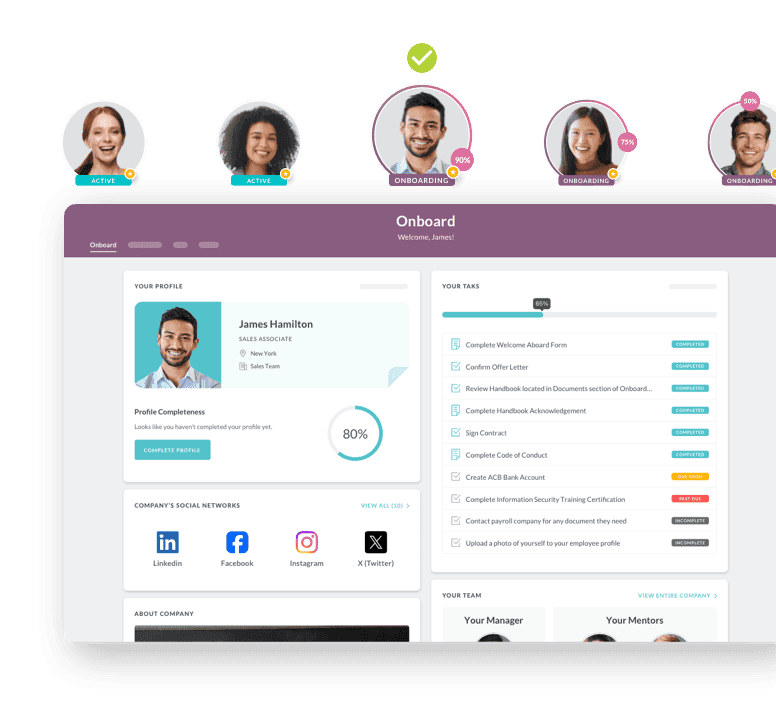
HR Cloud's Onboard platform is built around the parts of onboarding that create the most compliance and coordination risk: I-9 and E-Verify automation, digital forms and e-signatures, and workflow automation that assigns tasks to the right people without HR chasing anyone down. It's used by 760+ organizations including Toyota, Chick-fil-A, and Osmose Utilities Services, and connects directly to ADP, UKG, Workday, and Paylocity through more than 180 integrations. Implementation typically takes about six weeks.
The platform's Maya AI onboarding agent is a specific answer to one of the hardest onboarding-automation problems: reaching frontline and deskless workers who don't have a company email or a desk to sit at. Maya guides new hires through onboarding entirely over text message, no app download or portal login required. HR Cloud reports 89% task completion via SMS compared to 52% for portal-based onboarding, and its passwordless login eliminates password-reset tickets, a common source of new-hire IT friction in portal-based systems.
Where HR Cloud differs most from the general workflow-automation tools that currently dominate search results for this topic (Zapier-style app-connector platforms) is that compliance and HRIS-native workflows are the product, not something you assemble yourself out of a dozen connected apps.
What about the other platforms?
BambooHR covers onboarding checklists and e-signatures from its entry tier and adds compliance training content, but its mobile app has fewer features than its desktop version, according to G2 reviewers, which matters if a meaningful share of your new hires are on their phones.
Rippling bundles onboarding and offboarding automation with IT provisioning (accounts, devices, software access) in the same workflow, which is a genuine strength for tech-forward companies onboarding remote employees who need laptops and software access set up before day one.
Deel is built for global and distributed hiring specifically, with worker-classification compliance and country-specific onboarding built in. It's the strongest fit if you're hiring across borders rather than in one country.
Workday and UKG Pro are enterprise HCM platforms where onboarding automation is one module inside a much larger system. Both make sense if you're already standardized on that platform for other HR functions, less so if onboarding is your primary pain point and you don't need the rest of the suite.
ADP Workforce Now includes digital I-9 processing and e-signature natively, which matters if you're already running ADP payroll and want onboarding to live in the same system rather than syncing between two.
Paylocity and Gusto both fold onboarding automation into broader payroll-plus-HR platforms, which works well for companies that want one vendor for everything and don't have complex compliance needs beyond standard US requirements.
HiBob and Zoho People are strongest for companies prioritizing employee experience and culture-building features alongside the compliance basics, with Zoho People being the most budget-friendly option on this list by a wide margin.
Does Onboarding Automation Work Differently for Frontline and Multi-Location Teams?
Yes, and this is where a lot of onboarding automation projects fail without anyone realizing why. Most onboarding software is designed around one assumption: the new hire has a company email address and sits at a desk long enough to log into a portal. That assumption breaks down fast for healthcare, retail, hospitality, and construction employers, where a meaningful share of new hires start their first shift before they've ever logged into a computer at work.
In healthcare, the compliance layer is heavier than most industries: license and credential expiration dates need tracking alongside standard I-9 and HIPAA-related document handling, and staff are often floating between facilities with no fixed desk. In retail and hospitality, the defining challenge is volume and turnover speed. High seasonal hiring, multi-location consistency, and getting a new hire trained and productive inside their first few shifts (not their first few weeks) all matter more than in a typical office environment. In construction and field services, the core problem is that onboarding has traditionally been paper-based because there was no realistic alternative for a worker whose first day is on a job site, not in an office.
A workflow built for desk-based employees usually fails these teams in a specific, predictable way: the platform sends onboarding tasks to a company email inbox the new hire won't check until their probationary period is already underway, if they ever set one up at all. That's the exact gap HR Cloud's Maya AI agent is built to close, by moving the entire onboarding sequence onto SMS, a channel every new hire already has and checks. If your workforce includes any meaningful share of frontline, hourly, or field-based employees, ask every vendor you evaluate one direct question: does onboarding work completely, start to finish, for someone who never receives a company email address? For a lot of platforms on this list, the honest answer is no.
What Mistakes Should You Avoid When Automating Onboarding?
Automating a broken process. If your current onboarding has gaps (missing steps, unclear ownership, no compliance tracking) automation just executes those gaps faster and more consistently. A workflow that automatically reminds a manager to complete a step nobody actually needs doesn't fix anything, it just adds noise. Fix the process on paper first, map who owns each step, and only then build the automation around it.
Choosing software on price alone. The cheapest platform that doesn't handle your compliance requirements or doesn't work on a phone for frontline workers ends up costing more in manual workarounds than a pricier platform that fits your actual workforce. The real cost of a mismatched platform shows up months later, in the manual spreadsheet someone builds on the side to track what the software can't handle.
Stopping after week one. Onboarding doesn't end on day five. Automation that only covers the first week misses the 30/60/90-day check-ins, ongoing training, and pulse surveys that actually predict whether a new hire stays. Companies that automate only the paperwork-heavy first days and leave the rest manual tend to see their onboarding metrics look great on paper (100% form completion) while retention numbers don't move at all.
Ignoring the new hire's experience in favor of HR's convenience. A workflow that's efficient for HR but confusing or impersonal for the new hire defeats the purpose. The best automated workflows still feel like a company that's glad you joined, not a form-processing pipeline. If a new hire's first interaction with your company is an impersonal, robotic sequence of automated tasks with no human touch anywhere in the first week, the efficiency gain isn't worth what it costs in first impressions.
Overcomplicating the workflow. Excessive conditional branching, based on every possible edge case, becomes hard to maintain and harder to debug when something breaks. Start with the 80% case and handle true edge cases manually rather than building every exception into the automation from day one. A workflow nobody on the HR team can fully explain without pulling up a diagram is already too complicated to maintain reliably.
How Is AI Changing Onboarding Automation in 2026?
AI is starting to move onboarding automation from "runs a fixed workflow" to "responds to what the new hire actually needs." The most concrete example live today is conversational onboarding: instead of a new hire hunting through a portal for a form or a policy answer, an AI agent answers questions and guides them through tasks directly, over text or chat.
HR Cloud's Maya is a working example of this shift rather than a future promise. It handles document collection, I-9 and e-signature workflows, and new-hire questions over SMS, with no portal or app required, which matters most for frontline and deskless workers who are the hardest population to reach with a traditional web-based onboarding portal.
Beyond conversational agents, AI is also being applied to onboarding analytics: flagging which new hires are falling behind on task completion before it becomes a retention risk, rather than HR discovering the problem after the new hire has already disengaged. This is still an emerging capability across the industry and worth evaluating carefully rather than taking a vendor's AI claims at face value.
What Do Real Results Look Like When Companies Automate Onboarding?
Osmose Utilities Services replaced a process that took up to two hours per new hire and was prone to data-entry errors, with automated onboarding built for field employees working outside a central office. "Our hiring managers now have a reliable system that is easy to navigate," said Kaylee Collins, HR Analyst. "Our HR team can actively monitor the process, and assist if needed, but Onboard has helped them save so much valuable time and effort while increasing data accuracy."
Veolia has onboarded more than 10,000 employees through HR Cloud, with over 75% of onboarding completed on mobile and 80% of the workflows now managed directly by HR instead of requiring IT involvement.
Behavioral Progression cut onboarding time from four weeks to two and a half, reduced procedural questions from new hires by 60%, and saw a 10% improvement in therapist retention at the six-month mark. "The best part is the peace of mind," said CEO Nicole Minard, describing the shift from a paper-based process to an automated one.
These aren't universal guarantees, results depend on your starting process and how much of it you automate, but they represent what's achievable when automation replaces a genuinely manual process rather than a mostly-working one.
“ Our hiring managers now have a reliable system that is easy to navigate. Our HR team can actively monitor the process, and assist if needed, but Onboard has helped them save so much valuable time and effort while increasing data accuracy.”

— Kaylee Collins, HR Analyst, Osmose

How Much Does Automating Onboarding Actually Save?
The honest answer is that it depends heavily on how manual your current process is and which parts you automate first, which is exactly why a real calculation beats a generic industry average. HR Cloud's own onboarding ROI calculator states that most customers see a 40–60% reduction in administrative hours within the first year of automating, with payback typically landing between 3 and 9 months depending on how much of the onboarding process gets automated and how large the deployment is.
That range is wide on purpose. A company automating only compliance document collection will land toward the lower end of that savings range. A company automating the full sequence, from offer acceptance through 90-day check-ins, tends to land toward the higher end, but also takes longer to fully implement. Rather than anchoring on a single number pulled from a vendor's marketing page, run your own numbers: your current HR headcount cost, roughly how many hours per hire your team spends today on manual onboarding tasks, and your average new-hire volume per year. That calculation, specific to your actual process, is a far more reliable business case than any published industry benchmark.
What Metrics Should You Track After Automating Onboarding?
Once your workflow is live, tracking the right metrics is what separates a system that keeps improving from one that quietly decays. Focus on:
- Time to productivity: how long until a new hire is performing at expected level. This is the metric most directly tied to the business case for automating in the first place, since a faster ramp translates directly into revenue or output sooner.
- Completion rates: what percentage of onboarding tasks finish on time, and where hires stall. A single form or step with a consistently low completion rate is usually a sign that step is confusing or badly timed, not that new hires are being careless.
- Compliance completion: are I-9, E-Verify, and state forms finishing within required deadlines, every time, with no exceptions. This is the metric with the most legal exposure attached to it, so it deserves the tightest monitoring of the group.
- New hire satisfaction: pulse surveys at 30, 60, and 90 days, not just a single post-hire form that only captures a first impression.
- Manager satisfaction: managers are the other half of onboarding's success, and their feedback surfaces workflow friction that HR won't see directly from the new-hire side alone.
- Retention at 90 days and one year: the metric that ultimately proves whether the automation is working, not just running. A workflow can hit 100% task completion and still fail if the underlying onboarding experience isn't actually helping people stay.
The Bottom Line
Automating employee onboarding isn't a single software purchase, it's a process: map what's actually happening today, automate the highest-friction repetitive steps first, connect the systems that shouldn't require double data entry, and use completion data to keep improving. Companies that treat it this way see real results, like Osmose's reduction in data-entry errors and Behavioral Progression's improved retention, because they fixed the process and let software execute it consistently.
If you want to see this in action for your team, book a demo of HR Cloud's onboarding automation and walk through your own workflow with someone who's set this up for frontline, hourly, and compliance-heavy teams before. If you're still building the business case internally, HR Cloud's onboarding ROI calculator can help you estimate the time and cost savings before you commit to a platform. And if you want the deeper ROI math and definitional breakdown behind onboarding automation specifically, see our guide on what employee onboarding automation actually saves you.

Discover how our HR solutions streamline onboarding, boost employee engagement, and simplify HR management
Book a DemoFrequently Asked Questions
What does it mean to automate employee onboarding?
It means replacing manual HR tasks (forms, e-signatures, training assignment, compliance tracking) with software that triggers and tracks each step automatically once a new hire's offer is accepted, instead of relying on someone to manually kick off each task.
How long does it take to automate employee onboarding?
It depends on the platform. Lightweight tools like Gusto can be live within a day. HR Cloud's typical implementation runs about six weeks. Large enterprise platforms like Workday or UKG Pro can take several months, especially with complex integrations.
How much does onboarding automation software cost?
Public pricing varies widely: BambooHR starts at $10/employee/month, Deel HR starts at $5/employee/month, and HR Cloud's Essential tier starts at $295/month for companies with 1–50 employees. Several enterprise platforms, including Workday, ADP Workforce Now, and UKG Pro, don't publish pricing and require a custom quote.
Can small businesses automate employee onboarding?
Yes. Gusto, BambooHR, and Zoho People all offer accessible entry tiers built for smaller teams, and Zoho People offers a free plan for up to five users.
Does onboarding automation actually improve retention?
The companies that automate a genuinely broken process tend to see real retention gains. Behavioral Progression saw a 10% improvement in therapist retention at six months after automating with HR Cloud, tied to a shorter, less confusing onboarding process rather than automation alone.
Is onboarding automation software secure?
It should be, but confirm certifications rather than assuming. HR Cloud is SOC 2 Type II certified and GDPR compliant. Ask any vendor you're evaluating for their current certifications directly rather than relying on marketing language.
Can remote and distributed teams automate onboarding?
Yes, and it's one of the strongest use cases for automation. Digital forms, e-signatures, mobile access, and self-service portals let a new hire complete onboarding entirely remotely, without printing, scanning, or an in-person HR meeting.
What's the difference between digitizing onboarding and automating it?
Digitizing means moving paper forms to PDFs or online forms that a person still has to manually route. Automating means the software triggers the next step and assigns it to the right person on its own, without someone manually deciding what happens next.
Do I need to replace my whole HR system to automate onboarding?
No. Most onboarding automation platforms, including HR Cloud, are designed to integrate with your existing payroll and HRIS rather than replace it, so you can automate onboarding without a full system migration.
What's the biggest mistake companies make when automating onboarding?
Automating a process that's already broken. If steps are missing, unclear, or inconsistently followed today, automation just executes those same gaps faster and more consistently, at scale, across every future new hire. Fix the process first, on paper, with clear ownership for every step, and only then automate it.
About the author

Keep Reading


Like What You Hear?
We’d love to chat with you more about how HR Cloud® can support your business’s HR needs.
Book Your Free Demo